
1. Увод
This manual provides essential information for the safe and efficient use of your devolo Magic 2 LAN 2400 Mbps Powerline Adapter. The devolo Magic 2 LAN adapter utilizes G.hn technology to extend your internet connection through your home's existing electrical wiring, providing high-speed network access in any room with a power outlet.
Key features include a data transfer rate of up to 2400 Mbps and a Gigabit LAN port for connecting network-enabled devices. This adapter is compatible with all devolo Magic series devices but is not compatible with older dLAN series adapters.
2. Безбедносна упутства
- Always plug the adapter directly into a wall power outlet. Avoid using power strips, extension cords, or surge protectors, as these can interfere with performance.
- The device is designed for indoor use only. Do not expose it to moisture, extreme temperatures, or direct sunlight.
- Не отварајте уређај цasing. There are no user-serviceable parts inside. Opening the device will void the warranty.
- Држите уређај даље од деце и кућних љубимаца.
- Обезбедите одговарајућу вентилацију око адаптера. Не покривајте га.
3. Садржај пакета
The devolo Magic 2 LAN 2400 Mbps Powerline Adapter package includes:
- 1 x devolo Magic 2 LAN Powerline Adapter
- 1 x Ethernet (LAN) cable
4. Производ је готовview
The devolo Magic 2 LAN adapter is designed for ease of use and seamless integration into your home network. It features a Gigabit Ethernet port for connecting your devices and an integrated power socket to ensure no power outlet is lost.
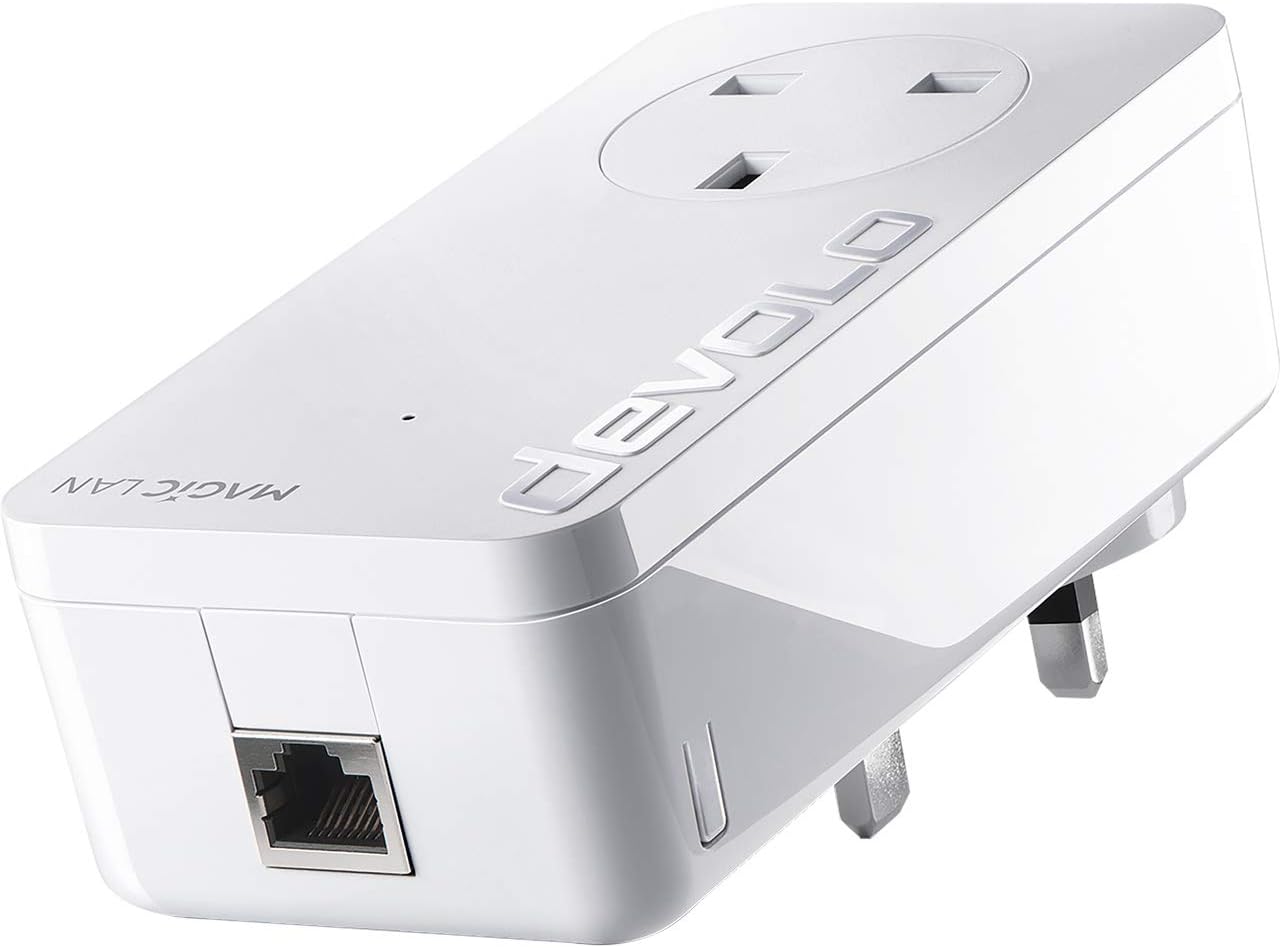
The image displays the devolo Magic 2 LAN adapter, a white rectangular device with a UK-style power plug on the back. The front features an integrated power socket, and the bottom has a Gigabit Ethernet port. The 'devolo' logo is visible on the top surface.
Кључне компоненте:
- Утикач: For connecting the adapter to a wall power outlet.
- Интегрисана утичница: Allows you to plug another electrical device into the adapter, ensuring the power outlet remains available.
- Гигабитни Етхернет порт: Connects your network devices (e.g., computer, smart TV, gaming console) to the adapter using an Ethernet cable.
- ЛЕД индикатор: Provides status information about the adapter's operation and network connection.
5. Подешавање
Setting up your devolo Magic 2 LAN adapter is a straightforward process:
- Повежите први адаптер:
- Plug one devolo Magic 2 LAN adapter directly into a wall power outlet near your internet router.
- Connect this adapter to your internet router using the provided Ethernet cable.
- Повежите додатне адаптере:
- Plug any additional devolo Magic 2 LAN adapters directly into wall power outlets in the rooms where you require internet access.
- Connect your network-enabled devices (e.g., computer, smart TV, gaming console) to these adapters using Ethernet cables.
- Аутоматско упаривање:
The devolo Magic adapters typically pair automatically within a few minutes. If the adapters do not connect automatically, you may need to manually pair them. Refer to the 'Pairing Adapters' section in the full user manual available on the devolo webсајт за детаљна упутства.
6. Оперативни
Once set up, your devolo Magic 2 LAN adapters will create a high-speed network connection using your home's electrical wiring.
Статус ЛЕД индикатора:
- Чврста бела: The adapter is powered on and connected to the powerline network.
- Трепери бела: The adapter is establishing a connection or undergoing a firmware update.
- Пуно црвено: The adapter is powered on but not connected to the powerline network.
- Искључено: The adapter is not powered on.
For optimal performance, ensure adapters are plugged directly into wall outlets and avoid placing them near devices that generate significant electrical noise (e.g., motors, dimmers).
7. Одржавање
To ensure the longevity and optimal performance of your devolo Magic 2 LAN adapter:
- Чишћење: Clean the adapter with a dry, soft, lint-free cloth. Do not use liquid cleaners or abrasive materials.
- Ажурирања фирмвера: Periodically check the official devolo website for available firmware updates. Keeping your adapter's firmware up-to-date ensures the best performance and security.
- Складиштење: If storing the adapter, keep it in a cool, dry place away from direct sunlight and extreme temperatures.
КСНУМКС. Решавање проблема
If you encounter issues with your devolo Magic 2 LAN adapter, consider the following troubleshooting steps:
- Нема мрежне везе:
- Ensure all adapters are securely plugged into wall outlets.
- Verify that the Ethernet cables are correctly connected to both the adapter and your router/device.
- Check the LED indicator on the adapter. If it's red, the adapter is not connected to the powerline network. Try re-pairing.
- Мала брзина везе:
- Ensure adapters are not plugged into power strips, extension cords, or surge protectors.
- Покушајте да укључите адаптере у различите зидне утичнице.
- Avoid placing adapters near large electrical appliances that might cause interference.
- Ensure your electrical wiring is in good condition.
- Adapters Not Pairing:
- Press the pairing button on one adapter for approximately 1 second, then within 2 minutes, press the pairing button on the other adapter for approximately 1 second. The adapters should then pair.
- If issues persist, perform a factory reset on both adapters (refer to the full manual for specific reset procedures).
For further assistance, please visit the official devolo support webсајту.
9. Спецификације
| Број модела | 8254 |
| Брзина преноса података | 2400 мегабита у секунди (Mbps) |
| Хардверски интерфејс | Етхернет |
| Протокол везе података | Етхернет |
| Димензије производа (Д к Ш к В) | 1.65 к 2.6 к 5.12 инча |
| Тежина артикла | 9.3 унци |
| Боја | Бела |
| Компатибилни уређаји | Desktop, Laptops, Smart TVs, Gaming Consoles, Network Printers, etc. |
| Технологија | G.hn Powerline |
10. Гаранција и подршка
devolo products are designed for reliability and performance. For detailed information regarding the warranty period and terms for your devolo Magic 2 LAN adapter, please refer to the warranty information provided with your purchase or visit the official devolo webсајту.
For technical support, frequently asked questions, and additional resources, please visit the devolo support section on their official website. You can find contact information for customer service there if further assistance is required.