
Zerone GSM 900/1800 MHz Fixed Wireless Terminal (FWT) User Manual
Model: Zeroner6sgbtuz4w-03
Brand: Zerone
1. Увод
This manual provides detailed instructions for the installation, operation, and maintenance of your Zerone GSM 900/1800 MHz Fixed Wireless Terminal (FWT), Model Zeroner6sgbtuz4w-03. This device allows you to connect standard telephones or alarm systems to a GSM mobile network, effectively replacing a traditional landline. Please read this manual carefully before using the product to ensure proper functionality and safety.
2. Карактеристике производа
- ЛЕД индикатори: Equipped with 9 LED indicators to display signal strength and call status, providing clear visual feedback.
- Enhanced SIM Card Slot: Features an updated card slot design for easy visualization of the contact between the SIM card and chip, facilitating simple insertion and removal.
- Automatic Step-Down Circuit: Allows direct power supply from a 12V security alarm system, simplifying integration.
- Standard DTMF Recognition: Supports standard DTMF input recognition and display, which helps prevent dialing errors and missed numbers.
- Anti-Noise Design: Incorporates an anti-noise and anti-jamming circuit design for clear and stable communication.
- 24-часовни рад: Built-in watchdog automatic detection ensures continuous 24-hour operation, preventing system crashes and missed calls.
- Strong Signal & Clear Voice: Utilizes an industrial wireless communication module with a high-quality signal enhancement antenna for robust signal reception and clear, stable voice quality.
3. Садржај пакета
Молимо вас да проверите да ли су све следеће ставке укључене у пакет вашег производа:
- Zerone GSM Fixed Wireless Terminal Unit
- Повер Адаптер
- Антена
- Telephone Line Cable (RJ-11)
- Упутство за употребу
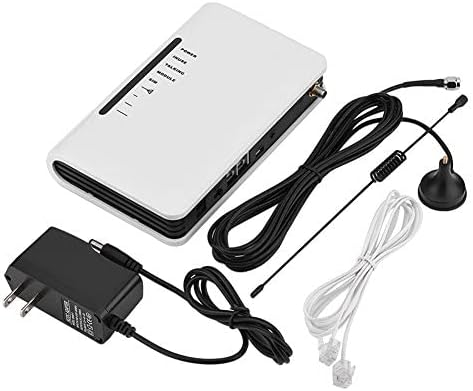
Image 3.1: Contents of the Zerone GSM Fixed Wireless Terminal package, including the main unit, power adapter, antenna, and telephone cables.
4. Упутства за подешавање
Follow these steps to set up your Zerone FWT:
- Припремите СИМ картицу: Before inserting, ensure your SIM card's PIN code is disabled. This can typically be done using a mobile phone. The device supports standard-sized SIM cards.
- Уметните СИМ картицу: Locate the SIM card slot, usually on the underside or side of the unit. Carefully insert the prepared SIM card until it clicks into place. Ensure proper orientation.
- Повезивање антене: Screw the provided antenna into the SMA connector on the unit. Position the antenna vertically for optimal signal reception.
- Connect Telephones/Alarm System: Use standard RJ-11 telephone cables to connect your landline telephones or alarm system to the RJ-11 ports on the FWT. The device typically has two RJ-11 ports.

Слика 4.1: Позади view of the Zerone FWT showing labeled ports including power interface, power button, USB upgrade interface, RJ-11 telephone ports, and reset button.

Image 4.2: Illustration of the Zerone FWT's RJ-11 ports connected to various communication devices such as corded and cordless telephones, and other communication products.
- Прикључите напајање: Plug the power adapter into the DC IN port on the FWT, then connect the adapter to a suitable power outlet. The unit will power on automatically or via the power button.
5. Упутство за употребу
Once the FWT is set up, it operates largely like a standard landline. The LED indicators provide important status information:
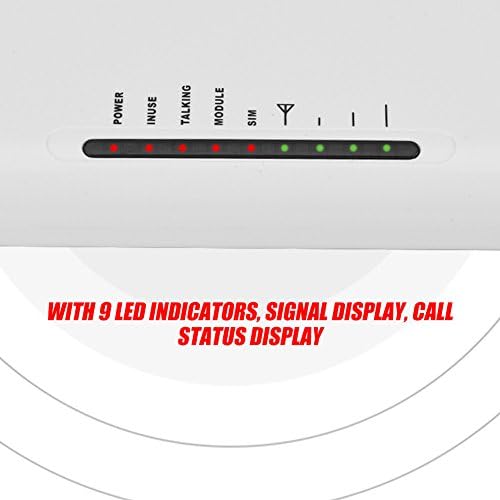
Слика 5.1: Крупни план view of the Zerone FWT's LED indicators, showing Power, In Use, Talking, Module, SIM, and signal strength lights.
- ЛЕД за напајање: Показује да ли је уређај укључен.
- ЛЕД диоде јачине сигнала: Multiple LEDs typically indicate the strength of the GSM signal. More lit LEDs mean a stronger signal.
- SIM LED: Indicates SIM card detection and registration status.
- Talking/In Use LED: Illuminates when a call is active.
To make a call, simply pick up the connected telephone handset and dial the number as you would with a regular landline. Incoming calls will ring on the connected telephones.
6. Одржавање
To ensure the longevity and optimal performance of your Zerone FWT, follow these maintenance guidelines:
- Keep the device in a dry, well-ventilated area, away from direct sunlight and extreme temperatures.
- Очистите спољашњост меком, сувом крпом. Не користите течна средства за чишћење или абразивне материјале.
- Ensure the antenna is securely connected and positioned for best signal reception.
- Избегавајте постављање тешких предмета на јединицу.
- Periodically check all cable connections (power, telephone, antenna) to ensure they are secure.
КСНУМКС. Решавање проблема
If you encounter issues with your Zerone FWT, refer to the following common problems and solutions:
- No Dial Tone or Cannot Make Calls:
- Ensure the SIM card is correctly inserted and its PIN code is disabled.
- Check the signal strength LEDs. If the signal is weak or absent, try repositioning the antenna or the FWT unit.
- Verify that the telephone cable connecting your phone to the FWT is functional and securely plugged in. A faulty cable can prevent service.
- Confirm that your SIM card is active and has sufficient credit/plan for calls.
- Poor Call Quality or Dropped Calls:
- This often indicates a weak GSM signal. Try moving the FWT to a location with better reception or adjusting the antenna.
- Ensure there are no strong sources of electromagnetic interference nearby.
- Уређај се не укључује:
- Check the power adapter connection to both the FWT and the wall outlet.
- Проверите да ли је утичница функционална.
- СИМ картица није препозната:
- Ensure the SIM card is a standard size and inserted correctly.
- Confirm the SIM card is unlocked (not SIM-locked to a specific carrier) and its PIN is disabled.
- Регионална компатибилност: This device operates on GSM 900/1800 MHz frequencies. Ensure these frequencies are supported by your local mobile network provider. Some regions or specific network configurations may not be fully compatible.
If problems persist after following these troubleshooting steps, please contact customer support.
8. Спецификације
| Феатуре | Спецификација |
|---|---|
| Бранд | Зероне |
| Број модела | Zeroner6sgbtuz4w-03 |
| ASIN | B07H96B26J |
| УПЦ / ГТИН | 798382989982 |
| Боја | Бела |
| Извор напајања | Wireless (via adapter) |
| Волtage | 12 волти (ДЦ) |
| Састав батерије | Lithium-ion (for backup) |
| Технологија повезивања | РЈ-11 |
| Компатибилни уређаји | Personal Computer, Tablet, Smartphone (for management, if applicable), Telephones, Alarm Systems |
| Врста инсталације | Није потребна професионална инсталација |
| Тип упозорења | Audio and motion (when connected to alarm systems) |
| Контролни метод | Application (if applicable) |
| Компатибилност паметног дома | Није компатибилан са паметним домом |
| Препоручена употреба | Secure wireless access to telephone networks, such as in homes or small businesses. |
9. Гаранција и подршка
For warranty information and customer support, please refer to the documentation included with your purchase or contact the retailer where the product was acquired. Keep your proof of purchase for warranty claims.