
1. Увод
Thank you for choosing the KAIDI KD-904 Bluetooth Earphones. These wireless in-ear headphones are designed for comfort and stability, making them ideal for sports and daily use. Featuring Bluetooth connectivity and a built-in microphone, they allow for hands-free calls and high-quality audio playback. This manual provides essential information for the proper setup, operation, and maintenance of your earphones.
2. Садржај пакета
- KAIDI KD-904 Bluetooth Earphones
- УСБ кабл за пуњење
- Упутство за употребу
3. Производ је готовview
The KAIDI KD-904 earphones feature an ergonomic design with ear hooks for a secure fit, especially during physical activity. The earbuds are magnetic, allowing them to clip together for convenient storage around your neck when not in use. An inline control module provides easy access to power, volume, and call functions.

Слика: Крупни план view of a single KAIDI KD-904 earphone, highlighting the in-ear bud and the flexible ear hook designed for stability.

Слика: Детаљна view of the earbud housing with the 'KAIDI' brand logo, showing the design and finish of the earphone unit.
4. Подешавање
4.1 Пуњење слушалица
- Connect the micro USB end of the charging cable to the charging port on the inline control module of the earphones.
- Повежите USB-A крај кабла за пуњење са USB извором напајања (нпр. USB портом рачунара, зидним адаптером).
- The LED indicator on the control module will illuminate, typically red, during charging.
- Once fully charged (approximately 1-2 hours), the LED indicator will change color (e.g., blue) or turn off.
Note: Ensure the earphones are fully charged before first use for optimal battery life.
4.2 Блуетоотх упаривање
- Укључено: Press and hold the multi-function button (usually the center button on the inline control) for approximately 3-5 seconds until the LED indicator flashes blue and red alternately. This indicates the earphones are in pairing mode.
- Активирајте Блуетоотх: На паметном телефону или другом уређају који подржава Bluetooth, идите на подешавања Bluetooth-а и уверите се да је Bluetooth укључен.
- Тражи Уређаји: Your device will scan for available Bluetooth devices. Look for "KD-904" or a similar name in the list.
- Повежите се: Select "KD-904" from the list to initiate the connection. Once successfully paired, the LED indicator on the earphones will typically flash blue slowly or turn solid blue, and you may hear an audible confirmation.
- Поново повежи: After initial pairing, the earphones will automatically attempt to connect to the last paired device when powered on, provided the device's Bluetooth is active and within range.
5. Упутство за употребу
5.1 Основне функције
- Укључено: Притисните и држите вишенаменско дугме 3 секунде.
- Искључивање: Притисните и држите вишенаменско дугме 5 секунде.
- Пусти/паузирај: Кратко притисните вишенаменско дугме.
- Појачавање звука: Кратко притисните дугме '+'.
- Смањивање јачине звука: Кратко притисните дугме '-'.
- Следећа нумера: Дуго притисните дугме „+“.
- Претходни запис: Дуго притисните дугме '-'.
5.2 Управљање позивима
- Одговори на позив: Short press the multi-function button when an incoming call rings.
- Заврши позив: Кратко притисните вишефункционално дугме током позива.
- Одбиј позив: Long press the multi-function button when an incoming call rings.
- Поновно бирање последњег броја: Двапут притисните вишефункционално дугме.
6. Одржавање
- Чишћење: Use a soft, dry cloth to clean the earphones. Do not use abrasive cleaners or immerse in water.
- Складиштење: Store the earphones in a cool, dry place away from direct sunlight and extreme temperatures. The magnetic earbuds help prevent tangling during storage.
- Одржавање батерије: To prolong battery life, avoid completely discharging the earphones frequently. Charge them regularly, even if not in use for extended periods.
- Избегните штету: Do not drop, disassemble, or modify the earphones. Keep away from sharp objects.
КСНУМКС. Решавање проблема
| Проблем | Могући узрок | Решење |
|---|---|---|
| Слушалице се не укључују. | Ниска батерија. | Потпуно напуните слушалице. |
| Упаривање са уређајем није могуће. | Earphones not in pairing mode; Bluetooth off on device; device out of range. | Ensure earphones are in pairing mode (flashing red/blue). Turn on Bluetooth on your device. Move device closer to earphones (within 10 meters). Try re-pairing. |
| Нема звука или је јачина звука ниска. | Јачина звука је прениска; није повезано; изабран је погрешан аудио излаз. | Increase volume on both earphones and connected device. Ensure earphones are successfully connected. Check audio output settings on your device. |
| Пуњење не ради. | Неисправан кабл или извор напајања. | Try a different USB charging cable and/or a different USB power source. |
8. Спецификације
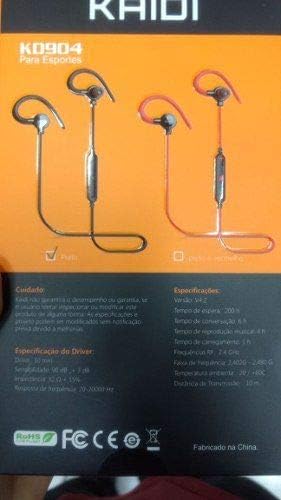
Image: Back of the KAIDI KD-904 product box, displaying detailed technical specifications and features in text.
- Модел: КД-904
- Блуетоотх верзија: В4.2
- Радни опсег: До 10 метара (33 стопе)
- Време репродукције музике: Отприлике 4 сата
- Време приправности: Отприлике 200 сата
- Време пуњења: Отприлике 1-2 сати
- Величина драјвера: 10 мм
- Осетљивост возача: 98 дБ
- Фреквенцијски одзив: 20Hz - 20kHz
- Повезивање: Бежични Блуетоотх
- Положај уха: In-ear (Intra-auricular)
- Специфичне употребе: Sports, Running
- Компатибилни уређаји: Android, Samsung, iPhone
9. Гаранција и подршка
For warranty information or technical support, please refer to the purchase documentation or contact your retailer. Keep your proof of purchase for any warranty claims. KAIDI is committed to providing quality products and support.