
1. Увод
This manual provides detailed instructions for the setup, operation, and maintenance of your RECCAZR WC500 Wireless Keyboard and Mouse Combo. This combo offers a reliable 2.4GHz wireless connection, adjustable DPI settings for the mouse, and convenient multimedia shortcuts for enhanced productivity.
2. Садржај пакета
Молимо вас да проверите да ли су све ставке присутне у вашем пакету:
- RECCAZR WC500 Wireless Keyboard
- RECCAZR Wireless Mouse
- USB Nano пријемник (смештен у одељку за батерију миша)
- Упутство за употребу
3. Упутства за подешавање
Follow these steps to set up your wireless keyboard and mouse:
- Инсталирајте батерије:
- For the mouse: Open the battery compartment on the underside of the mouse and insert one (1) AA battery (not included).
- For the keyboard: Open the battery compartment on the underside of the keyboard and insert two (2) AAA batteries (not included).
- Пронађите УСБ нано пријемник: The USB nano receiver is conveniently stored inside the mouse's battery compartment. Carefully remove it.
- Повежите пријемник: Plug the USB nano receiver into an available USB port on your computer (PC, Desktop, Laptop, Chromebook).
- Аутоматско повезивање: The keyboard and mouse should automatically connect to your computer. No additional drivers or software installation is required.

Figure 3.1: USB Nano Receiver and Battery Compartments. The image displays the underside of the mouse with its battery cover removed, revealing the slot for the USB receiver and the AA battery. Below it, the underside of the keyboard shows its AAA battery compartments.

Figure 3.2: Plug and Play Micro Receiver. This image shows the compact USB receiver being plugged into a laptop, highlighting the ease of connection without needing additional drivers.
4. Упутство за употребу
Understand how to use your RECCAZR WC500 combo effectively:
4.1 Рад мишем
- Технологија оптичког праћења: The mouse uses optical tracking for precise cursor movement on various surfaces.
- Подесиви ДПИ: Cycle through 3 DPI levels (800, 1200, 1600) by pressing the DPI button located on top of the mouse. This allows you to adjust cursor sensitivity to your preference.
- Symmetrical Design: The mouse features a symmetrical design, suitable for both left and right-handed users.

Figure 4.1: Adjustable Mouse DPI. This image illustrates the three adjustable DPI settings for the mouse, allowing users to switch between 800, 1200, and 1600 DPI for varied sensitivity.
4.2 Управљање тастатуром
- Изглед у пуној величини: The keyboard features a compact full-size layout, optimizing desktop space.
- 8° Tilt Angle: Designed with an 8° tilt angle for a comfortable typing experience.
- Multimedia Shortcuts: Access 12 convenient media shortcuts using the 'Fn' key in combination with the F1-F12 keys. Note: These shortcuts are not compatible with Mac systems.
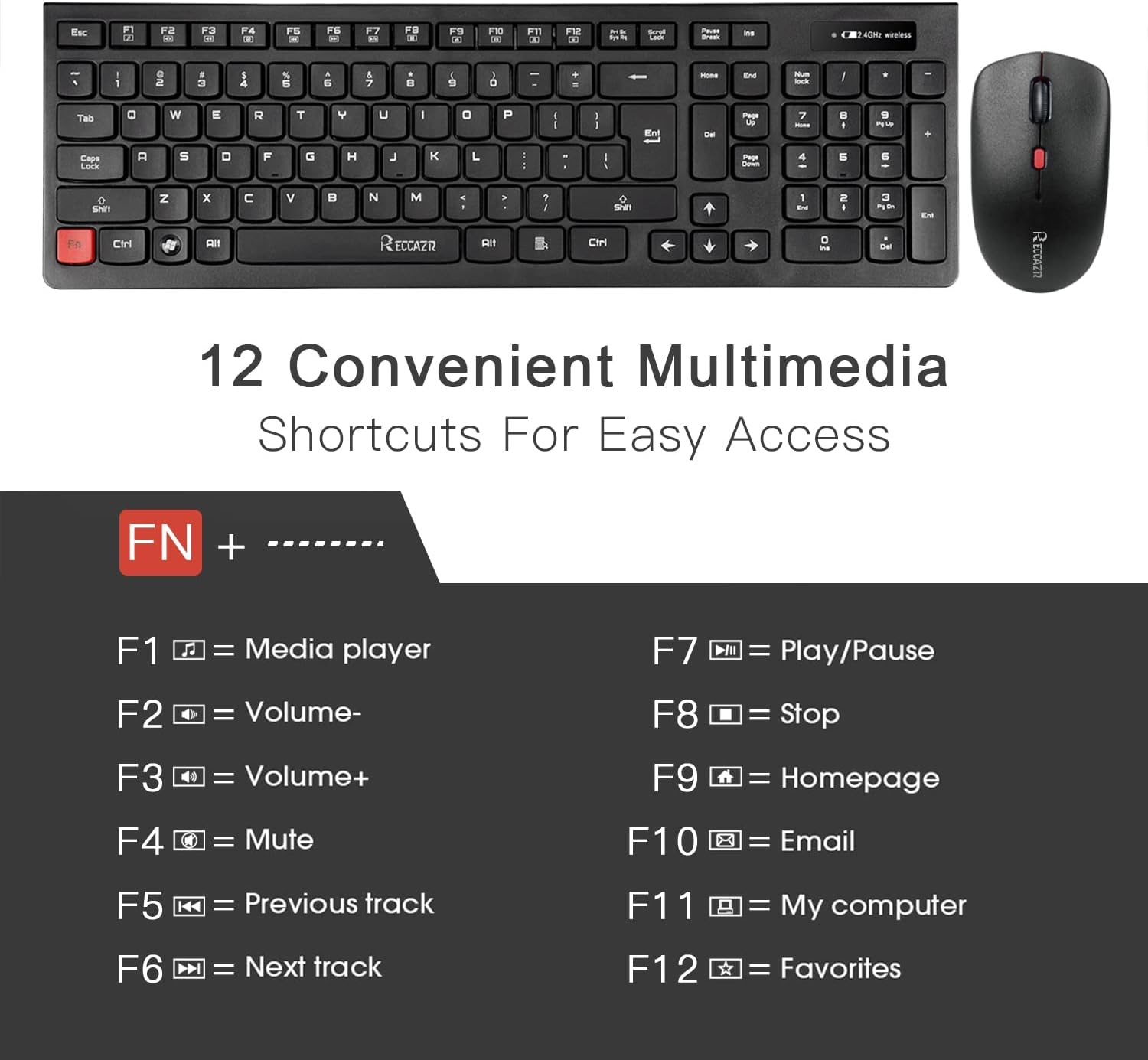
Figure 4.2: Multimedia Shortcuts. This image displays the keyboard's F1-F12 keys and their corresponding multimedia functions when used with the 'Fn' key, such as media player, volume control, mute, and homepage access.

Figure 4.3: Whisper-Quiet Keys. A close-up of the keyboard keys emphasizes the responsive and smooth typing experience, featuring a 'Volcanic-Vent' design for comfortable use.
4.3 Auto-Sleep Mode
Да би се уштедела батерија, и тастатура и миш имају аутоматски режим спавања:
- Миш ће ући у режим спавања након 8 минута неактивности.
- Тастатура ће ући у режим мировања након 10 минута неактивности.
- To reactivate either device, simply press any key on the keyboard or move/click the mouse.

Figure 4.4: Auto Sleep to Save Energy. This image visually explains the auto-sleep function for both the mouse (after 8 minutes) and the keyboard (after 10 minutes) to conserve battery power, with a note to press any key to activate.
5. Одржавање
To ensure the longevity and optimal performance of your RECCAZR WC500 combo, follow these maintenance guidelines:
- Чишћење: Користите меку, суву крпу за чишћење површина тастатуре и миша. За тврдокорну прљавштину, благо дamp cloth can be used, ensuring no moisture enters the devices.
- Водоотпорни дизајн: The keyboard features a waterproof design, offering protection against accidental spills. However, it is recommended to avoid submerging the device in liquid.
- Замена батерије: Replace batteries promptly when performance degrades. Ensure correct battery type (1 AA for mouse, 2 AAA for keyboard) and polarity.
- Складиштење: When not in use for extended periods, store the devices in a cool, dry place. Consider removing batteries if storing for several months.
КСНУМКС. Решавање проблема
If you encounter issues with your RECCAZR WC500, refer to the following common solutions:
- No Connection/Unresponsive Devices:
- Уверите се да су батерије правилно инсталиране и да су довољно напуњене. Замените их ако је потребно.
- Проверите да ли је USB nano пријемник безбедно прикључен у исправан USB порт на рачунару. Покушајте са другим USB портом.
- Move the keyboard and mouse closer to the USB receiver to rule out range issues (maximum 33 feet).
- Поново покрените рачунар.
- Typing Lag or Missed Keystrokes:
- This can often be resolved by checking battery levels and ensuring a clear line of sight between the devices and the USB receiver.
- Avoid using the devices on metallic surfaces, which can interfere with the wireless signal.
- Курсор миша скаче или је неправилан:
- Очистите оптички сензор на доњој страни миша.
- Покушајте да користите миш на другој површини или подлози за миш.
- No Caps Lock Indicator: Please note that this model does not feature a dedicated Caps Lock indicator light.
7. Спецификације
| Феатуре | Спецификација |
|---|---|
| Број модела | ВЦ500 |
| Технологија повезивања | КСНУМКСГХз Вирелесс |
| Домет | До 33 стопе (10 метара) |
| Батерија за тастатуру | 2 к ААА батерије (нису укључене) |
| Батерија за миш | 1 к АА батерија (није укључена) |
| Нивои DPI миша | 800 / 1200 / 1600 |
| Димензије тастатуре | 17.5 к 5.7 к 2.6 инча |
| Тежина артикла | 1 фунта |
| Компатибилни уређаји | Desktops, Laptops, Computers (Windows 2000 / XP / Vista / 7 / 8 / 10, Mac and other systems) |
| Посебне карактеристике | Waterproof keyboard, Auto-sleep mode, Multimedia shortcuts (not Mac compatible) |

Figure 7.1: Product Dimensions. This image provides a visual representation of the keyboard and mouse with their respective measurements in inches.
8. Гаранција и подршка
RECCAZR offers a 1-year worry-free warranty and a 30-day money-back guarantee for this product. If you encounter any problems during use or have questions, please contact RECCAZR customer support via Amazon Support for assistance.

Figure 8.1: RECCAZR Service Team. This image highlights the availability of 24-hour, 365-day customer support for any product-related inquiries or issues.