
Увод
Thank you for choosing the LENRUE A38S Computer Speakers. This manual provides essential information for setting up, operating, and maintaining your speakers to ensure optimal performance. The A38S speakers are designed to deliver clear audio for your desktop, laptop, and tablet, featuring a plug-and-play design with USB power and 3.5mm auxiliary audio input, complemented by dynamic RGB lighting.
Сетуп
Follow these steps to connect your LENRUE A38S speakers to your device.
- Прикључите напајање: Insert the USB-A plug into an available USB port on your computer or a USB power adapter. If your device has a USB-C port, use the provided USB-A to Type-C adapter. The speakers are powered via USB and contain an internal battery for portable use.
- Повежи аудио: Plug the 3.5mm audio jack into the headphone or audio output port of your computer, laptop, or tablet.
- Укључено: Rotate the main knob on the speaker clockwise to turn it on. The RGB lights will illuminate.
- Select Playback Device: On your computer, navigate to your sound settings and select "Speaker (4-USB Audio 2.0)" or a similar option as the output device. Adjust the volume to approximately 90% on your computer for optimal control via the speaker knob.
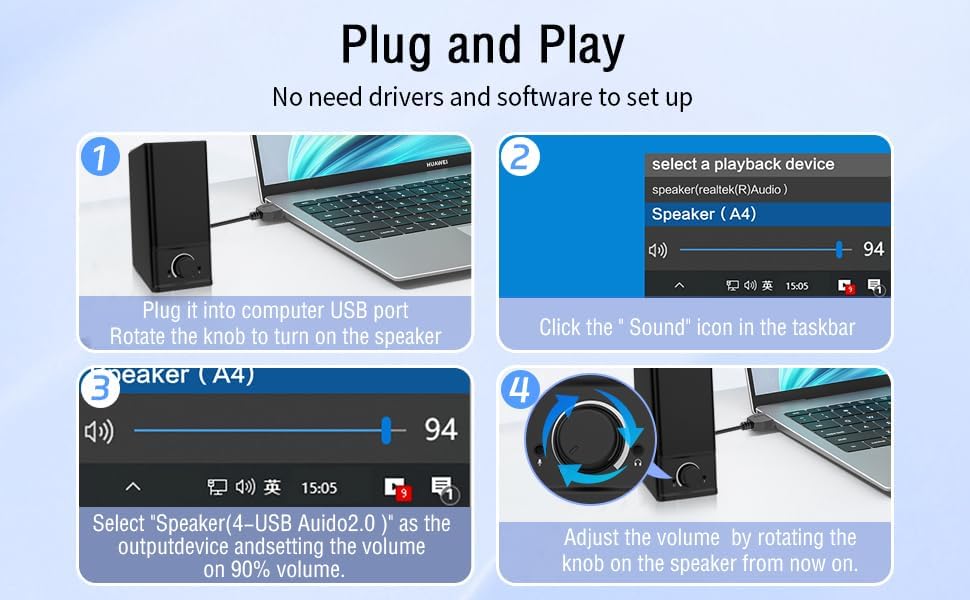
Операција
The LENRUE A38S speakers feature a multi-function knob for easy control.
- Укључивање/искључивање: Rotate the knob clockwise to turn on the speakers. Rotate counter-clockwise until it clicks to turn off.
- Контрола јачине звука: Rotate the knob clockwise to increase volume and counter-clockwise to decrease volume.
- РГБ режими осветљења: Double-click the knob to cycle through the three dynamic RGB lighting modes.
- Turn Off RGB Lights: Triple-click the knob to turn off all RGB lighting.

Одржавање
Proper care ensures the longevity of your speakers.
- Чишћење: Користите меку, суву крпу да обришете површину звучника. Не користите течна средства за чишћење или абразивне материјале.
- Складиштење: Чувајте звучнике на хладном и сувом месту, даље од директне сунчеве светлости и екстремних температура.
- Отпорност на воду: The speakers are waterproof. However, avoid prolonged submersion or exposure to high-pressure water jets to prevent damage. Ensure all ports are dry before connecting cables.
Решавање проблема
Ако наиђете на проблеме, погледајте следећа уобичајена решења:
| Проблем | Решење |
|---|---|
| Нема звука из звучника |
|
| РГБ светла не раде |
|
| Изобличен звук |
|
Спецификације
Detailed technical specifications for the LENRUE A38S Computer Speakers.
- Назив модела: АКСНУМКСС
- Тип звучника: Коаксијални
- Аудио излаз: Dual 5W drivers (10W RMS total), 18W Max Output
- Конфигурација канала сурроунд звука: 2.0 Стерео
- Повезивање: USB (for power), 3.5mm Aux-in (for audio)
- Извор напајања: USB Powered with internal Lithium Ion Battery
- Компатибилни уређаји: Desktops, PCs, Laptops, Mac, Tablets, Phones, Projectors, PS4, MP3 players
- Карактеристике: Dynamic RGB Lighting, Plug-n-Play, Waterproof
- Димензије производа: 2.1" (D) x 16" (W) x 2.5" (H)
- Тежина артикла: 286 грама (10.1 унци)
- Дужина кабла: Approximately 47.3 inches (USB and 3.5mm audio)
- Укључене компоненте: LENRUE A38S Speaker Unit, USB-A to Type-C Adapter, USB Power Cable, 3.5mm Audio Cable


Гаранција и подршка
LENRUE is committed to providing quality products and customer satisfaction.
- гаранција: Your LENRUE A38S speakers come with a 12-month worry-free replacement service from the date of purchase. This limited warranty covers manufacturing defects.
- Служба за кориснике: We offer lifetime customer service for any questions or issues you may encounter. For support, please refer to the contact information provided with your purchase or visit the official LENRUE webсајту.