
1. Увод
Thank you for choosing the ANITECH DZ09 Smart Watch. This device combines the functionality of a smartphone with the convenience of a wearable, allowing you to make calls, send messages, monitor your fitness, and more, directly from your wrist. This manual provides detailed instructions on how to set up, operate, and maintain your smart watch to ensure optimal performance.
Молимо вас да пажљиво прочитате ово упутство пре употребе уређаја и сачувате га за будуће потребе.
2. Садржај пакета
Уверите се да су све ставке присутне у пакету:
- 1 x ANITECH DZ09 Smart Watch
- 1 к УСБ кабл за пуњење
- 1 x Упутство за употребу (овај документ)
Note: SIM card and TF (Micro SD) card are not included and must be purchased separately.
3. Производ је готовview
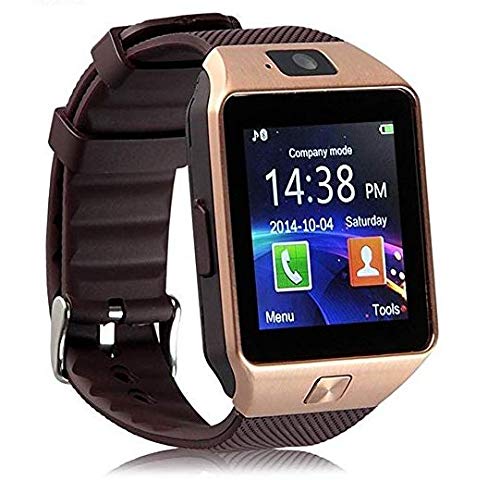
Слика 3.1: Предња страна view of the ANITECH DZ09 Smart Watch, showing the display, camera, and side button.
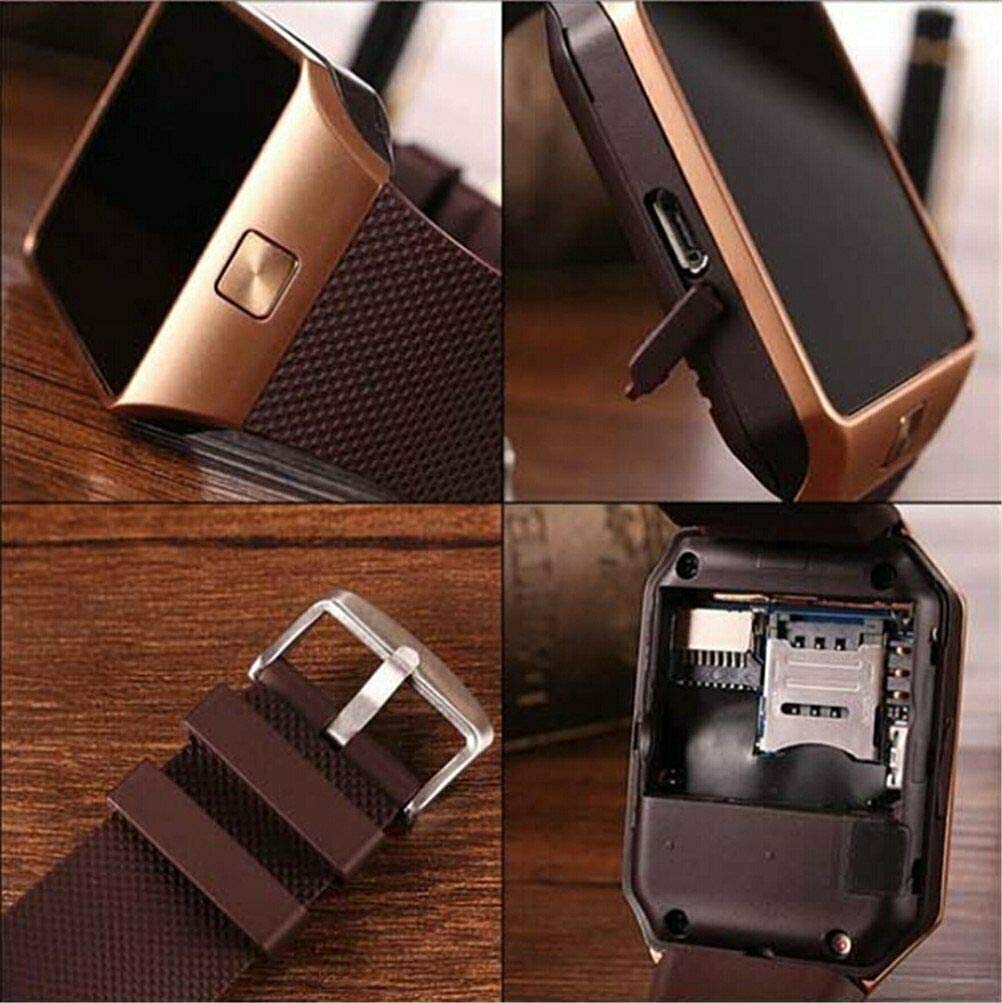
Figure 3.2: Close-up of the smart watch display and textured strap, highlighting the watch face.

Figure 3.3: The smart watch resting on its packaging box, showcasing its square design and display.

Слика 3.4: Детаљно view of the smart watch's back panel, revealing the SIM card and TF card slots for expansion.
Кључне карактеристике:
- High Sensitive Capacitive Touch Screen: 1.54" TFT HD LCD with 240x240 Pixel resolution.
- Phone Functionality: Make and receive calls directly from the watch with a Micro SIM card (GSM/GPRS 850/900/1800/1900).
- Sync Functions: Bluetooth synchronization for notifications (WhatsApp, Twitter, Facebook), time, schedule, and text messages.
- Мониторинг здравља: Pedometer for step counting, sleep monitoring, and sedentary reminders.
- мултимедија: Слика viewer, sound recorder (requires SD card), audio player, remote capture for phone camera.
- Додатни алати: Alarm clock, calendar, calculator, 0.3M camera, two-way anti-lost function.
- Два радна режима:
- Company Mode (Bluetooth): Connects to your smartphone via Bluetooth for calls, messages, and notifications.
- Network Mode (SIM Card): Functions as a standalone mobile phone with an inserted SIM card.
4. Подешавање
4.1. Инсталација SIM картице и TF картице
The ANITECH DZ09 supports a Micro SIM card for standalone phone functionality and a TF (Micro SD) card up to 32GB for storage.
- Power off the smart watch.
- Carefully remove the back cover of the watch.
- If installing a SIM card, gently lift the metal bracket for the SIM slot and insert the Micro SIM card with the gold contacts facing down, then close the bracket.
- Insert the TF card into its designated slot until it clicks into place.
- Вратите задњу маску безбедно.
Figure 4.1: Illustration of the SIM and TF card installation area on the back of the watch.
4.2. Пуњење уређаја
Before first use, fully charge the smart watch.
- Connect the small end of the USB charging cable to the charging port on the side of the smart watch.
- Повежите други крај USB кабла са USB адаптером за напајање (није укључен) или USB портом рачунара.
- Екран сата ће приказивати статус пуњења. Потпуно пуњење обично траје 1-2 сата.
- Када се потпуно напуни, искључите кабл за пуњење.
Note: Use a standard 5V/1A charger. Avoid using fast chargers as they may damage the device.
5. Упутство за употребу
5.1. Укључивање/искључивање
- Укључено: Press and hold the power button (usually on the side) until the screen lights up.
- Искључивање: Press and hold the power button until the power off options appear, then select "Power Off".
5.2. Bluetooth Connection (Company Mode)
To use the watch with your smartphone for notifications and calls via Bluetooth:
- On your smart watch, go to the Bluetooth settings and ensure Bluetooth is enabled and discoverable.
- На паметном телефону омогућите Блутут и потражите доступне уређаје.
- Select "DZ09" (or similar name) from the list of found devices on your smartphone.
- Потврдите захтев за упаривање на оба уређаја.
- For full functionality (like SMS sync, notifications), you may need to install a companion app on your smartphone (e.g., BT Notification, FunDo Wear). Refer to the watch's manual or QR code on the watch for app download.
Note: All functions support Android 4.3 and up. For iPhone, it supports answer & call, phone book, music play, camera, clock, pedometer, anti-lost alert, radio, sleep monitoring. SMS functionality with iPhone is limited without a SIM card in the watch.
5.3. Phone Functions (with SIM Card)
- Упућивање позива: From the dialer app on the watch, enter the number and press the call icon.
- Одговарање/одбијање позива: Swipe to answer or reject incoming calls on the watch screen.
- Телефонски именик: Access your contacts (if synced or stored on SIM) to make calls.
5.4. Messaging (SMS)
- Local SMS: Send and receive SMS directly using the SIM card in the watch.
- Блуетоотх синхронизација: View SMS messages from your connected smartphone (Android only, with companion app).
5.5. Праћење здравља
- Педометар: Tracks steps, calculates calories burned, and records sports mileage. Activate from the Pedometer app.
- Седентарни подсетник: Set reminders to move after periods of inactivity. Configure in settings.
- Праћење сна: Monitors your sleep patterns. Activate before sleeping.
5.6. Camera and Remote Capture
- Watch Camera: Use the built-in 0.3M camera to take photos. Photos are stored on the watch (requires TF card).
- Даљинско снимање: Control your smartphone's camera remotely from the watch (Android only, with companion app). Photos are stored on the phone.
5.7. Anti-Lost Function
- Anti-Lost Remind: The watch will alert you if it loses connection with your paired smartphone (e.g., if you walk too far away).
- Two-Way Search: Use the watch to find your phone, or use your phone to find your watch (both will ring/vibrate).
5.8. Other Applications/Features
- Слика Viewер: Browse photos stored on the watch.
- Снимање гласа: Record audio (requires TF card).
- Аудио плејер: Пусти музику files stored on the TF card.
- Будилник: Подесите више аларма.
- Календар: View dates and schedule events.
- Калкулатор: Основне аритметичке функције.
- Штоперица: Time events.
- компас: Digital compass functionality.
- Bluetooth Push: Receive notifications from various apps (e.g., WhatsApp, Twitter, Facebook) on your watch (Android only, with companion app).
6. Одржавање
To ensure the longevity and optimal performance of your ANITECH DZ09 Smart Watch, follow these maintenance guidelines:
- Чишћење: Wipe the watch screen and body with a soft, dry, lint-free cloth. Do not use harsh chemicals or abrasive cleaners.
- Отпорност на воду: The watch is sweatproof, meaning it can withstand light splashes or sweat. It is NOT waterproof. Do not submerge the watch in water, wear it while swimming, or expose it to heavy rain.
- температура: Avoid exposing the watch to extreme temperatures (hot or cold) or direct sunlight for prolonged periods.
- Складиштење: Када се сат не користи дуже време, чувајте га на хладном и сувом месту.
- Пуњење: Use only the provided or recommended charging cable. Avoid overcharging.
- Утицај: Protect the watch from drops and impacts, which can damage the screen or internal components.
КСНУМКС. Решавање проблема
If you encounter issues with your smart watch, refer to the following common problems and solutions:
| Проблем | Могући узрок / решење |
|---|---|
| Сат се не укључује. | Battery is depleted. Charge the watch for at least 30 minutes. |
| Не могу се повезати са паметним телефоном путем Блутут-а. |
|
| Обавештења се не примају. |
|
| СИМ картица није откривена. |
|
| Екран осетљив на додир не реагује. |
|
8. Спецификације
| Феатуре | Детаљ |
|---|---|
| Модел | ДЗ09 |
| Бранд | АНИТЕХ |
| Дисплаи | 1.54 inch TFT HD LCD, 240x240 Pixel |
| Блуетоотх верзија | Вер. 3.0 |
| Камера | 0.3М |
| Меморија | Supports max 32GB TF card |
| Network (SIM) | GSM/GPRS 850/900/1800/1900 (2G) |
| Батерија | Lithium Ion (included), 380 Watt Hours |
| Сензор убрзања | 3D acceleration, Step gauge analysis, Sedentary remind, Sleep monitoring, Anti-lost, Remote picture |
| Г-сензор | Да |
| Оперативни систем | Android (compatible with Android 4.3+; limited iOS support) |
| Димензије | Прибл. 1.51 к 2.19 к 0.46 инча (3.84 к 5.56 к 1.17 цм) |
| Нето тежина | 50г |
9. Гаранција и подршка
ANITECH provides a standard warranty for this product against manufacturing defects. Please retain your purchase receipt as proof of purchase for warranty claims.
For technical support, warranty inquiries, or service requests, please contact your retailer or the ANITECH customer service department through the contact information provided at the point of purchase or on the official ANITECH webсајту.
Please note that the warranty does not cover damage caused by misuse, accidents, unauthorized repairs, or failure to follow the instructions in this manual.