
1. Увод
Хвала вам на куповиниasing the Yenkee YKB 3200 Gaming Keyboard. This manual provides essential information for the proper setup, operation, and maintenance of your new keyboard. Please read this manual thoroughly before using the product to ensure optimal performance and longevity.
2. Безбедносне информације
- Држите тастатуру даље од течности и прекомерне влаге.
- Не излажите тастатуру екстремним температурама.
- Избегавајте испуштање или излагање тастатуре јаким ударцима.
- Do not attempt to disassemble or repair the keyboard yourself. Refer all servicing to qualified personnel.
- Use only a dry, soft cloth for cleaning.
3. Садржај пакета
Молимо вас да проверите садржај пакета приликом распакивања. Ако неке ставке недостају или су оштећене, обратите се продавцу.
- Yenkee YKB 3200 Gaming Keyboard with integrated smartphone holder
- USB кабл (приложен)
4. Производ је готовview
The Yenkee YKB 3200 is a robust gaming keyboard designed for an enhanced gaming experience. It features a durable metal construction, responsive rubber dome keys, and dynamic rainbow backlighting.
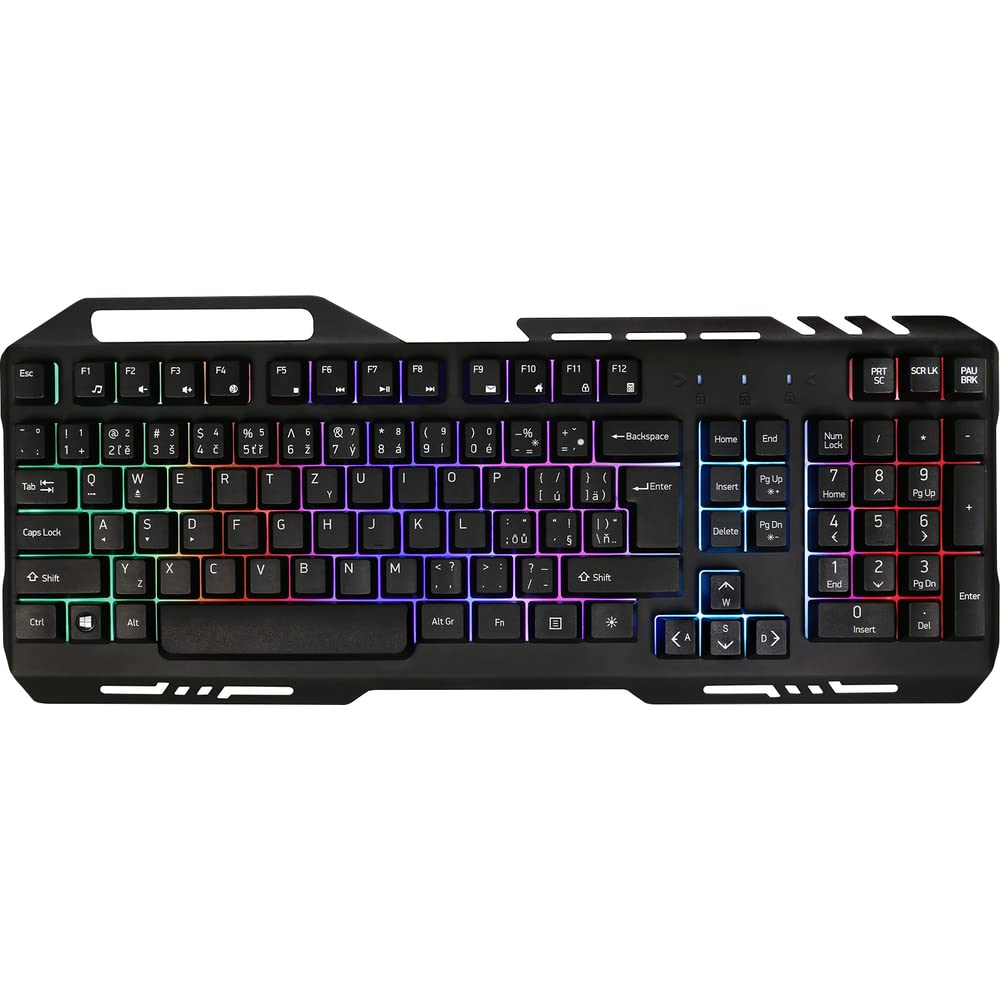
Image 1: Yenkee YKB 3200 Gaming Keyboard. This image displays the full keyboard with its metal frame and illuminated keys, highlighting the integrated smartphone holder at the top.
Кључне карактеристике:
- Metal Keyboard Design: Provides enhanced durability and a premium feel.
- Integrated Smartphone Holder: Conveniently located at the top of the keyboard for easy access to your mobile device.
- Durable Rubber Dome Keys: Offers a comfortable and responsive typing experience.
- Nine Rainbow Backlight Modes: Customizable lighting effects to suit your preference and gaming atmosphere.
- УСБ повезивање: Simple plug-and-play connection to your computer.
- 1.5m Cable Length: Обезбеђује ampпосегнути за разним подешавањима.
5. Подешавање
- Распакујте тастатуру: Пажљиво извадите тастатуру из паковања.
- Повежите се са рачунаром: Locate an available USB port on your computer (PC or laptop). Insert the USB connector of the keyboard into the USB port.
- Инсталација драјвера: The keyboard is plug-and-play and typically does not require additional driver installation. Your operating system should automatically detect and install the necessary drivers.
- Пласман: Place the keyboard on a stable, flat surface. You can use the integrated smartphone holder to position your mobile device.
- Тест функционалност: Open a text editor or browser to test if the keys are responding correctly.
6. Упутство за употребу
Контрола позадинског осветљења:
The Yenkee YKB 3200 features nine distinct rainbow backlight modes. These modes can typically be cycled through using a dedicated function key combination.
- Промена начина рада: Look for a key labeled 'FN' (Function) and a key with a light bulb icon or 'Scroll Lock' / 'Pause Break'. Pressing FN + Light Bulb / Scroll Lock / Pause Break (depending on keyboard layout) will cycle through the available backlight modes.
- Подешавање осветљености: Some keyboards allow brightness adjustment using FN + Up/Down Arrow keys. Refer to your specific keyboard layout for exact key combinations.
- Укључивање/искључивање позадинског осветљења: A long press of the backlight control key or a specific FN combination might turn the backlight on or off.
Multimedia and Function Keys:
The keyboard may include additional function keys (F1-F12) that, when combined with the 'FN' key, provide multimedia control or quick access to applications. Common functions include:
- FN + F1-F12: Volume control, media playback, email, web browser, etc. (Specific functions vary by model).
7. Одржавање
Чишћење:
- Генерално чишћење: Use a soft, dry, lint-free cloth to wipe the surface of the keyboard.
- Уклањање прашине: Користите компримовани ваздух да уклоните прашину и остатке између тастера.
- Упорне мрље: За тврдокорне мрље, благо дampen the cloth with water or a mild, non-abrasive cleaning solution. Ensure no liquid enters the keyboard.
Складиштење:
Када се тастатура не користи дуже време, чувајте је на хладном и сувом месту, даље од директне сунчеве светлости и екстремних температура.
КСНУМКС. Решавање проблема
| Проблем | Могући узрок | Решење |
|---|---|---|
| Тастатура не реагује | Лабава УСБ веза, неисправан УСБ порт, проблем са драјвером. | Уверите се да је USB кабл безбедно повезан. Покушајте са другим USB портом. Поново покрените рачунар. |
| Позадинско осветљење не ради | Backlight turned off, low brightness setting. | Press the backlight control key combination (e.g., FN + Scroll Lock) to cycle modes or adjust brightness. |
| Тастери су лепљиви или не реагују | Dirt or debris under keys. | Clean the keyboard using compressed air and a soft cloth. |
9. Спецификације
| Феатуре | Спецификација |
|---|---|
| Бранд | Јенки |
| Број модела | ИКБ 3200 |
| Технологија повезивања | УСБ |
| Цабле Ленгтх | 1.5 метара |
| Опис тастатуре | Гаминг |
| Backlight Theme | Rainbow (9 modes) |
| Компатибилни уређаји | Лаптоп, ПЦ |
| Димензије производа | 45.2 к 20 к 3.5 цм |
| Тежина производа | 841 г |
| Укључене компоненте | USB cable (attached) |
10. Гаранција и подршка
Yenkee products are designed and manufactured to the highest quality standards. For information regarding warranty terms and conditions, please refer to the warranty card included with your purchase or visit the official Yenkee website. For technical support or service inquiries, please contact your local retailer or the Yenkee customer support team.