
Јахитек YA-00097936
Упутство за употребу рачунарског стола Yaheetech Multistore 2002
Модел: ИА-00097936 | Марка: Иахеетецх
Увод
Thank you for choosing the Yaheetech Multistore 2002 Computer Desk. This manual provides detailed instructions for assembly, operation, maintenance, and troubleshooting to ensure safe and efficient use of your new desk. Please read this manual thoroughly before beginning assembly or use, and retain it for future reference.
Безбедносне информације
- Држите све делове и материјал за паковање ван домашаја деце.
- Саставите сто на мекој, чистој површини како бисте спречили огреботине.
- Уверите се да су сви завртњи и причвршћивачи добро затегнути пре употребе. Периодично проверавајте и по потреби поново затегните.
- Do not overload the desk. Refer to the "Specifications" section for weight capacities.
- Avoid placing hot items directly on the desk surface.
- Use caution when moving the desk, especially on uneven surfaces. Ensure casters are unlocked if moving.
Листа делова
Пре склапања, проверите да ли су све доле наведене компоненте присутне и да нису оштећене. Ако неки делови недостају или су оштећени, обратите се корисничкој подршци.

Слика 1: Експлодирао view of the desk showing main components and their names. This image highlights the heavy MDF boards, thickened frame, smooth steel ball drawer, open middle shelf, open bottom shelf, and lockable casters.
- A: Top Board (1 pc)
- B: Middle Shelf (1 pc)
- C: Bottom Shelf (1 pc)
- D: Side Frames (2 pcs)
- E: Drawer Front (1 pc)
- F: Drawer Sides (2 pcs)
- G: Drawer Back (1 pc)
- H: Drawer Bottom (1 pc)
- I: Drawer Slides (2 sets)
- J: Casters (4 pcs, 2 lockable)
- K: Hardware Pack (Screws, bolts, Allen wrench)
Упутство за монтажу
Пажљиво пратите ове кораке за правилно склапање. Препоручује се да за склапање буду укључене две особе.
- Step 1: Attach Casters to Side Frames.
Carefully attach the four casters (J) to the bottom of the two side frames (D). Ensure the two lockable casters are placed on the front side for easy access. Tighten securely with the provided wrench.

Слика 2: Detail of a caster wheel attached to the desk's metal frame. This shows the sturdy connection point and the wheel's design.
- Корак 2: Саставите главни оквир.
Connect the bottom shelf (C) and middle shelf (B) to the side frames (D) using the appropriate screws from the hardware pack (K). Do not fully tighten screws until all parts are aligned.
- Step 3: Assemble the Drawer.
Assemble the drawer components (E, F, G, H) using the provided screws. Ensure the drawer bottom (H) slides into the grooves correctly. Attach the drawer slides (I) to the sides of the assembled drawer.

Слика 3: The desk's pull-out drawer, shown partially open, revealing its interior space. This image demonstrates the drawer's functionality and capacity.
- Step 4: Install Drawer Slides to Desk Frame.
Attach the other part of the drawer slides (I) to the designated points on the desk's main frame, just below where the top board will sit. Ensure they are level and aligned.

Слика 4: Детаљно view of the smooth steel ball drawer slide mechanism. This highlights the quality of the sliding components for the drawer.
- Step 5: Attach the Top Board.
Place the top board (A) onto the assembled frame and secure it with screws. Ensure all pre-drilled holes align.
- Step 6: Insert the Drawer.
Carefully slide the assembled drawer into the installed drawer slides until it clicks into place.
- Корак 7: Завршно затезање.
Once all components are in place and aligned, fully tighten all screws and fasteners. Do not overtighten.
Упутство за употребу
The Yaheetech Multistore 2002 Computer Desk is designed for versatile use in various settings, including home offices, living rooms, or bedrooms.

Слика 5: The computer desk positioned next to a sofa in a living room, demonstrating its compact size and suitability for small spaces. A laptop is placed on the top surface.
- Пласман: Position the desk on a flat, stable surface. If using on carpet, ensure the casters can move freely.
- мобилност: To move the desk, unlock the two lockable casters by flipping their levers. Push or pull the desk gently to its desired location. Once in place, lock the casters to prevent accidental movement.
- Складиштење:
- The top surface is suitable for laptops, monitors, or writing.
- The pull-out drawer provides enclosed storage for small items like pens, notebooks, or external hard drives.
- The open middle shelf is ideal for books, documents, or small electronic devices.
- The open bottom shelf can accommodate larger items such as a CPU tower, printer, or storage boxes.
- Капацитет тежине: Adhere to the maximum weight capacities specified in the "Specifications" section to prevent damage.
Одржавање
Regular maintenance will help prolong the life and appearance of your Yaheetech Multistore 2002 Computer Desk.
- Чишћење: Обришите површине меком, дamp крпа. Избегавајте употребу јаких хемикалија, абразивних средстава за чишћење или полирања која могу оштетити завршну обраду.
- Просипање: Clean up spills immediately to prevent staining or damage to the MDF boards.
- Причвршћивачи: Периодично проверавајте све завртње и причвршћиваче како бисте били сигурни да су чврсто затегнути. По потреби поново затегните да бисте одржали стабилност.
- Котачићи: Држите точкове чистим од остатака (косе, прашине итд.) како бисте осигурали глатко кретање.
- Sunlight/Heat: Избегавајте дуже излагање директној сунчевој светлости или екстремним температурама, што може проузроковати блеђење или деформацију.
Решавање проблема
Ако наиђете на било какве проблеме са својим столом, погледајте следеће уобичајене проблеме и решења:
| Проблем | Могући узрок | Решење |
|---|---|---|
| Сто је климав. | Лабави причвршћивачи; нераван под. | Ensure all screws are fully tightened. Move desk to a level surface or use shims if necessary. |
| Фиока не клизи глатко. | Клизне траке фиоке нису поравнате; остаци у шинама. | Check that drawer slides are correctly installed and aligned. Clean tracks of any dust or debris. |
| Casters do not roll freely. | Casters locked; debris in wheels. | Unlock casters if they are engaged. Remove any hair or debris from the wheels. |
| Missing parts after unboxing. | Грешка у паковању. | Contact Yaheetech customer support with your purchase details and the specific missing parts. |
Спецификације
Detailed dimensions and material information for the Yaheetech Multistore 2002 Computer Desk.
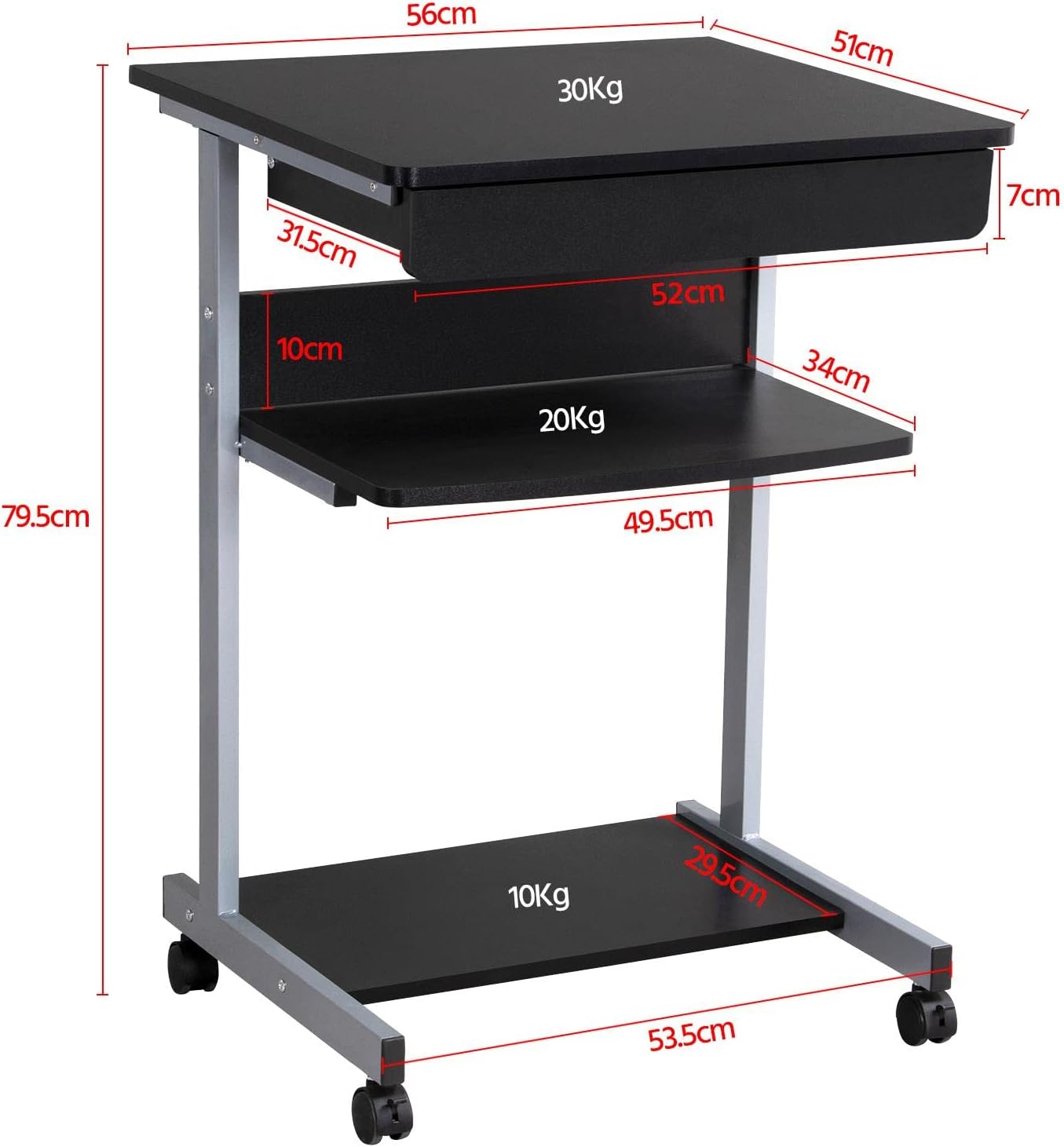
Слика 6: Detailed dimensional drawing of the desk, including measurements for overall height, width, depth, and individual shelf and drawer dimensions. Also shows weight capacities for each surface.
| Феатуре | Детаљ |
|---|---|
| Број модела | ИА-00097936 |
| Укупне димензије (Д к Ш к В) | КСНУМКС к КСНУМКС к КСНУМКС цм (КСНУМКС к КСНУМКС к КСНУМКС инча) |
| Top Board Dimensions | 56 к 51 цм (22 к 20.1 инча) |
| Drawer Dimensions (Inner) | КСНУМКС к КСНУМКС к КСНУМКС цм (КСНУМКС к КСНУМКС к КСНУМКС инча) |
| Middle Shelf Dimensions | 50 к 34 цм (19.7 к 13.4 инча) |
| Bottom Shelf Dimensions | 50 к 30.5 цм (19.7 к 12 инча) |
| Материјал | MDF (Medium Density Fiberboard) with Metal Frame |
| Боја | Црно |
| Нето тежина | Прибл. 10.9 кг (24 лбс) |
| Max. Load Capacity (Top Board) | 30 кг (66 лбс) |
| Max. Load Capacity (Middle Shelf) | 20 кг (44 лбс) |
| Max. Load Capacity (Bottom Shelf) | 10 кг (22 лбс) |
| Цастерс | 4 (2 with locking mechanism) |
Гаранција и подршка
Yaheetech products are manufactured to high-quality standards. For specific warranty information, please refer to the warranty card included with your product or visit the official Yaheetech website. If you have any questions, require assistance with assembly, or need to report missing/damaged parts, please contact our customer support team:
- Webсајт: www.yaheetech.com (Молимо вас да проверите регионалне webсајтови)
- Емаил: Refer to your purchase documentation for customer service email.
- Телефон: Refer to your purchase documentation for customer service phone number.
When contacting support, please have your model number (YA-00097936) and purchase date ready.
Ask a question about this manual
Ask about setup, troubleshooting, compatibility, parts, safety, or missing instructions. Manuals+ will review the question and use this page’s manual context to help answer it.