
1. Увод
This manual provides essential information for the safe and efficient operation of your lightmaXX Nano Beam FX show effect light. Please read it thoroughly before use and retain it for future reference.
2. Безбедносна упутства
- Пажљиво прочитајте сва упутства.
- Сачувајте ово упутство за будућу употребу.
- Не излажите уређај киши или влази.
- Осигурајте одговарајућу вентилацију.
- Искључите из струје пре чишћења или сервисирања.
- Use only specified power supply.
- Избегавајте директно излагање очију извору светлости.
- Овај уређај је само за унутрашњу употребу.
- Ensure the mounting bracket is securely fastened.
3. Садржај пакета
Verify that all items are present and in good condition.
- lightmaXX Nano Beam FX Unit
- Повер Цабле
- Ремоте Цонтрол
- Упутство за употребу (овај документ)

Image 1: lightmaXX Nano Beam FX unit, power cable, and remote control.
4. Производ је готовview
4.1 Предња плоча
The front panel features multiple lenses for projecting various light effects.
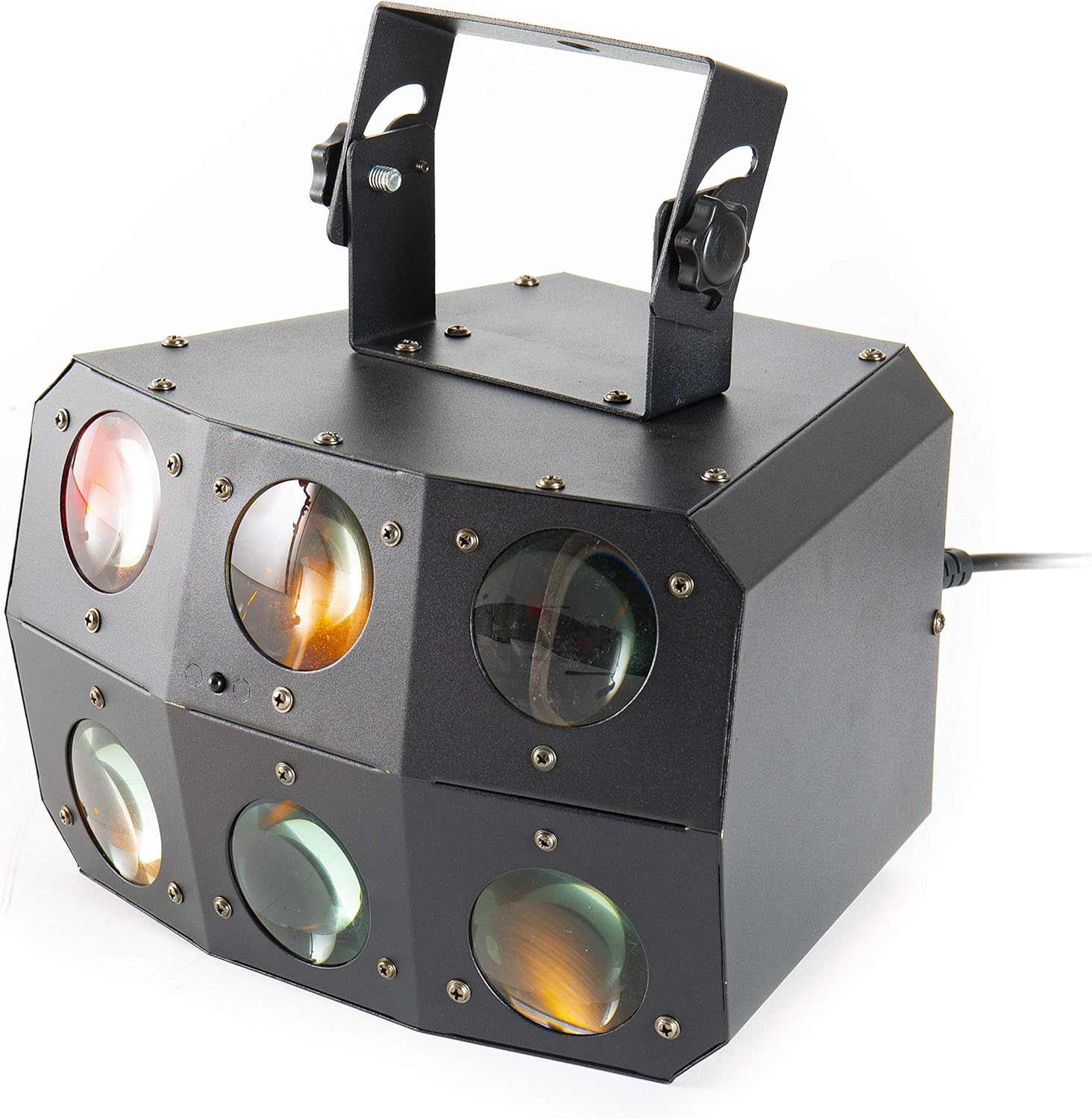
Слика 2: Крупни план view of the front lenses.
4.2 Задња плоча и прикључци
The rear panel provides power input/output, DMX connections, and control interface.

Image 3: Rear panel with connections and control interface.
- НАПАЈАЊЕ: Овде повежите испоручени кабл за напајање.
- ИСКЉУЧИТЕ: For daisy-chaining power to other units.
- ДМКС ИН: Connect DMX controller or previous DMX device.
- ДМКС ОУТ: Connect to the next DMX device in the chain.
- МИЦ: Уграђени микрофон за режиме активиране звуком.
- Екран и дугмад: For menu navigation and settings (MENU, UP, DOWN, ENTER).
- SAFETY ROPE: Attachment point for a safety cable.
4.3 Даљински управљач
The included remote control allows for convenient operation of the unit's functions.
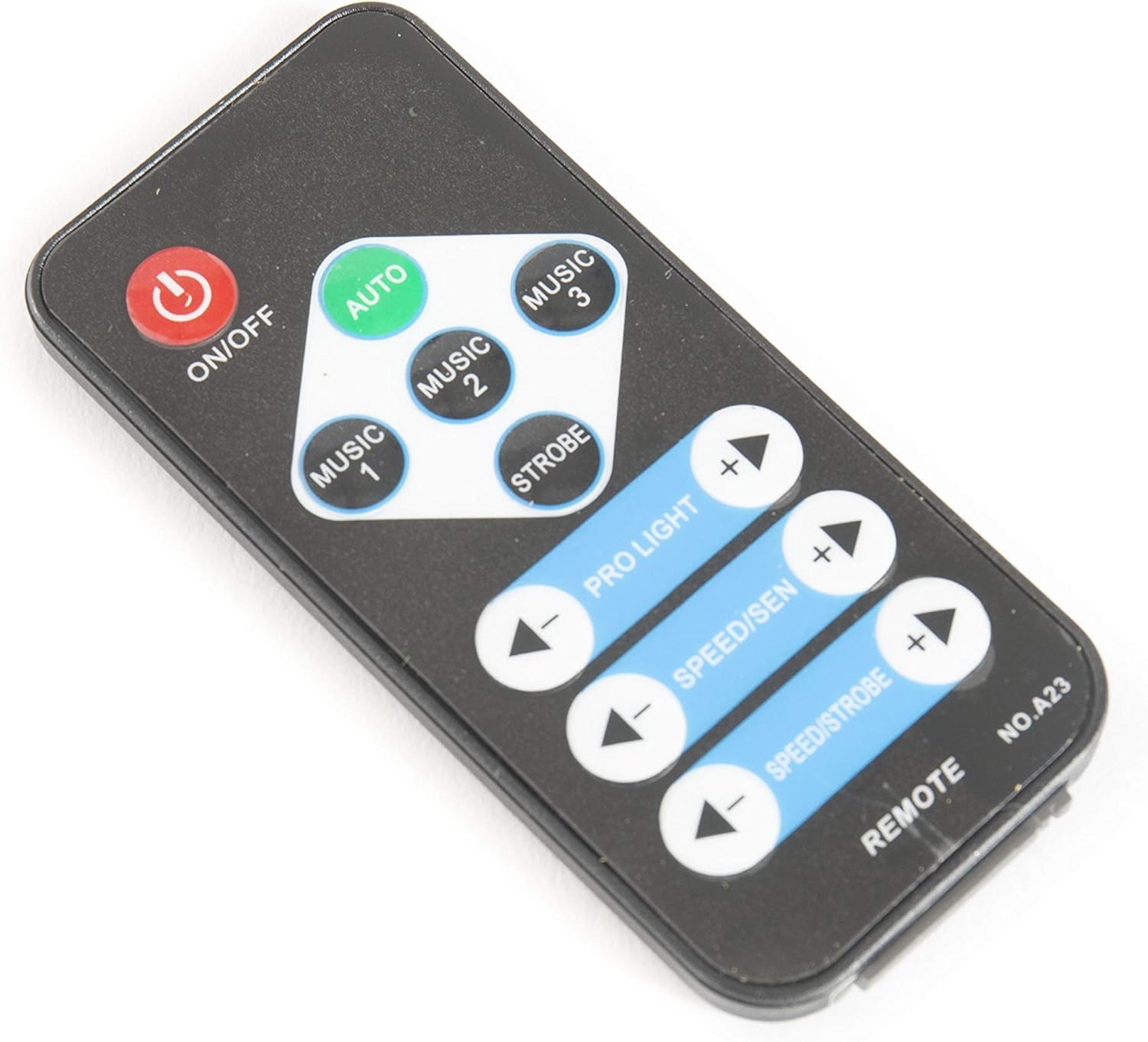
Image 4: Remote control for the Nano Beam FX.
- УКЉУЧЕНО/ИСКЉУЧЕНО: Укључите или искључите уређај.
- АУТО: Activates automatic program mode.
- MUSIC 1/2/3: Activates sound-activated modes with different sensitivities or patterns.
- СТРОБЕ: Activates strobe effect.
- PRO LIGHT: Adjusts light intensity or program selection.
- SPEED/SEN: Adjusts program speed or sound sensitivity.
5. Подешавање
5.1 Распакивање
Carefully remove the unit from its packaging. Inspect for any damage during transit. Retain packaging for future transport or storage.
5.2 Монтажа
The Nano Beam FX unit is equipped with a mounting bracket for secure installation.

Image 5: Adjustable mounting bracket.
- Attach the unit securely to a truss, ceiling, or wall using appropriate clamps and hardware (not included).
- Always use a safety cable (not included) attached to the SAFETY ROPE point on the rear panel, ensuring it can hold the weight of the unit.
- Adjust the angle of the unit using the knobs on the mounting bracket.
5.3 Прикључак за напајање
Connect the supplied power cable to the POWER IN socket on the rear panel and then to a suitable power outlet.
5.4 DMX веза (опционо)
For advanced control, connect the unit to a DMX controller.
- Connect a DMX cable from your DMX controller's output to the DMX IN socket of the Nano Beam FX.
- If connecting multiple DMX devices, connect from the DMX OUT of the first unit to the DMX IN of the next.
- Refer to the DMX channel chart (not provided in product data) for specific DMX control parameters.
6. Оперативни
6.1 Укључивање/искључивање
Притисните тастер ОН/ОФФ button on the remote control or ensure the unit is connected to power. The unit will power on automatically when connected to power.
6.2 Режими рада
The Nano Beam FX offers several operating modes, selectable via the remote control or the rear panel display.
- АУТО режим: Притисните тастер АУТО button on the remote. The unit will cycle through its pre-programmed light shows automatically.
- МУЗИЧКИ режим: Притисните МУЗИКА 1, МУЗИКА 2, или МУЗИКА 3 on the remote. The unit will react to sound picked up by its internal microphone. Different music modes may offer varying sensitivities or patterns.
- СТРОБЕ режим: Притисните тастер СТРОБЕ button on the remote to activate a flashing light effect.
- ДМКС режим: If connected to a DMX controller, the unit will respond to DMX signals. Use the rear panel display to set the DMX address.

Слика 6: Примерample of light effects (blue and red).

Слика 7: Примерample of light effects (green and yellow).

Слика 8: Примерample of light effects (orange and red).
6.3 Adjustments via Remote Control
- PRO LIGHT: Користите + и - buttons to cycle through different light programs or adjust intensity in certain modes.
- SPEED/SEN: Користите + и - buttons to adjust the speed of automatic programs or the sensitivity of sound-activated modes.
7. Одржавање
7.1 Чишћење
Disconnect the unit from power before cleaning. Use a soft, lint-free cloth to wipe the exterior. For lenses, use a specialized lens cleaner and cloth to avoid scratches. Do not use abrasive cleaners.
7.2 Складиштење
When not in use, store the unit in its original packaging or a suitable case in a dry, dust-free environment.
КСНУМКС. Решавање проблема
| Проблем | Могући узрок | Решење |
|---|---|---|
| Јединица се не укључује. | Нема напајања; неисправан кабл. | Проверите везу кабла за напајање; покушајте са другом утичницом. |
| Даљински управљач не ради. | Dead battery; obstruction; out of range. | Replace remote battery; ensure clear line of sight; move closer to unit. |
| No light effects. | Unit in DMX mode without DMX signal; program not selected. | Select AUTO or MUSIC mode; check DMX connection and settings. |
| Sound-activated mode not responding. | Осетљивост микрофона је прениска; нема звучног улаза. | Increase sensitivity using remote; ensure sound source is close to the unit. |
9. Спецификације
| Феатуре | Детаљ |
|---|---|
| Модел | Nano Beam FX |
| Бранд | лигхтмаКСКС |
| Димензије производа | 32 к 30 к 29 цм |
| Тежина артикла | 3.5 кг |
| Извор напајања | Цордед Елецтриц |
| Извор светлости Ватtage | 3 Watts (per light source) |
| Број извора светлости | 24 |
| Референца произвођача | ЛИГ0015648-000 |
| ASIN | B07JM9XVT4 |
10. Гаранција и подршка
За информације о гаранцији и техничкој подршци, обратите се званичном сервису произвођача webсајт или контактирајте продавца. Сачувајте доказ о куповини за евентуалне рекламације.