
1. Увод
Thank you for choosing the LECLSTAR Motion Sensor Closet Light. This manual provides essential information for the safe and effective use of your new lighting product. Please read these instructions carefully before installation and operation, and retain them for future reference.
This wireless, battery-operated light features 51 LEDs, motion sensing capabilities, and is designed for various indoor applications such as closets, cabinets, kitchens, and stairs.
2. Безбедносне информације
- Не излажите уређај води или прекомерној влази.
- Do not attempt to disassemble, repair, or modify the light. This will void the warranty and may cause damage or injury.
- За пуњење користите само приложени УСБ кабл.
- Avoid direct eye exposure to the LED light, as it can be very bright.
- Чувати ван домашаја деце.
3. Садржај пакета
Молимо вас да проверите пакет како бисте били сигурни да су сви састојци присутни:
- 1 x LECLSTAR Motion Sensor Closet Light
- 1 x Magnetic Plastic Bracket
- 2 x 3M Adhesive Pads
- 4 к завртњи за монтажу
- 1 к УСБ кабл за пуњење
- 1 к Упутство за употребу
4. Производ је готовview
Familiarize yourself with the components of your LECLSTAR Motion Sensor Closet Light.

Слика 1: Product Components. This diagram illustrates the various parts of the light, including the USB charging port, magnetic strip for mounting, LED light board, durable aluminum alloy casing, ON/OFF switch, infrared motion sensor receiver, and protective ABS cover.
- УСБ порт: За пуњење унутрашње батерије.
- Магнетна трака: Allows for easy attachment to magnetic surfaces or the included bracket.
- LED Light Board: Contains 51 bright LEDs for illumination.
- Aluminum Alloy Material: Provides a durable and lightweight housing.
- Дугме за укључивање/искључивање: Controls the power and operating modes.
- Инфрацрвени пријемник: Detects signals from the remote control (if applicable).
- ABS Cover: Protects the LEDs and diffuses light.
5. Подешавање и инсталација
The LECLSTAR Motion Sensor Closet Light offers flexible installation options.
5.1 Charging Before First Use
Before installation, fully charge the light. Refer to Section 6 for detailed charging instructions.
5.2 Опције монтаже
You can install the light using the magnetic plastic bracket with 3M adhesive or screws.
- Magnetic Adhesion: Peel off the protective film from the 3M adhesive pads and attach them to the magnetic plastic bracket. Press the bracket firmly onto a clean, dry surface where you wish to install the light. The light can then be magnetically attached to the bracket.
- Монтажа завртњима: Use the provided screws to secure the magnetic plastic bracket to a desired surface. Once the bracket is securely mounted, attach the light magnetically.

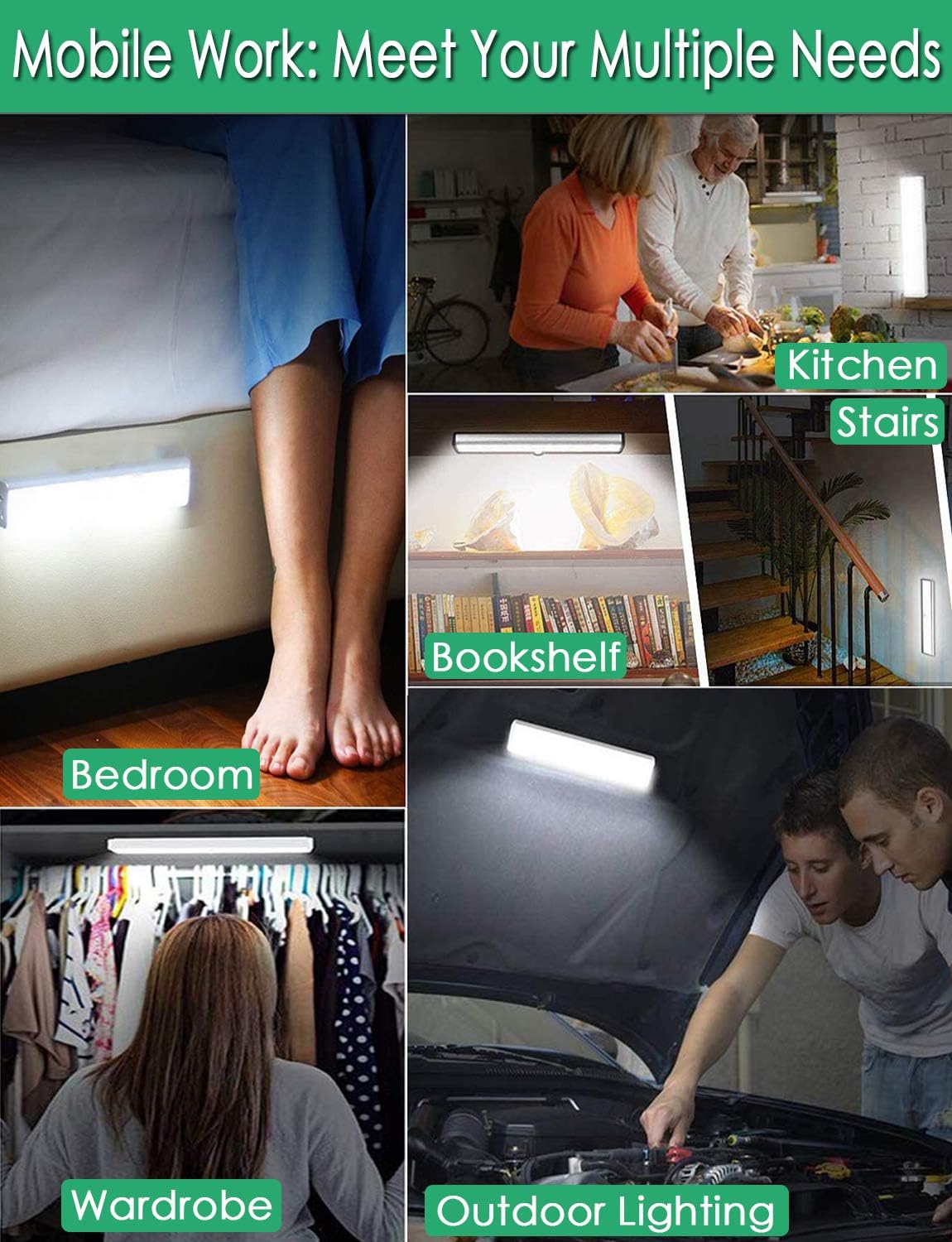
Слика 2: Versatile Installation. This image illustrates the light's adaptability, showing it mounted under a bed, in a kitchen, on a bookshelf, along stairs, inside a wardrobe, and providing illumination for outdoor tasks, highlighting its ease of placement in diverse environments.
5.3 Разматрања пласмана
- For optimal motion detection, position the sensor ball to face the direction of expected movement.
- When using multiple motion sensor lights, avoid placing them too close together in motion-sensing mode, as they may interfere with each other's sensitivity.
- Ensure the installation surface is clean and dry for secure adhesion.
6. Упутства за пуњење
The LECLSTAR Motion Sensor Closet Light is equipped with a built-in 2400mAh lithium battery.
- Connect the provided USB charging cable to the light's USB port.
- Укључите други крај USB кабла у стандардни USB адаптер за напајање (није укључен) или USB порт рачунара.
- During charging, the indicator light on the device will be плава.
- Када се потпуно напуни, индикаторска лампица ће се упалити црвена.
- Потпуно пуњење обично траје отприлике 4 сата.
Слика 3: Charging Status. This image demonstrates the charging process, showing the light connected to a power source. The indicator light is red when charging and turns blue when the battery is fully charged, indicating its status clearly.
7. Упутство за употребу
The light features multiple operating modes and can be controlled via its ON/OFF button or an optional remote control.
7.1 Mode Selection (ON/OFF Button)
Locate the ON/OFF button on the side of the light. Toggle the switch to select the desired mode:
- ВАН: Светло је потпуно искључено.
- НА: Светло остаје непрекидно упаљено.
- АУТОМАТСКИ (режим сензора покрета): Светло ће се аутоматски упалити када се детектује кретање у мрачном окружењу. Искључиће се отприлике 30 секунди након што се не детектује никакво кретање.

Слика 4: Motion Sensor Operation. This image demonstrates how the motion sensor works: the light remains off in bright environments, automatically turns on when movement is detected in the dark within a 3-meter, 120-degree range, and then automatically turns off after 30 seconds of inactivity.
7.2 Motion Sensor Details
- Угао детекције: 120 степени.
- Удаљеност детекције: Up to 3 meters (approximately 10 feet).
- The sensor is designed to activate only in low-light conditions to conserve battery life.
7.3 Remote Control Functions (Optional)
If your model includes a remote control, you can access additional features:

Слика 5: Remote Control Functions. This image displays the remote control, highlighting its various buttons: ON/OFF for power, 'S' for sensor mode, '1', '2', '3' for different light modes or brightness levels, '+' and '-' for adjusting brightness, and '15', '30', '60', '120' for setting a timer.
- УКЉУЧЕНО/ИСКЉУЧЕНО: Укључује или искључује светло.
- S (Sensor Mode): Активира режим сензора покрета.
- 1, 2, 3 (Light Modes): Selects different light modes or brightness levels.
- 50%, 100%, +, - (Adjustable Brightness): Подешава интензитет светлости.
- 15, 30, 60, 120 (Timer Function): Sets the light to turn off automatically after a specified duration.
8. Одржавање
- Чишћење: Wipe the light with a soft, dry cloth. Do not use abrasive cleaners or solvents.
- Одржавање батерије: To prolong battery life, avoid fully discharging the battery frequently. Charge the light regularly, especially if it will not be used for an extended period.
КСНУМКС. Решавање проблема
- Светло се не укључује:
- Уверите се да је батерија напуњена.
- Check that the light is switched to the 'ON' or 'AUTO' mode.
- Сензор покрета не ради:
- Ensure the light is in 'AUTO' mode.
- Verify that the ambient light is dark enough for the sensor to activate.
- Check that the sensor is not obstructed and is facing the area of expected movement.
- If multiple motion sensor lights are nearby, they might interfere with each other. Try repositioning them.
- Светло неочекивано трепери или се пригушује:
- The battery level may be low. Recharge the light.
10. Спецификације
| Модел | B07JRBSJDR |
| Лигхт Цолор | чисто бела (6000К) |
| ЛЕД количина | 51 ЛЕД диоде |
| Лумен Оутпут | 240лм |
| Motion Detecting Angle | 120 степени |
| Motion Detecting Distance | До 3 метара (10 стопе) |
| ЛЕД животни век | Више од 80,000 сати |
| Тип батерије | 2400мАх литијумска батерија |
| УСБ време пуњења | Отприлике 4 сата |
| Оператинг Волtage | 4.2В |
| Ватtage | 3W |
| Димензије | 15.3 к 0.8 к 0.8 инча |
| Материјал | Метал, Пластика |
| Извор напајања | Баттери Поверед |
| Посебне карактеристике | Инстант Он |
11. Гаранција и подршка
LECLSTAR provides a lifetime warranty for this product. If you encounter any issues or have questions regarding your Motion Sensor Closet Light, please contact the LECLSTAR service team for assistance. Our dedicated support team is ready to help you.
For warranty claims or technical support, please refer to the contact information provided on the product packaging or the official LECLSTAR webсајту.