
1. Увод
This manual provides comprehensive instructions for the installation, operation, and maintenance of your Keenso USB AUX Car Switch. This product is designed to integrate USB and auxiliary audio input capabilities into compatible BMW vehicles, enhancing your in-car entertainment and connectivity options. Please read this manual thoroughly before installation and use to ensure proper function and safety.
2. Производ је готовview
The Keenso USB AUX Car Switch is a replacement or upgrade unit that provides both a USB port for data transfer and device charging, and an AUX-in port for audio input. It comes with a wire harness for connection to your vehicle's existing system.

Image 2.1: Keenso USB AUX Car Switch with included wire harness and cables.

Слика 2.2: Детаљно view of the USB and AUX input ports.
3. Компатибилност
This USB AUX Car Switch is designed for specific BMW models. Please verify your vehicle's compatibility before installation.
- E87LCI / E88 / E90 / E90LCI / E91 / E91LCI / E92 / E92LCI / E93 / E93LCI
- F07GT / F10 / F11 / F18 / E12 / F13 / F01 / F02 / F03 / F04HYB
- F25 / X5E70LCI / X6E71 / X6E72 / HYB Z4 E89
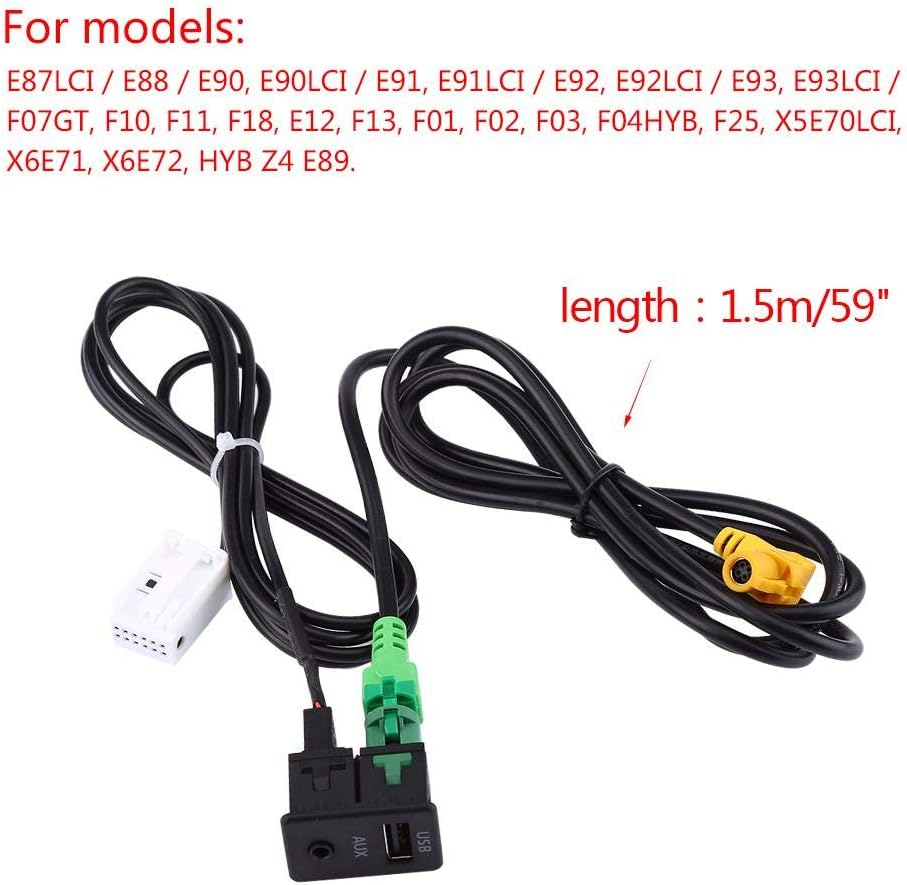
Image 3.1: List of compatible BMW models.
4. Подешавање и инсталација
The installation of this USB AUX switch involves connecting the provided wire harness to your vehicle's audio system. While designed for ease of installation, professional installation is recommended if you are unfamiliar with car audio wiring or dashboard disassembly.
Општи кораци инсталације:
- Припрема: Ensure your vehicle's ignition is off and the battery is disconnected to prevent electrical shorts.
- Приступ: Carefully remove the trim panels and existing switch unit from your vehicle's center console or designated installation area to access the wiring.
- веза: Connect the provided wire harness to the corresponding ports on your vehicle's head unit or existing wiring. The harness is designed for a direct fit.
- Монтажа: Insert the new Keenso USB AUX switch into the designated slot in your vehicle's console. Ensure it sits flush.
- тестирање: Reconnect the battery and test the functionality of both the USB and AUX ports before reassembling all trim panels.
- Поновно састављање: Securely reattach all removed trim panels.
Note: Incorrect installation can lead to damage to the product or your vehicle's electrical system. If you encounter any difficulties, consult a qualified automotive technician.

Слика 4.1: Примерample of the USB AUX switch installed in a vehicle's console.

Слика 4.2: Детаљно view of the switch and its cable connections.
5. Упутство за употребу
Коришћење УСБ порта:
- Пренос података: Connect a USB storage device (e.g., flash drive) to the USB port. Your vehicle's infotainment system should recognize the device, allowing you to play media files. Refer to your vehicle's manual for specific media playback instructions.
- Пуњење уређаја: Connect your smartphone or other USB-powered device to the USB port using a compatible cable. The port provides power for charging.
Using the AUX-in Port:
- Аудио улаз: Connect an audio device (e.g., smartphone, MP3 player) to the AUX-in port using a 3.5mm audio cable. Select the AUX input source on your vehicle's infotainment system to play audio from the connected device.
6. Одржавање
The Keenso USB AUX Car Switch requires minimal maintenance. Follow these guidelines to ensure longevity:
- Keep the USB and AUX ports free from dust and debris. Use a soft, dry cloth to clean the surface of the switch.
- Избегавајте просипање течности по уређају.
- Do not use harsh chemicals or abrasive cleaners, as these can damage the plastic finish.
- Ensure cables are connected and disconnected gently to prevent damage to the ports.
КСНУМКС. Решавање проблема
If you experience issues with your Keenso USB AUX Car Switch, refer to the following common problems and solutions:
| Проблем | Могући узрок | Решење |
|---|---|---|
| USB device not recognized / No charging |
|
|
| No audio from AUX-in |
|
|
| Switch does not fit flush in console |
|
|
| Cables do not connect to head unit |
|
|
8. Спецификације
| Феатуре | Детаљ |
|---|---|
| Број модела | KS-USB-AUX-01 |
| Бранд | Кеенсо |
| Тип конектора | Помоћни, УСБ |
| Број портова | 2 (1x USB, 1x AUX-in) |
| Цабле Ленгтх | 1.5 метара (59 инча) |
| Материјал | PVC Plastic, ABS Finish |
| Боја | Црно |
| Тежина артикла | 0.09 килограма |
| Специфичне употребе | Cell Phone, GPS, Audio Playback |
| Пренос података | High speed data transfer supported |
| Излазна снага | Device charge power supported via USB |
9. Информације о гаранцији
Keenso is committed to customer satisfaction. While a formal warranty period is not specified, if you encounter any issues with your Keenso USB AUX Car Switch, please contact customer support. We aim to provide assistance and resolve concerns within 24 hours.
10. Корисничка подршка
For technical assistance, troubleshooting, or any product-related inquiries, please contact Keenso customer support via email. Refer to your purchase documentation or the retailer's webсајт за конкретне контакт податке.
We strive to provide the best customer care and will respond to your inquiries promptly.