
1. Увод
The FeinTech VAX00102 is an advanced HDMI 2.0 audio extractor designed to separate audio from an HDMI signal and route it to an AV receiver, soundbar, or active speakers. It supports resolutions up to Ultra-HD / 4K HDR (up to 18 Gbps data rate) with lossless HDMI signal transmission. This device is backward compatible with all lower resolutions and includes features to enhance compatibility with older HDMI 1.3/1.4 devices.
The VAX00102 also supports Audio Return Channel (ARC), allowing audio from your TV to be output through the extractor's digital outputs. An audio mode switch provides control over the audio format output by the HDMI source, ensuring optimal sound delivery even when connected to stereo TVs.
2. Безбедносне информације
- Уверите се да је уређај постављен на стабилну, равну површину.
- Не излажите уређај влази, киши или екстремним температурама.
- Користите само испоручени адаптер за напајање.
- Избегавајте блокирање вентилационих отвора да бисте спречили прегревање.
- Не покушавајте сами да отворите или поправите уређај. Све сервисирање препустите квалификованом особљу.
3. Садржај пакета
Молимо вас да проверите пакет за следеће ставке:
- FeinTech VAX00102 HDMI 2.0 Audio Extractor
- Повер Адаптер
- Упутство за употребу
4. Производ је готовview
The FeinTech VAX00102 features a compact design with clearly labeled ports and controls for easy integration into your home theater system.
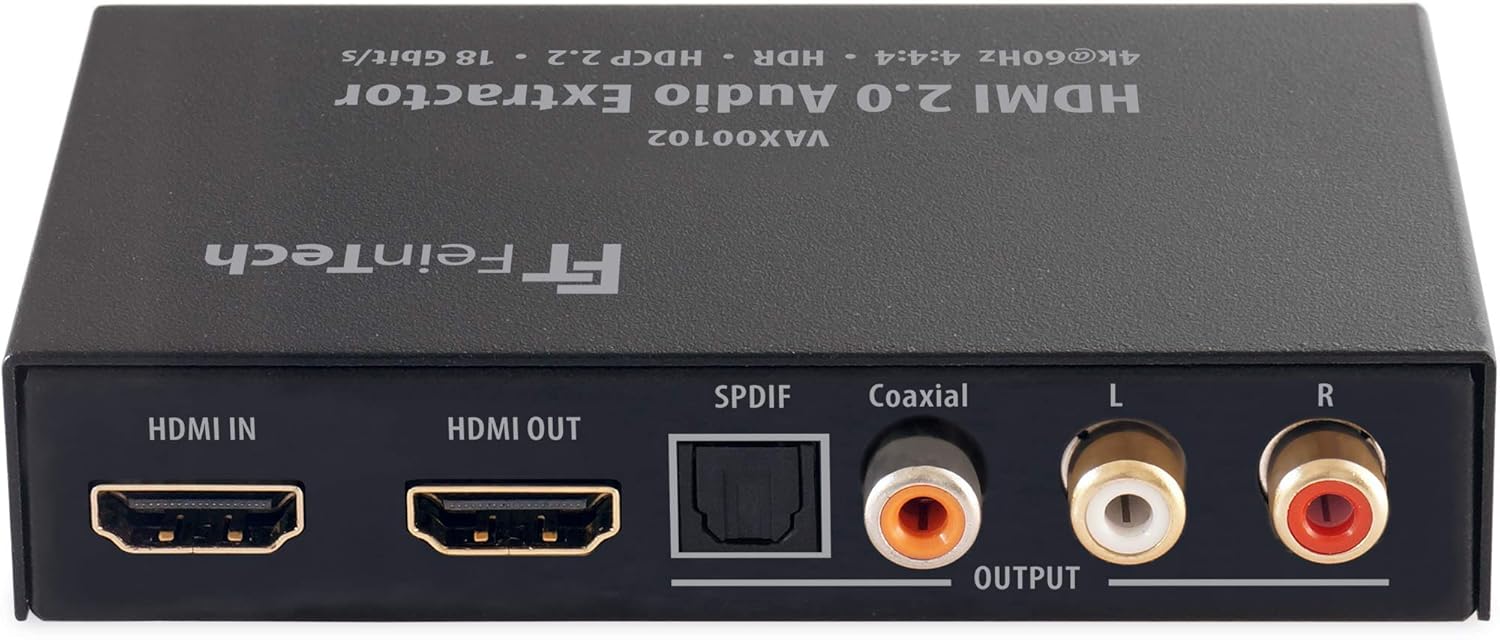
Слика 4.1: Предње и задње view of the FeinTech VAX00102 HDMI Audio Extractor, showing HDMI In, HDMI Out, SPDIF (Toslink), Coaxial, and Analog L/R RCA audio output ports.
Контроле и конектори:
- Улазна снага: Connection for the included power supply.
- ЛЕД индикатори: Lights up when functions are active.
- Audio EDID Switch: Selects audio format (Auto/Bypass, 2.0, 5.1).
- HDMI 1.3/1.4 Downgrade Switch: Improves compatibility with older HDMI devices.
- Video Stop Switch: Disables video output, allowing only audio output.
- ARC (Audio Return Channel) Switch: Enables TV audio output via SPDIF and Coaxial (not analog).
- Прекидач за укључивање/искључивање: Контрола снаге за уређај.
- ХДМИ улаз: Connects to your media player or source device.
- ХДМИ излаз: Connects to your TV, monitor, or projector.
- SPDIF Digital Audio Output (Toslink): Оптички дигитални аудио излаз.
- Коаксијални дигитални аудио излаз: Коаксијални дигитални аудио излаз.
- Analog Stereo L+R Audio Output (RCA): Аналогни стерео аудио излаз.
5. Подешавање
5.1 Основна веза
- Connect your HDMI source (e.g., Blu-ray player, streaming device) to the ХДМИ ИН port on the VAX00102.
- Connect your display (TV, monitor, projector) to the ХДМИ ОУТ port on the VAX00102.
- Connect your audio receiver, soundbar, or active speakers to the desired audio output port on the VAX00102 (SPDIF, Coaxial, or Analog RCA).
- Connect the included power adapter to the VAX00102 and then to a power outlet.
- Укључите све повезане уређаје.
5.2 Connecting to a 5.1 Sound System
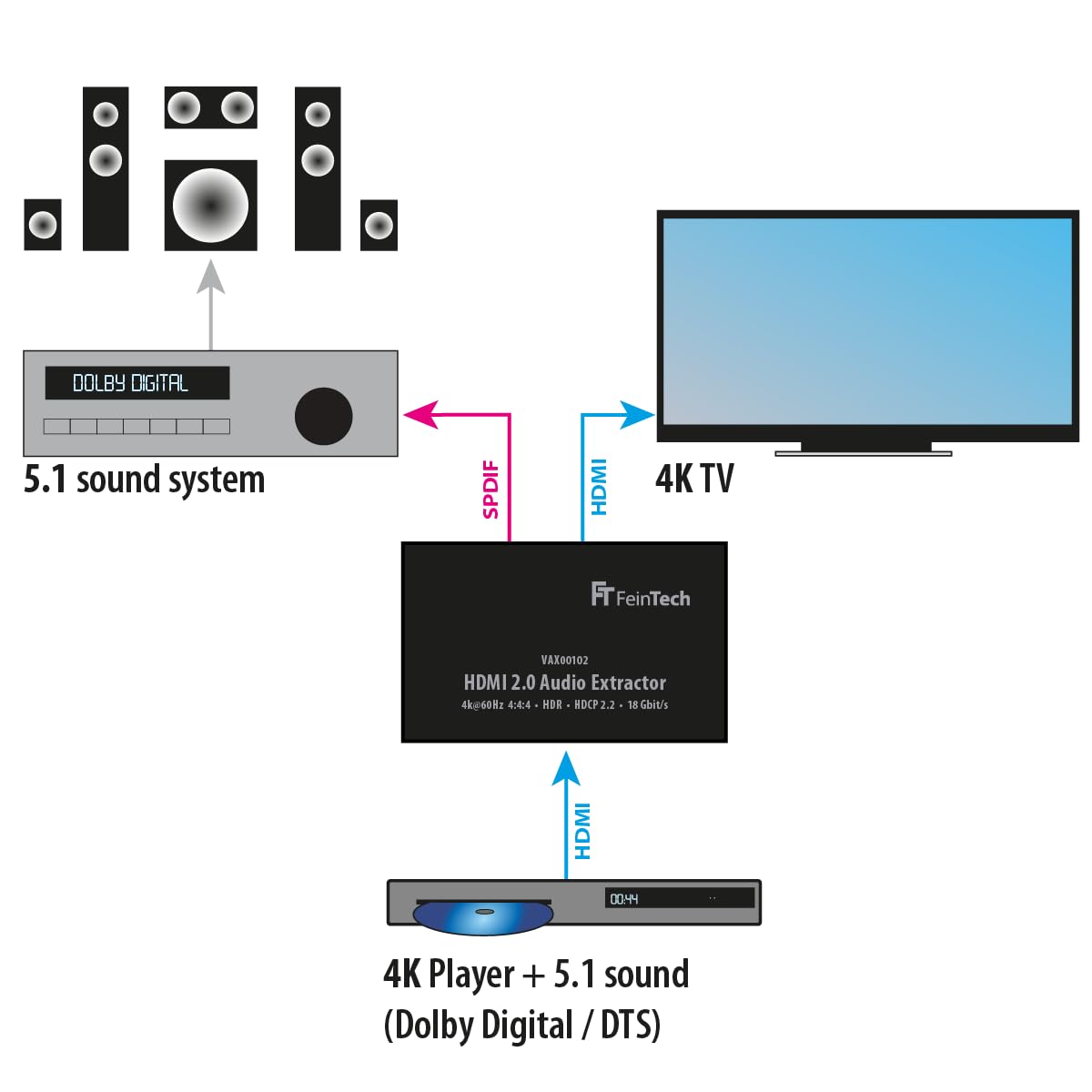
Слика 5.1: Connection diagram for a 4K player with 5.1 sound (Dolby Digital / DTS) to a 5.1 sound system and 4K TV via the VAX00102.
For 5.1 channel audio, connect your 4K player to the HDMI IN of the VAX00102. Connect the HDMI OUT to your 4K TV. Use the SPDIF or Coaxial output from the VAX00102 to connect to your 5.1 sound system. Ensure your HDMI source is configured to output Bitstream (Dolby Digital or DTS) instead of PCM for 5.1 audio via SPDIF/Coaxial.
5.3 Using Audio Return Channel (ARC)

Слика 5.2: Connection diagram for ARC functionality, where TV audio is sent back to the VAX00102 and then to a 5.1 sound system via SPDIF. Note that analog RCA outputs do not support ARC audio.
To use ARC, connect the HDMI OUT port of the VAX00102 to the ARC-enabled HDMI input on your TV. Connect the SPDIF or Coaxial output of the VAX00102 to your audio system. Ensure ARC is enabled on both your TV and the VAX00102. Note that ARC audio is only available via the digital SPDIF and Coaxial outputs, not the analog RCA outputs.
6. Упутство за употребу
6.1 Audio Mode Switch (EDID)
The audio mode switch allows you to manually control the audio format output by the HDMI source. This is useful when your audio system has specific format requirements or when you want to ensure a particular audio output.
- Auto / Bypass: The output audio format is determined by the best format supported by the connected HDMI display device.
- 2.0 (стерео): The output is stereo (LPCM 2.0) on all audio outputs.
- 5.1: The output is in 5.1 audio format (Dolby Digital / AC-3 or DTS), provided the 5.1 soundtrack is available from the source.
Important Note on 5.1 Audio via SPDIF/Coaxial: For 5.1 audio transmission via SPDIF or Coaxial, set your HDMI source to output Битстреам (e.g., Dolby Digital or DTS) instead of PCM. Ensure you select Dolby Digital, not Dolby Digital Plus, if applicable.
6.2 HDMI 1.3/1.4 Compatibility Switch
If you are connecting an older HDMI 1.3 or 1.4 source device to a newer HDMI 2.0 TV, you may encounter compatibility issues. Use this switch to downgrade the HDMI signal to 1.3/1.4, which can improve compatibility.
6.3 Video Stop Switch
This switch allows you to disable the video output, making the TV screen go black. This feature is useful if you only require audio output from the HDMI source and want to conserve power or avoid display issues.
6.4 Контрола јачине звука
Volume control should be managed at the source device (e.g., media player) or your audio system (AV receiver, soundbar), not on the TV, to ensure proper audio levels.
6.5 Supported Audio Formats
- Digital Outputs (SPDIF, Coaxial): AC3 / Dolby Digital 2.0 and 5.1, DTS 5.1, Stereo PCM.
- Аналогни РЦА излази: Stereo PCM only.
- ХДМИ излаз: All formats, including Dolby Atmos, Dolby TrueHD, DTS-HD, and multi-channel PCM. Note that Dolby Atmos can ONLY be transmitted via HDMI, not via other audio outputs.
7. Одржавање
To ensure the longevity and optimal performance of your FeinTech VAX00102, follow these simple maintenance guidelines:
- Одржавајте уређај чистим тако што ћете га обрисати меком, сувом крпом.
- Не користите течна средства за чишћење или аеросолне спрејеве.
- Осигурајте одговарајућу вентилацију око уређаја како бисте спречили прегревање.
- Disconnect the power adapter if the device will not be used for an extended period.
КСНУМКС. Решавање проблема
If you encounter issues with your VAX00102, please refer to the following common troubleshooting steps:
- Нема аудио излаза:
- Проверите све кабловске везе да бисте били сигурни да су безбедни.
- Verify the audio mode switch (EDID) setting. Try "Auto/Bypass" first.
- Ensure your audio source is outputting a compatible audio format for your connected audio system.
- If using SPDIF/Coaxial for 5.1 audio, confirm the source is set to Bitstream (Dolby Digital/DTS), not PCM.
- Check the volume levels on your source device and audio system.
- Нема видео излаза:
- Ensure the HDMI cables are connected correctly and are not damaged.
- Check if the "Video Stop" switch is accidentally activated.
- Try connecting the HDMI source directly to the TV to rule out source or TV issues.
- ARC Not Working:
- Confirm that your TV's HDMI port supports ARC and that ARC is enabled in your TV's settings.
- Ensure the HDMI cable is connected to the ARC-enabled HDMI port on your TV.
- Remember that ARC audio is only available via SPDIF and Coaxial outputs, not analog RCA.
- Compatibility Issues with Older Devices:
- Utilize the HDMI 1.3/1.4 compatibility switch to improve connection stability with older source devices.
9. Спецификације
| Број модела | ВАКС00102 |
| Димензије производа (Д к Ш к В) | 10.5 к 6.2 к 2.2 цм |
| Тежина артикла | 160 грама |
| Тип интерфејса | Coaxial, HDMI |
| Број канала | 2 (стерео) |
| Компатибилни уређаји | TV, AV Receivers, Soundbars, Active Speakers |
| Тип монтаже | Wall Mount (if applicable, based on product design) |
| Земља порекла | Кина |
| ХДМИ верзија | ХДМИ 2.0 |
| Максимална резолуција | 4К 60Хз ХДР |
| Дата Рате | До 18 Гбпс |
| АРЦ подршка | Yes (SPDIF, Coaxial) |
Cable Length Recommendation: With standard 24AWG HDMI cables, maximum range for 1080p is 10m input + 8m output. For 4K, maximum range is 5m input + 5m output.
10. Информације о гаранцији
FeinTech products are designed for reliability and performance. This product comes with a standard manufacturer's warranty. Please refer to the warranty card included in your package or visit the official FeinTech webсајт за детаљне услове гаранције.
11. Корисничка подршка
For any questions, technical assistance, or support regarding your FeinTech VAX00102, please contact FeinTech customer service. Contact details can typically be found on the official FeinTech webсајту или у паковању производа.