
Увод
Thank you for choosing the MARVO KG925G Mechanical Gaming Keyboard. This manual provides essential information for setting up, operating, maintaining, and troubleshooting your new keyboard. Please read this manual carefully before use to ensure optimal performance and longevity of your device.
Садржај пакета
Проверите да ли су све ставке присутне у пакету:
- MARVO KG925G Mechanical Gaming Keyboard
- Кориснички приручник (овај документ)
Сетуп
Системски захтеви
- Оперативни систем: Виндовс 8 или новији
- Доступан УСБ 2.0 порт
Повезивање тастатуре
- Пронађите слободан USB 2.0 порт на рачунару.
- Plug the USB connector of the MARVO KG925G keyboard into the USB port.
- Оперативни систем ће аутоматски открити и инсталирати потребне драјвере. Овај процес може потрајати неколико тренутака.
- Once the drivers are installed, the keyboard's backlighting will illuminate, indicating it is ready for use.
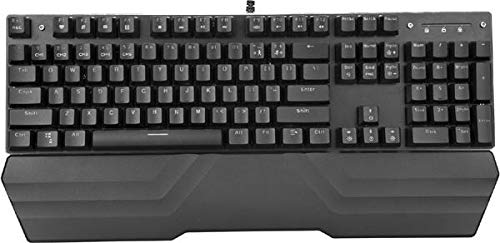
Image: The MARVO KG925G Mechanical Gaming Keyboard with its USB cable connected, ready for use. The keyboard features a wrist rest and illuminated keys.
Упутство за употребу
Основне функције тастатуре
The MARVO KG925G functions as a standard QWERTY keyboard for typing and general computer use.
Мултимедијални тастери
The keyboard includes dedicated multimedia functions, typically accessed via the Fn key combined with the F-keys (F1-F12). Refer to the keycap legends for specific functions such as volume control, media playback, and launching applications.
- Fn + F1-F12: Access various multimedia and system functions.
Контрола позадинског осветљења
The MARVO KG925G features customizable backlighting. Specific key combinations are used to change lighting modes, brightness, and speed. Consult the keyboard's keycap legends or the manufacturer's website for detailed instructions on advanced lighting customization.
- Режими осветљења: Typically cycled using a dedicated key or Fn + a specific key (e.g., Scroll Lock, Pause Break, or a dedicated lighting key).
- Подешавање осветљености: Often controlled by Fn + Up/Down arrow keys.
Одржавање и њега
Правилно одржавање осигурава дуготрајност и перформансе ваше тастатуре.
- Чишћење: Use a soft, dry cloth to wipe the keyboard surface. For deeper cleaning, use a can of compressed air to remove dust and debris from between the keycaps. Avoid using harsh chemicals or abrasive materials.
- Просипање: In case of liquid spills, immediately unplug the keyboard from your computer. Turn it upside down to drain any liquid and allow it to dry completely for at least 24-48 hours before reconnecting. Do not attempt to use the keyboard while it is wet.
- Складиштење: Чувајте тастатуру на хладном и сувом месту, даље од директне сунчеве светлости и екстремних температура.
Решавање проблема
If you encounter issues with your MARVO KG925G keyboard, refer to the following common solutions:
| Проблем | Могуће решење |
|---|---|
| Тастатура не реагује. |
|
| Backlighting is not working. |
|
| Keys are not registering correctly. |
|
Спецификације
- Модел: КГ925Г
- Бренд: МАРВО
- Повезивање: УСБ 2.0
- Тип тастатуре: Механичка тастатура за игре
- Карактеристике: Illumination, Wrist Rest, Multimedia Keys
- Компатибилни ОС: Виндовс 8 и новији
- Димензије: Приближно 47.5 к 18.7 к 8.4 цм (18.7 к 7.4 к 3.3 инча)
Гаранција и подршка
For warranty information and technical support, please refer to the warranty card included with your product or visit the official MARVO webсајт. Сачувајте доказ о куповини за потребе гаранције.