
Увод
This manual provides instructions for the Insignia NS-PNKNUM19 Wired Numeric Keypad. This device is designed to enhance data entry for accounting functions and spreadsheet applications on both Mac and PC computers. It features a standard numeral arrangement and responsive keys for efficient operation.
Безбедносне информације
Please read these safety instructions carefully before using your new numeric keypad to prevent damage to the device or injury to yourself.
- Do not expose the keypad to water or excessive moisture.
- Избегавајте екстремне температуре.
- Do not attempt to disassemble or repair the keypad yourself. Refer all servicing to qualified personnel.
- Keep the keypad away from strong magnetic fields.
- Користите само са компатибилним уређајима као што је наведено у овом упутству.
Садржај пакета
- Insignia NS-PNKNUM19 Wired Numeric Keypad
- Quick Setup Guide (not included in this digital manual)

Image: The Insignia NS-PNKNUM19 Wired Numeric Keypad shown in its retail packaging, highlighting the product and its simple design.
Карактеристике
- 19 кључева: Offers a comfortable and complete numeric typing experience.
- УСБ интерфејс: Enables a simple wired connection to your computer.
- PC and Mac Compatible: Designed for use with both Windows and macOS operating systems.
- Плуг-анд-Плаи: No driver installation required for most operating systems.
- ЛЕД индикатор: An LED light indicates when the keypad is connected and active.
Сетуп
Setting up your Insignia NS-PNKNUM19 Wired Numeric Keypad is a straightforward process.
- Повежите тастатуру: Locate an available USB port on your computer (PC or Mac). Plug the USB connector of the numeric keypad into the USB port.
- Препознавање система: Your computer should automatically detect and install the necessary drivers. This is a plug-and-play device, so no manual driver installation is typically required.
- Потврдите везу: An LED indicator on the keypad will illuminate, confirming that the device is connected and ready for use.
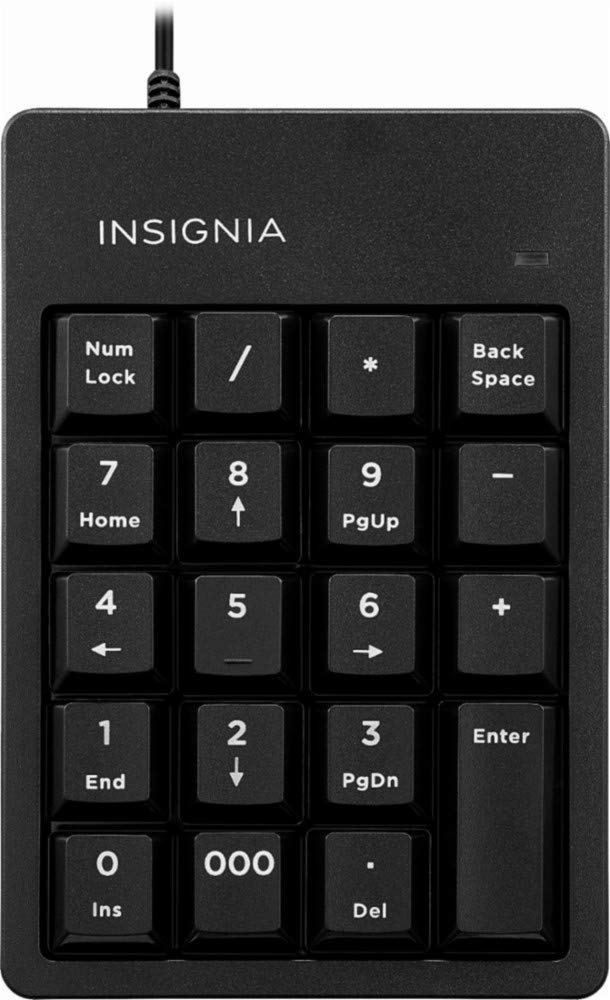
Image: The Insignia NS-PNKNUM19 Wired Numeric Keypad, showing its 19 keys and the attached USB cable ready for connection.
Упутство за употребу
Once connected, the numeric keypad functions similarly to the numeric section of a full-sized keyboard.
- Нумерички унос: Press the number keys (0-9) to input numerical data.
- Arithmetic Operators: Use the +, -, *, and / keys for basic arithmetic operations.
- децимални зарез: The '.' key allows for decimal input.
- Типка на тастатури: Функционише као стандардни тастер Ентер.
- Нум Лоцк: The "Num Lock" key toggles the numeric function of the keys. When Num Lock is active (indicated by the LED), the keys function as numbers. When Num Lock is off, some keys may perform alternative functions like Home, End, PgUp, PgDn, or arrow navigation, depending on the application.
- Бацк Спаце: Брише знак лево од курсора.
- Del (Обриши): Deletes the character to the right of the cursor or selected text.
- 000 кључ: Provides quick input for three zeros.
Одржавање
To ensure the longevity and optimal performance of your numeric keypad, follow these simple maintenance guidelines:
- Чишћење: Use a soft, dry, lint-free cloth to clean the surface of the keypad. For stubborn dirt, slightly dampen the cloth with water or a mild, non-abrasive cleaner. Avoid spraying liquids directly onto the keypad.
- Складиштење: When not in use, store the keypad in a clean, dry environment away from direct sunlight and extreme temperatures.
- Руковање: Avoid dropping the keypad or subjecting it to strong impacts, which can damage internal components.
Решавање проблема
If you encounter issues with your Insignia NS-PNKNUM19 Wired Numeric Keypad, refer to the following common solutions:
| Проблем | Решење |
|---|---|
| Keypad is not recognized by the computer. |
|
| Тастери не реагују или куцају погрешне знакове. |
|
| ЛЕД индикатор је искључен. |
|
Спецификације
| Број модела: | NS-PNKNUM19 |
| Бренд: | Инсигниа |
| Повезивање: | Wired USB (standard USB-A connector) |
| Број кључева: | 19 |
| Компатибилност: | ПЦ, Мац |
| Боја: | Црно |
| Опис тастатуре: | Ергономски |
| Димензије (приближно): | 25.9 x 14.9 x 3.9 cm (Parcel Dimensions) |
| Тежина (приближно): | 156 г |
Гаранција и подршка
Insignia products are manufactured to high quality standards. For specific warranty information, please refer to the warranty card included with your purchase or visit the official Insignia website. For technical support or customer service, please contact Insignia customer support through their official channels.
Manufacturer Contact Information: Peachtree City, GA 30269, US