

1. Увод
This manual provides detailed instructions for the installation, operation, and maintenance of your MPC Factory Remote Activated Remote Start Kit. This system allows you to remotely start your 2008-2012 Ford Taurus using your existing factory key fobs, providing convenience and comfort.
2. Безбедносне информације
- Always ensure the vehicle is in Park (P) and the parking brake is engaged before attempting remote start.
- Never remote start the vehicle in an enclosed area without proper ventilation. Exhaust fumes are dangerous.
- Disconnect the vehicle's battery before beginning any installation procedures to prevent electrical shorts or damage.
- It is recommended that installation be performed by a qualified automotive technician.
- This product is designed for automatic transmission vehicles only.
3. Садржај пакета
Пре почетка инсталације проверите да ли су све компоненте присутне:
- Remote Start Data Interface Module
- Vehicle-Specific T-Harness
- Installation Tip Sheet / Instructions (accessible via QR code)
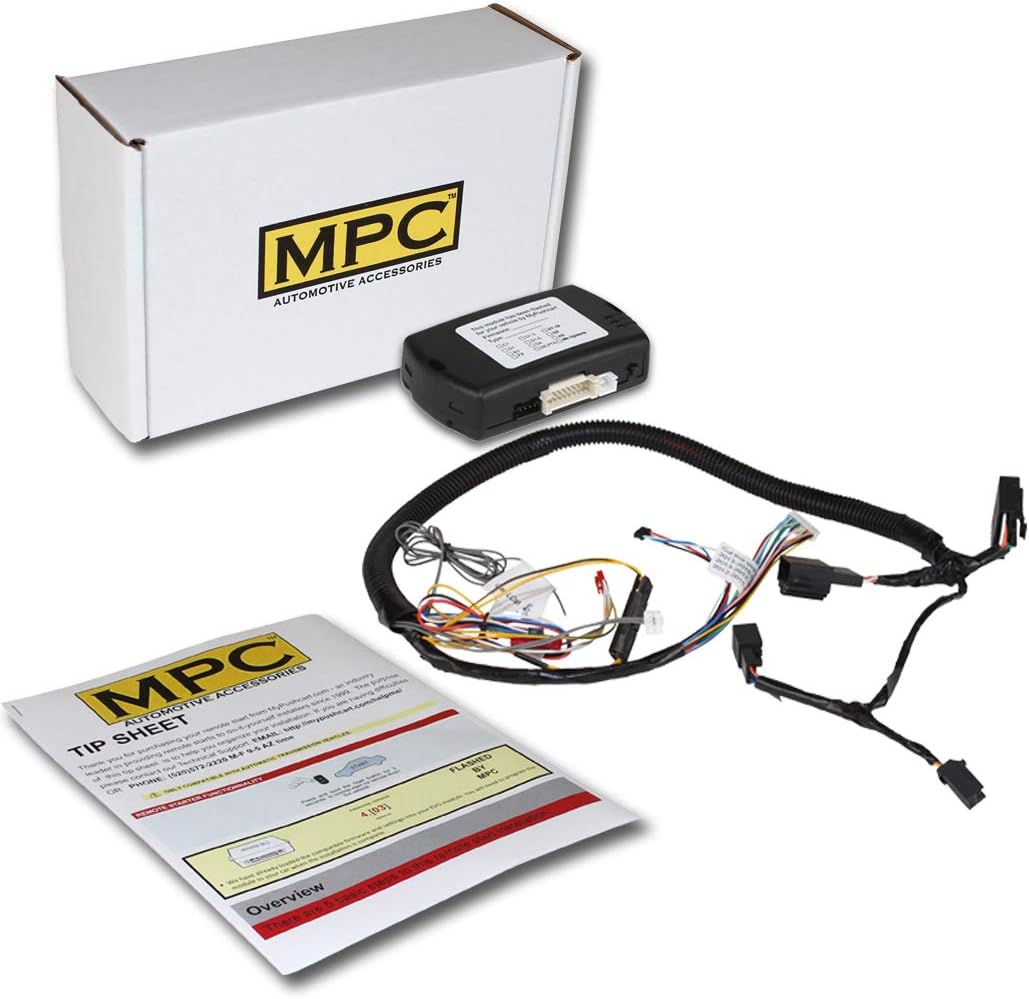
This image displays the complete contents of the MPC Remote Start Kit. It includes the main control module, a pre-wired T-harness for simplified installation, and a tip sheet with initial instructions. These components are essential for the remote start system's functionality.
4. Компатибилност возила
This remote start kit is specifically designed for:
- Направите: Форд
- Модел: Бик
- године: 2008, 2009, 2010, 2011, 2012
- Тип паљења: Key-to-Start (Conventional Key Ignition)
- Тип мотора: Gas Engine Only (Not for Hybrid vehicles)
- Преношење: Automatic Transmission ONLY
Requires 2 original factory keys to learn the key code to the module. Cloned or copied keys will NOT work for this programming step.

This diagram clarifies vehicle compatibility. The system is designed exclusively for vehicles with a conventional key-start ignition. It is not compatible with vehicles equipped with a push-to-start button or hybrid engines.
5. Подешавање и инсталација
The firmware for your specific vehicle is preloaded onto the module. However, some wiring connections and a key learning procedure are required.
5.1 Кораци пре инсталације
- Read the entire instruction manual and the included tip sheet thoroughly before starting.
- Gather necessary tools (e.g., screwdrivers, wire strippers, electrical tape, multimeter).
- Ensure the vehicle battery is disconnected.
5.2 T-Harness Installation
This kit utilizes a T-Harness to simplify the installation process by reducing the number of required wiring connections. However, some direct wiring connections are still necessary. The provided instructions will detail specific wire colors and locations for your vehicle.
A person with basic knowledge of automotive electronics wiring should be able to install this product successfully.

This graphic represents the relative ease of installation for the remote start kit, suggesting it is on the easier side of the spectrum for those with basic automotive wiring knowledge.
5.3 Key Learning Procedure
After physical installation, the module must be programmed to recognize your vehicle's keys. This process typically involves a sequence of turning the ignition on and off with two original factory keys. Refer to the detailed instructions provided with your kit for the exact steps.
6. Упутство за употребу
This system uses your existing factory key fobs to activate the remote start function.
6.1 Remote Starting Your Vehicle
- Ensure the vehicle is locked and the doors are closed.
- Притисните тастер Закључај button on your factory key fob three (3) times in quick succession.
- Паркинг светла возила ће трептати и мотор ће се покренути.
- The engine will run for a preset duration (typically 15 minutes) or until the remote stop sequence is initiated.

This image illustrates the use of existing factory key fobs to activate the remote start system. The system allows users to warm or cool their vehicle using their original key fobs, typically by pressing the lock button three times, without activating the vehicle's horn.
6.2 Remote Stopping Your Vehicle
To turn off the engine after a remote start:
- Притисните тастер Закључај button on your factory key fob three (3) times again.
- Alternatively, insert the key into the ignition and turn it to the 'ON' position.
6.3 Entering the Vehicle After Remote Start
- Unlock the vehicle using your factory key fob.
- Уђите у возило.
- Insert the key into the ignition and turn it to the 'ON' (not 'START') position.
- Press the brake pedal. The remote start system will disengage, and the vehicle will be ready to drive.
7. Опционе функције
This remote start system can be expanded with additional features, available separately:
- Smartphone App Interface Module: Allows control of your remote start system via a smartphone application. (Shipping limited to the continental U.S.)
- Additional Remotes: Options include (2) Ultra-Compact 1-Button 1-Way Keyless Entry Remotes (EVO-REMOTE-1 Ready) or (2) Long-Range 4-Button 2-Way Keyless Entry Remotes (EVO-REMOTE-4 Ready).
8. Одржавање
The MPC Remote Start Kit is designed for reliability and requires minimal maintenance.
- Ensure the control module remains dry and free from excessive dust or debris.
- Периодично проверавајте све ожичене спојеве како бисте били сигурни да су безбедни.
- No user-serviceable parts are inside the module. Do not attempt to open or repair it.
КСНУМКС. Решавање проблема
Ако наиђете на проблеме, поновоview следећи уобичајени проблеми и решења:
- System does not respond to factory fob:
- Ensure the vehicle battery is charged.
- Verify that the key learning procedure was completed successfully.
- Check all T-harness and direct wiring connections for proper seating and continuity. - Vehicle starts but immediately shuts off:
- This often indicates an issue with the key learning process or a security bypass problem. Re-perform the key learning procedure carefully.
- Ensure you are using original factory keys for programming. - Vehicle does not start after remote command:
- Check if the vehicle's hood is closed properly (some systems have a hood pin safety switch).
- Ensure the vehicle is in Park and the parking brake is engaged.
- Verify that the factory key fob is functioning correctly (e.g., can lock/unlock doors).
For more complex issues or specific error codes, refer to the detailed troubleshooting guide available via the QR code on your tip sheet or contact technical support.
10. Спецификације
| Феатуре | Спецификација |
|---|---|
| Тежина артикла | 2 фунти |
| Димензије производа | 8 к 5 к 2 инча |
| Број модела ставке | Б-4368-232 |
| Произвођач | MPC Products |
11. Информације о гаранцији
MPC remote starters and alarms carry a limited lifetime warranty through the manufacturer. Physical damage or damage due to improper installation will void the manufacturer's warranty.
- Прва година: Contact MPC for warranty issues. The product must be returned at the customer's expense for warranty service.
- After First Year: Warranty issues must be handled directly through the manufacturer. A receipt from the original purchase will be required.
The product is warranted to the end user, when properly installed and under normal conditions of use, to be free from defects in workmanship and materials for a period of one year from the provided date of purchase, to the original purchaser. This warranty does not cover abuse, operation inconsistent with the product's design, or damage from exposure to elements. If a defect is considered "under warranty," MyPushcart will, at its option, repair or replace the product free of charge. MyPushcart is not liable for installation charges, loss, or damage incurred in the replacement or repair of any warranted product.
12. Техничка подршка
MPC provides technical support based in Tucson, AZ, United States. Several methods of support are available to assist you with installation or troubleshooting.
- Refer to the QR code included with your kit for access to the most up-to-date information and detailed installation guides.
- Посетите MPC Store on Amazon за додатне ресурсе.

This series of images demonstrates that installation instructions and tip sheets are accessible digitally on various devices, including smartphones, tablets, and laptops, providing convenient access to support materials.