
Увод
This manual provides instructions for the setup, operation, and maintenance of your Zelotes T20 Ergonomic Vertical Mouse. Please read this manual thoroughly before using the product to ensure proper function and longevity.
Производ је завршенview
The Zelotes T20 is an ergonomic vertical mouse designed to promote a natural hand and wrist posture, reducing strain during extended use. It features adjustable DPI settings and multiple programmable buttons for enhanced control.

Figure 1: Zelotes T20 Ergonomic Vertical Mouse. This image displays the overall design of the mouse, highlighting its vertical orientation and LED lighting.
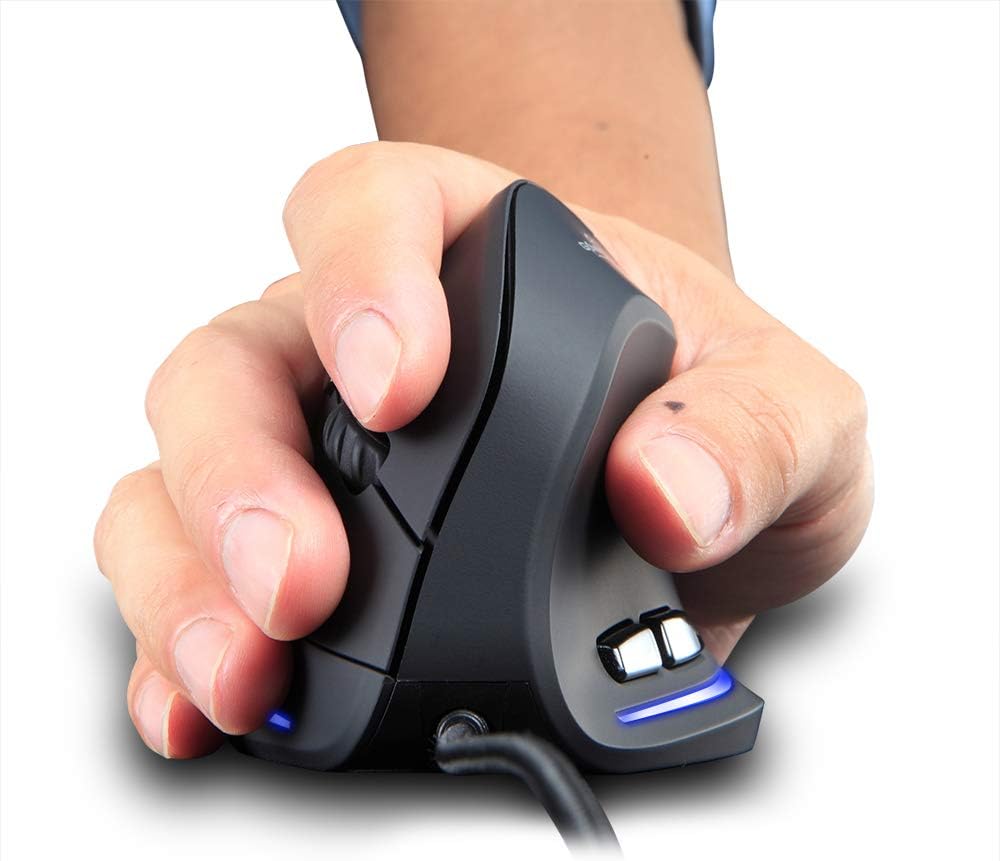
Figure 2: Proper hand placement on the Zelotes T20 mouse. This image illustrates how the vertical design allows for a natural handshake grip, intended to reduce wrist strain.

Figure 3: Ergonomic comparison. This diagram contrasts the natural wrist posture with a vertical mouse against the twisted posture often associated with traditional horizontal mice, emphasizing fatigue reduction.
Садржај пакета
Проверите да ли су све ставке присутне у пакету:
- 1 x Zelotes Ergonomic Vertical Mouse
- 1 x Упутство за употребу (овај документ)
Сетуп
- Повежите миш: Plug the USB cable of the Zelotes T20 mouse into an available USB port on your computer.
- Инсталација драјвера: The mouse is plug-and-play. Your operating system should automatically detect and install the necessary drivers. No additional software installation is typically required.
- Уклоните заштитни филм: Before use, locate and remove the protective film from the "Bigfoot pads" on the underside of the mouse for optimal gliding performance.

Figure 4: Underside of the mouse. This image shows the Teflon material pads and indicates the location of the protective film that should be removed before initial use.
Упутство за употребу
Функције дугмета
The Zelotes T20 mouse features 6 buttons for various functions:
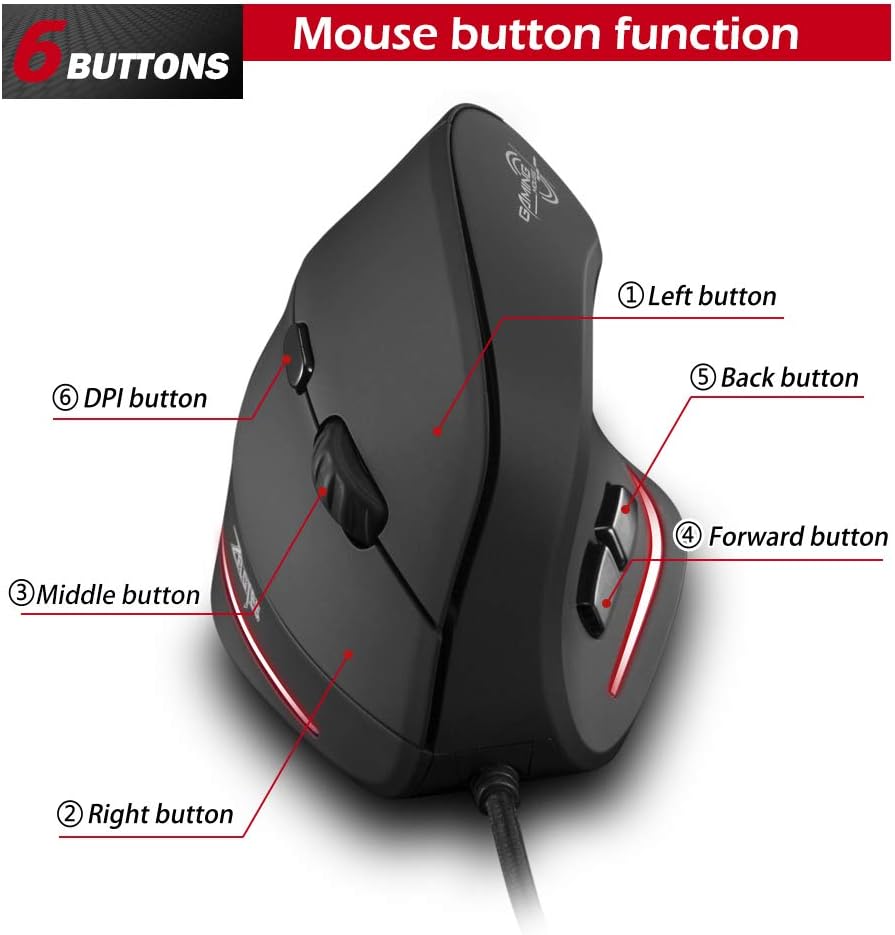
Figure 5: Mouse button layout. This diagram labels each of the six buttons: Left, Right, Middle (scroll wheel click), Forward, Back, and DPI adjustment button.
- Лево дугме: Стандардна функција левог клика.
- Десно дугме: Стандардна функција десног клика.
- Middle Button (Scroll Wheel): Clickable scroll wheel for middle-click functions.
- Дугме за напред: Навигација напред у web претраживачи или file истраживачи.
- Дугме за назад: Навигација уназад web претраживачи или file истраживачи.
- Дугме ДПИ: Подешава осетљивост миша (DPI).
Подешавање DPI (осетљивости)
The mouse offers four adjustable DPI settings to suit different tasks and preferences. Press the DPI button (Button 6 in Figure 5) to cycle through the settings. Each DPI level is indicated by a specific LED light color:
- 1200 ДПИ: Blue light hint
- 1600 ДПИ: Dark purple light hint
- 2400 ДПИ: Red light hint
- 3200 ДПИ: Light purple light hint
The light will stay on for approximately 3 seconds when switching DPI settings to indicate the current level.

Figure 6: DPI adjustment and LED indicators. This image illustrates the DPI button and the color coding for each of the four sensitivity settings.
Using Forward/Back Keys
The dedicated Forward and Back buttons (Buttons 4 and 5 in Figure 5) provide quick navigation. These buttons are designed to streamline browsing through web pages or folders, reducing the need for on-screen clicks.

Figure 7: Forward and Back navigation buttons. This image highlights the placement of the forward and back buttons, designed for convenient web и file навигација.
Одржавање
- Чишћење: Користите меку, суву крпу за чишћење површине миша. За тврдокорну прљавштину, благо дamp Може се користити крпа, водећи рачуна да течност не уђе у миш.
- Одржавање сензора: Одржавајте оптички сензор на доњој страни миша чистим и без прашине или прљавштине како бисте осигурали прецизно праћење.
- Нега каблова: Избегавајте оштра савијања или прекомерно повлачење USB кабла како бисте спречили оштећења.

Figure 8: Mouse surface texture. This image provides a close-up view of the mouse's surface, described as smooth for comfortable handling.
Решавање проблема
- Миш не реагује:
- Уверите се да је USB кабл безбедно прикључен у исправан USB порт на рачунару.
- Покушајте да прикључите миш на други УСБ порт.
- Поново покрените рачунар.
- Нетачно праћење:
- Очистите оптички сензор на доњој страни миша.
- Ensure you are using the mouse on a suitable surface (e.g., a mouse pad). Highly reflective or transparent surfaces may cause issues.
- Подесите DPI подешавање помоћу дугмета DPI.
- Дугмад не функционишу исправно:
- Проверите да ли је миш правилно повезан.
- Тестирајте миш на другом рачунару да бисте утврдили да ли је проблем са мишем или подешавањима рачунара.
Спецификације
| Феатуре | Детаљ |
|---|---|
| Модел | Т20 |
| Број дугмета | 6 дугмади |
| Систем за праћење | Оптицал |
| Дужина УСБ кабла | 1.8м |
| Воркинг Волtagе/Струја | 5В/100мА |
| Буттон Лифе | 5 милиона пута |
| Живот на ваљцима | 1.2 million turns |
| Димензије производа (Д к Ш к В) | 110 к 72 к 75 мм (4.33 к 2.83 к 2.95 инча) |
| Тежина производа | 160 ± 5g (5.6 ounces) |
| Резолуција (ДПИ) | 1200-1600-2400-3200 |
| Rate of Return (Polling Rate) | 125Хз |
| Компатибилност | Windows 2000/ME/XP (x64)/Vista/7/8/10, Mac OS X (over V10.4), Linux |

Figure 9: Product dimensions. This image provides detailed measurements of the mouse from various angles.
Гаранција и подршка
За информације о гаранцији или техничку подршку, обратите се званичном сервису произвођача webсајт или контактирајте њихову службу за кориснике. Сачувајте рачун као доказ о куповини.