
1. Увод
Welcome to the user manual for your AAXA LED Pico Micro Video Projector. This compact and versatile projector is designed for personal media sharing, business presentations, and home cinema experiences. This manual provides detailed instructions on setting up, operating, maintaining, and troubleshooting your device to ensure optimal performance.
Садржај пакета
Молимо вас да проверите да ли су све ставке присутне у вашем пакету:
- AAXA LED Pico Micro Video Projector
- УСБ кабл
- АВ кабл
- Mini Tripod (optional, may vary by package)
- Адаптер за напајање (није експлицитно наведен, али се подразумева да је за пуњење)
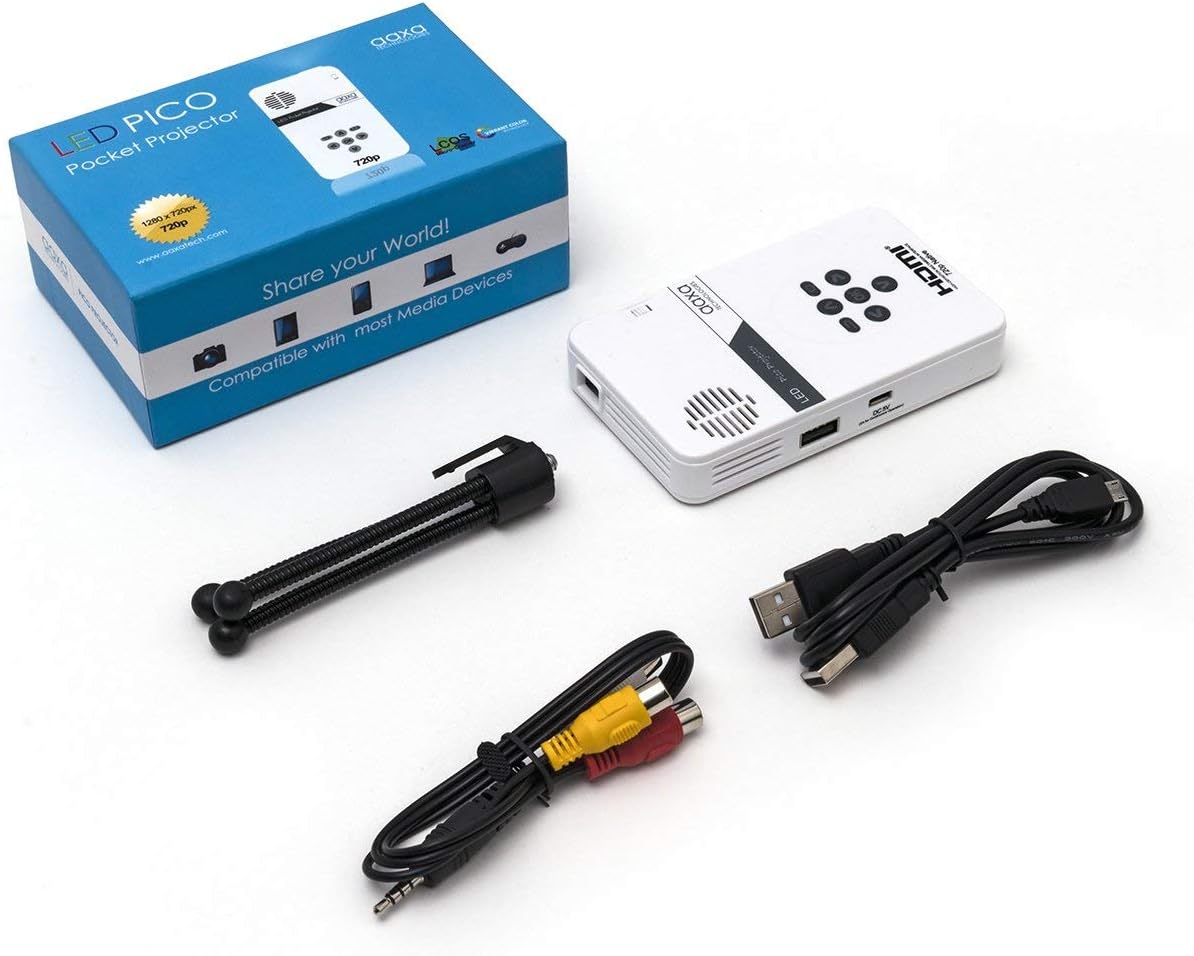
Figure 1: Package contents including the projector, cables, and tripod.
2. Производ је готовview
The AAXA LED Pico Micro Video Projector is a compact device featuring a user-friendly interface and multiple connectivity options. It is designed for portability and ease of use.
Кључне карактеристике:
- Ultra Bright 25 Lumens LED light source with 15,000-hour lifespan.
- High Definition 720p (1280x720) native resolution, supporting up to 1080p input.
- Vibrant Color Technology for rich and accurate colors.
- Built-in 80-minute rechargeable Lithium-ion battery.
- Integrated media player and speakers.
- Compact and lightweight design (4.25 x 2.36 x 0.7 inches, 6.3 ounces).
Контроле и портови:
Familiarize yourself with the various controls and connection ports on your projector:

Слика 2: Врх view of the projector with navigation buttons (Up, Down, Left, Right, OK, Menu, Back) and speaker grille.
- Дугмад за навигацију: Користи се за навигацију кроз меније и избор опција.
- Решетка звучника: For audio output from the built-in speakers.
- Точак фокуса: Located on the side, used to adjust image clarity.

Слика 3: Предња страна view of the projector showing the HDMI, AV, and 3.5mm audio out ports.
- ХДМИ улаз: Повежите се са лаптоповима, играчким конзолама или другим уређајима који подржавају HDMI.
- АВ улаз: За повезивање старијих уређаја помоћу приложеног AV кабла.
- 3.5 мм аудио излаз: Повежите екстерне слушалице или звучнике.

Слика 4: Страна view of the projector showing the USB port and DC 5V charging port.
- УСБ порт: За повезивање УСБ уређаја за репродукцију медија.
- ДЦ 5В Улаз: Power input for charging the internal battery.

Слика 5: Страна view of the projector showing the TF Card slot.
- Micro SD (TF Card) Slot: Insert a Micro SD card (up to 16GB) for media playback.
3. Подешавање
3.1 Укључивање/искључивање и пуњење
- Пуњење: Connect the supplied micro USB cable to the DC 5V input on the projector and a compatible USB power source. The LED indicator will show charging status.
- Укључено: Press and hold the power button (usually located near the focus wheel or on the top panel) until the projector powers on.
- Искључивање: Press and hold the power button again until the projector shuts down.
3.2 Позиционирање пројектора
Place the projector on a stable, flat surface. For optimal image quality, project onto a smooth, light-colored wall or a dedicated projector screen. The distance from the surface will determine the image size.

Figure 6: The projector can be mounted on a tripod for stable positioning and angle adjustment.
3.3 Подешавање фокуса
To achieve a clear image, rotate the focus wheel located on the side of the projector until the projected image appears sharp and in focus.
4. Упутство за употребу
4.1 Повезивање уређаја
- ДВИ: Connect an HDMI cable from your source device (laptop, game console, etc.) to the HDMI input port on the projector. Select HDMI as the input source in the projector's menu.
- АВ: Use the provided AV cable to connect to devices with composite video and audio outputs. Select AV as the input source.
- УСБ/Мицро СД: Insert a USB flash drive into the USB port or a Micro SD card into the TF Card slot. The projector's media player interface will typically appear, allowing you to browse and play files.
4.2 Репродукција медија
The built-in media player supports various video, music, and picture formats. Use the navigation buttons on the projector to browse files and select content for playback.
4.3 Аудио излаз
The projector has built-in speakers. For private listening or enhanced audio, connect headphones or external speakers to the 3.5mm Audio Out port.
5. Одржавање
- Чишћење: Use a soft, dry cloth to clean the exterior of the projector. For the lens, use a lens cleaning cloth and specialized lens cleaning solution. Do not use abrasive cleaners.
- Складиштење: Када се не користи, пројектор чувајте на хладном и сувом месту, даље од директне сунчеве светлости и екстремних температура.
- Одржавање батерије: To prolong battery life, avoid fully discharging the battery frequently. Charge the projector regularly, even if not in active use.
КСНУМКС. Решавање проблема
| Проблем | Могући узрок | Решење |
|---|---|---|
| Нема пројектоване слике | Projector not powered on; incorrect input source; loose cable connection. | Ensure projector is on and charged. Select correct input source (HDMI, AV, USB/SD). Check all cable connections. |
| Слика је мутна | Focus not adjusted; projector too close/far from surface. | Adjust the focus wheel until the image is clear. Adjust the distance of the projector from the projection surface. |
| Нема звука | Volume too low; external audio device connected; audio format not supported. | Increase volume. Disconnect external audio devices if using internal speakers. Ensure audio format is supported. |
| Projector shuts off unexpectedly | Low battery; overheating. | Charge the battery. Ensure proper ventilation and clear any obstructions from vents. |
7. Спецификације
| Феатуре | Детаљ |
|---|---|
| Бранд | AAXA Technologies |
| Број модела | KP-101-01-cr |
| Резолуција екрана | 1280 x 720 (Native), Max 1080p Input |
| Осветљеност | 25 лумена |
| Живот извора светлости | 15,000 сати (ЛЕД) |
| Технологија повезивања | HDMI, USB, Micro SD, 3.5mm Aux Out, Composite AV |
| Трајање батерије | Up to 80 minutes (Lithium-Ion) |
| Димензије производа | 4.25 к 2.36 к 0.7 инча |
| Тежина артикла | 6.3 унци |
| Препоручена употреба | Пословање, образовање, кућни биоскоп |
8. Гаранција и подршка
This product is offered as an Amazon Renewed item, which means it has been professionally inspected and tested to work and look like new. Amazon Renewed products are eligible for replacement or refund under the Amazon Renewed Guarantee if you are not satisfied with your purchase.
For further assistance or technical support, please refer to the official AAXA Technologies webсајт или директно контактирајте њихову корисничку службу.