
1. Производ је готовview
The Sato One-Touch Timer TM-22 is a versatile digital timer designed for various timing needs, from kitchen use to laboratory applications. It combines ease of use with practical features to enhance your daily tasks.
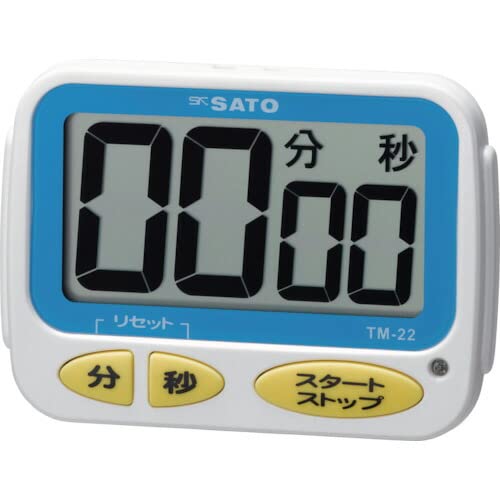
Слика 1: Предња страна view of the Sato One-Touch Timer TM-22. The timer features a clear digital display and control buttons.
Кључне карактеристике:
- Automatic Reset Alarm: The alarm sounds for 5 seconds at the set time and automatically resets to the initial set time.
- Једноставна операција: The primary key is for starting; no complex operations are required to stop the timer's alarm cycle.
- Dual Notification: Alerts users with both sound (70dB) and light.
- Drip-Proof Construction: Designed to resist splashes, making it suitable for kitchen environments.
- Више опција за монтажу: Equipped with a magnet on the back for attachment to metal surfaces and a strap for hanging.
- Функције одбројавања и одбројавања: Supports both decreasinг и повећањеasing time measurements.
2. Подешавање
Инсталација батерије:
The TM-22 timer requires one AAA battery for operation. A battery is included with the unit.
- Пронађите поклопац одељка за батерије на задњој страни тајмера.
- Померите или откопчајте поклопац да бисте отворили одељак.
- Уметните једну ААА батерију, водећи рачуна да позитивни (+) и негативни (-) терминали буду правилно поравнати са ознакама унутар одељка.
- Вратите поклопац одељка за батерије безбедно.
The timer should power on, and the display will show '00:00' or the last set time.
3. Упутство за употребу
The TM-22 timer features both countdown and count-up functionalities.
3.1. Тајмер за одбројавање
This function allows you to set a specific duration, and the timer will count down to zero.
- Подесите време: Use the 'M' (Minute) button and 'S' (Second) button to adjust the desired countdown duration. The timer can be set from 1 second up to 99 minutes and 59 seconds.
- Start Countdown: Press the 'START' button to begin the countdown.
- Обавештење о аларму: When the time reaches zero, an alarm will sound for 5 seconds, accompanied by a flashing light.
- Аутоматско ресетовање: After the 5-second alarm, the timer automatically resets to the initial set time, ready for the next countdown without manual intervention.
- Пауза/Заустављање: To pause the countdown, press the 'START' button again. To resume, press 'START' once more. To clear the set time, press the 'RESET' button (if available) or hold the 'START' button for a few seconds.
3.2. Count-up Timer
This function measures elapsed time from zero.
- Start Count-up: Ensure the timer display shows '00:00'. If not, press the 'RESET' button to clear any previous settings. Press the 'START' button to begin counting upwards from zero.
- Паузирај/настави: To pause the count-up, press the 'START' button. To resume, press 'START' again.
- Ресетовати: To reset the count-up timer to '00:00', press the 'RESET' button (if available) or hold the 'START' button for a few seconds while paused.
4. Одржавање
Чишћење:
To maintain the timer's appearance and functionality:
- Wipe the exterior of the timer with a soft, dry cloth.
- Do not use abrasive cleaners, solvents, or chemical agents, as these may damage the casinг или приказ.
- The timer is drip-proof, but do not immerse it in water or expose it to heavy splashing.
Замена батерије:
Replace the battery when the display becomes dim or the timer's functions become erratic.
- Follow the battery installation steps outlined in the "2. Setup" section.
- Always use a fresh AAA battery.
- Истрошене батерије одложите у складу са локалним прописима.
КСНУМКС. Решавање проблема
If you encounter issues with your TM-22 timer, refer to the following common problems and solutions:
| Проблем | Могући узрок | Решење |
|---|---|---|
| Тајмер се не укључује. | Батерија је празна или је неправилно инсталирана. | Check battery polarity. Replace with a new AAA battery. |
| Display is faint or flickering. | Ниска снага батерије. | Замените ААА батерију. |
| Аларм се не оглашава. | Volume obstruction or internal issue. | Ensure the speaker is not covered. Check battery level. If problem persists, contact support. |
| Timer does not reset automatically after alarm. | This feature is specific to the countdown function. | Ensure you are using the countdown function. For count-up, manual reset is required. |
6. Спецификације
| Феатуре | Детаљ |
|---|---|
| Број модела | ТМ-22 |
| Максимално време | 99 минута 59 секунди |
| Minimum Timing | 1 секунда |
| Димензије (В к Ш к Д) | 67 мм к 93 мм к 20 мм |
| Тежина | 96 г |
| Извор напајања | ААА батерија к 1 (укључено) |
| Јачина звука аларма | 70 дБ |
| Функције | Countdown, Count-up |
| Посебне карактеристике | Drip-proof construction, Magnet on back, Hanging strap, Sound and light notification |
7. Гаранција и подршка
For warranty information, technical assistance, or customer support regarding your Sato One-Touch Timer TM-22, please contact your authorized retailer or the manufacturer, Sato Corporation. Keep your purchase receipt as proof of purchase.
Please visit the official Sato webсајт за најновије информације о подршци и контакт податке.