
1. Увод
Thank you for choosing the iggual QR Barcode Scanner. This device is designed for efficient and reliable scanning of both 1D and 2D barcodes, offering both manual and automatic scanning modes. It features an ergonomic design for comfortable use and broad compatibility with various operating systems. This manual provides essential information for setting up, operating, and maintaining your scanner.
Кључне карактеристике:
- Ergonomic design with a comfortable trigger button.
- Detects all common 1D and 2D barcodes, including QR codes.
- Supports manual and automatic scanning modes.
- Wired USB connectivity for reliable data transmission.
- Compatible with Windows XP/7/8/10, macOS, Linux, and Android.
2. Садржај пакета
Молимо вас да проверите садржај пакета како бисте били сигурни да су сви предмети присутни:
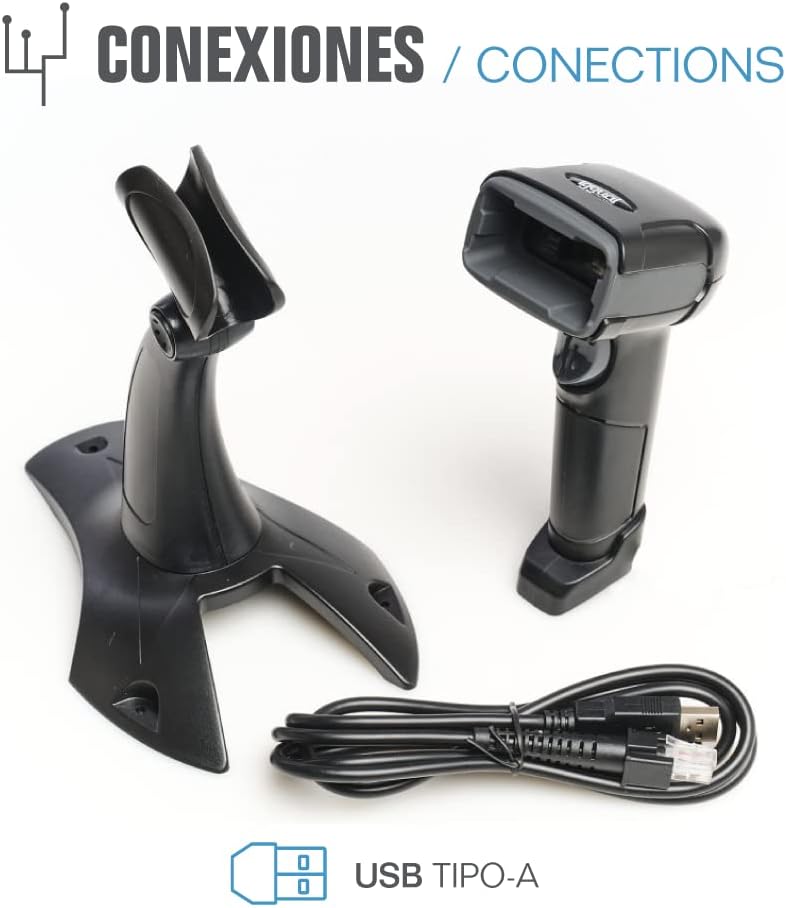
- iggual QR Barcode Scanner (Model IGG315651)
- USB Cable (Type-A)
- Scanner Stand (Optional, depending on package)

Слика 2.1: Package contents including the scanner, stand, and USB Type-A cable.
3. Производ је готовview
Familiarize yourself with the main components of your iggual barcode scanner:
- Прозор за скенирање: Area where barcodes are read.
- Дугме за окидање: Activates scanning in manual mode.
- УСБ порт: For connecting the scanner to your computer.
- ЛЕД индикатор: Provides visual feedback on scanning status.
- Беепер: Provides audible feedback on scanning status.

Слика 3.1: The iggual barcode scanner with its optional stand, highlighting the LED indicator and beeper functionality.
4. Подешавање
4.1 Повезивање скенера
- Connect the USB cable to the USB port on the scanner.
- Укључите други крај УСБ кабла у слободан УСБ порт на рачунару или хост уређају.
- The scanner will typically be recognized automatically by your operating system as a standard HID keyboard device. No special drivers are usually required.
4.2 Компатибилност система
The iggual QR Barcode Scanner is compatible with a wide range of operating systems:
- Виндовс КСП / 7 / 8 / 10
- мацОС
- Линук
- Андроид

Слика 4.1: Operating system compatibility for the iggual barcode scanner.
5. Упутство за употребу
5.1 Режими скенирања
Скенер подржава два основна режима скенирања:
- Ручни режим: Press the trigger button to activate the scanner and read a barcode. Release the button after a successful scan.
- Аутоматски режим: The scanner continuously emits a scanning beam, reading barcodes as they are presented within its field of view without needing to press the trigger. Refer to the full product manual (if available from iggual.com) for instructions on switching between modes, usually done by scanning specific configuration barcodes.
5.2 Подржани типови баркодова
This scanner is capable of reading a wide range of 1D and 2D barcode symbologies, including:
- 2Д кодови: QR Code, Maxi Code, MicroPDF, PDF417
- 1Д кодови: Code 128, EAN-13, EAN-8, Code 39, UPC-A, UPC-E, Code 93, Interleaved 2 of 5, Codabar, MSI, RSS, etc.

Слика 5.1: Scanner capabilities including 200 scans/second, 2D scanning, and supported code types.
5.3 Scanning Procedure
- Ensure the scanner is properly connected to your host device.
- Open an application where you want the scanned data to appear (e.g., a text editor, spreadsheet, or POS software).
- Point the scanning window at the barcode you wish to read.
- If in manual mode, press and hold the trigger button. If in automatic mode, simply present the barcode.
- A successful scan will be indicated by a short beep and/or a flash of the LED indicator. The scanned data will appear in your active application.
- If the barcode is not read, adjust the distance and angle of the scanner relative to the barcode.
6. Одржавање
6.1 Чишћење
- To clean the scanner's exterior, use a soft, damp тканина.
- For the scanning window, use a lint-free cloth and a mild glass cleaner. Avoid abrasive materials or harsh chemicals that could scratch the surface.
- Ensure no liquid enters the scanner's housing.
6.2 Складиштење
When not in use, store the scanner in a cool, dry place, away from direct sunlight and extreme temperatures.
КСНУМКС. Решавање проблема
| Проблем | Могући узрок | Решење |
|---|---|---|
| Рачунар не препознаје скенер. | Loose USB connection, faulty USB port, or cable issue. | Ensure USB cable is securely connected. Try a different USB port or cable. Restart the computer. |
| Скенер не чита баркодове. | Barcode damaged, incorrect scanning angle/distance, scanner in wrong mode, or dirty scanning window. | Check barcode integrity. Adjust scanning angle and distance. Ensure scanner is in the correct mode (manual/automatic). Clean the scanning window. |
| Скенирани подаци се приказују погрешно. | Keyboard layout mismatch or corrupted data. | Ensure your computer's keyboard layout matches the scanner's default output (usually US English). If issues persist, consult the full product manual for advanced configuration. |
8. Спецификације
| Феатуре | Детаљ |
|---|---|
| Модел | ИГГ315651 |
| Димензије (Д к Ш к В) | 160 к 80 к 100 мм (6.3 к 3.15 к 3.94 инча) |
| Тежина | 120 г (0.26 лбс) |
| Брзина скенирања | 200 скенирања у секунди |
| Сензор слике | 640(H) x 480(V), 256 Grayscale |
| Повезивање | Wired USB (Type-A) |
| Извор напајања | Електрични са каблом (напајање преко УСБ-а) |
| Оперативни системи | Windows XP/7/8/10, macOS, Linux, Android |
| Подржани баркодови | 1D & 2D (QR, Maxi Code, MicroPDF, Code, PDF417, RSS, etc.) |
Слика 8.1: Physical dimensions of the iggual barcode scanner.
9. Гаранција и подршка
For warranty information, technical support, or to download the complete product manual with advanced configuration options, please visit the official iggual webсајт или контактирајте свог локалног дистрибутера.
Службено Webсајт: ввв.иггуал.цом