
1. Увод
The nJoy Aten Pro 1000VA is an advanced Uninterruptible Power Supply (UPS) designed to provide reliable power protection for sensitive electronic equipment. This online double-conversion UPS ensures a continuous, clean power supply, safeguarding your devices against power outagес, волtage fluctuations, and surges. It features a pure sine wave output, an LCD display for real-time status, and communication ports for comprehensive management.
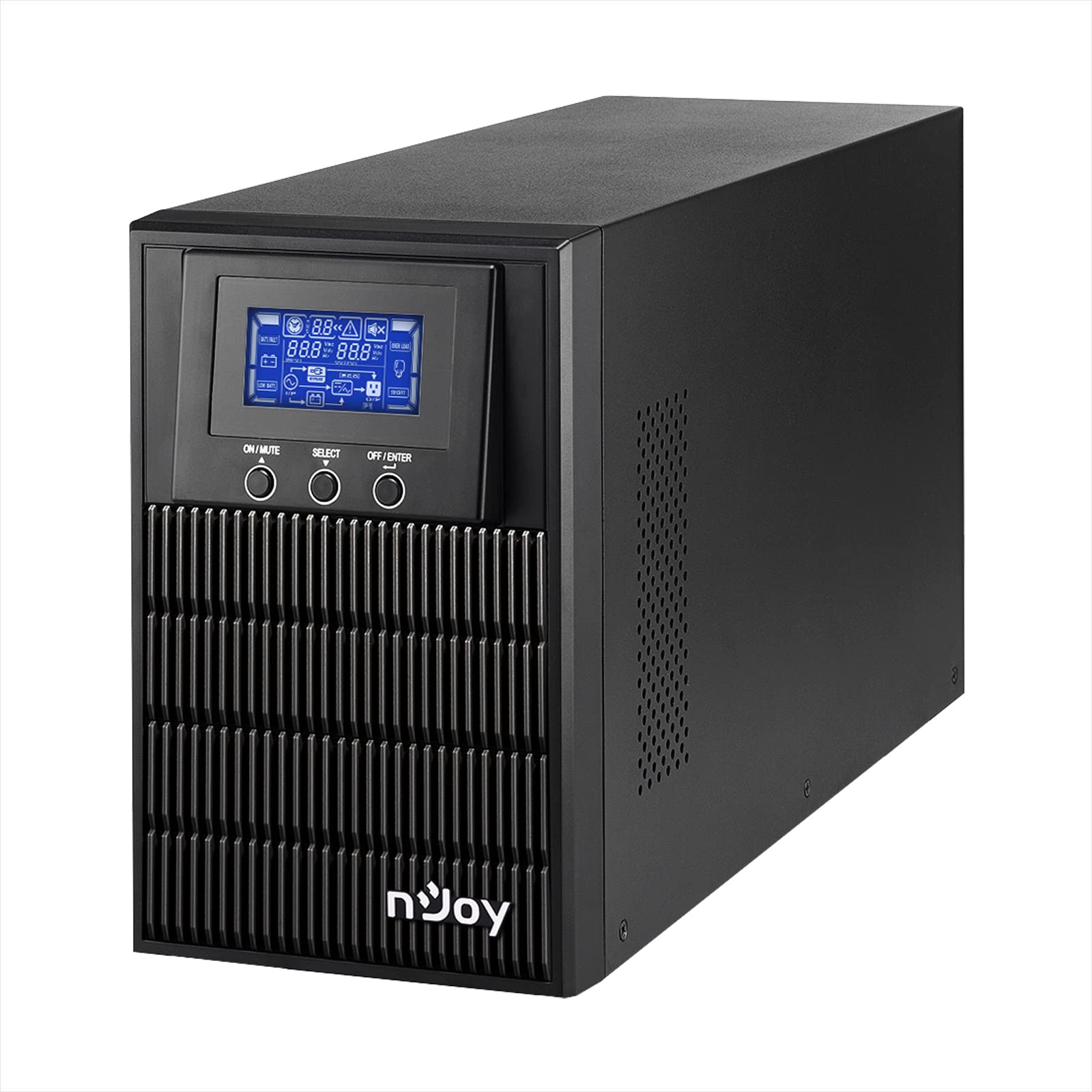
Figure 1: nJoy Aten Pro 1000VA UPS Front View
This image shows the front of the nJoy Aten Pro 1000VA UPS, highlighting its compact tower design and the integrated LCD display panel with control buttons.

Слика 2: Кључне карактеристике изнадview
This image visually summarizes the main features of the nJoy Aten Pro 1000VA UPS, including its online double-conversion technology, 1000VA/900W capacity, dual 12V@9.0Ah batteries, USB interface, LCD display, pure sine wave output, and SNMP capability.
2. Безбедносне информације
Please read and follow all safety instructions carefully before installing, operating, or maintaining the UPS.
- This UPS is designed for indoor use only.
- Не отварајте UPS уређајasinг. Унутра нема делова које корисник може сам да поправи. Сво сервисирање препустите квалификованом сервисном особљу.
- Уверите се да је УПС повезан на правилно уземљену утичницу са наизменичном струјом.
- Do not block ventilation openings. Maintain adequate airflow around the UPS.
- Avoid placing the UPS in direct sunlight, near heat sources, or in environments with excessive dust, humidity, or corrosive substances.
- Искључите UPS из извора наизменичне струје пре него што извршите било какво одржавање или чишћење.
- Batteries can present a risk of electrical shock and high short-circuit current. Observe the following precautions:
- Уклоните сатове, прстење или друге металне предмете.
- Користите алате са изолованим ручкама.
- Носите гумене рукавице и чизме.
3. Карактеристике и компоненте производа
The nJoy Aten Pro 1000VA UPS is equipped with several features and ports for optimal performance and connectivity.
3.1 Предња плоча

Слика 3: Предњи панел изнадview
This image displays the front panel of the UPS, showing the LCD screen that provides real-time status updates and the three control buttons: ON/MUTE, SELECT, and OFF/ENTER.
- ЛЦД екран: Shows real-time status information such as AC mode, battery mode, charge level, battery level, input voltagе, оутпут волtage, overload, fault, and low battery.
- Дугме УКЉУЧЕНО/ИСКЉУЧИВАЊЕ ЗВУКА: Укључује УПС или искључује звук аларма.
- Дугме СЕЛЕЦТ: Креће се кроз меније ЛЦД екрана.
- Дугме ИСКЉУЧЕНО/УНОС: Искључује УПС или потврђује изборе.
3.2 Задња плоча

Слика 4: Прикључци на задњој плочи
This image illustrates the rear panel of the UPS, detailing the various connection ports and components, including RS232, Schuko outputs, circuit breaker, intelligent slot, USB, and AC input.
- РС232 интерфејс: For serial communication with a computer.
- Schuko Outputs (3): Connect your critical devices here for battery backup and surge protection.
- Прекидач: Обезбеђује заштиту од преоптерећења.
- Intelligent Slot (SNMP): For optional SNMP card for network management.
- УСБ интерфејс: For USB communication with a computer.
- АЦ улаз: Connect the UPS to the main AC power supply.
4. Упутства за подешавање
4.1 Распакивање и преглед
- Carefully unpack the UPS and inspect it for any shipping damage. If any damage is found, do not install the unit and contact your dealer.
- Verify that all accessories are included: UPS unit, USB cable, RS232 cable, and user manual.
4.2 Постављање
- Place the UPS in a clean, dry, and temperature-controlled environment.
- Ensure adequate clearance (at least 20 cm) around the UPS for proper ventilation.
- Avoid placing the UPS near water or excessive humidity.
4.3 Почетно пуњење
- Before initial use, connect the UPS to a standard AC power outlet for at least 4 hours to ensure the batteries are fully charged. This will maximize battery runtime.
4.4 Повезивање опреме
- Connect your computer, monitor, and other critical devices to the Schuko output receptacles on the rear panel of the UPS.
- Do not connect laser printers or strip heaters to the UPS outputs, as these devices can draw significant power and overload the UPS.
- Повежите УПС у зидну утичницу помоћу приложеног кабла за напајање.
4.5 Инсталација софтвера (опционо)
For advanced monitoring and management, install the UPS management software on your computer.

Figure 5: UPS Management Software
This image shows a graphical representation of the UPS management software interface, illustrating its capabilities for monitoring UPS status, scheduling operations, and configuring settings across various operating systems like Mac OS, Linux, and Windows.
- Connect the UPS to your computer using either the USB or RS232 cable.
- Install the provided management software (compatible with Mac OS, Linux, Windows).
- The software allows for:
- Real-time status visualization.
- Scheduling of power on/off and battery tests.
- Comprehensive UPS configuration.
5. Упутство за употребу
5.1 Укључивање/искључивање УПС-а
- Да бисте укључили: Притисните и држите ОН/МУТЕ button until you hear a beep. The UPS will perform a self-test and then enter AC mode.
- Да искључите: Притисните и држите ОФФ/ЕНТЕР button until the UPS powers down.
5.2 Информације о ЛЦД екрану
LCD екран пружа важне информације о статусу UPS-а. Користите СЕЛЕЦТ button to cycle through different display modes.
- АЦ режим: Indicates the UPS is operating on utility power.
- Режим батерије: Indicates the UPS is operating on battery power (during an outagи).
- Ниво пуњења: Shows the current load percentage.
- Ниво батерије: Displays the remaining battery capacity.
- Улазни волtage: Current incoming AC voltage.
- Оутпут Волtage: Current outgoing AC voltage.
- Преоптерећење: Indicates connected equipment exceeds UPS capacity.
- грешка: Indicates a system error.
- Слаба батерија: Warning that battery power is critically low.
5.3 Еко режим
The Eco Mode feature helps reduce energy consumption. When the input voltage is within the acceptable range, the UPS will bypass the inverter and directly supply power from the utility, increasing energy efficiency. This mode can be configured via the management software.

Слика 6: Кључне оперативне карактеристике
This image highlights three core operational features of the UPS: Pure Sine Wave output for clean power, Zero Transfer Time for seamless power transition, and Eco Mode for energy efficiency.
6. Одржавање
6.1 Battery Care and Replacement
- The UPS uses sealed lead-acid batteries (2 x 12V/9Ah). These batteries are designed for a specific lifespan.
- To maximize battery life, ensure the UPS is always connected to AC power to keep the batteries charged.
- Batteries are user-replaceable by qualified personnel only. Contact NJOY support or a certified technician for battery replacement.
- Старе батерије одложите на одговарајући начин у складу са локалним прописима.
6.2 Чишћење
- Ensure the UPS is turned off and disconnected from AC power before cleaning.
- Користите меку, суву крпу да обришете спољашњост UPS-а.
- Немојте користити течна или аеросолна средства за чишћење.
- Periodically clean the ventilation openings to prevent dust buildup.
КСНУМКС. Решавање проблема
If the UPS is not operating correctly, refer to the following table for common issues and solutions.
| Проблем | Могући узрок | Решење |
|---|---|---|
| УПС се не укључује. | No AC input power; Low battery. | Ensure the power cord is securely connected. Allow the UPS to charge for at least 4 hours. |
| UPS is in battery mode frequently. | Unstable AC input power; High sensitivity setting. | Check the utility power quality. Adjust the UPS input voltage sensitivity via software if necessary. |
| Overload warning on LCD. | Too many devices connected; Connected devices draw too much power. | Disconnect non-essential equipment. Ensure total load does not exceed 900W. |
| Кратко време трајања батерије. | Batteries not fully charged; Batteries reaching end of life. | Allow the UPS to charge for 24 hours. Consider battery replacement if batteries are old. |
| УПС емитује непрекидни аларм. | Overload; Battery fault; System fault. | Check LCD for specific error codes. Reduce load. If alarm persists, contact support. |
For issues not listed here, or if problems persist, please contact NJOY customer support.
8. Спецификације
Detailed technical specifications for the nJoy Aten Pro 1000VA UPS.
| Феатуре | Спецификација |
|---|---|
| Број модела | PWUP-OL100AP-AZ01B |
| Капацитет | 1000 ВА / 900 В |
| Тип УПС-а | On-line Double Conversion |
| Номинални улаз Волtage | 110 – 300 Вац |
| Номинални излаз Волtage | 230 Vac (± 1% in battery mode) |
| Фреквенцијски опсег | КСНУМКС Хз ~ КСНУМКС Хз |
| Излазне утичнице | 3 к Сцхуко |
| Време преноса (АЦ на ДЦ) | Зеро |
| Време пребацивања (са инвертора на бајпас) | 4 мс |
| Комуникациони портови | USB, RS232 (Optional: Smart SNMP card) |
| Радна температура | 0 ~ 40 °Ц |
| Ефикасност | до 90% |
| Тип батерије | 2 x 12V/9Ah Sealed Lead-Acid |
| Димензије (Д к Ш к В) | 28.2 к 14.5 к 22 цм |
| Тежина | 7 килограма |
8.1 Runtime Chart
The following chart illustrates the approximate battery runtime based on the connected load.
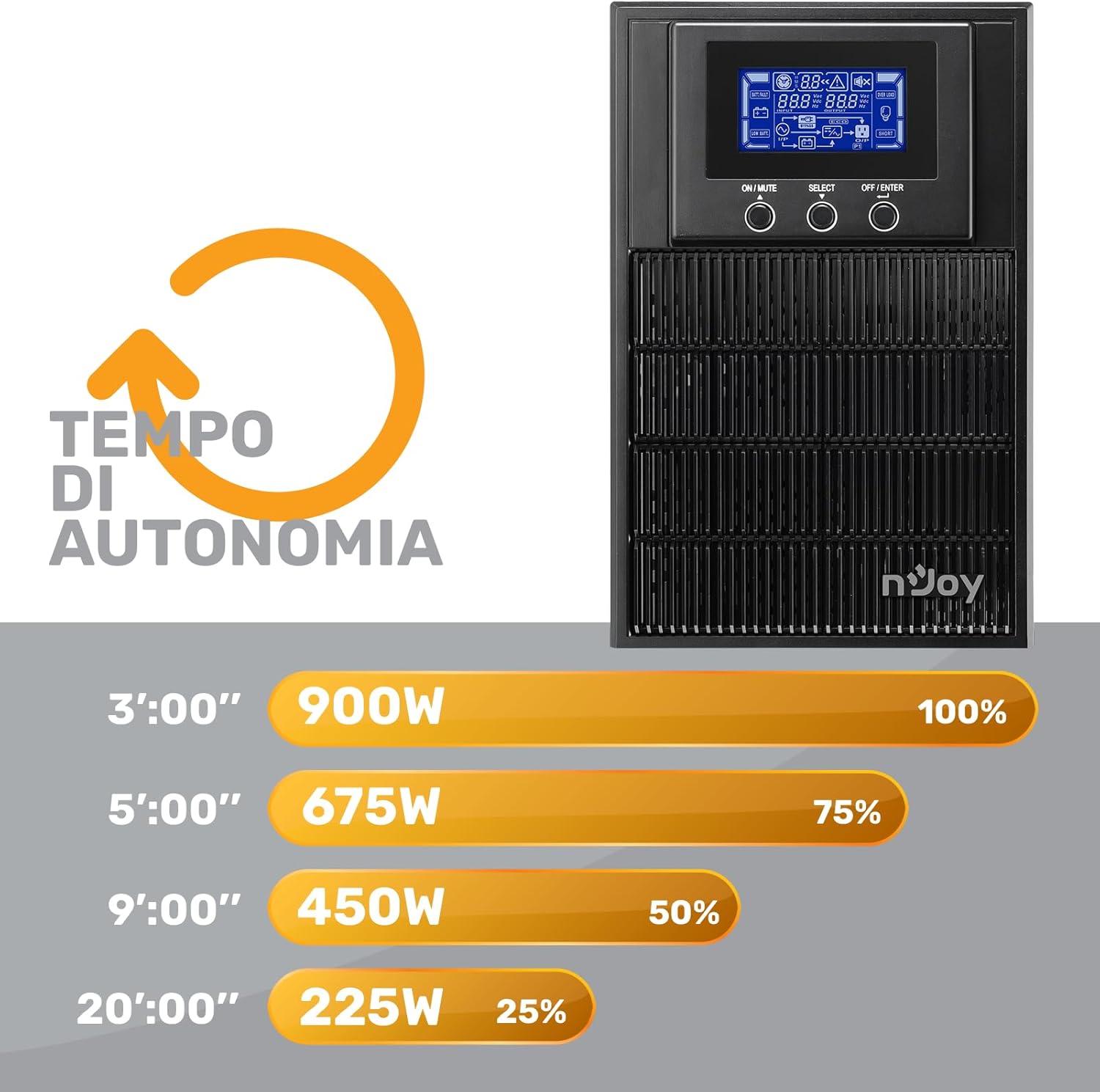
Figure 7: Battery Runtime vs. Load
This graph shows the estimated battery runtime in minutes for the nJoy Aten Pro 1000VA UPS at different load percentagес. Фор екample, at 100% load (900W), the runtime is approximately 3 minutes, while at 25% load (225W), it can last up to 20 minutes.
- 100% Load (900W): Approximately 3 minutes
- 75% Load (675W): Approximately 5 minutes
- 50% Load (450W): Approximately 9 minutes
- 25% Load (225W): Approximately 20 minutes
9. Гаранција и подршка
NJOY provides a comprehensive warranty and dedicated customer support for the Aten Pro series.
- Гарантни период: The nJoy Aten Pro UPS comes with a 3 година гаранције. Batteries are covered by a 1 година гаранције.
- Корисничка подршка: Our professional customer service team is available to provide prompt and quality assistance. If you require help or support before, during, or after your purchase, please do not hesitate to contact NJOY customer service. Refer to your product packaging or the NJOY official webсајт за конкретне контакт податке.