
1. Увод
This user manual provides detailed instructions for the installation, operation, and troubleshooting of the SIIG HDMI 2.0 Audio Extractor (Model: CE-H24F11-S1). This device is designed to split an incoming HDMI audio signal into stereo analog audio and Toslink optical outputs, enabling connection to various audio systems that may lack HDMI input.
The extractor supports high-resolution video up to 4K/60Hz with HDR and is compliant with HDCP 2.2. It also features ARC (Audio Return Channel) support via Toslink and CEC bypass, ensuring compatibility with modern home theater setups. Please read this manual thoroughly before use to ensure proper setup and optimal performance.
2. Карактеристике производа
- HDMI 2.0a and HDCP 2.2 compliant.
- Supports HDCP 2.2, HDR, and CEC bypass.
- Video resolutions up to 4Kx2K@60Hz YUV 4:4:4 8-bit and 4K HDR YUV 4:2:0 10-bit.
- Supports 480p, 720p, 1080i, 1080p resolutions.
- Video bandwidth: 18Gbps (600MHz per channel).
- Audio extraction via 3.5mm stereo jack and Toslink optical output.
- ARC audio extraction via Toslink (S/PDIF).
- Supports audio embedded via stereo and S/PDIF (Toslink).
- Подржани аудио формати:
- HDMI: PCM 2/5.1/7.1, Dolby 5.1/7.1, DTS 5.1/7.1
- Toslink (S/PDIF): PCM 2, Dolby 5.1, DTS 5.1
- 3.5mm Stereo: PCM 2
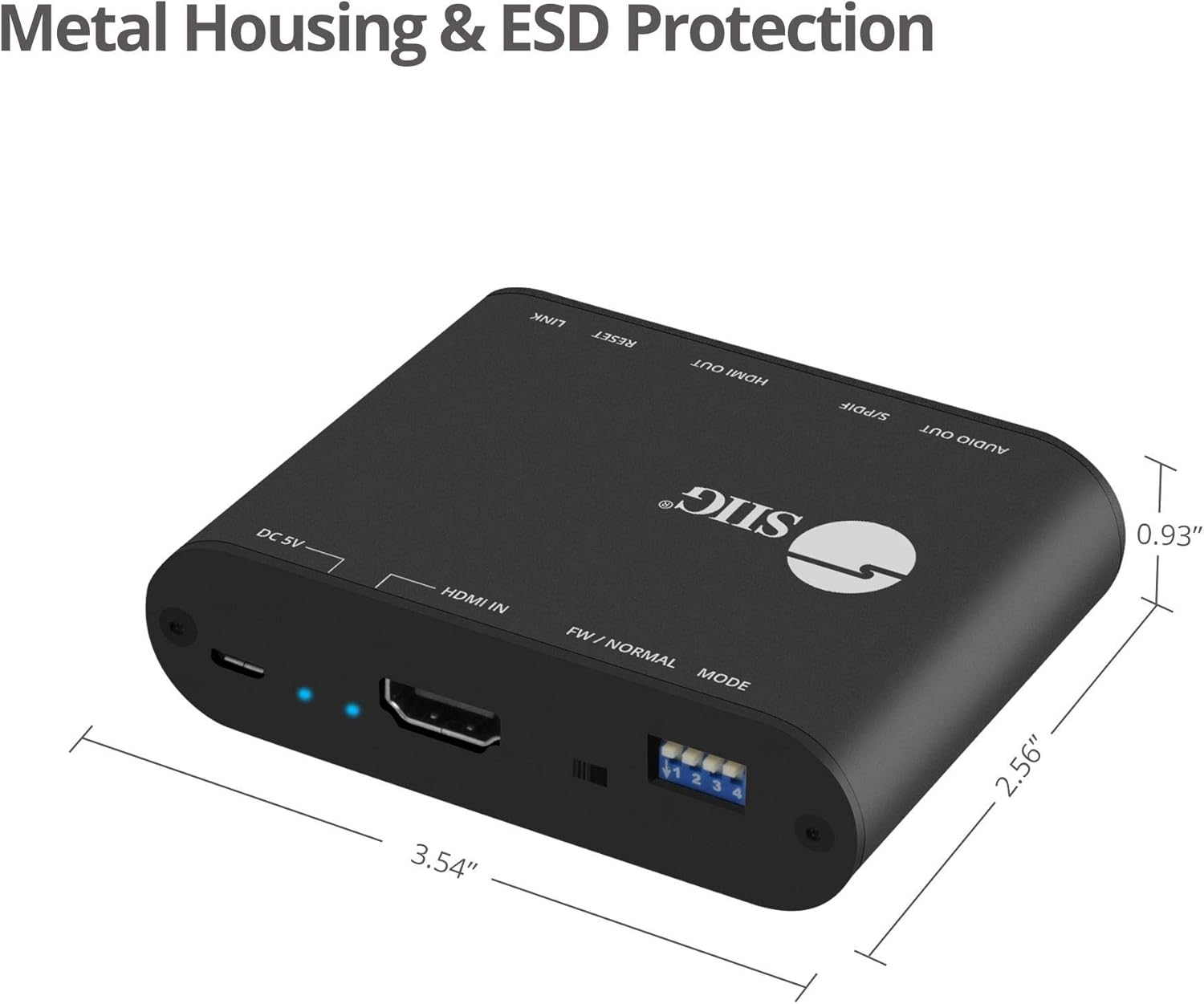
- Sturdy metal enclosure for durability and EMI/RFI noise interference minimization.
- ESD protection: ±15kV Air & ±8kV Contact.
- Country of origin: Taiwan.
- Regulatory approvals: FCC, CE, RoHS.

3. Садржај пакета
Please verify that all items are present and in good condition. If any items are missing or damaged, contact your vendor for assistance.
- 1x HDMI 2.0 Audio Extractor/Embedder (CE-H24F11-S1)
- 1x USB Type-A to Micro B Cable (for power)
- 1x Installation Guide (this document)
4. Производ је готовview and Port Descriptions


Предњи панел:
- 3.5 мм стерео излаз: Connect to analog audio devices (e.g., headphones, stereo speakers).
- S/PDIF (Toslink) Output: Connect to digital optical audio receivers or soundbars.
- ХДМИ излаз: Connect to an HDMI display (e.g., TV, monitor, projector).
- Output Signal LED Indicator: Illuminates when an HDMI output signal is detected.
- Дугме за ресетовање: Користи се за ресетовање уређаја.
- Slide Switch (FW/NORMAL Mode):
- Left (FW): Firmware update mode.
- Right (NORMAL): Normal operating mode. Ensure this is set to NORMAL for regular use.
Задњи панел:
- Micro-USB Port (DC 5V): Connect the provided USB power cable for device power. Also used for firmware updates.
- ЛЕД индикатор напајања: Светли када је уређај укључен.
- Input Signal LED Indicator: Illuminates when an HDMI input signal is detected.
- ХДМИ улаз: Connect to an HDMI source device (e.g., Blu-ray player, game console, streaming device).
- 4-pin DIP Switch: Used to configure EDID settings and enable/disable ARC and audio extraction functions.
5. Упутства за подешавање
Follow these steps to set up your SIIG HDMI 2.0 Audio Extractor:
- Уређаји за искључивање: Ensure all source devices, displays, and audio systems are powered off before making any connections.
- Connect HDMI Input: Connect an HDMI cable from your source device (e.g., Blu-ray player, game console) to the ХДМИ ИН port on the audio extractor.
- Connect HDMI Output: Повежите HDMI кабл са ХДМИ ОУТ port on the audio extractor to your display device (e.g., TV, monitor, projector).
- Connect Audio Output (Digital): For digital audio, connect a Toslink (optical) cable from the S/PDIF (Toslink) Output port on the extractor to your audio receiver, soundbar, or ampлифиер.
- Connect Audio Output (Analog): For analog stereo audio, connect a 3.5mm audio cable from the 3.5 мм стерео излаз port on the extractor to your headphones or stereo speakers.
- Прикључите напајање: Connect the provided USB Type-A to Micro B cable to the Мицро-УСБ порт (ДЦ 5В) on the extractor and the other end to a USB power source (e.g., USB wall adapter, TV USB port). The Power LED Indicator will illuminate.
- Verify Slide Switch: Ensure the slide switch on the front panel is set to the НОРМАЛНО position (right).
- Уређаји за укључење: Power on your display, audio system, and source device in that order.

6. Упутство за употребу
6.1 EDID and Function Configuration (DIP Switch)
The 4-pin DIP switch on the back panel allows you to configure the EDID (Extended Display Identification Data) settings and control the ARC and audio extraction functions. Adjust these settings based on your connected devices and desired audio output.

| Положај ДИП прекидача | Опис |
|---|---|
| PIN1: OFF, PIN2: OFF | ЕДИД бипасс |
| PIN1: OFF, PIN2: ON | Ultra HD (4K2K@60Hz) – 8/10/12bit, 3D, HDR video & 5.1ch audio |
| PIN1: ON, PIN2: OFF | Ultra HD (4K2K@60Hz) – 8/10/12bit, 3D, HDR video & 2ch audio |
| PIN1: ON, PIN2: ON | Learning EDID from Output |
| PIN3: OFF | Disable ARC Function |
| PIN3: ON | Enable ARC Function |
| PIN4: OFF | Disable Audio Extractor Function |
| PIN4: ON | Enable Audio Extractor Function (via Toslink & 3.5mm) |
Напомена: After changing DIP switch settings, it is recommended to power cycle the audio extractor and all connected devices to ensure the new settings are applied correctly.
6.2 ARC (Audio Return Channel) Function
When ARC is enabled (PIN3 ON) and your display supports ARC, audio from your TV's internal tuner or smart apps can be sent back to the audio extractor via the HDMI cable and then output through the Toslink (S/PDIF) port to your audio system.

6.3 CEC Bypass
The device supports CEC (Consumer Electronics Control) bypass, allowing CEC commands to pass through the extractor to control connected HDMI devices. This means you can use a single remote to control multiple CEC-enabled devices in your setup.
КСНУМКС. Решавање проблема
If you encounter issues with the SIIG HDMI 2.0 Audio Extractor, please refer to the following common troubleshooting steps:
- Нема видео излаза:
- Уверите се да су сви HDMI каблови безбедно повезани.
- Verify the input source is selected correctly on your display.
- Check the power connection to the extractor; the Power LED should be illuminated.
- Пробајте други HDMI кабл.
- Adjust DIP switch settings for EDID (PIN1 & PIN2) to match your display's capabilities or try "EDID bypass".
- Power cycle all connected devices (source, extractor, display).
- No Audio Output (Toslink/3.5mm):
- Ensure audio cables (Toslink or 3.5mm) are securely connected to the correct output ports on the extractor and input ports on your audio system.
- Verify the audio input is selected correctly on your audio receiver/soundbar.
- Check DIP switch PIN4 is set to ON to enable audio extraction.
- If using ARC, ensure DIP switch PIN3 is set to ON and your TV's ARC function is enabled.
- Confirm the audio format from your source is supported by your audio system and the extractor (refer to "Product Features" for supported formats). Some audio systems may not support certain multi-channel formats.
- Try setting DIP switch PIN1: ON, PIN2: OFF for 2ch audio output if your audio system only supports stereo.
- Power cycle all connected devices.
- Intermittent Video/Audio:
- Проверите да ли су каблови лабави.
- Уверите се да је напајање стабилно.
- Reduce cable lengths if possible, especially for HDMI.
- Verify that the slide switch is in the НОРМАЛНО положај.
- Test with different HDMI cables.
- HDR/4K Issues:
- Ensure all connected HDMI cables are rated for HDMI 2.0 or higher and support 18Gbps bandwidth.
- Verify your source and display devices both support 4K/60Hz and HDR.
- Adjust EDID settings (PIN1 & PIN2) to ensure the correct video mode is selected.
8. Спецификације
| Феатуре | Детаљ |
|---|---|
| Број модела | ЦЕ-Х24Ф11-С1 |
| ХДМИ усклађеност | ХДМИ 2.0а |
| ХДЦП усклађеност | ХДЦП 2.2 |
| Видео Бандвидтх | 18Gbps (600MHz per channel) |
| Подржане резолуције | Up to 4Kx2K@60Hz (YUV 4:4:4 8-bit), 4K HDR (YUV 4:2:0 10-bit), 1080p, 1080i, 720p, 480p |
| ХДР подршка | Yes (4K@60Hz YUV 4:2:0 10-bit) |
| Аудио излази | 1x Toslink (S/PDIF), 1x 3.5mm Stereo |
| АРЦ подршка | Yes (via Toslink) |
| Подршка ЦИК-а | Бипасс |
| ЕСД заштита | ±15kV Air & ±8kV Contact |
| Материјал | Метално кућиште |
| Димензије производа (Д x Ш) | 4.56" x 0.78" (11.58 цм x 1.98 цм) |
| Тежина артикла | 6.4 унце (181.4 грама) |
| Повер Суппли | DC 5V (преко микро-USB-а) |
| Радна температура | До 104°Ф (40°Ц) |
| Цертификати | FCC, CE, RoHS, TAA compliant |
| Земља порекла | Тајван |
9. Одржавање
The SIIG HDMI 2.0 Audio Extractor is designed for reliable operation with minimal maintenance.
- Чишћење: Use a soft, dry cloth to clean the device. Avoid using liquid or aerosol cleaners, as they may damage the unit.
- вентилација: Уверите се да је уређај постављен у добро проветреном простору како бисте спречили прегревање. Не блокирајте вентилационе отворе.
- Складиштење: Када се уређај не користи дуже време, чувајте га на хладном и сувом месту, даље од директне сунчеве светлости и екстремних температура.
- Ажурирања фирмвера: Periodically check the SIIG website for any available firmware updates for your model. Follow the instructions provided with the firmware update carefully.
10. Безбедносне информације
Please observe the following safety guidelines to prevent damage to the device and ensure user safety:
- Не излажите уређај води или прекомерној влази.
- Не покушавајте да отворите или модификујете уређај. Унутра нема делова које корисник може сам да поправи.
- Use only the provided power cable or a certified 5V USB power adapter.
- Држите уређај даље од извора топлоте, директне сунчеве светлости и запаљивих материјала.
- Ensure proper grounding for all connected electrical equipment.
11. Гаранција и техничка подршка
11.1 Информације о гаранцији
The SIIG HDMI 2.0 Audio Extractor (CE-H24F11-S1) comes with a 3 година гаранције. This warranty covers defects in materials and workmanship under normal use. For specific terms and conditions, please refer to the warranty documentation provided with your purchase or visit the official SIIG webсајту.
11.2 Техничка подршка
For technical assistance, product inquiries, or troubleshooting beyond the scope of this manual, please contact SIIG customer support.
- Webсајт: Visit the official SIIG webсајт за ресурсе подршке, честа питања и контакт информације.
- Контакт: Refer to your product packaging or the SIIG webсајт за најновије контакт информације за техничку подршку.