
Увод
Thank you for choosing the ChenFec Bluetooth Beanie. This beanie integrates wireless stereo headphones, allowing you to enjoy music and hands-free calls while staying warm. This manual provides detailed instructions for setup, operation, and maintenance to ensure optimal performance and longevity of your device.
Производ је завршенview
The ChenFec Bluetooth Beanie is designed for comfort and convenience, featuring:
- Блуетоотх В5.0 технологија: Ensures stable and wide compatibility with various Bluetooth-enabled devices.
- Дуг век трајања батерије: Offers up to 60 hours of standby time and 8–10 hours of continuous music playback.
- Контролна табла прилагођена кориснику: Integrated on the left earpiece for easy management of music and calls.
- Built-in Stereo Speakers and Microphone: Provides clear audio for music and hands-free communication.
- Warm and Comfortable Material: Keeps your head warm in cold weather.
Шта је у кутији
Након отварања пакета, требало би да пронађете следеће ставке:
- 1 x ChenFec Bluetooth Beanie
- 1 к Мицро УСБ кабл за пуњење
- 1 x User Welcome Guide
видео: Распакивање и готовоview of the ChenFec Bluetooth Beanie, showing the beanie, charging cable, and welcome guide.
Упутства за подешавање
1. Charging the Beanie
Before first use, fully charge your Bluetooth Beanie.
- Locate the Micro USB charging port on the control panel, typically on the left earpiece.
- Connect the provided Micro USB cable to the beanie's charging port.
- Plug the other end of the USB cable into a USB power source (e.g., computer, wall adapter).
- The LED indicator light will illuminate during charging and turn off or change color when fully charged.
2. Блуетоотх упаривање
Follow these steps to connect your beanie to your device:
- Дуго притисните дугме Плаи/Паусе (usually about 4 seconds) on the beanie's control panel until the LED indicator light flashes blue and red, indicating pairing mode.
- On your mobile device (smartphone, tablet, etc.), open Bluetooth settings.
- Тражи нови уређаји and select "BT-03S" from the list of available devices.
- Once connected, the LED indicator light will typically show a solid blue or flash blue slowly.

слика: Visual guide for connecting the Bluetooth beanie to a smartphone. It illustrates pressing the play button, opening device settings, and selecting "BT-03S" for connection.
Упутство за употребу
Функције контролне табле
The control panel is located on the left earpiece of the beanie. Familiarize yourself with its buttons:
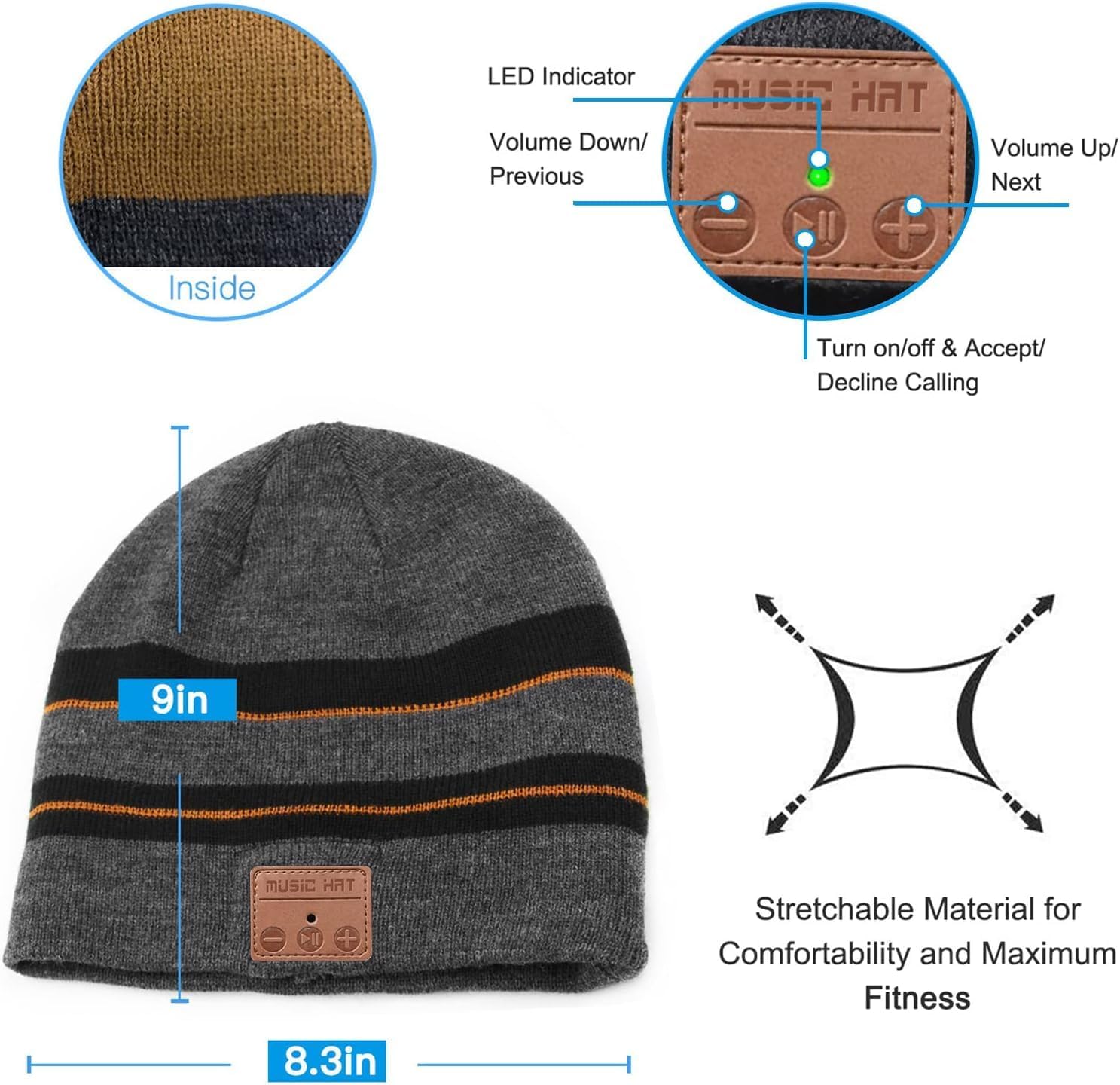
слика: Детаљно view of the beanie's control panel, highlighting the LED indicator, Volume Down/Previous Track button, Play/Pause/Power/Call button, and Volume Up/Next Track button.
- Укључивање/искључивање: Дуго притисните дугме Плаи/Паусе.
- Пусти/паузирај музику: Кратко притисните дугме Плаи/Паусе.
- Појачавање звука: Кратко притисните дугме „+“.
- Смањивање јачине звука: Кратко притисните дугме „-“.
- Следећа нумера: Дуго притисните дугме „+“.
- Претходни запис: Дуго притисните дугме „-“.
- Одговори/заврши позив: Short press the Play/Pause button during an incoming call.
- Одбијање позива: Long press the Play/Pause button during an incoming call.
- Поновно бирање последњег броја: Двапут притисните дугме Плаи/Паусе.
Одржавање
Washing Instructions (Detachable Speakers)
To wash your ChenFec Bluetooth Beanie, you must first remove the electronic components:
- Find the pocket between the double layers of the beanie where the control unit and speakers are housed.
- Gently take out one of the speakers from its pocket.
- Remove the other speaker and the main control unit. Ensure all electronic parts are completely removed before washing.
- Hand wash the beanie with mild detergent and cold water. Do not machine wash or tumble dry with electronics inside.
- Allow the beanie to air dry completely before reinserting the electronic components.
- Once dry, carefully reinsert the speakers and control unit into their designated pockets.
слика: Step-by-step visual guide demonstrating how to locate the inner pocket, gently remove the speakers, and detach the control unit from the beanie for washing.
Решавање проблема
- Није могуће укључити: Ensure the beanie is fully charged. Connect it to a power source and try again.
- Не могу да упарим уређај са:
- Ensure the beanie is in pairing mode (LED flashing red and blue).
- Уверите се да је Блуетоотх омогућен на вашем уређају.
- Check if the beanie is already connected to another device. Disconnect from other devices if necessary.
- Move your device closer to the beanie.
- Нема звука или је јачина звука ниска:
- Increase the volume on both the beanie and your connected device.
- Ensure the beanie is properly paired.
- Check if the speakers are correctly positioned over your ears.
- Повремена веза:
- Ensure there are no obstructions between the beanie and your device.
- Stay within the effective Bluetooth range (up to 33 feet).
- Restart both the beanie and your device.
Спецификације
| Феатуре | Детаљ |
|---|---|
| Димензије производа | 8.66 к 9.44 к 0.59 инча |
| Тежина артикла | 4.2 унци |
| Број модела ставке | Блуетоотх шешир |
| Батерије | Потребна је 1 литијум-јонска батерија (укључена) |
| Бежичне комуникационе технологије | Блуетоотх |
| Цоннецтивити Тецхнологиес | Bluetooth, Wired (for charging) |
| Посебне карактеристике | Bluetooth connectivity, Built-in headphones and microphone, Volume control |
| Аудио Јацк | Мицро УСБ |
| Боја | Браон |
| Произвођач | Shenzhen CFZC technology co., LTD |
| Датум првог доступног | 17. децембра 2018. године |
Безбедносне информације
- Do not expose the electronic components to water or extreme temperatures.
- Avoid disassembling the control unit or speakers.
- Користите само приложени кабл за пуњење или сертификовани еквивалент.
- Чувати ван домашаја деце.
- Do not wear the beanie in situations where hearing external sounds is critical for safety (e.g., driving, operating heavy machinery).
Гаранција и подршка
Your ChenFec Bluetooth Beanie comes with a standard manufacturer's warranty. For specific warranty details, please refer to the packaging or contact ChenFec customer support. If you encounter any issues or have questions not covered in this manual, please reach out to our support team for assistance.
Contact information for support can typically be found on the product packaging or the official ChenFec webсајту.