
1. Увод
Thank you for choosing the KWANWA Digital Alarm Clock, Model KW616-3N. This manual provides detailed instructions for setting up, operating, and maintaining your new clock. Designed for clear visibility and convenience, this battery-operated clock features an 8-inch extra-large LED display with 3-inch digits, adjustable brightness, and versatile placement options.

Figure 1: KWANWA Digital Alarm Clock (Model KW616-3N) with large red LED display.
2. Карактеристике производа
- Лако читљив екран: 3-inch huge LED time display against a large black backlit screen for excellent visibility.
- Ради на батерије: Operates on 2 D-cell batteries (not included), eliminating messy cords and allowing flexible placement.
- Разноврстан пласман: Features two unfoldable stand legs for table-top use and three wall-mounting hang holes for wall installation.
- Подесива осветљеност: Offers 3-level manual brightness adjustment and an automatic night mode (8 PM - 6 AM) to dim the display.
- Висока тачност: Maintains time accuracy within ±30 seconds per month.
- Дневни аларм: Includes a daily alarm with a gradually increasing volume for up to 2 minutes.
3. Садржај пакета
- KWANWA Digital Alarm Clock (Model KW616-3N)
- Упутство за употребу
4. Подешавање
4.1. Инсталација батерије
- Пронађите одељак за батерије на полеђини сата.
- Отворите поклопац одељка за батерије.
- Insert two (2) D-cell alkaline batteries (not included), ensuring correct polarity (+/-).
- Добро затворите поклопац одељка за батерије.
КСНУМКС. Постављање
The clock offers two convenient placement options:
- Table-top: Unfold the two stand legs located on the back of the clock to place it on a desk, table, bedside, or nightstand.
- на зиду: Use the three wall-mounting hang holes on the back of the clock to securely hang it on a wall.
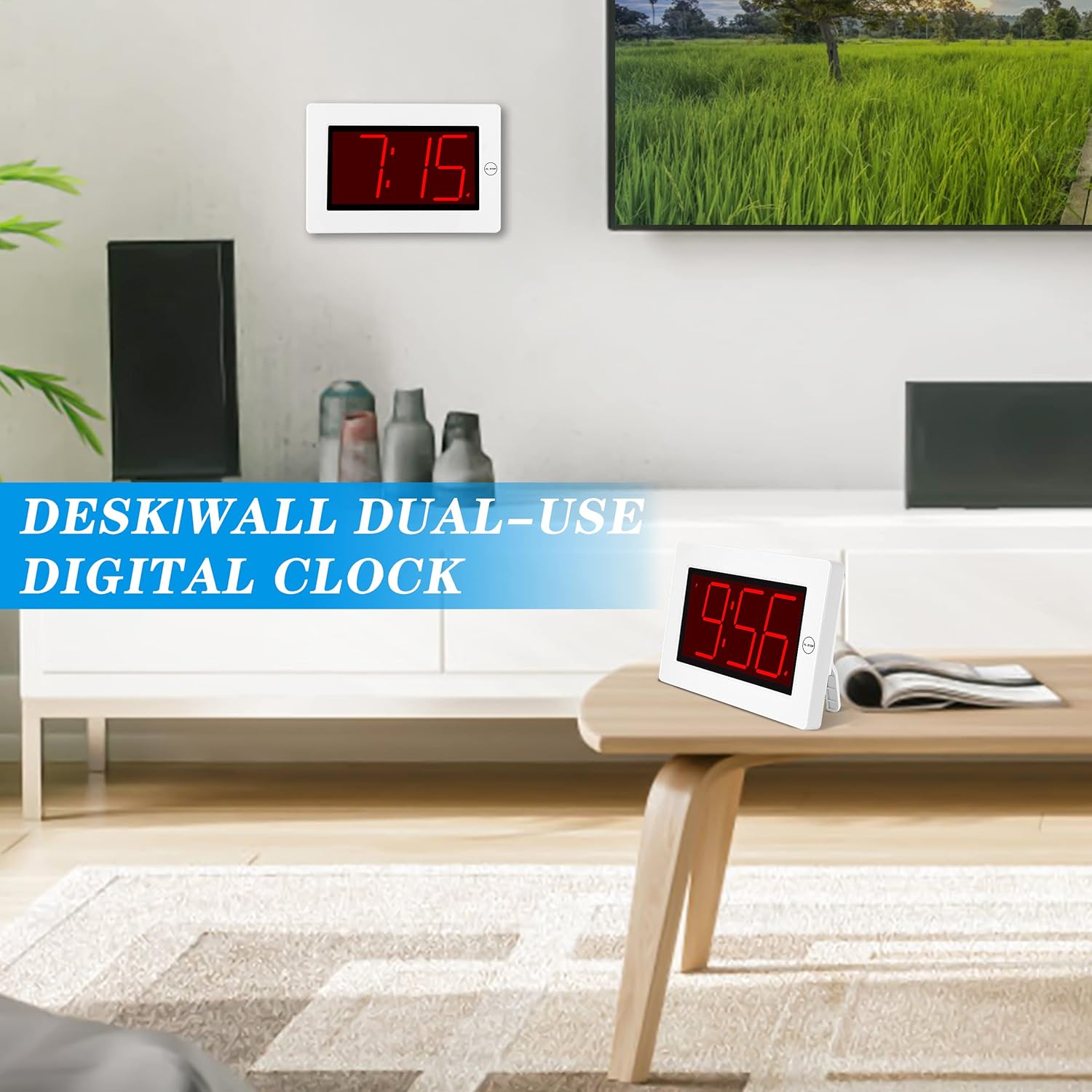
Figure 2: The clock can be used as a table-top or wall-mounted device.
5. Упутство за употребу
All control buttons are located on the back of the clock for easy access.

Слика 3: Задња страна view of the clock with labeled control buttons.
5.1. Подешавање времена
- Притисните и држите ВРЕМЕНСКИ СКЛОП дугме 2 секунде да бисте ушли у режим подешавања времена. Цифре за сате ће трептати.
- Притисните тастер ХОУР dugme za podešavanje sata.
- Притисните тастер МИН тастер за подешавање минута.
- Притисните ВРЕМЕНСКИ СКЛОП поново да бисте потврдили и изашли.
5.2. Подешавање аларма
- Притисните и држите АЛАРМ СЕТ дугме 2 секунде да бисте ушли у режим подешавања аларма. Цифре сата аларма ће трептати.
- Притисните тастер ХОУР dugme za podešavanje sata alarma.
- Притисните тастер МИН дугме за подешавање минута аларма.
- Притисните АЛАРМ СЕТ поново да бисте потврдили и изашли.
5.3. Alarm On/Off & Snooze
- Аларм укључен/искључен: Притисните тастер АЛАРМ УКЉУЧЕН / ИСКЉУЧЕН button on the back to activate or deactivate the alarm. An alarm icon will appear/disappear on the display.
- Одгода: Када се огласи аларм, притисните велико AL STOP button on the top of the clock to activate snooze. The alarm will pause for a short period and sound again later.
- Заустави аларм: To stop the alarm for the day, press any button on the back of the clock.

Figure 4: Interacting with the alarm and snooze button.
5.4. Подешавање осветљености
The clock offers both manual and automatic brightness control:
- Ручни димер: Притисните тастер РУЧНИ ЗАТИМЉИВАЧ button on the back to cycle through 3 brightness levels (High, Medium, Low) or turn the display OFF.
- Аутоматско затамњивање: The clock automatically dims the LED display between 8 PM and 6 AM to protect your eyes and save energy. This feature can be toggled ON/OFF using the АУТОМАТСКИ ЗАТИМЉИВАЧ УКЉУЧЕН/ИСКЉУЧЕН дугме на полеђини.

Figure 5: Visual representation of the three brightness levels.
5.5. Летње рачунање времена (ДСТ)
Притисните тастер ДСТ button on the back to adjust the time for Daylight Saving Time. This will advance or set back the time by one hour.
5.6. Подешавање јачине звука
Користите ВОЛУМЕ button on the back to adjust the alarm volume to your preference.
6. Одржавање
- Clean the clock's exterior with a soft, dry cloth. Avoid using abrasive cleaners or solvents.
- Ако се сат неће користити дуже време, извадите батерије да бисте спречили цурење.
КСНУМКС. Решавање проблема
- Екран је затамњен или искључен: Check battery levels and replace if necessary. Ensure the manual dimmer is not set to 'OFF' or the lowest setting.
- Аларм се не оглашава: Verify that the alarm is activated (alarm icon visible on display). Check the alarm volume setting.
- Нетачно време: Re-set the time following the instructions in section 5.1. Ensure DST setting is correct for your region.
8. Спецификације
| Феатуре | Детаљ |
|---|---|
| Бранд | КВАНВА |
| Број модела | КВ616-3Н |
| Дисплаи Типе | Дигитал ЛЕД |
| Величина екрана | 8 inches (3-inch digits) |
| Димензије производа | 8.7" Ш x 5.6" В |
| Извор напајања | Напајање батеријама (потребно је 2 D батерија) |
| Тип монтаже | Table-top/Wall-mounted |
| Материјал | Пластика |
| Тежина артикла | 11.7 унци |
| Посебна карактеристика | Cordless, Adjustable Brightness, Alarm |
9. Гаранција и подршка
This product comes with a limited warranty. For warranty claims, technical support, or any inquiries regarding your KWANWA Digital Alarm Clock, please contact KWANWA customer service at салес@ус-михоме.цом.