
Увод
This manual provides essential instructions for the safe and efficient operation of your KINGONE K9 Super Bass Portable Bluetooth Speaker. Please read this manual thoroughly before using the device and retain it for future reference.
The KINGONE K9 is a portable Bluetooth speaker featuring powerful stereo sound, multiple input options including Bluetooth, MicroSD, and AUX, and convenient touch controls. It also supports hands-free calling and NFC for easy pairing.
Садржај пакета
Уверите се да су све ставке присутне у пакету:
- KINGONE K9 Super Bass Portable Bluetooth Speaker
- Мицро УСБ кабл за пуњење
- 3.5 мм аудио кабл (AUX)
- Кориснички приручник (овај документ)
Производ је завршенview
The KINGONE K9 speaker is designed for portability and high-quality audio. Below is an image illustrating the speaker and its packaging.
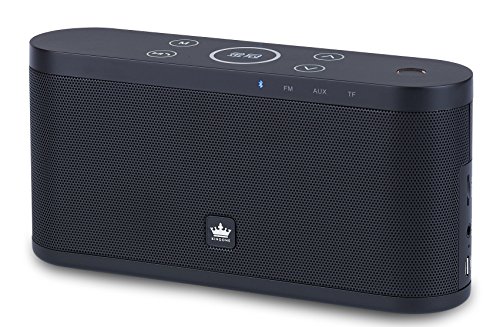
Image: The KINGONE K9 Super Bass Portable Bluetooth Speaker (left) shown next to its metallic-finish packaging (right).
Кључне карактеристике:
- Блуетоотх 4.0 повезивање: Supports A2DP, AVRCP, HFP, HSP profiles for stable wireless audio streaming.
- НФЦ подршка: For quick and easy pairing with compatible devices.
- Вишеструки режими репродукције: Bluetooth, MicroSD card, and AUX input.
- Хандс-фрее позивање: Built-in microphone for answering phone calls.
- Контроле на додир: Intuitive touch-sensitive buttons for volume, track navigation, and play/pause.
- Моћан стерео звук: 2 x 5W output for a rich audio experience.
- Преносиви дизајн: Compact dimensions and a 2200mAh battery for extended use.
Контроле и функције
The speaker features touch-sensitive controls located on the top panel. Familiarize yourself with these controls for optimal use:
- Дугме за напајање: Притисните и држите 3 секунди да бисте укључили/искључили напајање.
- Дугме за репродукцију/паузу: Tap to play or pause audio. During a call, tap to answer/end.
- Јачина звука (+): Tap to increase volume.
- Утишавање (-): Tap to decrease volume.
- Next Track (>>): Додирните да бисте прешли на следећу нумеру.
- Previous Track (<<): Додирните да бисте прешли на претходну нумеру.
- Дугме за режим (М): Tap to switch between Bluetooth, MicroSD, and AUX input modes.
Сетуп
1. Пуњење звучника
- Connect the Micro USB charging cable to the speaker's charging port.
- Connect the other end of the USB cable to a DC 5V USB power source (e.g., computer USB port, USB wall adapter).
- Индикаторска лампица пуњења ће се упалити.
- Charging typically takes 4-5 hours for a full charge. The indicator light will change or turn off once fully charged.
2. Укључивање/искључивање
- To power on, press and hold the Power button for approximately 3 seconds until you hear an audible prompt.
- To power off, press and hold the Power button for approximately 3 seconds until you hear an audible prompt.
3. Блуетоотх упаривање
- Ensure the speaker is powered on and in Bluetooth mode (indicated by a flashing blue LED). If not, press the 'M' (Mode) button to switch to Bluetooth mode.
- Омогућите Блутут на свом мобилном уређају (паметном телефону, таблету, лаптопу).
- Тражи available Bluetooth devices. You should see "KINGONE K9" in the list.
- Select "KINGONE K9" to pair. Once paired, the speaker will emit an audible confirmation, and the blue LED will stop flashing and remain solid.
- Звучник ће се аутоматски поново повезати са последњим упареним уређајем када се укључи, ако је Bluetooth уређаја активан и у домету.
4. NFC Pairing (for compatible devices)
- Ensure NFC is enabled on your compatible smartphone or tablet.
- Power on the KINGONE K9 speaker.
- Gently tap your NFC-enabled device against the NFC area on the speaker (refer to the speaker's diagram for exact location, usually marked with an NFC logo).
- Your device will prompt you to confirm the pairing. Accept the connection.
5. Повезивање AUX улаза
- Connect one end of the 3.5mm audio cable to the AUX port on the speaker.
- Повежите други крај 3.5 мм аудио кабла са прикључком за слушалице или аудио излазом вашег екстерног аудио уређаја.
- Притисните дугме „M“ (Mode) на звучнику да бисте прешли на AUX режим.
- Звук ће се сада репродуковати преко звучника са вашег повезаног уређаја. Контролишите репродукцију и јачину звука са вашег екстерног уређаја.
6. MicroSD Card Playback
- Insert a MicroSD (TF) card with MP3 audio files into the MicroSD card slot on the speaker.
- Press the 'M' (Mode) button to switch to MicroSD card mode.
- Звучник ће аутоматски почети да репродукује звук fileс са картице.
- Use the speaker's touch controls for play/pause, next track, and previous track.
Упутство за употребу
Контрола јачине звука
- Tap the 'Volume Up (+)' button to increase the volume.
- Tap the 'Volume Down (-)' button to decrease the volume.
Track Navigation (Bluetooth/MicroSD modes)
- Tap the 'Next Track (>>)' button to skip to the next song.
- Tap the 'Previous Track (<<)' button to go back to the beginning of the current song or to the previous song.
Позивање без употребе руку
- When a call comes in while connected via Bluetooth, the speaker will ring.
- Tap the 'Play/Pause' button to answer the incoming call.
- Tap the 'Play/Pause' button again to end the call.
- To reject an incoming call, press and hold the 'Play/Pause' button for a few seconds.
Одржавање
- Држите звучник даље од воде, влаге и екстремних температура.
- Очистите звучник меком, сувом крпом. Не користите абразивна средства за чишћење или раствараче.
- Избегавајте испуштање звучника или његово излагање јаким ударцима.
- When not in use for extended periods, store the speaker in a cool, dry place and charge it periodically to maintain battery health.
Решавање проблема
- Нема напајања:
- Уверите се да је звучник потпуно напуњен.
- Проверите кабл за пуњење и адаптер за напајање да ли су оштећени.
- Нема звука:
- Појачајте јачину звука и на звучнику и на повезаном уређају.
- Ensure the speaker is in the correct input mode (Bluetooth, AUX, MicroSD).
- If using Bluetooth, ensure the device is properly paired and within the 10-meter operating range.
- If using AUX, ensure the 3.5mm cable is securely connected to both devices.
- Блуетоотх прекид везе:
- Приближите уређај звучнику.
- Уверите се да нема препрека између звучника и вашег уређаја.
- Turn off and on Bluetooth on your device, then try re-pairing.
- Контроле не реагују:
- Уверите се да је звучник укључен.
- Try restarting the speaker.
Спецификације
| Модел | K9 |
| Блуетоотх верзија | 4.0 |
| Блуетоотх Проfiles | А2ДП, АВРЦП, ХФП, ХСП |
| Оперативни опсег | До 10 метара (33 стопе) |
| Излазна снага | 2 x 5W (Total 10W) |
| Конфигурација канала | 2.0 Стерео |
| Опције уноса | Bluetooth, MicroSD (TF Card), AUX (3.5mm) |
| Капацитет батерије | 2200мАх |
| Улаз за пуњење | ДЦ 5В (микро УСБ) |
| Време пуњења | 4-5 сати |
| Димензије (Д к Ш к В) | 22 цм x 12 цм x 15 цм (приближно) |
| Тежина | 1.5 кг (приближно) |
| Контролни метод | Додирните |
| Посебне карактеристике | NFC, Hands-free Calling, Portable |
Безбедносне информације
- Do not expose the speaker to direct sunlight, heat sources, or open flames.
- Do not disassemble, repair, or modify the device yourself. This may void the warranty and cause damage.
- Чувати ван домашаја деце.
- Одложите производ и његову батерију одговорно у складу са локалним прописима.
- Avoid listening at high volumes for prolonged periods to prevent hearing damage.
Гаранција и подршка
For warranty information or technical support, please refer to the documentation provided at the time of purchase or contact your retailer. Keep your proof of purchase for warranty claims.