
Увод
Thank you for choosing the NEC NP-MC372X Portable Projector. This manual provides essential information for the safe and efficient use of your projector. Please read these instructions thoroughly before operating the device and retain them for future reference. The NEC NP-MC372X is an XGA LCD projector designed for clear and bright presentations, offering 3700 lumens of brightness and a native resolution of 1024x768.
Безбедносне информације
Увек се придржавајте следећих мера предострожности како бисте спречили пожар, струјни удар или повреде:
- Не блокирајте вентилационе отворе. Обезбедите довољно простора око пројектора за правилан проток ваздуха.
- Не гледајте директно у сочиво пројектора када је укљученоamp је укључено, јер јако светло може изазвати оштећење ока.
- Не постављајте пројектор на нестабилна колица, постоље или сто.
- Unplug the projector from the power outlet before cleaning. Use a dry cloth for cleaning.
- Све сервисирање препустите квалификованом сервисном особљу.
Садржај пакета
Проверите да ли су све ставке наведене у наставку укључене у ваш пакет:
- NEC NP-MC372X Portable Projector
- Повер Цабле
- ХДМИ кабл
- Ремоте Цонтрол
Производ је завршенview
The NEC NP-MC372X is a versatile projector featuring an LCD display, 1024x768 native resolution, and 3700 lumens brightness. It includes a 1.2x zoom lens and offers a lamp life of up to 10,000 hours. Connectivity options include Dual HDMI, VGA, and USB.
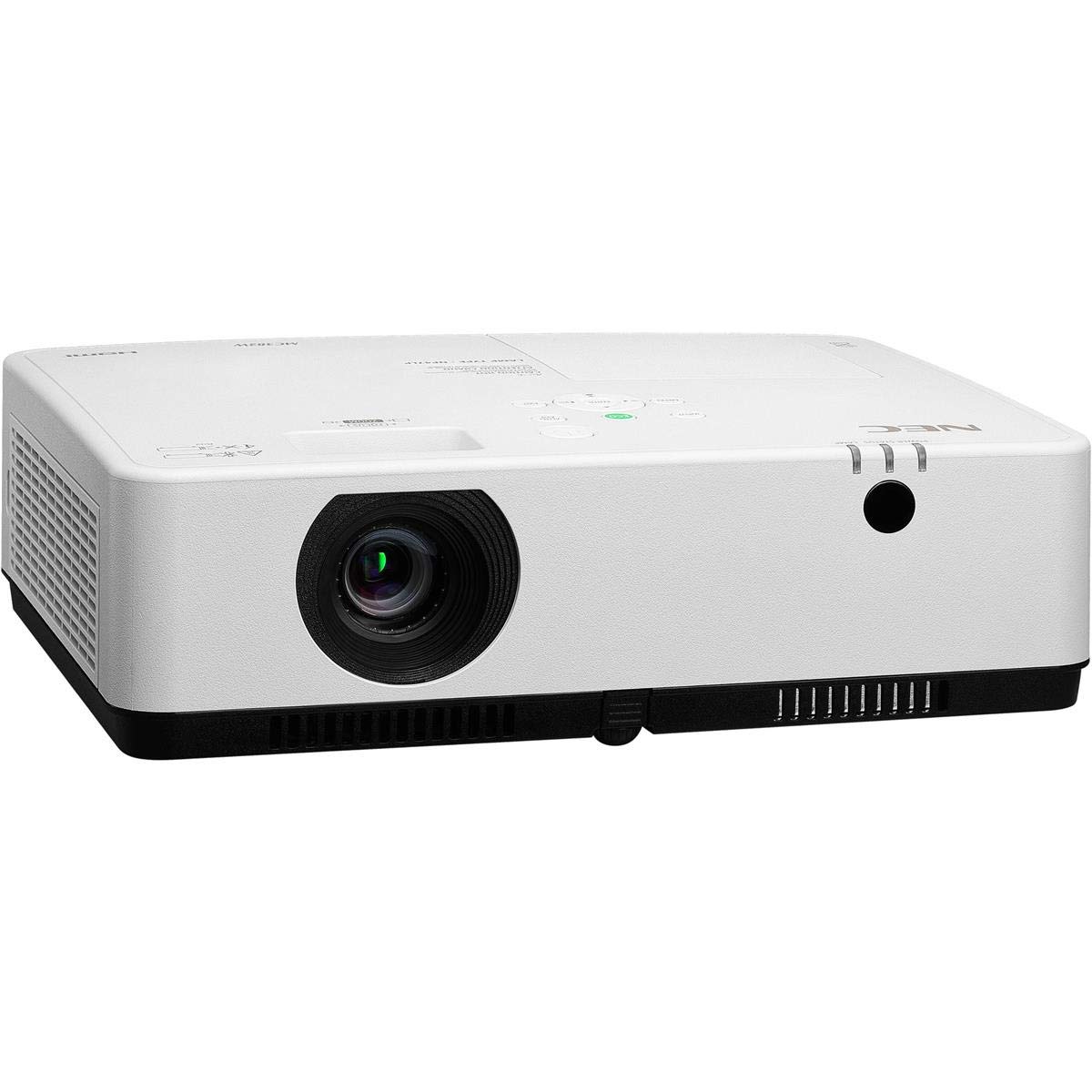
Слика 1: Предња и горња страна view of the NEC NP-MC372X Portable Projector, showing the lens and control panel.

Слика 2: Предња страна view of the projector, highlighting the projection lens.

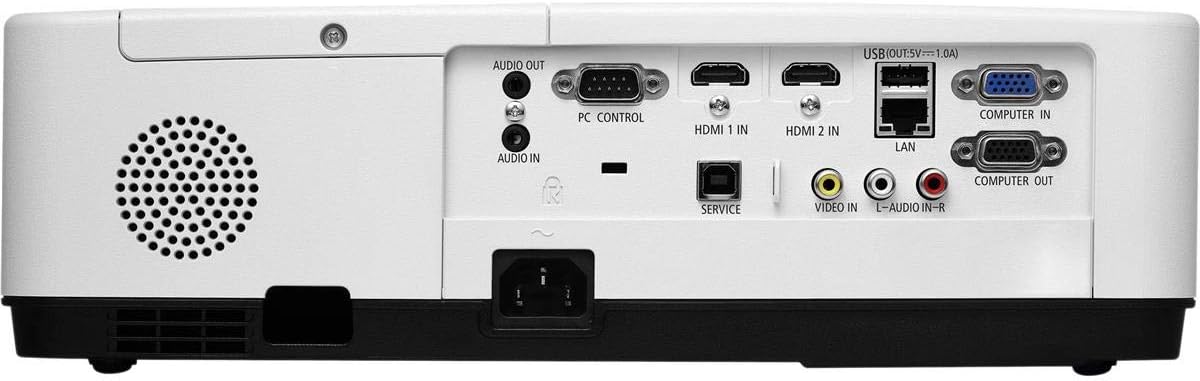
Слика 3: Задња страна view of the projector, displaying the various input and output ports including HDMI, VGA, USB, LAN, and audio connections.
Слика 4: Страна view of the projector, showing the ventilation grille for heat dissipation.
Сетуп
Пхисицал Плацемент
Place the projector on a stable, flat surface or mount it securely. Ensure the projector is positioned at an appropriate distance from the screen to achieve the desired image size. Maintain clear space around the projector for ventilation.
Повезивање уређаја
Refer to Figure 3 for port locations. Connect your source device (e.g., laptop, gaming console) to the projector using one of the following methods:
- ДВИ: Use an HDMI cable to connect to either HDMI 1 IN or HDMI 2 IN.
- ВГА: Use a VGA cable to connect to COMPUTER IN. For audio, connect a 3.5mm audio cable to AUDIO IN.
- УСБ: Connect a USB device to the USB port for direct media playback.
- ЛАН: Connect an Ethernet cable to the LAN port for network connectivity.
Укључивање/искључивање
1. Connect the power cable to the projector and a power outlet.
2. Press the power button on the projector or the remote control to turn on the projector.
3. To turn off, press the power button again. Confirm shutdown when prompted.
Упутство за употребу
Основно руковање даљинским управљачем
Use the included remote control to navigate menus, select input sources, and adjust settings. Point the remote control towards the projector's remote sensor.
Избор улазног извора
Press the 'Input' button on the remote control or projector control panel to cycle through available input sources (HDMI 1, HDMI 2, Computer In, USB).
Подешавање слике
- Фокус: Окрећите прстен за фокусирање на објективу док слика не постане оштра.
- Зумирање: Use the zoom ring on the lens to adjust the image size without moving the projector. The projector features a 1.2x optical zoom.
- Кеистоне Цоррецтион: If the image appears trapezoidal, use the keystone correction function in the projector menu to square the image.
Посебне карактеристике
- Multi Presenter: This feature allows multiple users to connect and display content wirelessly from their devices. Refer to the on-screen menu for setup instructions.
- УСБ Viewer Capability: Insert a USB drive into the USB port to directly view photos, videos, and documents without a connected computer.
- Затворени титлови: Enable closed captioning for compatible video sources through the projector's menu settings.
Одржавање
Lamp Замена
Пројектор лamp has an operating life of up to 10,000 hours. When the lamp reaches the end of its life, a warning message will appear. Consult a qualified service technician for lamp замена како би се осигурала правилна инсталација и безбедност.
Чишћење
- Екстеријер: Обришите пројектор casing with a soft, dry, lint-free cloth. For stubborn marks, slightly dampу крпу са водом.
- Објектив: Use a professional lens cleaning kit or a soft, dry cloth specifically designed for optical lenses. Avoid harsh chemicals.
- Ваздушни филтер: Regularly check and clean the air filter to prevent dust buildup, which can affect performance and lamp life. Refer to the projector's on-screen menu for filter usage time.
Решавање проблема
Ако наиђете на проблеме, испробајте следећа решења пре него што контактирате подршку:
- Нема слике: Ensure all cables are securely connected. Verify the correct input source is selected. Check if the lens cap is removed.
- Нема звука: Confirm audio cables are connected (if applicable). Adjust volume on both the projector and the source device.
- Даљински управљач не ради: Check the batteries in the remote. Ensure there are no obstructions between the remote and the projector's sensor.
- Слика је мутна: Adjust the focus ring on the lens. Ensure the projection surface is flat.
- Упозорење о прегревању: Ensure ventilation openings are not blocked. Clean the air filter if necessary.
Спецификације
| Феатуре | Спецификација |
|---|---|
| Бранд | НЕЦ |
| Назив модела | МЦ372Кс |
| Број модела | НП-МЦ372Кс |
| Дисплаи Типе | ЛЦД |
| Нативе Ресолутион | 1024 к 768 (КСГА) |
| Осветљеност | 3700 лумена |
| Технологија повезивања | HDMI, USB, VGA, LAN |
| Зоом | 1.2к Оптицал |
| Радни век извора светлости | 10,000 сата |
| Ватtage | 267 watts (typical 120V) |
| Тип контролера | Ремоте Цонтрол |
| Тежина артикла | 7.1 фунти |
| Волtage | 120 Волтс |
| УПЦ | 805736070248 |
Гаранција и подршка
The NEC NP-MC372X Portable Projector comes with a 3-годишња ограничена гаранција. For warranty claims or technical support, please contact NEC customer service. You can find contact information on the official NEC webсајту или преко вашег продавца производа.