
HANWHA HCV-6070R
Hanwha Techwin HCV-6070R 2MP Outdoor Vandal-Resistant Dome Camera User Manual
Model: HCV-6070R
Увод
This manual provides detailed instructions for the installation, operation, and maintenance of the Hanwha Techwin HCV-6070R 2MP Outdoor Vandal-Resistant Dome Camera. This camera is designed for outdoor security surveillance, offering 2-megapixel resolution, a 2.8-12mm manual varifocal lens, and night vision capabilities with a BNC connection.
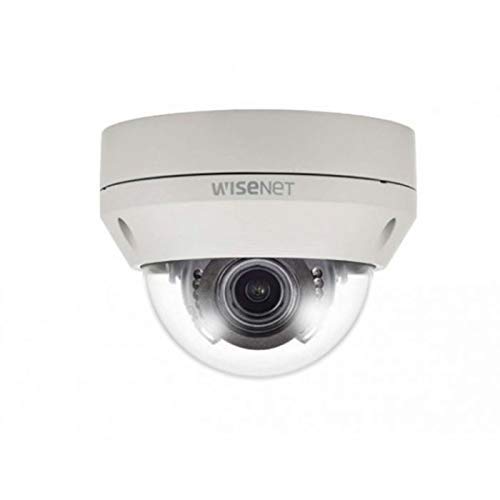
Figure 1: Hanwha Techwin HCV-6070R 2MP Outdoor Vandal-Resistant Dome Camera.
Безбедносне информације
Please read all safety instructions carefully before installing or operating the camera. Keep this manual for future reference.
- Ensure the power supply matches the camera's requirements to prevent electrical shock or fire.
- Не излажите камеру екстремним температурама, влази или корозивним срединама.
- Инсталацију треба да изврши квалификовано особље у складу са локалним електричним прописима.
- Avoid direct exposure of the lens to strong light sources for extended periods.
- Не покушавајте да растављате или модификујете камеру. То ће поништити гаранцију.
Садржај пакета
Проверите да ли су све ставке присутне у пакету:
- Hanwha Techwin HCV-6070R Dome Camera (1 unit)
- Монтажни завртњи и анкери
- Шаблон за инсталацију
- Водич за брзи почетак
- Waterproof Cap (if applicable)
Сетуп
1. Монтажа камере
The HCV-6070R is designed for wall mounting. Choose a suitable outdoor location that provides the desired surveillance coverage and is protected from direct impact.
- Use the provided installation template to mark the drilling holes on the wall.
- Drill holes according to the template and insert the wall anchors.
- Secure the camera base to the wall using the mounting screws.
- Подесите камеру viewing angle as needed before tightening all screws.
2. Ожичење и прикључци
The camera utilizes a BNC connection for video output and requires a separate power supply. Ensure all connections are secure and weatherproof for outdoor use.
- Видео веза: Connect a BNC cable from the camera's BNC port to the video input of your DVR (Digital Video Recorder).
- Прикључак за напајање: Connect a 12V DC power adapter (not included) to the camera's power input. The camera operates at 8 watts.
- Бежична повезаност: The camera supports Wi-Fi for remote control and monitoring. Refer to the operating section for initial Wi-Fi setup.

Слика 2: Прample of a BNC coaxial cable for video connection. Ensure a secure connection to the camera and DVR.
3. Почетна конфигурација
After physical installation and power-up, access the camera settings via your connected DVR or a compatible mobile application (Android controller type specified).
- Подесите датум и време.
- Configure network settings for Wi-Fi connectivity.
- Adjust video quality and recording preferences.
Управљање камером
1. Video Monitoring and Recording
The camera provides 2MP effective video resolution, capturing video at 1080p and a frame rate of 30 fps. Video is typically recorded in MPEG-4 format.
- Приступите уживо view и снимљено фуtage through your connected DVR or the remote control application.
- Ensure your DVR is configured to record from the correct channel.
2. Подешавање фокуса и зума
The HCV-6070R features a 2.8-12mm manual varifocal lens with optical zoom. Adjustments are made manually on the camera body.
- Loosen the focus and zoom locking screws on the camera lens assembly.
- Adjust the zoom ring to achieve the desired field of view.
- Adjust the focus ring until the image is clear and sharp.
- Tighten the locking screws to secure the settings.
3. Night Vision and Low Light Performance
Equipped with night vision and "Night Color" low light technology, the camera automatically switches to infrared mode in low light conditions to provide clear surveillance footage. The light source type is LED.
- Ensure no obstructions block the infrared LEDs on the camera.
- The camera will automatically activate its infrared illuminators when ambient light levels drop.
4. Детекција покрета
The camera supports motion-only alerts. Configure motion detection zones and sensitivity settings through your DVR or the remote control application.
- Дефинишите одређене области унутар камере view за детекцију покрета.
- Set the sensitivity level to minimize false alarms.
- Configure alert notifications (e.g., email, push notifications) via your DVR or application.
5. Даљински управљач
The camera can be controlled remotely using a compatible Android application. Ensure the camera is connected to your Wi-Fi network.
- Download and install the Hanwha Techwin mobile application on your Android device.
- Follow the in-app instructions to add and connect to your HCV-6070R camera.
- Преко апликације можете view ливе фооtage, access recordings, and adjust certain camera settings.
Одржавање
Редовно одржавање осигурава оптималне перформансе и дуготрајност вашег фотоапарата.
- Чишћење сочива: Gently wipe the camera lens with a soft, clean, lint-free cloth. For stubborn dirt, use a lens cleaning solution specifically designed for optical surfaces.
- Чишћење кућишта: Clean the camera's exterior housing with a damp тканина. Немојте користити јаке хемикалије или абразивна средства за чишћење.
- Инспекција каблова: Periodically check all cables and connections for signs of wear, damage, or corrosion, especially for outdoor installations.
- Ажурирања фирмвера: Check the Hanwha Techwin website for any available firmware updates to ensure your camera has the latest features and security patches.
Решавање проблема
| Проблем | Могући узрок | Решење |
|---|---|---|
| Нема видео излаза | No power; Loose BNC connection; Incorrect DVR input selected. | Check power supply; Secure BNC cable; Select correct channel on DVR. |
| Нејасна или замагљена слика | Lens out of focus; Dirty lens. | Manually adjust focus (refer to Operating section); Clean the lens. |
| Ноћни вид не ради | IR LEDs blocked; Insufficient power; Camera stuck in day mode. | Clear obstructions; Verify power supply; Restart camera. |
| Motion detection not triggering | Incorrect sensitivity settings; Motion detection zone not configured. | Adjust sensitivity; Configure motion detection zones in DVR/app. |
| Cannot connect via Wi-Fi | Incorrect Wi-Fi password; Camera out of range; Network issues. | Verify Wi-Fi credentials; Move camera closer to router; Check network status. |
Спецификације
| Модел | ХЦВ-6070Р |
| Бранд | HANWHA Techwin |
| Ефективна видео резолуција | 2 MP (1080p) |
| Фраме Рате | 30 фпс |
| Ленс Типе | 2.8-12mm Manual Varifocal Lens |
| Фоцус Типе | Мануал Фоцус |
| Тип зумирања | Оптицал Зоом |
| Технологија повезивања | Wireless (Wi-Fi), BNC Connection |
| Извор напајања | Manual (requires external 12V DC power adapter) |
| Ватtage | 8 вати |
| Унутрашња/спољна употреба | Оутдоор |
| Посебна карактеристика | Night Vision (Night Color low light technology) |
| Форм Фацтор | Доме |
| Тип монтаже | Валл Моунт |
| Компатибилни уређаји | ДВР |
| Контролни метод | Remote (Android Controller Type) |
| Оцена међународне заштите | ИП54 |
| Технологија фото сензора | ЦМОС |
| Формат видео снимања | МПЕГ-4 |
| Тип упозорења | Мотион Онли |
Гаранција и подршка
For warranty information and technical support, please refer to the official Hanwha Techwin webсајт или директно контактирајте њихову корисничку службу. Сачувајте рачун као доказ о куповини за потребе гаранције.
Произвођач: Ханвха
Датум прве доступности: 19. фебруара 2019. године