
Zoook Thunder 2
Zoook Rocker Thunder 2 Karaoke Bluetooth Party Speaker Instruction Manual
Увод
This manual provides comprehensive instructions for the setup, operation, and maintenance of your Zoook Rocker Thunder 2 Karaoke Bluetooth Party Speaker. Please read this manual thoroughly before using the product to ensure proper function and to maximize your enjoyment.

Image: The Zoook Rocker Thunder 2 speaker, a black portable unit with colorful LED lights on the front grille, a control panel on top, and a wired microphone and remote control beside it.
Шта је у кутији
Приликом отварања пакета, молимо вас да се уверите да су присутни сви следећи елементи:
- Zoook Rocker Thunder 2 Bluetooth Speaker
- Мицро УСБ кабл за пуњење
- Жични микрофон
- Кориснички приручник (овај документ)
- Ремоте Цонтрол

Image: A visual representation of the package contents, including the speaker, wired microphone, and remote control.
Кључне карактеристике
- 30W Powerful Audio Output: Delivers clear and robust sound for various environments.
- Flashing DJ Lights: Integrated multi-color LED lights enhance the party atmosphere.
- Функционалност караоке: Includes a wired microphone for singing along to your favorite tracks.
- Уграђена пуњива батерија: Features a 4000mAh Lithium-Ion battery for portable use.
- Више опција повезивања: Supports Bluetooth streaming, USB disk, TF card, AUX input, and FM radio.
- Снимање једним кликом: Allows recording of microphone input directly to a connected USB or TF card.
- даљински управљач: Provides convenient control over speaker functions from a distance.

Image: The Zoook Rocker Thunder 2 speaker with icons highlighting its features: One Click Recording, Karaoke Ready, Bluetooth Streaming, TF Card Support, USB Disk, Lithium-Ion Battery, FM Radio, and Flashing DJ Lights.
Водич за подешавање
1. Пуњење звучника
- Connect the Micro USB charging cable to the speaker's charging port.
- Укључите други крај кабла у компатибилни USB адаптер за напајање (није укључен) или USB порт рачунара.
- Индикаторска лампица пуњења ће се упалити. Када се потпуно напуни, лампица може променити боју или се искључити, у зависности од модела.
2. Укључивање/искључивање
- To power on, press and hold the Power button on the control panel.
- Да бисте искључили напајање, поново притисните и држите дугме за напајање.
3. Connecting the Wired Microphone
- Insert the microphone cable into the MIC input jack on the speaker's control panel.
- Ensure the ON/OFF switch on the microphone is set to 'ON' for operation.
4. Блуетоотх упаривање
- Power on the speaker. It will automatically enter Bluetooth pairing mode, indicated by a flashing Bluetooth light or an audible prompt.
- Омогућите Блутут на свом мобилном уређају (паметном телефону, таблету итд.).
- Тражи available Bluetooth devices and select "ZOOOK THUNDER 2" from the list.
- Once paired, the speaker will emit a confirmation sound, and the Bluetooth indicator light will become solid.
Упутство за употребу
1. Избор режима
- Press the 'MODE' button on the control panel or remote to switch between Bluetooth, FM Radio, AUX, USB, and TF card modes.
2. Блуетоотх режим
- After successful pairing, play audio from your connected device.
- Use the speaker's volume knob or your device's volume controls to adjust the sound level.
- Use the 'Previous/Next Track' buttons on the speaker or remote to navigate songs.
3. Функција караоке
- Ensure the wired microphone is connected and powered on.
- Adjust the microphone volume using the dedicated 'MIC VOL' knob (if available) or the main volume control.
- To add an echo effect, use the 'ECHO' knob to control the intensity.

Image: The Zoook Rocker Thunder 2 speaker with a vintage-style microphone, emphasizing its karaoke feature and 30-watt power.
4. Режим ФМ радија
- Switch to FM mode using the 'MODE' button.
- Press and hold the 'Play/Pause' button to initiate an automatic station scan. The speaker will save available stations.
- Use the 'Previous/Next Track' buttons to switch between saved FM stations.
5. Репродукција са USB/TF картице
- Insert a USB flash drive or TF (MicroSD) card into the respective port.
- Звучник ће се аутоматски пребацити у USB/TF режим и почети да репродукује звук files.
- Use the 'Previous/Next Track' and 'Play/Pause' buttons to control playback.
6. Функција снимања
- Ensure a USB drive or TF card is inserted.
- Press the 'REC' button to start recording microphone input.
- Press 'REC' again to stop recording. The recording will be saved to the inserted storage device.
7. DJ Lights Control
- Press the 'ON/OFF LED' button on the control panel to toggle the flashing DJ lights on or off.
Видео: Промотивни видео приказasing the Zoook Rocker Thunder 2 speaker in a party setting, demonstrating its sound and flashing lights, and highlighting its portability and karaoke features.
Video: An Amazon.in product video highlighting the key features of the Zoook Rocker Thunder 2 speaker, including its 30W power, DJ lights, karaoke function, and built-in battery.
Одржавање
- Чишћење: Use a soft, dry cloth to clean the speaker's exterior. Avoid using harsh chemicals or abrasive cleaners.
- Одржавање батерије: To prolong battery life, fully charge the speaker before first use and recharge it regularly, even if not in frequent use. Avoid completely draining the battery.
- Складиштење: Чувајте звучник на хладном и сувом месту, даље од директне сунчеве светлости и екстремних температура.
- Изложеност води: Овај звучник није водоотпоран. Избегавајте излагање води или високој влажности.
Решавање проблема
- Нема напајања: Ensure the speaker is charged. Connect the charging cable and allow it to charge for a period before attempting to power on.
- Нема звука: Check the volume levels on both the speaker and your connected device. Ensure the correct input mode is selected.
- Микрофон не ради: Verify the microphone is securely plugged into the MIC input and its ON/OFF switch is in the 'ON' position. Adjust the microphone volume knob.
- Проблеми са Блуетоотх везом: Ensure the speaker is in Bluetooth pairing mode. Turn off and on Bluetooth on your device, then try re-pairing. Keep devices within the effective Bluetooth range.
- Слаб ФМ пријем: Extend the antenna fully. Try repositioning the speaker to improve signal reception.
Спецификације
| Феатуре | Детаљ |
|---|---|
| Модел | Гром 2 |
| Бранд | Zoook |
| Максимална излазна снага звучника | 30 Ваттс |
| Извор напајања | Баттери Поверед |
| Тип батерије | Литијум-јонска (4000 mAh) |
| Просечан век трајања батерије | 6 сата |
| Технологија повезивања | AUX, Bluetooth, USB, Wireless |
| Режим аудио излаза | Стерео |
| Посебне карактеристике | Bluetooth, Portable, Wireless, Flashing DJ Lights, Karaoke |
| Димензије производа (ДкШкВ) | 30 к 17 к 38 цм |
| Тежина артикла | 3.2 кг |
| Боја | Црно |
| Земља порекла | Кина |

Image: The Zoook Rocker Thunder 2 speaker with its dimensions labeled: 11 inches wide, 5.5 inches deep, and 13.4 inches high.
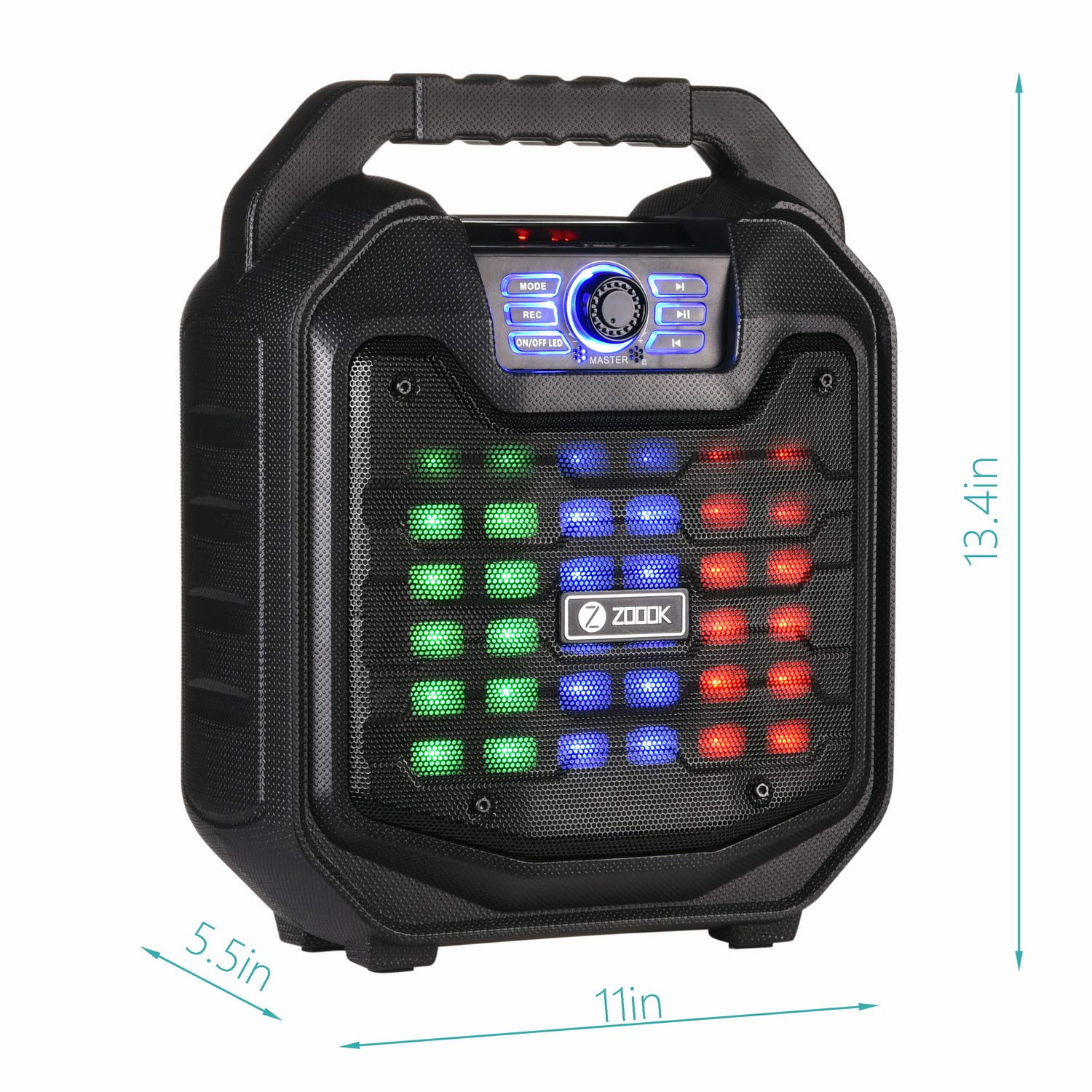
Image: A comparison table showing different models in the Zoook Thunder Series, including the Thunder 2, with specifications like microphone type, wattage, recording, and party lights.
Гаранција и подршка
Your Zoook Rocker Thunder 2 speaker comes with a 1-годишња гаранција. For any queries, assistance, or support, please use the following contact methods:
- Бесплатан број: 1800-103-3544
- Подршка путем е-поште: support@zoook.co.in
- Подршка путем ћаскања: Via Facebook at www.facebook.com/GoZoook
- Service Centre List: Find your nearest service center at https://goo.gl/eezwYW
Please provide us an opportunity to assist you and make your experience delightful!

Image: A graphic displaying Zoook's customer support options, including a toll-free number, email address, and Facebook chat link.
Ask a question about this manual
Ask about setup, troubleshooting, compatibility, parts, safety, or missing instructions. Manuals+ will review the question and use this page’s manual context to help answer it.