
Увод
This manual provides instructions for the operation and maintenance of your Senville Remote Control, model AR2015-IR. This remote is designed for use with Senville AURA Series and LETO Series mini split air conditioning systems. Please read this manual thoroughly before using the remote control to ensure proper function and longevity.
Производ је завршенview
The Senville AR2015-IR remote control allows you to manage various functions of your compatible Senville mini split system, including temperature settings, operating modes, fan speed, and special features.
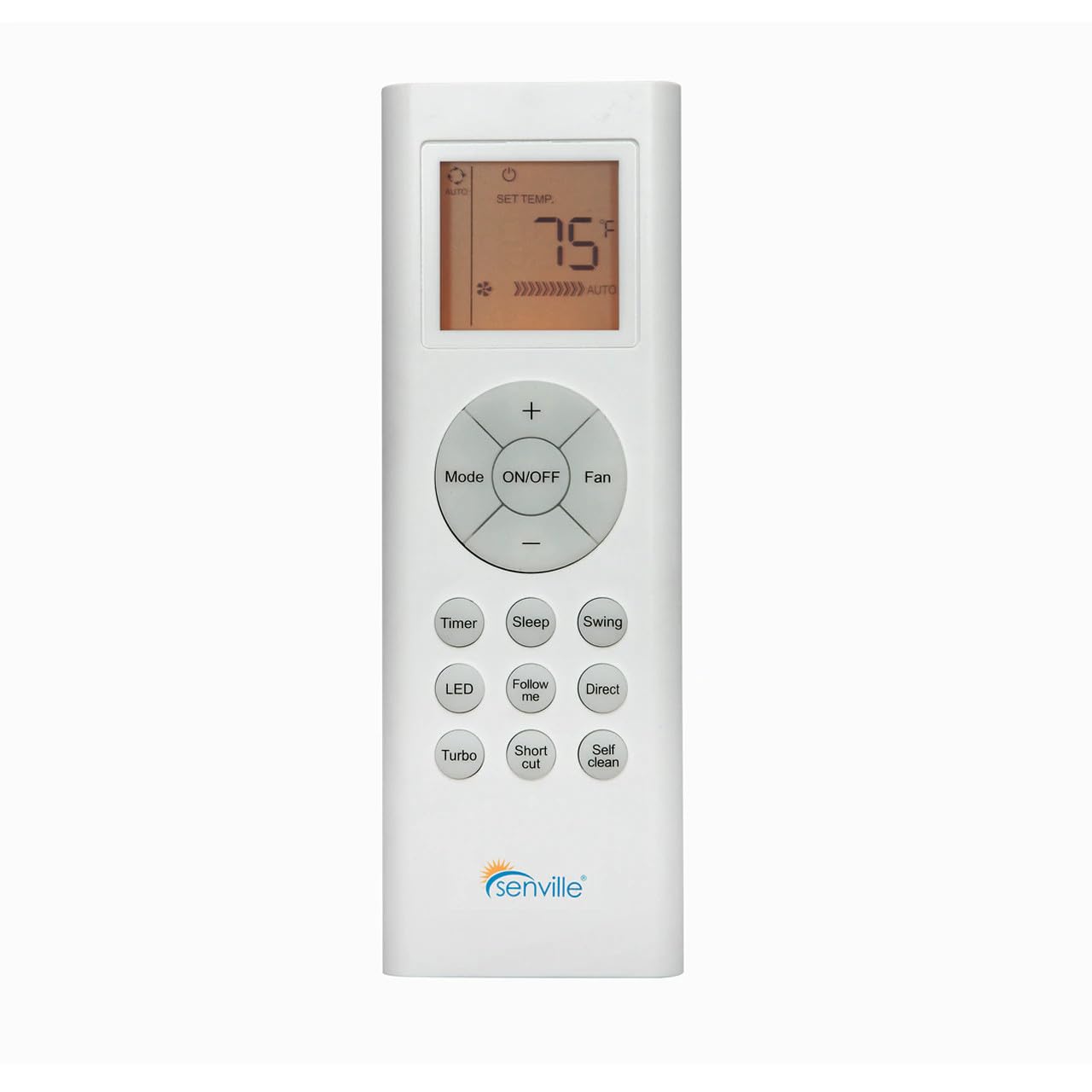
Слика 1: Фронт view of the Senville AR2015-IR Remote Control. It features an LCD screen at the top, a central circular button cluster for power, mode, fan, and temperature adjustment, and additional function buttons below.
Сетуп
1. Инсталација батерије
- Пронађите поклопац одељка за батерије на задњој страни даљинског управљача.
- Померите поклопац надоле или притисните резу да бисте га отворили.
- Уметните две ААА батерије (нису укључене), водећи рачуна о исправном поларитету (+ и -) као што је назначено унутар одељка.
- Вратите поклопац одељка за батерије.
Напомена: The remote control does not require programming and should function immediately upon battery installation with compatible Senville AURA and LETO series units.
Упутство за употребу
Функције дугмета
- УКЉУЧЕНО/ИСКЉУЧЕНО: Притисните да бисте укључили или искључили клима уређај.
- Режим: Циклира кроз режиме рада: Аутоматски, Хлађење, Сушење, Грејање, Вентилатор.
- Лепеза: Подешавање брзине вентилатора: Аутоматски, Ниско, Средње, Високо.
- Temperature (+/-): Increases or decreases the set temperature. The display shows the set temperature in Fahrenheit or Celsius.
- Тајмер: Подешава тајмер за аутоматско укључивање или искључивање.
- спавање: Активира или деактивира режим спавања за енергетски ефикасан рад током спавања.
- Свинг: Контролише функцију вертикалног замаха жалузина.
- ЛЕД: Turns the indoor unit's display LED light on or off.
- Прати ме: Activates the Follow Me function, which senses the temperature at the remote's location.
- Директно: Adjusts the horizontal louver direction.
- Турбо: Активира брзо хлађење или грејање на кратак период.
- Пречица: Recalls your preferred settings.
- Самочишћење: Initiates the self-cleaning function of the indoor unit.
Избор јединице температуре
To switch between Fahrenheit (°F) and Celsius (°C), ensure the unit is off. Press and hold the Temperature (+) and Temperature (-) buttons simultaneously for approximately 3 seconds. The display will change to the alternate unit.
Одржавање
Замена батерије
Replace batteries when the display becomes dim or the remote's range decreases. Always replace both batteries at the same time with new AAA batteries. Dispose of used batteries according to local regulations.
Чишћење даљинског управљача
Обришите даљински управљач меком, сувом крпом. Не користите течна средства за чишћење или абразивне материјале, јер могу оштетити површину даљинског управљача или унутрашње компоненте.
Решавање проблема
- Даљински не реагује:
- Проверите да ли су батерије правилно постављене и да нису истрошене. Замените их ако је потребно.
- Ensure there are no obstructions between the remote control and the indoor unit's receiver.
- Уверите се да је даљински управљач усмерен директно ка унутрашњој јединици.
- Екран је замагљен или празан:
- Замените батерије.
- Unit not responding to specific functions:
- Verify that your specific Senville unit model supports the function you are trying to use. Refer to your air conditioner's manual for compatibility.
Спецификације
| Број модела | AR2015-IR |
| Компатибилни уређаји | Senville AURA Series, Senville LETO Series mini split air conditioners (HF, HF/Z, CD/X Models) |
| Технологија повезивања | Инфрацрвени |
| Извор напајања | 2 к ААА батерије (нису укључене) |
| Димензије (Д к Ш к В) | 6.89 к 2.68 к 0.83 инча |
| Тежина | 2.89 унци (без батерија) |
Гаранција и подршка
For warranty information or technical support regarding your Senville Remote Control or compatible air conditioning unit, please refer to the documentation provided with your main Senville product or visit the official Senville website. Contacting Senville customer service directly is recommended for specific inquiries.
Више информација и ресурса за подршку можете пронаћи на Senville Store on Amazon.