
MIATONE BOOMBOX
MIATONE BOOMBOX Bluetooth Speaker User Manual
Model: BOOMBOX
1. Увод
Thank you for choosing the MIATONE BOOMBOX Bluetooth Speaker. This portable and waterproof wireless speaker is designed to deliver high-quality audio for various environments, from indoor relaxation to outdoor adventures. Please read this manual carefully before using the product to ensure proper operation and to maximize its lifespan.

Аудио високе резолуције: Experience crisp highs, rich mids, and deep bass with advanced DSP-enhanced sound technology.
2. Безбедносне информације
- Do not expose the speaker to extreme temperatures (heat or cold) or high humidity.
- Избегавајте испуштање или излагање звучника јаким ударима.
- Не растављајте, не поправљајте или не модификујте звучник сами. Обратите се квалификованом сервисеру.
- Држите звучник даље од медицинских уређаја, јер његово магнетно поље може ометати њихов рад.
- Ensure the charging port cover is securely closed when using the speaker near water to maintain its waterproof rating.
- Користите само приложени кабл за пуњење или сертификовани еквивалент.
- Do not listen at excessively high volumes for prolonged periods to prevent hearing damage.
3. Садржај пакета
Молимо вас да проверите пакет за следеће ставке:
- MIATONE BOOMBOX Bluetooth Speaker
- Мицро УСБ кабл за пуњење
- Помоћни улазни кабл
- Упутство за употребу
4. Производ је готовview
Familiarize yourself with the various parts and controls of your MIATONE BOOMBOX speaker.
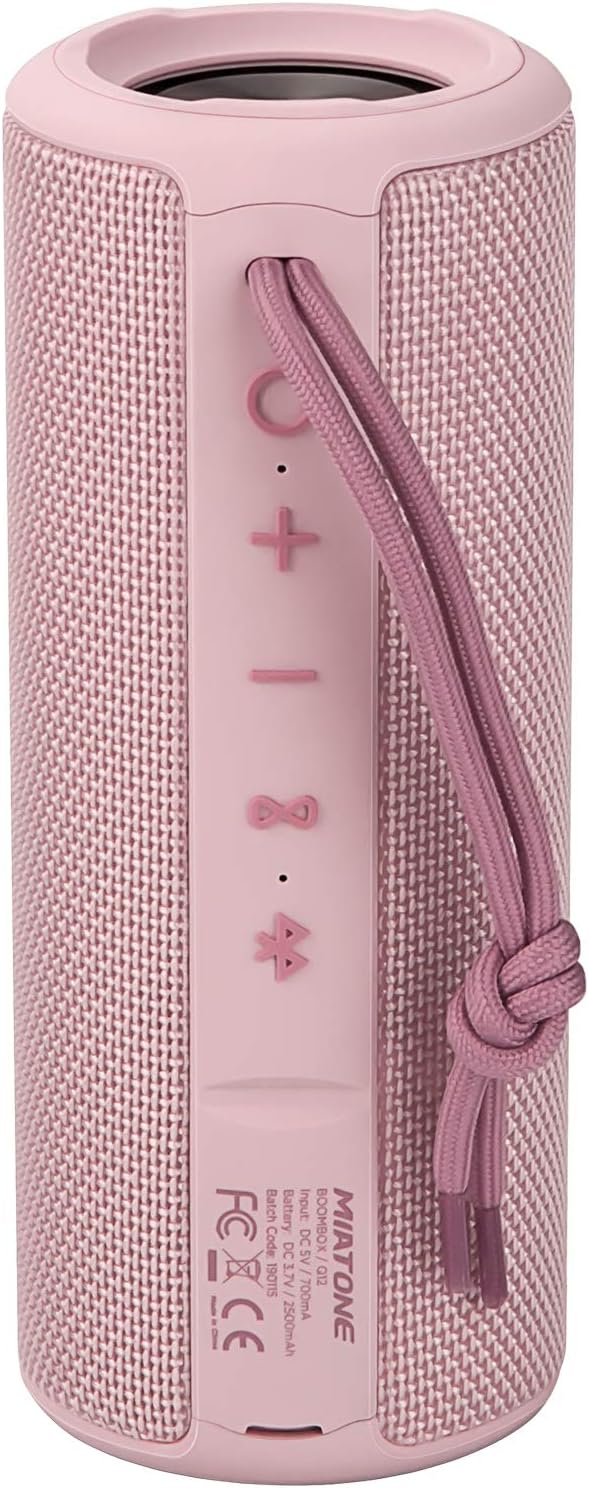
Фронт View: Shows the speaker grille and the MIATONE logo.

Позади View: Displays the control buttons (+, -, Play/Pause, Bluetooth, TWS) and the charging/AUX ports under a protective flap.

Reinforced Silicone End Caps: The speaker features durable silicone bumpers on both ends to absorb impact and prevent slipping.
Функције дугмета:
| Дугме | Функција |
|---|---|
| + | Short press: Volume Up; Long press: Next Track |
| - | Short press: Volume Down; Long press: Previous Track |
| Пусти/Паузирај | Short press: Play/Pause; Short press (incoming call): Answer/End Call; Long press (incoming call): Reject Call |
| Икона Блуетоотх | Long press: Disconnect current Bluetooth device and enter pairing mode |
| TWS Icon | Short press: Initiate TWS pairing (True Wireless Stereo) |
| Дугме за напајање | Дуг притисак: Укључивање/искључивање |
5. Подешавање
5.1 Пуњење звучника
- Open the protective flap on the back of the speaker to reveal the charging port.
- Connect the Micro USB charging cable to the speaker's charging port and the other end to a USB power adapter (not included) or a computer's USB port.
- ЛЕД индикатор ће приказивати статус пуњења (нпр. црвена боја за пуњење, искључена када је потпуно напуњена).
- A full charge takes approximately 12 hours. Ensure the protective flap is sealed after charging.
5.2 Укључивање/искључивање
- Укључено: Long press the Power button until you hear a power-on prompt.
- Искључивање: Long press the Power button until you hear a power-off prompt.
5.3 Блуетоотх упаривање
- Ensure the speaker is powered on and in Bluetooth pairing mode (indicated by a flashing blue LED). If not, long press the Bluetooth icon button.
- Омогућите Блуетоотх на свом уређају (паметном телефону, таблету, рачунару).
- Тражи "BOOMBOX" in your device's Bluetooth list.
- Select "BOOMBOX" to connect. You will hear a confirmation sound once paired.
- Звучник ће се аутоматски поново повезати са последњим упареним уређајем када се укључи, ако је у домету.

Upgraded Bluetooth 5.3: Provides faster and more stable wireless connections.
5.4 TWS (прави бежични стерео) упаривање
TWS allows you to pair two MIATONE BOOMBOX speakers together for a true stereo sound experience.
- Ensure both BOOMBOX speakers are powered on and not connected to any Bluetooth device.
- On one speaker (this will be the primary speaker), short press the TWS icon button. It will enter TWS pairing mode.
- The two speakers will automatically connect to each other. You will hear a confirmation sound once TWS pairing is successful.
- Once TWS paired, connect your device to the primary speaker via Bluetooth as described in section 5.3.
- To disconnect TWS, short press the TWS icon button on either speaker.
6. Упутство за употребу
6.1 Репродукција музике
- Пусти/паузирај: Кратко притисните дугме Плаи/Паусе.
- Појачавање звука: Кратко притисните на + дугме.
- Смањивање јачине звука: Кратко притисните на - дугме.
- Следећа нумера: Дуго притисните + дугме.
- Претходни запис: Дуго притисните - дугме.
6.2 Позивање без употребе руку
- Одговори на позив: Кратко притисните дугме Репродукуј/Паузирај када зазвони долазни позив.
- Заврши позив: Кратко притисните дугме Репродукуј/Паузирај током позива.
- Одбиј позив: Дуго притисните дугме Репродукуј/Паузирај када зазвони долазни позив.
6.3 Auxiliary Input (AUX Mode)
You can connect non-Bluetooth devices to the speaker using the provided 3.5mm auxiliary cable.
- Отворите заштитни поклопац на задњој страни звучника.
- Connect one end of the 3.5mm AUX cable to the speaker's AUX port and the other end to your audio device's headphone jack.
- Звучник ће се аутоматски пребацити у AUX режим.
- Контролишите репродукцију и јачину звука са повезаног уређаја.
- Ensure the protective flap is sealed after use to maintain water resistance.
7. Одржавање
7.1 Чишћење
- Обришите звучник меком, дamp тканина.
- Не користите абразивна средства за чишћење, алкохол или хемијске раствараче.
- Ensure the speaker is completely dry before charging or storing.
7.2 Складиштење
- Чувајте звучник на хладном и сувом месту, даље од директне сунчеве светлости и екстремних температура.
- If storing for a long period, charge the battery to about 50% every few months to preserve battery life.
7.3 Водоотпорност (IPX6)
The MIATONE BOOMBOX is IPX6 waterproof, meaning it can withstand powerful water jets. It is not designed for submersion.
- Always ensure the charging port and AUX port protective flap is securely closed before exposing the speaker to water.
- If the speaker gets wet, wipe it dry with a clean cloth before opening the port flap or charging.
- Do not charge the speaker if the ports are wet.

IPX6 Waterproof Speaker: Designed to float and withstand water splashes, making it ideal for poolside or beach use.
КСНУМКС. Решавање проблема
| Проблем | Могући узрок | Решење |
|---|---|---|
| Звучник се неће укључити. | Батерија је празна или је празна. | Потпуно напуните звучник. |
| Није могуће упарити са Блуетоотх уређајем. | Speaker is not in pairing mode; device's Bluetooth is off; speaker is already connected to another device; device list needs refresh. | Ensure speaker is in pairing mode (flashing blue LED). Turn device's Bluetooth off and on. Disconnect from other devices. Forget "BOOMBOX" on your device and re-scan. |
| Нема звука или је јачина звука ниска. | Volume too low on speaker or device; incorrect input mode; speaker not connected. | Increase volume on both speaker and device. Ensure correct input mode (Bluetooth/AUX). Re-establish Bluetooth connection. |
| Изобличење звука. | Прејака јачина звука; празна батерија; сметње. | Reduce volume. Charge the speaker. Move speaker closer to the device or away from other electronic devices. |
| Упаривање TWS-а није успело. | Звучници су превише удаљени; један звучник је већ повезан са уређајем. | Уверите се да су оба звучника близу један другом и да нису повезана ни са једним Bluetooth уређајем пре него што започнете TWS упаривање. |
9. Спецификације
| Феатуре | Детаљ |
|---|---|
| Назив модела | BOOMBOX (Q12) |
| Технологија повезивања | Блутут 5.3, УСБ, АУКС |
| Спеакер Типе | Portable Speaker, Bluetooth Speaker |
| Максимална излазна снага | 20 Ваттс |
| Фреквенцијски одзив | 20 КХз |
| Трајање батерије | До 17 сати (при 50% запремине) |
| Време пуњења | 12 сата |
| Водоотпорна оцена | ИПКС6 |
| Блуетоотх домет | До 100 стопе (30.5 метара) |
| Димензије (Д к Ш к В) | КСНУМКС к КСНУМКС к КСНУМКС цм (КСНУМКС к КСНУМКС к КСНУМКС инча) |
| Тежина | 421.84 грама (0.93 лбс) |
| Материјал | Алуминијум |
| Компатибилни уређаји | Personal Computer, Laptop, Tablet, Smartphone |

Дуготрајно време репродукције: Enjoy up to 17 hours of playback at 50% volume.
10. Гаранција и подршка
MIATONE products are designed and manufactured to the highest quality standards. For information regarding warranty coverage, technical support, or service inquiries, please refer to the contact information provided on the product packaging or visit the official MIATONE webсајту.
Сачувајте доказ о куповини за гаранцијске захтеве.
Ask a question about this manual
Ask about setup, troubleshooting, compatibility, parts, safety, or missing instructions. Manuals+ will review the question and use this page’s manual context to help answer it.