
1. Увод
The ENHANCE Infiltrate USB Gaming Mouse is designed for an enhanced gaming experience, featuring customizable controls and dynamic lighting. This manual provides instructions for setting up, operating, and maintaining your gaming mouse.

Image: The ENHANCE Infiltrate USB Gaming Mouse, showcasinг његов ергономски дизајн и елегантна црна завршна обрада.
2. Кључне карактеристике
- Multi-Color LED Light: Dynamic rainbow lighting pattern illuminates the mouse accents, slowly fading between colors.
- On-the-Fly DPI Adjustment: Quickly select from 4 DPI intervals (800, 1200, 1600, 2400) using the dedicated DPI button.
- Ergonomic Design with Smooth Rubber Grip: The top features a sleek rubber coating, while the side includes two extra thumb buttons with a textured grip for comfort.
- 6 програмабилних дугмади: Customize your gaming experience with additional buttons for macros or specific functions.
- Плуг & Плаи дизајн: Connects easily to your PC via a gold-plated USB connector for immediate use.
- Издржљиви плетени кабл: Designed for longevity and resistance to tangles.
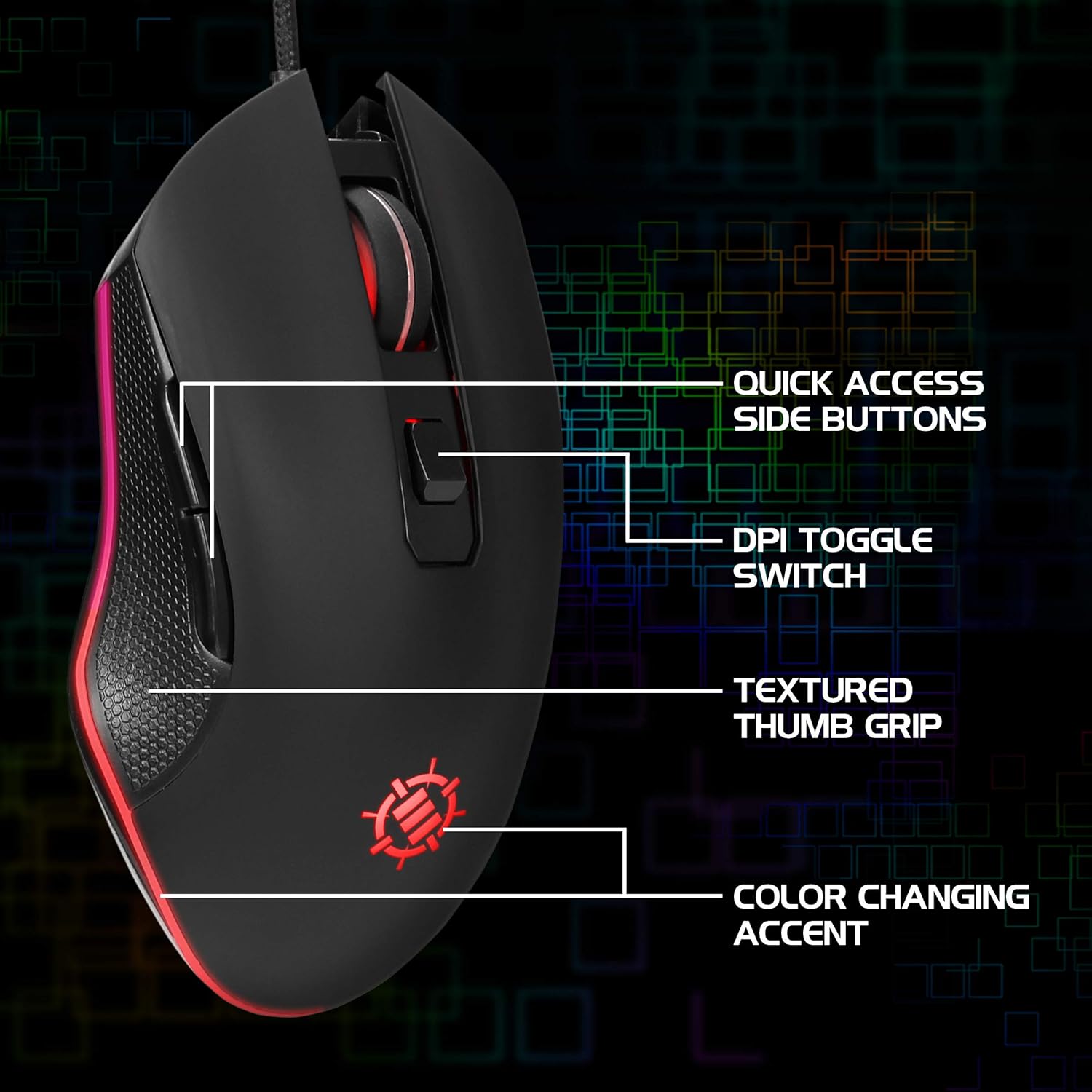
Image: Diagram highlighting key features of the ENHANCE Infiltrate mouse, including quick access side buttons, DPI toggle switch, textured thumb grip, and color-changing accent.
3. Водич за подешавање
- Распакујте миш: Carefully remove the ENHANCE Infiltrate USB Gaming Mouse from its packaging.
- Повежите се са рачунаром: Locate an available USB port on your computer. Insert the gold-plated USB connector of the mouse into the USB port. The mouse is plug-and-play, so no additional drivers are typically required for basic functionality.
- Почетно признање: Ваш оперативни систем би требало аутоматски да детектује и инсталира потребне драјвере. Овај процес може потрајати неколико тренутака.
- Проверите функционалност: Once installed, the mouse's LED lighting should activate, and you should be able to move the cursor on your screen.

Слика: Крупни план view of the heavy-duty braided cable and gold-plated USB connector, ready for connection.
For a visual guide on connecting and using the mouse, please watch the official product video below.
Video: Official product video demonstrating the ENHANCE Infiltrate USB Gaming Mouse, including connection and feature highlights.
4. Упутство за употребу
4.1 Основне функције миша
The ENHANCE Infiltrate mouse functions like a standard USB mouse. It includes left-click, right-click, and a scroll wheel with a clickable middle button.

Image: A hand demonstrating the ergonomic grip of the ENHANCE Infiltrate Gaming Mouse on a gaming mouse pad.
4.2 ДПИ подешавање
The mouse features a dedicated DPI button located behind the scroll wheel. Press this button to cycle through four preset DPI (Dots Per Inch) sensitivity levels:
- 800 ДПИ
- 1200 ДПИ
- 1600 ДПИ
- 2400 ДПИ
Each DPI setting may correspond to a different LED color on the mouse, providing visual feedback for the current sensitivity level.
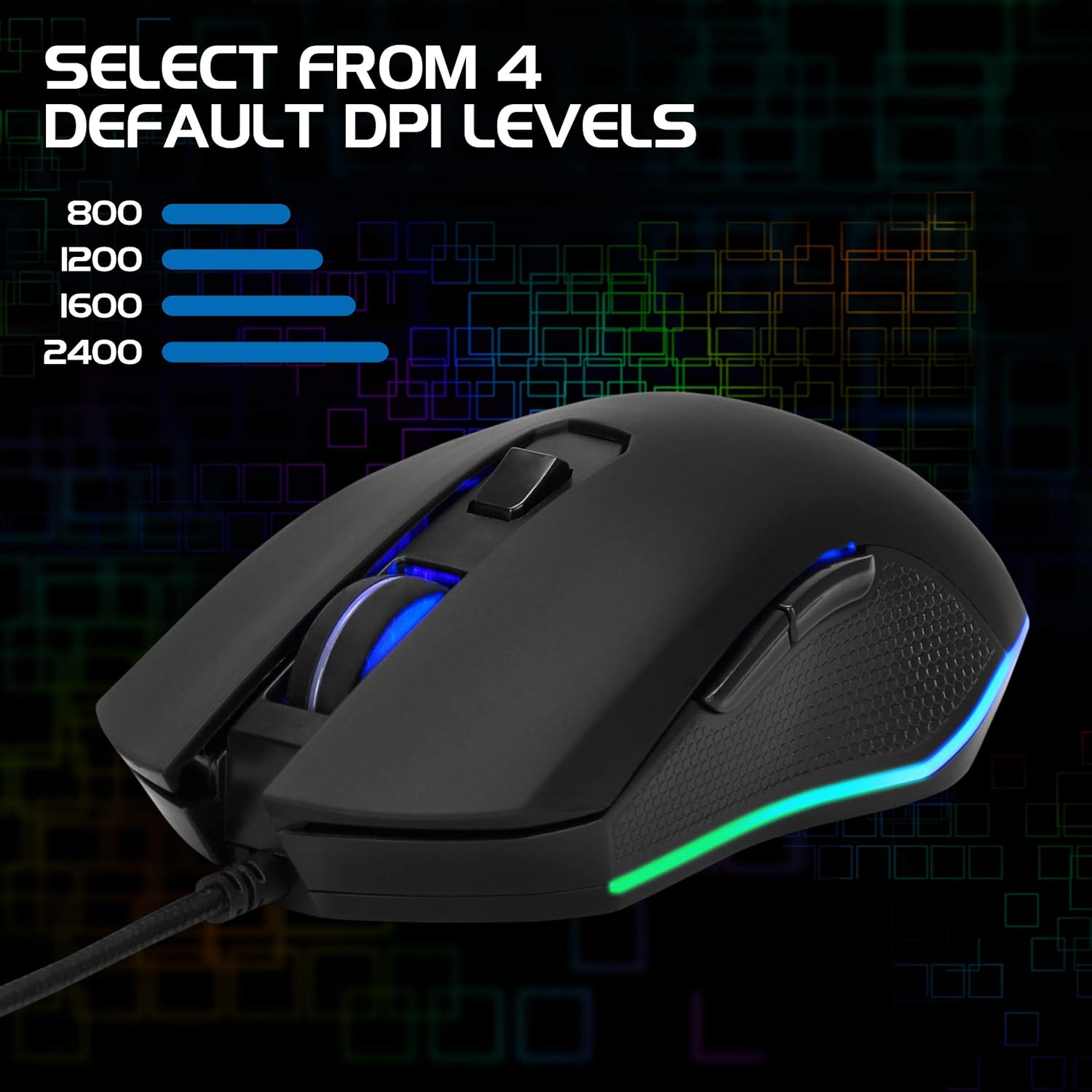
Image: The ENHANCE Infiltrate Gaming Mouse illustrating the four selectable DPI levels (800, 1200, 1600, 2400) and their corresponding LED indicators.
4.3 Multi-Color LED Lighting
The Infiltrate mouse features dynamic multi-color LED lighting that cycles through a rainbow pattern. This lighting is automatic and provides an aesthetic enhancement to your gaming setup.

Image: The ENHANCE Infiltrate Gaming Mouse displaying its sleek color-changing lighting accents.

Слика: Сајд професионалацfile of the ENHANCE Infiltrate Gaming Mouse, showcasing its blue LED lighting.
4.4 Програмабилна дугмад
The mouse includes 6 programmable buttons. For advanced customization and programming of these buttons, please refer to your operating system's mouse settings or any third-party software compatible with generic gaming mice. Specific software for this model is not provided by the manufacturer.
5. Одржавање
- Чишћење: Користите меку, суву крпу да обришете површину миша. За тврдокорну прљавштину, благо дamp може се користити крпа, водећи рачуна да влага не уђе у унутрашње компоненте.
- Оптички сензор: Periodically clean the optical sensor area on the underside of the mouse with a cotton swab to ensure optimal tracking performance.
- Нега каблова: Избегавајте оштре савијање или прекомерно повлачење плетеног USB кабла како бисте спречили оштећења.
- Складиштење: Када се не користи, чувајте миш на чистом и сувом месту, даље од екстремних температура.
КСНУМКС. Решавање проблема
- Миш не реагује:
- Уверите се да је USB кабл безбедно прикључен у исправан USB порт на рачунару.
- Покушајте да прикључите миш на други УСБ порт.
- Поново покрените рачунар.
- Тестирајте миш на другом рачунару да бисте утврдили да ли је проблем са мишем или вашим системом.
- Кретање курсора је неправилно или скачкасто:
- Очистите оптички сензор на доњој страни миша.
- Уверите се да користите миш на чистој, нерефлектујућој површини. Препоручује се подлога за миш.
- Check for any software conflicts or outdated drivers on your computer.
- ЛЕД светла не раде:
- Verify the mouse is properly connected to your computer.
- The LED lighting is automatic and should activate upon connection. If not, try a different USB port or computer.
- DPI Button Not Changing Sensitivity:
- Ensure the mouse is fully recognized by your computer.
- Чврсто притисните дугме DPI.
7. Спецификације
| Бранд | ЕНХАНЦЕ |
| Број модела | ENINMNU100BOEW |
| Хардверска платформа | Мак, рачунар |
| Тежина артикла | 4.4 унци |
| Димензије производа (ДкШкВ) | 4.92 к 2.68 к 1.56 инча |
| Боја | Црно |
| Извор напајања | Електрични са каблом (УСБ) |
| Технологија повезивања | УСБ |
| Посебна карактеристика | Ергономски дизајн |
| Технологија детекције покрета | Оптицал |
| ДПИ Левелс | 800, 1200, 1600, 2400 |
8. Гаранција и подршка
The ENHANCE Infiltrate USB Gaming Mouse is backed by a 3-годишња гаранција произвођачаОва гаранција покрива недостатке у материјалу и изради при нормалној употреби.
For warranty claims or technical support, please contact ENHANCE customer service. Keep your proof of purchase for warranty validation.
For further assistance, visit the official ENHANCE Gaming webсајт или контактирајте њихове канале за подршку.