
Divoom N12107
Divoom Timebox Mobile Bluetooth Speaker User Manual
Модел: Н12107
Увод
Хвала вам на куповиниasing the Divoom Timebox Mobile Bluetooth Speaker. This manual provides essential information for setting up, operating, and maintaining your device. The Divoom Timebox is a versatile portable Bluetooth speaker featuring a unique pixel art display, offering both audio playback and visual entertainment.
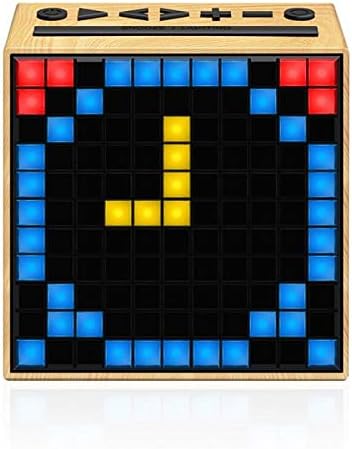
Слика: Фронт view of the Divoom Timebox speaker, showcasing its pixel display with a digital clock. The speaker has a light wood-grain finish.
Безбедносне информације
Please read all safety instructions before using this product. Failure to follow these instructions may result in electric shock, fire, or other injuries.
- Не излажите уређај екстремним температурама, директној сунчевој светлости или високој влажности.
- Не урањајте уређај у воду или било коју другу течност.
- Не покушавајте да растављате, поправљате или модификујете уређај. Сва сервисирања препустите квалификованом особљу.
- Користите само назначени кабл за пуњење и адаптер за напајање.
- Држите уређај даље од деце и кућних љубимаца.
- Избегавајте испуштање или излагање уређаја јаким ударима.
Сетуп
1. Распакивање и почетна наплата
Carefully remove the Divoom Timebox speaker and all accessories from the packaging. Before first use, it is recommended to fully charge the speaker. Connect the provided USB charging cable to the speaker's charging port and the other end to a USB power source (e.g., computer USB port or USB wall adapter).
2. Укључивање/искључивање
To power on the speaker, press and hold the power button located on the top panel for a few seconds until the pixel display illuminates. To power off, press and hold the power button again until the display turns off.
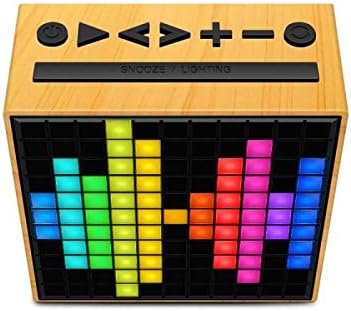
Слика: Врх view of the Divoom Timebox speaker, highlighting the control buttons including power, volume, and playback controls. The pixel display shows a colorful pattern.
3. Блуетоотх упаривање
- Ensure the Divoom Timebox is powered on. It will automatically enter Bluetooth pairing mode, indicated by a blinking Bluetooth icon on the display.
- На свом мобилном уређају (паметном телефону, таблету итд.) омогућите Блутут.
- Тражи available Bluetooth devices. Select "Divoom Timebox" from the list.
- Once connected, the speaker will emit a confirmation sound, and the Bluetooth icon on the display will become solid.
- Your device is now paired and ready for audio playback.
Упутство за употребу
Аудио репродукција
- Пусти/паузирај: Press the Play/Pause button on the top panel.
- Појачавање/утишавање: Притисните дугмад „+“ или „-“ да бисте подесили јачину звука.
- Следећа/претходна нумера: Press the 'Next' or 'Previous' track buttons.
- Аук-ин режим: Connect an audio device using a 3.5mm audio cable to the AUX-in port. The speaker will automatically switch to AUX mode.
Pixel Display Functions
The Divoom Timebox features a customizable pixel display. To fully utilize its features, download the official Divoom app from your device's app store. The app allows you to:
- Create and display custom pixel art.
- Choose from pre-set animations and designs.
- Set alarms and timers with custom pixel animations.
- Display notifications from your phone.
- Access various pixel games.
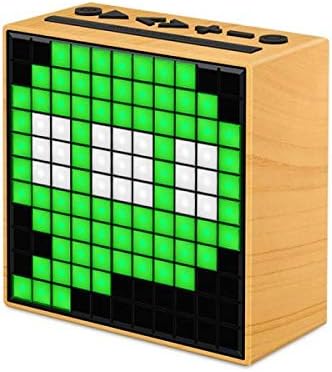
Слика: Са стране view of the Divoom Timebox speaker, showcasing a vibrant green pixel art design on its display. The speaker maintains its light wood-grain aesthetic.
Одржавање
- Чишћење: Use a soft, dry, lint-free cloth to clean the speaker's surface. Do not use abrasive cleaners, waxes, or solvents.
- Складиштење: Када се звучник не користи дуже време, чувајте га на хладном и сувом месту, даље од директне сунчеве светлости и екстремних температура.
- Одржавање батерије: Да бисте продужили век трајања батерије, избегавајте често потпуно пражњење батерије. Редовно пуните звучник, чак и ако га не користите активно.
Решавање проблема
| Проблем | Могући узрок | Решење |
|---|---|---|
| Звучник се не укључује. | Слаба батерија; Дугме за напајање није довољно дуго држано. | Потпуно напуните звучник. Притисните и држите дугме за напајање 3-5 секунди. |
| Нема звука из звучника. | Јачина звука је прениска; Уређај није повезан; Неисправан режим уноса. | Increase speaker and device volume. Re-pair Bluetooth. Ensure AUX cable is fully inserted if using AUX mode. |
| Блуетоотх веза не успева. | Звучник није у режиму упаривања; Блутут уређаја је искључен; Сметње. | Ensure speaker is in pairing mode. Turn device Bluetooth off and on. Move speaker closer to device. Forget device on phone and re-pair. |
| Pixel display not working. | Software glitch; Low battery. | Restart the speaker. Ensure battery is charged. Check Divoom app for updates. |
Спецификације
| Феатуре | Детаљ |
|---|---|
| Бранд | Дивоом |
| Број модела | Н12107 |
| Спеакер Типе | Блуетоотх звучници |
| Технологија повезивања | Блуетоотх |
| Nominal Output / Speaker Maximum Output Power | 5 Ваттс |
| Тип порта | Аудио Јацк |
| Тежина производа | 383 г |
| Dimensions (Depth x Height x Width) | 114 мм к 115.8 мм к 55 мм |
| Извор напајања | Electricity (Rechargeable Battery) |
| Први доступан датум | 28. јануара 2019 |
Гаранција и подршка
For warranty information and technical support, please refer to the documentation included with your product or visit the official Divoom webсајт. Сачувајте рачун као доказ о куповини за потребе гаранције.
Произвођач: Дивоом
Ask a question about this manual
Ask about setup, troubleshooting, compatibility, parts, safety, or missing instructions. Manuals+ will review the question and use this page’s manual context to help answer it.