
Leupold 177187
LTO-Tracker 2 Thermal Viewер Упутство за употребу
Бренд: Леуполд
1. Производ је готовview
The Leupold LTO-Tracker 2 is a compact and lightweight thermal viewer designed to enhance your outdoor experience, whether for hunting, tracking, or general observation. It allows you to detect heat signatures from game, blood trails, and other objects, both day and night. Its robust design and advanced features make it a reliable companion in various conditions.
A key feature is the new Беацон моде, which recalibrates the screen to improve daytime use, making it easier to identify objects with similar heat signatures to their backgrounds. Built with a durable aluminum housing and a Gorilla Glass display, the LTO-Tracker 2 is designed for rugged field use.

Figure 1: The Leupold LTO-Tracker 2 Thermal Viewer, a compact and durable device for detecting heat signatures.
2. Кључне карактеристике
- Број модела: 177187
- Трајност: 100% waterproof, fog proof, and shockproof construction.
- Опсег детекције: Up to 600-yard detection range.
- Приказ: 240 x 204 resolution display with Gorilla Glass for enhanced durability.
- Изградња: Lightweight and rugged aluminum housing.
- Зумирање: 7x digital zoom for improved identification at longer distances.
- Палете боја: Six different thermal color palette options.
- Порекло: Designed, machined, and assembled in the USA.
- Специјални режим: Beacon mode for improved daytime visibility.
3. Подешавање
The LTO-Tracker 2 is designed for quick and easy setup, allowing you to get it ready for use in minimal time.
3.1. Инсталација батерије
The LTO-Tracker 2 operates on a single CR123 battery. To install the battery:
- Locate the battery cap, typically at the rear or side of the device.
- Unscrew the battery cap counter-clockwise.
- Insert a fresh CR123 battery with the positive (+) end facing inward, as indicated by the diagram near the battery compartment.
- Screw the battery cap back on clockwise until it is finger-tight to ensure a waterproof seal.
3.2. Прво укључивање
After battery installation, press and hold the power button (refer to the device's physical buttons for exact location) for approximately 2-3 seconds until the display illuminates. The device will perform a brief startup sequence, typically taking about 5 seconds, before displaying the thermal image.

Figure 2: The LTO-Tracker 2 in use, demonstrating its compact size and clear thermal display.
4. Упутство за употребу
The LTO-Tracker 2 features intuitive controls for easy operation in the field.
4.1. Укључивање/искључивање
- За укључивање: Притисните и држите дугме за напајање док се екран не активира.
- За искључивање: Притисните и држите дугме за напајање док се екран не искључи.
4.2. Избор режима
The LTO-Tracker 2 typically has buttons for navigating menus and selecting modes. Consult the physical buttons on your device for specific functions (e.g., a central button for menu, and directional buttons for navigation).
4.3. Дигитални зум
The device features a 7x digital zoom. Use the designated zoom buttons (often marked with '+' and '-') to magnify or reduce the thermal image. Note that digital zoom may reduce image clarity at higher magnifications.
4.4. Beacon Mode
Activate Beacon mode to recalibrate the screen, which helps improve visibility and object identification during daylight hours, especially when heat signatures are subtle or blend with the background.
4.5. Палете боја
The LTO-Tracker 2 offers six distinct color palettes to optimize viewing for different environments and preferences. Cycle through these palettes using the dedicated palette selection button to find the best contrast for your situation.

Figure 3: The six selectable color palettes available on the LTO-Tracker 2, including Hi-Black, Hi-White, Hi/Lo Green, Black, White, and Green.
5. Одржавање
Proper maintenance ensures the longevity and optimal performance of your LTO-Tracker 2.
5.1. Чишћење
- сочива: Use a soft, lint-free cloth specifically designed for optics. Gently wipe away dust and debris. For stubborn smudges, use a small amount of lens cleaning solution applied to the cloth, not directly to the lens.
- Тело: Wipe the device body with a clean, damp крпу. Избегавајте абразивна средства за чишћење или раствараче.
5.2. Складиштење
- Store the LTO-Tracker 2 in a cool, dry place away from direct sunlight and extreme temperatures.
- If storing for extended periods, remove the battery to prevent leakage and potential damage to the device.
5.3. Брига о батерији
- Always use high-quality CR123 batteries.
- Replace batteries when the low battery indicator appears to ensure consistent performance.
- Истрошене батерије одлажите одговорно у складу са локалним прописима.
КСНУМКС. Решавање проблема
If you encounter issues with your LTO-Tracker 2, refer to the following common troubleshooting steps:
- Уређај се не укључује:
- Уверите се да је батерија правилно инсталирана са исправним поларитетом.
- Замените батерију новом.
- Check that the battery cap is securely tightened.
- Замућена или изобличена слика:
- Clean the objective lens and eyepiece with a suitable lens cloth.
- Power the device off and then on again to reset the display.
- Ensure the device is operating within its specified temperature range (-40°F to 572°F).
- Poor Thermal Detection:
- Adjust the color palette to one that provides better contrast for your environment.
- Уверите се да нема препрека испред објектива.
- Consider the distance to the target; detection range is up to 600 yards, but identification clarity decreases with distance.
- Дугмад не реагују:
- Укључите уређај.
- Уверите се да око дугмади нема остатака.
If problems persist after attempting these steps, please contact Leupold customer support for further assistance.
7. Техничке спецификације

Figure 4: Detailed technical specifications for the LTO-Tracker 2.
| Спецификација | Валуе |
|---|---|
| Назив модела | 177187 |
| Цолор Палеттес | 6 |
| Трајање батерије | 10 сата (приближно) |
| Детецтион Дистанце | 600 јарди |
| Дигитални зум | 7x |
| Дисплаи | 1.2" Flat Bottom AMOLED |
| Резолуција екрана | 240x204 пиксела |
| Поље оф View | 14° |
| Фраме Рате | 30Хз |
| Радна температура | -40°F - 572°F |
| Време покретања | 5 секунди |
| Тхермал Сенсор | 206x156 пиксела |
| Тежина | 7 oz (approx. 0.44 lbs) |
| Материјал | Алуминијум |
| Нигхт Висион | Да |
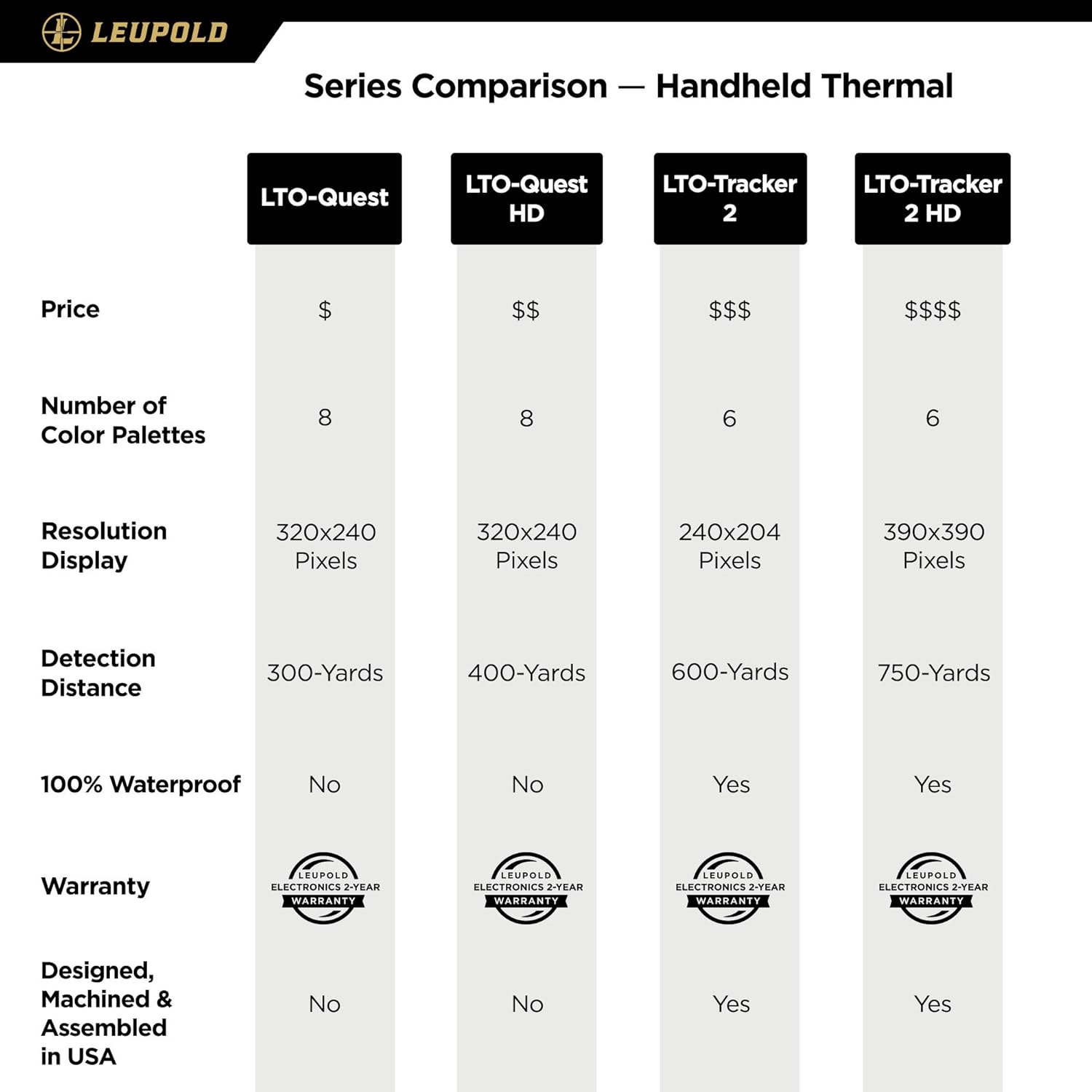
Figure 5: Comparison of LTO-Tracker series handheld thermal devices, highlighting differences in resolution, detection distance, and features.
8. Гаранција и подршка
8.1. Информације о гаранцији
The Leupold LTO-Tracker 2 Thermal Viewer is covered by Leupold's Gold Ring 2-Year Electronics Warranty. This warranty covers defects in materials and workmanship for a period of two years from the date of purchase. Please retain your proof of purchase for warranty claims.
8.2. Корисничка подршка
For technical assistance, service, or warranty claims, please contact Leupold customer support. You can find contact information and additional resources on the official Leupold webсајт:
Visit the Official Leupold Store on Amazon
Молимо вас да имате при руци број модела вашег производа (177187) и детаље о куповини када контактирате подршку.
Ask a question about this manual
Ask about setup, troubleshooting, compatibility, parts, safety, or missing instructions. Manuals+ will review the question and use this page’s manual context to help answer it.