
1. Увод
The LB-Link BL-WR3000 is a 300Mbps Wireless AP/Client High Speed Router designed to provide reliable and fast wireless connectivity. Featuring three 5dBi high gain omni-directional antennas, it ensures stronger signals and extended transmission distances. This manual provides detailed instructions for setting up, operating, maintaining, and troubleshooting your device to ensure optimal performance and network security.
2. Производ је готовview
2.1 Кључне карактеристике
- Supports IEEE 802.11n/b/g and IEEE 802.11.3/3u standards.
- Three 5dBi High Gain Omni-directional Antennas for enhanced coverage.
- MIMO technology for improved wireless transmissions and stability.
- Supports QoS (Quality of Service) Bandwidth Control.
- WPS button for quick and secure wireless setup.
- Supports WDS Bridge mode to easily expand wireless networks.
- Built-in firewall with IP, MAC, and URL filters for network control.
- Supports WPA2, WPA, WEP (128 / 64-bit encryption), WPA-PSK, WPA2-PSK and WPA/WPA2-PSK mixed encryptions.
2.2 Садржај пакета
Проверите да ли ваш пакет садржи следеће ставке:
- LB-Link BL-WR3000 Wireless Router
- Повер Адаптер
- Етхернет Цабле
- Водич за брзу инсталацију
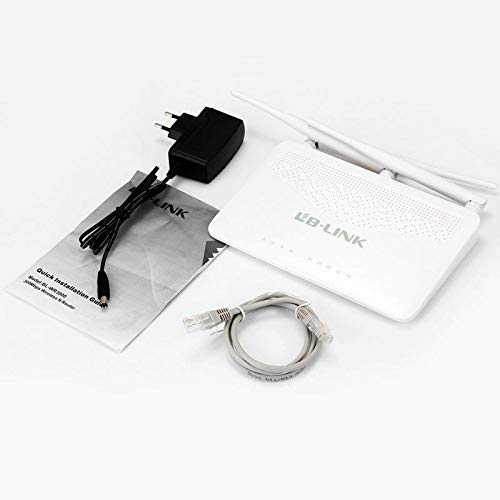
This image shows the typical contents found in the LB-Link BL-WR3000 package: the wireless router unit, a power adapter for electrical connection, an Ethernet cable for wired connections, and a Quick Installation Guide for initial setup.
3. Подешавање
3.1 Физичка веза
- Позиционирајте рутер: Place the router in a central location to maximize wireless coverage. Avoid obstructions like thick walls or large metal objects.
- Повежите антене: Ensure the three external antennas are securely attached and oriented vertically for best signal.
- Повежите се са напајањем: Plug the power adapter into the router's power port and then into a wall outlet. The power indicator light should illuminate.
- Повежите се на интернет (WAN): Connect an Ethernet cable from your modem's LAN port to the router's WAN port (usually distinct in color, e.g., yellow).
- Connect to Computer (Optional LAN): For initial setup or wired access, connect an Ethernet cable from your computer to one of the router's LAN ports (usually blue).
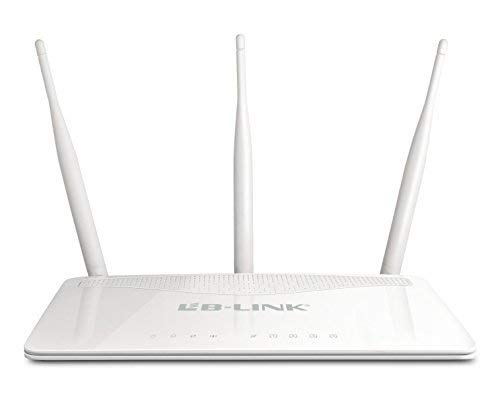
This image displays the front of the LB-Link BL-WR3000 wireless router, featuring three external omni-directional antennas for enhanced signal coverage. The front panel includes multiple LAN ports (blue), a WAN port (yellow), and a power input.
3.2 Почетна конфигурација
- Приступите Web Интерфејс: Отвори а web browser on a computer connected to the router (either wired or wirelessly using the default SSID). Enter the router's default IP address (e.g., 192.168.1.1 or 192.168.0.1) у адресну траку и притисните Ентер.
- Пријава: Унесите подразумевано корисничко име и лозинку (обично
adminfor both, refer to the Quick Installation Guide for specifics). - Покрените чаробњака за подешавање: Follow the on-screen instructions of the setup wizard to configure your internet connection type (e.g., PPPoE, Dynamic IP, Static IP) and set up your wireless network name (SSID) and password.
- Промена подразумеваних акредитива: For security, it is highly recommended to change the default login username and password for the router's web интерфејс.
4. Радни режими
The BL-WR3000 supports multiple operating modes to suit various networking needs.
4.1 Режим рутера
In Router Mode, the device acts as the primary connection point for your network, sharing an internet connection with multiple wired and wireless devices. It performs Network Address Translation (NAT) and acts as a DHCP server.
4.2 Режим приступне тачке (АП)
In AP Mode, the device connects to an existing wired network and broadcasts a wireless signal, allowing wireless devices to connect to the wired network. It essentially extends the reach of a wired network wirelessly.
4.3 Режим клијента
In Client Mode, the device acts as a wireless adapter for a wired device. It connects wirelessly to an existing wireless network and provides internet access to a single wired device (e.g., a desktop PC or gaming console) via its Ethernet port.
4.4 WDS Bridge Mode
Wireless Distribution System (WDS) Bridge Mode allows the router to wirelessly connect to another router or access point to expand the wireless network coverage without the need for cables. This is useful for extending your Wi-Fi signal to areas with weak coverage.
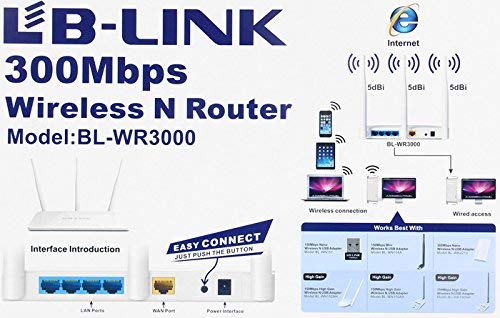
This diagram highlights the various ports and buttons on the rear panel of the LB-Link BL-WR3000 router. It shows the LAN ports, WAN port, power interface, and the WPS (Wi-Fi Protected Setup) button for quick and secure wireless connections.
5. Сигурносне карактеристике
The BL-WR3000 offers robust security features to protect your network from unauthorized access.
- Бежично шифровање: Supports WPA2, WPA, WEP (128 / 64-bit), WPA-PSK, WPA2-PSK, and WPA/WPA2-PSK mixed encryption protocols. WPA2-PSK is recommended for the strongest security.
- ВПС (Ви-Фи заштићено подешавање): Allows for quick and secure connection of WPS-enabled devices by simply pressing the WPS button on the router and the client device, or by entering a PIN.
- SSID Broadcasting Control: You can choose to hide your wireless network name (SSID) to make it less visible to unauthorized users.
- Филтрирање МАЦ адресе: Restrict network access to only specific devices based on their unique MAC addresses.
- Built-in Firewall: Provides basic network protection against external threats.
- IP, MAC, and URL Филтрирање: Allows administrators to control access to specific websites or block certain devices from accessing the internet.
6. Одржавање
Редовно одржавање помаже у обезбеђивању дуготрајности и оптималних перформанси вашег рутера.
- Ажурирања фирмвера: Periodically check the LB-Link official website for firmware updates. Updating firmware can improve performance, add new features, and fix security vulnerabilities.
- Редовно поновно покретање: Rebooting the router every few weeks can resolve minor performance issues and clear temporary data.
- Физичко чишћење: Keep the router free from dust and debris. Ensure ventilation holes are not blocked to prevent overheating.
- Конфигурација резервне копије: Препоручљиво је направити резервну копију подешавања конфигурације рутера пре него што извршите веће измене или ажурирања фирмвера.
КСНУМКС. Решавање проблема
This section addresses common issues you might encounter with your BL-WR3000 router.
- Нема приступа интернету:
- Check if the WAN indicator light on the router is on.
- Уверите се да је Етернет кабл из вашег модема безбедно повезан са ВАН портом рутера.
- Поново покрените модем, а затим и рутер.
- Проверите подешавања интернет конекције у рутеру web interface (e.g., PPPoE username/password).
- Weak Wireless Signal or Frequent Disconnections:
- Relocate the router to a more central position, away from obstacles and interference sources (e.g., cordless phones, microwaves).
- Adjust the orientation of the antennas.
- Check for overlapping Wi-Fi channels with neighboring networks and try changing your router's wireless channel in the settings.
- Не могу приступити рутерима Web Интерфејс:
- Ensure your computer is connected to the router (wired or wirelessly).
- Verify that your computer's IP address is set to obtain automatically (DHCP).
- Покушајте да обришете кеш меморију прегледача или да користите други прегледач.
- If you forgot the login credentials, you may need to perform a factory reset (see below).
- Фацтори Ресет: If you encounter persistent issues or forget your login password, you can perform a factory reset. With the router powered on, press and hold the reset button (usually a small pinhole button) for about 5-10 seconds until the lights flash. This will restore the router to its default factory settings, requiring you to reconfigure it.
8. Спецификације
| Феатуре | Спецификација |
|---|---|
| Бранд | LB-Link |
| Број модела | BL-WR3000 |
| Вирелесс Стандардс | ИЕЕЕ 802.11н, ИЕЕЕ 802.11г, ИЕЕЕ 802.11б |
| Етхернет стандарди | ИЕЕЕ 802.3, ИЕЕЕ 802.3у |
| Бежична брзина | До 300 Мбпс |
| Антенна Типе | 3x 5dBi Omni-directional Antennas |
| Фрекуенци Банд | 2.4 ГХз |
| Интерфејс | 1x 10/100M auto-negotiation WAN port, 4x 10/100M auto-negotiation LAN ports |
| Безбедност | WPA2, WPA, WEP (128 / 64-bit), WPA-PSK, WPA2-PSK, WPA/WPA2-PSK mixed, MAC Address Filtering, SSID Broadcast Enable/Disable |
| Карактеристике | QoS, Firewall, IP/MAC/URL Filtering, WDS Bridge, WPS |
| Величина инсталиране РАМ меморије | 64 МБ |
| Компатибилни уређаји | Laptop, Desktop, Smartphones, Tablets |
| Боја | Бела |
9. Гаранција и подршка
9.1 Информације о гаранцији
The LB-Link BL-WR3000 router comes with a 3 године гаранције за замену from the date of purchase. Please retain your proof of purchase for warranty claims. The warranty covers manufacturing defects and malfunctions under normal use. It does not cover damage caused by misuse, accidents, unauthorized modifications, or acts of nature.
9.2 Техничка подршка
For technical assistance, troubleshooting beyond this manual, or warranty inquiries, please contact LB-Link customer support. Refer to the official LB-Link webвеб-сајт или контакт информације наведене у паковању производа за најновије канале подршке.
- Подршка на мрежи: Visit the official LB-Link webсајт за често постављана питања, преузимање драјвера и ресурсе за подршку.
- Подршка путем е-поште: Contact customer service via email for detailed inquiries.
- Телефонска подршка: Check the LB-Link webсајт за регионалне бројеве телефонске подршке.