
1. Увод
This manual provides instructions for the Macally BTDYNAMOUSE Wireless Bluetooth Mouse. This device is designed for comfortable and quiet operation across various platforms.
The Macally BTDYNAMOUSE is a slim, ambidextrous Bluetooth mouse featuring silent click buttons and adjustable DPI settings. It connects wirelessly to compatible devices, offering a clutter-free workspace.
2. Шта је у кутији
- Macally BTDYNAMOUSE Wireless Bluetooth Mouse
- 2 к ААА батерије
3. Карактеристике производа
- Подесиви ДПИ: Пребацујте се између 800, 1200 и 1600 DPI за прецизну контролу курсора.
- Дугмад са тихим кликом: Designed for quiet operation, reducing click noise by 90% compared to traditional mice.
- Slim and Ambidextrous Design: Comfortable for both left and right-handed users, with a low-profile фактор форме.
- Блуетоотх бежично повезивање: Connects wirelessly up to 10 meters (30 feet).
- Дуг век трајања батерије: Two AAA batteries provide up to 3 months of use (based on 8 hours daily use). Battery life may vary.
- Компатибилност: Works with Windows and macOS operating systems.
4. Упутства за подешавање
4.1. Инсталирајте батерије
1. Locate the battery compartment on the underside of the mouse.
2. Отворите поклопац одељка за батерије.
3. Insert two AAA batteries, ensuring correct polarity (+/-).
4. Затворите поклопац одељка за батерије.

Слика 1: Инсталација батерије
4.2. Блуетоотх упаривање
1. Turn on the mouse using the ON/OFF switch located on the underside.
2. Press and hold the Bluetooth pairing button (usually a small button near the ON/OFF switch or sensor) for 2-3 seconds until the LED indicator starts blinking, indicating it's in pairing mode.
3. On your computer or device (Mac, Windows, iPad, Tablet):
- Идите на подешавања Блуетоотх-а.
- Тражи нових уређаја.
- Select "Macally BTDYNAMOUSE" from the list of available devices.
- Пратите сва упутства на екрану да бисте довршили процес упаривања.
Once successfully paired, the LED indicator on the mouse will stop blinking and remain solid or turn off, depending on the mouse model.

Figure 2: Mouse with Laptop, indicating multi-device compatibility
5. Упутство за употребу
The Macally BTDYNAMOUSE features a standard 3-button layout with a scroll wheel for intuitive navigation.
- Леви клик: Примарна радња, обично се користи за избор ставки или отварање линкова.
- Десни клик: Secondary action, typically used to open context menus.
- Точак за померање: Користи се за вертикално скроловање кроз документе и web pages. The scroll wheel can also be pressed for a middle-click action, depending on software configuration.

Figure 3: Ergonomic Design for Comfortable Use

Figure 4: Quiet Click Buttons in Action
6. Подешавање DPI-ја
The mouse features a DPI switch button to adjust cursor sensitivity. This allows you to fine-tune the mouse's responsiveness to your preference.
To change the DPI setting, press the small button located behind the scroll wheel. Each press cycles through the available DPI levels: 800, 1200, and 1600.
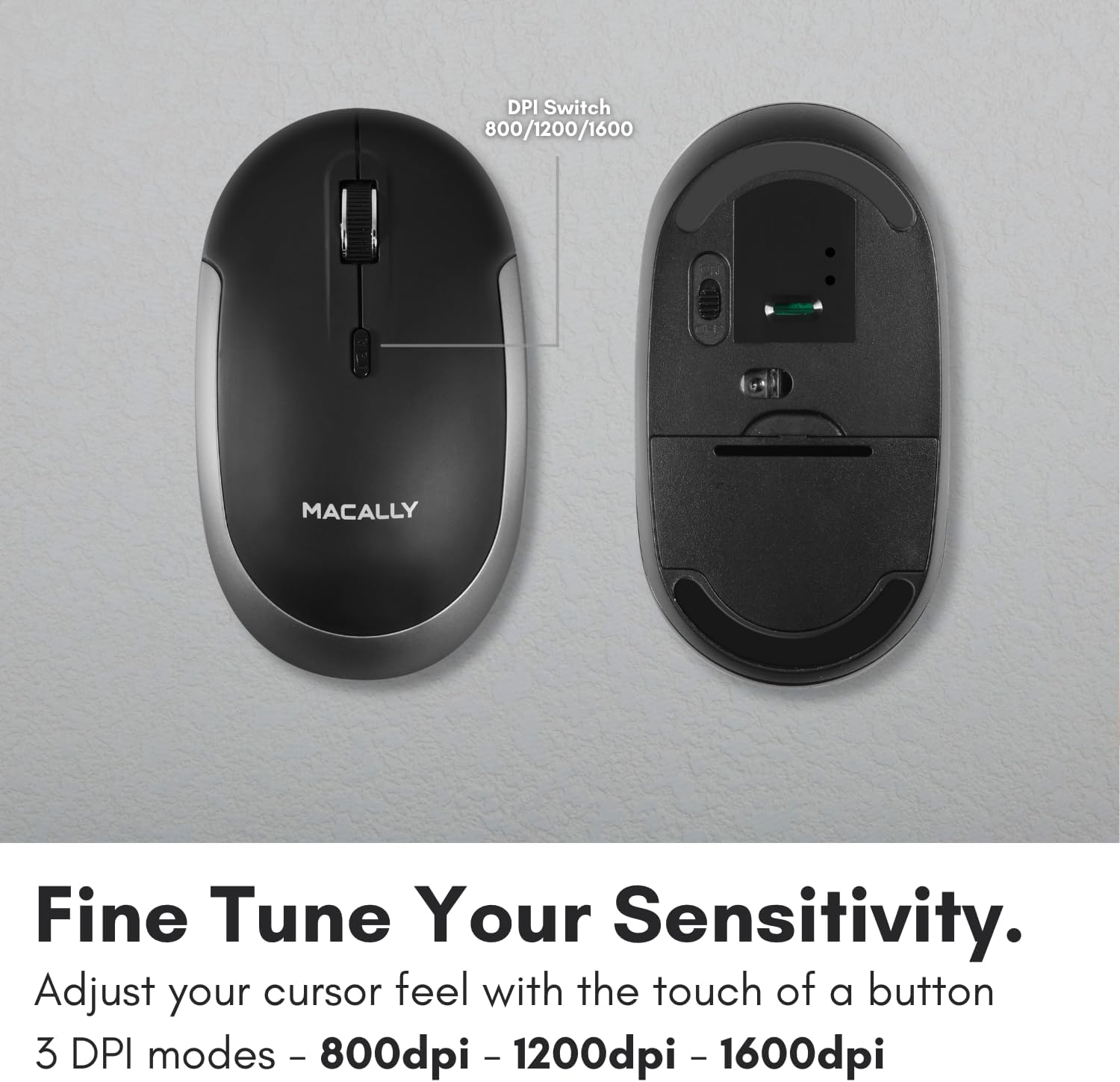
Figure 5: DPI Switch Location
7. Информације о батерији
The Macally BTDYNAMOUSE uses two AAA batteries. For optimal performance and battery life, it is recommended to use high-quality alkaline batteries.
- Тип батерије: 2 к ААА
- Процењени век трајања батерије: Up to 3 months (based on 8 hours of daily use). Actual battery life may vary based on usage patterns and computing conditions.
When the battery level is low, the mouse's LED indicator may flash or change color to alert you. Replace batteries promptly to ensure uninterrupted use.
8. Одржавање
To ensure the longevity and optimal performance of your Macally BTDYNAMOUSE, follow these maintenance guidelines:
- Чишћење: Користите меку, суву крпу за чишћење миша. За тврдокорну прљавштину, благо дamp Може се користити крпа, али водите рачуна да влага не уђе у уређај.
- Избегавајте течности: Не излажите миш течностима или прекомерној влази.
- Складиштење: Чувајте миш на хладном и сувом месту када га не користите дуже време.
- Замена батерије: Replace batteries as needed. Dispose of old batteries according to local regulations.
КСНУМКС. Решавање проблема
| Проблем | Могући узрок | Решење |
|---|---|---|
| Миш се не повезује преко Блутут-а | Mouse is off or batteries are low. Not in pairing mode. Device's Bluetooth is off. | Ensure mouse is on and batteries are fresh. Put mouse in pairing mode. Check device's Bluetooth settings. Try re-pairing. |
| Cursor is erratic or unresponsive | Dirty optical sensor. Mouse used on unsuitable surface. Low battery. | Clean the optical sensor. Use a mouse pad or a smooth, non-reflective surface. Replace batteries. |
| Mouse clicks are not silent | This mouse is designed for 90% noise reduction, not complete silence. | The mouse provides a significantly quieter click than standard mice, but a faint sound may still be audible. |
| Кратко трајање батерије | Frequent usage. Low-quality batteries. | Use high-quality alkaline batteries. Turn off the mouse when not in use for extended periods. |
10. Спецификације
| Феатуре | Детаљ |
|---|---|
| Бранд | Макално |
| Назив модела | BTDYNAMOUSE |
| Технологија повезивања | Блутут, бежични |
| Технологија детекције покрета | Оптицал |
| ДПИ подешавања | 800 / 1200 / 1600 |
| Дугмад | 4 (Left, Right, Scroll Click, DPI Switch) |
| Оријентација руке | Амбидектроус |
| Компатибилни уређаји | Laptop, Personal Computer (Windows, macOS) |
| Домет | До 10 м (30 стопа) |
| Тип батерије | 2 к ААА (укључено) |
| Трајање батерије | До 3 месеца (процењено) |
| Тежина артикла | 73 грама |
| Материјал | Silicone (Enclosure) |
| Боја | Црно |
11. Званични видео снимци производа
11.1. Bluetooth Optical Silent Click Mouse - White
Овај видео пружа крајview of the Macally BTDYNAMOUSE, highlighting its slim design, ambidextrous body, simple 3-button layout, 90% noise reduction, and easy DPI adjustability (800/1200/1600).
11.2. Macally Wireless Bluetooth Mouse for Windows PC and Mac
This video demonstrates the Macally BTDYNAMOUSE's features, including its Bluetooth wireless technology, comfortable ambidextrous design, simple 3-button/scroll wheel layout, silent click buttons, and easy DPI adjustability.
12. Гаранција и подршка
For warranty information and technical support, please refer to the official Macally webсајт или контактирајте њихову корисничку службу. Сачувајте рачун за куповину за потребе гаранције.