
Увод
This manual provides detailed instructions for the installation, operation, and maintenance of your Dakota Micro AgCam 92° AHD Camera (DMAC-CK1). Please read this manual thoroughly before using the product to ensure proper function and longevity. The AgCam is designed for robust performance in demanding environments, offering clear visibility for various applications.
Карактеристике производа
The AgCam DMAC-CK1 camera is engineered with several key features to provide reliable performance:
- Solid Aluminum Anodized Housing: Provides durability and protection against environmental factors.
- 100% Waterproof Triple O-ring Sealed Housing: Ensures complete water resistance for use in wet conditions.
- Auto Shading, Triple Hardened Glass Lens: Delivers clear images and resists scratches and impacts.
- Automatic Infrared Illuminators: Enables clear vision in low-light or no-light conditions.
- High Strength Magnetic Mount: Allows for flexible and secure placement on various surfaces.

Image: AgCam 92 degree AHD Camera highlighting its key features including solid aluminum housing, waterproof sealing, hardened glass lens, infrared illuminators, and magnetic mount.
Безбедносне информације
Молимо придржавајте се следећих мера предострожности:
- Ensure all connections are secure before operating the camera.
- Не покушавајте да растављате или модификујете камеру, јер ће то поништити гаранцију и може проузроковати оштећења.
- Keep cables clear of moving parts and high-temperature areas to prevent damage.
- Mount the camera securely to prevent it from falling during operation, especially in moving vehicles or machinery.
- Use only the provided cables and accessories to ensure compatibility and optimal performance.
Садржај пакета
Your AgCam DMAC-CK1 package includes:
- 1x AgCam 92° AHD Camera
- 1x 60-foot Camera Cable
- 1x 20-foot Camera Cable
Подешавање и инсталација
1. Монтажа камере
The AgCam features a high-strength magnetic mount for easy and secure attachment. Choose a mounting location that provides the desired field of view and is free from obstructions. Ensure the surface is clean and flat for optimal magnetic adhesion. The camera can also be permanently mounted using screws through the base if preferred.
2. Повезивање каблова
Connect the camera to your monitor or recording device using the provided cables. The camera uses a secure, threaded connector. Align the connector pins carefully and twist the locking collar until it is hand-tight to ensure a waterproof and reliable connection.
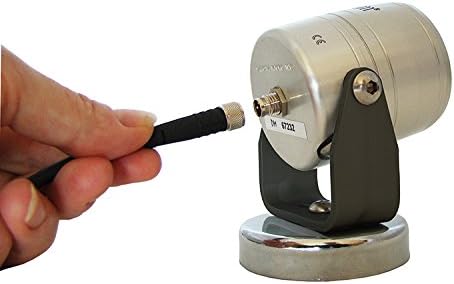
Image: A hand connecting the cable to the rear port of the AgCam camera, showing the threaded connection mechanism.

Слика: Крупни план view of the robust, multi-pin connectors used for the AgCam camera cables, designed for secure and waterproof connections.
Use either the 20-foot or 60-foot cable depending on the required distance. Route the cables carefully to avoid pinching, abrasion, or interference with moving parts. Secure the cables with cable ties or clips as needed.
3. Укључивање
Once all connections are made, power on your monitor or recording device. The camera will automatically activate and begin transmitting video. Refer to your monitor's manual for specific instructions on selecting the correct input.
Упутство за употребу
The AgCam DMAC-CK1 is designed for straightforward operation:
- Аутоматски рад: The camera automatically adjusts to lighting conditions. Its auto shading feature and automatic infrared illuminators ensure optimal image quality day or night.
- Поље оф View: Поље од 92° view provides a wide perspective, suitable for monitoring large areas or for backup assistance.
- Wireless Communication (Wi-Fi): While the camera itself is wired for video transmission, some compatible monitors or systems may offer Wi-Fi connectivity for additional features or remote viewing. Consult your monitor's documentation for details on Wi-Fi integration.
Одржавање
To ensure the longevity and optimal performance of your AgCam camera:
- Чишћење: Нежно обришите сочиво и кућиште камере меком крпомamp крпом. Избегавајте абразивна средства за чишћење или раствараче који би могли оштетити сочиво или завршну обраду.
- Инспекција каблова: Periodically inspect cables for any signs of wear, cuts, or damage. Replace damaged cables immediately to prevent system failure or water ingress.
- Провера везе: Ensure all cable connections remain tight and secure, especially after prolonged use or exposure to vibrations.
- Складиштење: When not in use for extended periods, store the camera in a clean, dry environment.
Решавање проблема
| Проблем | Могући узрок | Решење |
|---|---|---|
| Нема слике на монитору | Слаба веза кабла No power to monitor/camera Incorrect monitor input selected | Check all cable connections, ensure they are tight. Verify power supply to both camera and monitor. Select the correct video input on your monitor. |
| Треперење или искривљена слика | Оштећен кабл Лоша веза Електричне сметње | Проверите каблове да ли су оштећени; замените их ако је потребно. Уверите се да су везе безбедне. Relocate cables away from power sources or other electronics. |
| Лош квалитет слике ноћу | Infrared illuminators obstructed Сочиво прљаво | Ensure nothing is blocking the front of the camera. Пажљиво очистите објектив камере. |
| Camera not mounting securely | Mounting surface is not magnetic or uneven Debris on magnetic base | Ensure the surface is ferrous metal and flat. Clean the magnetic base and mounting surface. |
Спецификације
- Модел: DMAC-CK1
- Поље оф View: 92 степени
- Објектив: 3.6мм
- Становање: Solid Aluminum, Anodized, Triple O-ring Sealed
- Ниво водоотпорности: Водоотпоран
- Осветљење: Automatic Infrared Illuminators
- Монтажа: High Strength Magnetic Mount
- Компатибилни уређаји: Монитор
- Технологија бежичне комуникације: Wi-Fi (for compatible systems/monitors)
- Произвођач: Дакота Мицро, Инц.
- УПЦ: 817436013449
Гаранција и подршка
The Dakota Micro AgCam DMAC-CK1 camera comes with a 3-годишња фабричка гаранција. For warranty claims or technical support, please contact Dakota Micro directly. Keep your purchase receipt as proof of purchase.
For further assistance, visit the official Dakota Micro webсајту или контактирајте њихов тим за корисничку подршку.