
1. Увод
This manual provides instructions for the Zerone Universal Remote Control, designed as a replacement for various Haier TV models. It is compatible with Haier HTR-A18M, 55D3550, 40D3500M, and 48D3500 series televisions. This remote control offers direct access to digital TV functions without complex programming.

Image 1.1: The Zerone Universal Remote Control in use, demonstrating its compatibility with Haier HTR-A18M, 55D3550, 40D3500M, and 48D3500 TV models.
2. Подешавање
2.1 Инсталација батерије
Даљински управљач захтева две (2) ААА батерије (нису укључене) за рад. Пратите ове кораке да бисте инсталирали батерије:
- Пронађите одељак за батерије на полеђини даљинског управљача.
- Press down on the latch and slide the battery cover off.
- Уметните две ААА батерије, водећи рачуна да позитивни (+) и негативни (-) терминали буду правилно поравнати са ознакама унутар одељка.
- Гурните поклопац батерије назад на место док не кликне безбедно.
The remote is ready for use immediately after battery installation; no additional programming is required for compatible Haier TV models.

Слика 2.1: Детаљно view of the remote control, highlighting the battery compartment for AAA battery installation.
3. Упутство за употребу
3.1 Основне функције
This remote control provides standard functions for your Haier TV. Point the remote directly at your television's infrared receiver for optimal performance.
- Дугме за укључивање (U): Укључује или искључује телевизор.
- Инпут: Selects video input sources (HDMI, AV, etc.).
- Дугмад са бројевима (0-9): Direct channel selection.
- ВОЛ +/-: Adjusts volume up or down.
- ЦХ +/-: Мења канале горе или доле.
- МУТЕ: Искључује или укључује звук телевизора.
- МЕНУ: Приступа главном менију телевизора.
- Navigation Buttons (Up, Down, Left, Right, OK): Креће се кроз меније и потврђује изборе.
- НАЗАД / ИЗЛАЗ: Returns to the previous screen or exits the current menu.
- ДИСПЛАИ: Shows current channel information.
- SAP / AUDIO: Selects audio language or mode.
- СЛЕЕП: Подешава тајмер за спавање.
- PICTURE / WIDE: Adjusts picture mode or aspect ratio.
- CH.LIST / FAVORITE: Accesses channel list or favorite channels.
- Media Control Buttons (Play, Pause, Fast Forward, Rewind): Контролише репродукцију медија.
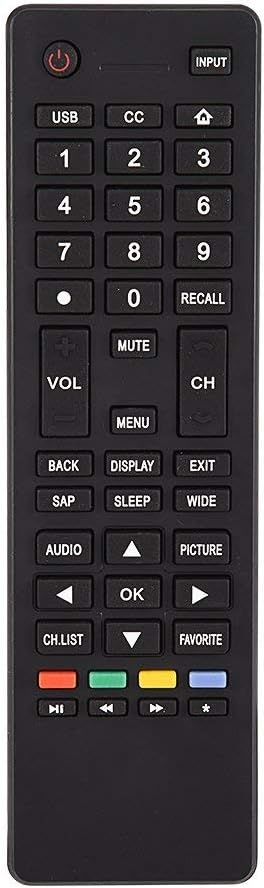
Слика 3.1: Готовоview of the remote control's button layout for easy identification of functions.
3.2 Радни опсег
The remote control has a stable signal transmission distance of up to 10 meters (33 feet). Actual remote distance may vary depending on environmental factors and the specific model of your TV.
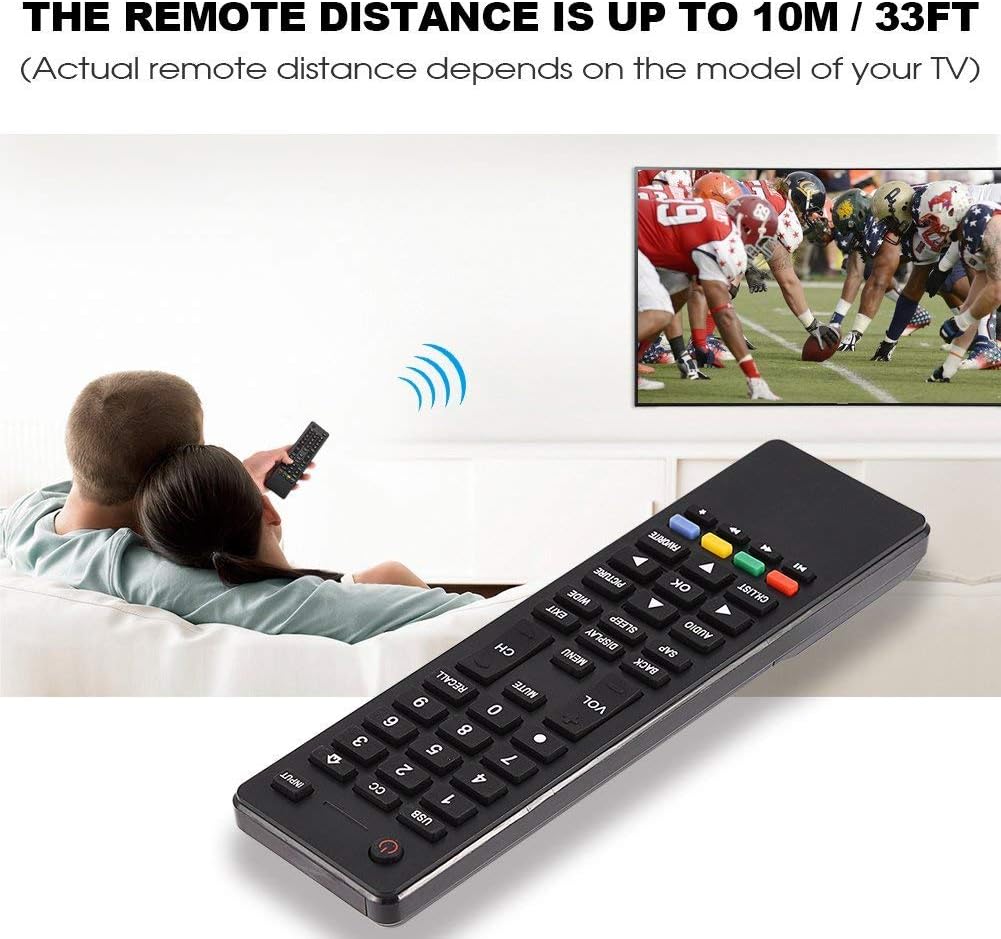
Image 3.2: Visual representation of the remote control's effective operating distance to the television.
4. Одржавање
4.1 Чишћење
За чишћење даљинског управљача користите меку, суву крпу. За тврдокорну прљавштину, лагано обришитеampen the cloth with water or a mild cleaning solution. Avoid using harsh chemicals or abrasive cleaners, as these can damage the remote's surface or internal components.
4.2 Одржавање батерије
- Замените батерије када даљински управљач постане спор или престане да ради.
- Немојте мешати старе и нове батерије или различите типове батерија.
- Извадите батерије ако даљински управљач неће бити коришћен дуже време како бисте спречили цурење.
- Истрошене батерије одлажите одговорно у складу са локалним прописима.
КСНУМКС. Решавање проблема
5.1 Даљински управљач не реагује
- Проверите батерије: Ensure batteries are inserted correctly with the correct polarity (+/-) and are not depleted. Replace with fresh AAA batteries if necessary.
- Линија видљивости: Make sure there are no obstructions between the remote control and the TV's infrared sensor.
- Удаљеност: Confirm you are within the effective operating range (up to 10 meters / 33 feet).
- ТВ компатибилност: Verify that your TV model is listed as compatible (Haier HTR-A18M, 55D3550, 40D3500M, 48D3500).
5.2 Buttons Not Working Correctly
- Цлеан Ремоте: Dust or debris under buttons can cause malfunction. Refer to the Maintenance section for cleaning instructions.
- Провера батерије: Weak batteries can lead to inconsistent button responses. Replace batteries.
6. Спецификације
| Феатуре | Детаљ |
|---|---|
| Бранд | Зероне |
| Компатибилни уређаји | Haier HTR-A18M, 55D3550, 40D3500M, 48D3500 TVs |
| Технологија повезивања | Инфрацрвени |
| Максимални домет | 10 метара (33 стопа) |
| Тип батерије | 2 к ААА (није укључено) |
| Тип контролера | Контрола дугмета |
| Материјал | АБС |
| Број модела | Zerone9rnag3b5y4-cr |
| УПЦ | 647213811490 |

Image 6.1: Physical dimensions of the Zerone Universal Remote Control.
7. Информације о гаранцији
Овај производ се нуди као обновљени производ из Амазона. Производи из Амазона су професионално прегледани и тестирани да би функционисали и изгледали као нови. Ако нисте задовољни куповином, обновљени производи испуњавају услове за замену или повраћај новца у складу са гаранцијом Амазона.
Additionally, the manufacturer provides a 90-дневна ограничена гаранција. For specific details regarding the terms and conditions of this warranty, please refer to the documentation provided at the time of purchase or contact customer support.
8. Корисничка подршка
If you encounter any issues or have questions regarding your Zerone Universal Remote Control that are not addressed in this manual, please contact the seller or Amazon Renewed customer service for assistance.
For Amazon Renewed Guarantee claims, please visit the Amazon Renewed program page or contact Amazon customer support directly.