
1. Увод
The myTouchSmart In-Wall Push-Button Countdown Timer Switch (Model 40953) is designed to simplify your routine by providing convenient automation for indoor or outdoor lighting and various appliances. This timer replaces any standard single-pole light switch and offers preset countdown times to automatically turn off connected devices. It is compatible with LED, CFL, incandescent, and halogen bulbs.

The product packaging displays the in-wall digital countdown timer switch, highlighting its key features such as preset countdown times and compatibility with various bulb types.
2. Безбедносне информације
Before beginning installation, read all instructions carefully. Improper installation can result in electrical shock or fire. Always consult a qualified electrician if you are unsure about any part of the installation process.
- ИСКЉУЧИТЕ НАПАЈАЊЕ at the circuit breaker or fuse box before wiring.
- Овај уређај је намењен за инсталацију у складу са националним електричним кодексом и локалним прописима.
- Користите само бакарну жицу.
- NEUTRAL WIRE REQUIRED за операцију.
3. Инсталација
3.1 Потребан алат
- Одвијач (Пхиллипс и Флатхеад)
- Скидачи жице
- Електрична трака
- Волtagе Тестер (препоручено)
3.2 Упутства за ожичење
- Искључите напајање to the switch location at the circuit breaker or fuse box. Verify power is off using a voltagе тестер.
- Remove the existing wall plate and switch from the wall box.
- Carefully disconnect the wires from the old switch. Identify and label the LINE (hot), LOAD, NEUTRAL, and GROUND wires. The timer requires a neutral wire for proper operation.
- Connect the wires to the myTouchSmart timer using the screw terminals:
- Повежите ЛИНЕ (hot) wire to the terminal labeled 'LINE'.
- Повежите ЛОАД wire (to the light/appliance) to the terminal labeled 'LOAD'.
- Повежите НЕУТРАЛНО wire (typically white) to the terminal labeled 'NEUTRAL'.
- Повежите ГРОУНД wire (typically bare copper or green) to the terminal labeled 'GROUND'.
- Уверите се да су све жице безбедне.
- Carefully push the wired timer into the wall box.
- Mount the timer to the wall box using the provided screws.
- Attach the desired color faceplate (White or Light Almond included, wallplate not included).
- Вратите напајање на прекидач.

Позади view of the timer, displaying the screw terminals for Line, Load, Neutral, and Ground connections, essential for proper installation.

Споредни професионалацfile of the timer, showing its depth and how it fits into a standard electrical wall box, with wiring connections visible.
4. Упутство за употребу
The myTouchSmart timer features an ON/OFF door panel that conceals preset buttons and LEDs when closed. Opening the door provides access to all countdown options.
4.1 Activating a Countdown
- Open the front door panel to reveal the preset buttons.
- Press the desired countdown button: 5 Min, 10 Min, 30 Min, 60 Min, 2 Hour, or 4 сата.
- A blue LED indicator light next to the selected button will illuminate, confirming the countdown is active. The connected device will turn on and remain on for the selected duration, then automatically turn off.
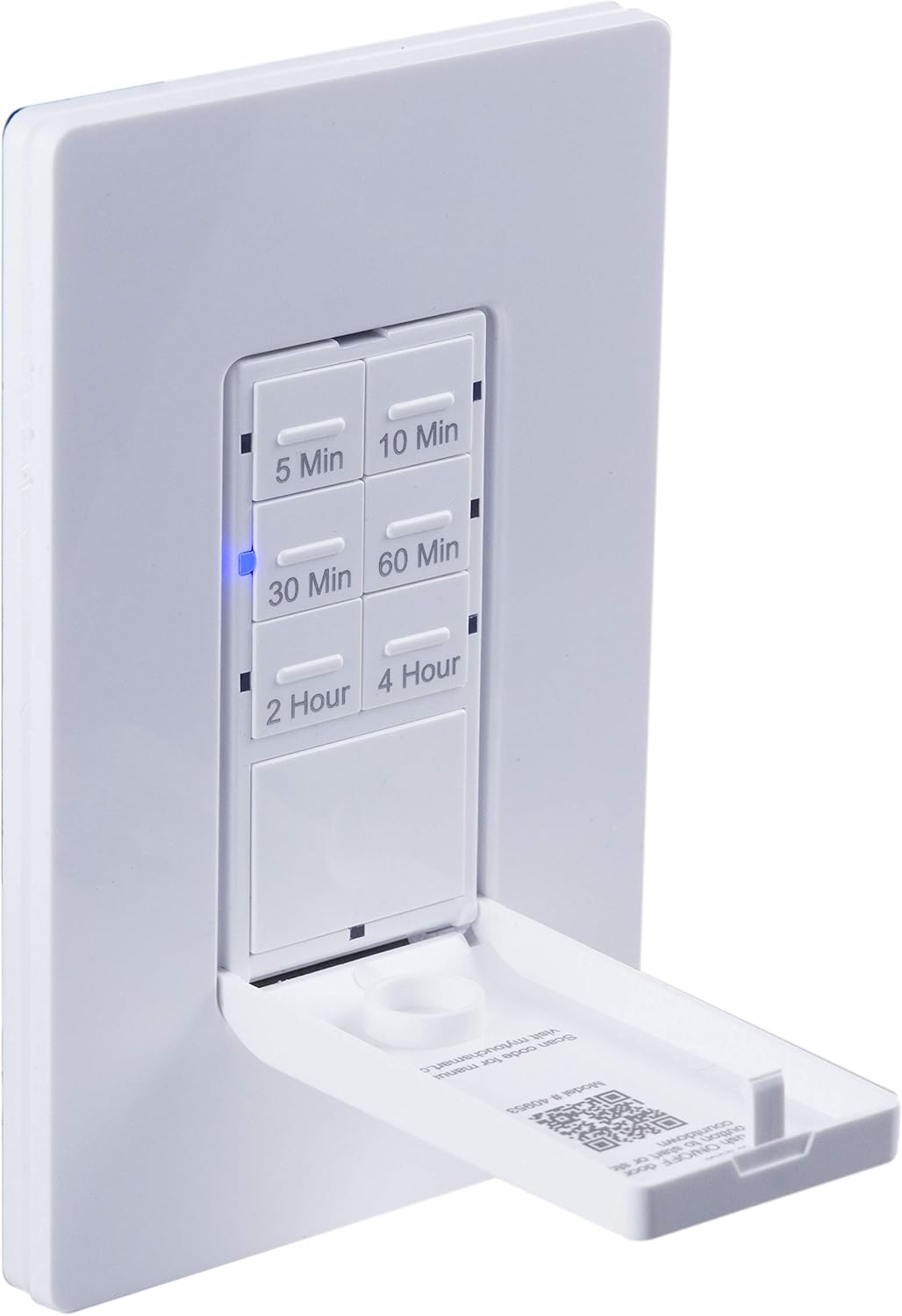
Крупни план view of the timer with its front door panel open, exposing the six preset countdown buttons (5, 10, 30, 60 minutes, 2, and 4 hours) and the manual ON/OFF button.

The in-wall timer with its door open, showing the preset buttons and a blue LED illuminated next to the '30 Min' button, indicating an active countdown.

A hand pressing one of the preset countdown buttons on the timer, demonstrating user interaction.
4.2 Manual ON/OFF Override
- To manually turn the connected device ON or OFF at any time, press the large ON/OFF button located at the bottom of the timer (this button is also the door panel when closed).
- Pressing this button will override any active countdown. If no countdown is active, it functions as a standard ON/OFF switch.
4.3 Апликације
This timer is suitable for a variety of applications, including:
- Унутрашње и спољашње осветљење
- Издувни вентилатори
- Грејачи
- Other compatible appliances

An image illustrating various applications for the timer, including controlling indoor/outdoor lights, ceiling fans, and exhaust fans.
5. Одржавање
The myTouchSmart timer requires minimal maintenance. Follow these guidelines:
- Чишћење: Disconnect power at the circuit breaker before cleaning. Wipe the surface with a soft, damp тканина. Немојте користити јаке хемикалије или абразивна средства за чишћење.
- инспекција: Periodically check for any loose connections or damage to the switch. If any damage is observed, discontinue use and consult a qualified electrician.
КСНУМКС. Решавање проблема
If you experience issues with your myTouchSmart timer, refer to the following common problems and solutions:
| Проблем | Могући узрок | Решење |
|---|---|---|
| Timer does not turn on/off. | No power to the switch; Incorrect wiring (Line/Load reversed); Loose connections. | Check circuit breaker. Verify wiring connections (Line to Line, Load to Load, Neutral, Ground). Ensure all wires are securely fastened. |
| Countdown does not activate. | Button not fully pressed; Faulty unit. | Ensure the desired countdown button is pressed firmly until the blue LED illuminates. If issue persists, contact customer support. |
| ЛЕД индикатори не раде. | No power; Unit malfunction. | Check power supply. If the timer functions but LEDs do not, contact customer support. |
| Рад са прекидима. | Loose wiring; Overload. | Check all wiring connections for tightness. Ensure the connected load does not exceed the timer's electrical ratings. |
Ако кораци за решавање проблема не реше проблем, обратите се корисничкој подршци.
7. Спецификације
| Феатуре | Спецификација |
|---|---|
| Број модела | 40953 |
| Оперативни режим | Automatically, Off, Push Button |
| Цуррент Ратинг | 15 Amps |
| Оператинг Волtage | 120 ВАЦ, 60 Хз |
| Ресистиве Лоад | 15А |
| Волфрамово оптерећење | 1200В |
| Оцена мотора | КСНУМКС / КСНУМКС КС |
| Компатибилне сијалице | ЛЕД, ЦФЛ, жаруља, халогена |
| Тип монтаже | Валл Моунт |
| Димензије (Д к Ш к В) | 2.75 к 4.85 к 6.85 инча |
| Тежина артикла | 5.9 унци |
| Неутрал Вире | Обавезно |
| Укључене компоненте | In-Wall Timer, White/Light Almond Door Panels |
8. Гаранција и подршка
За информације о гаранцији и техничкој подршци, обратите се званичном сервису произвођача webсајт или контактирајте њихову службу за кориснике. Сачувајте рачун као доказ о куповини.
Произвођач: миТоуцхСмарт
УПЦ: 030878409537
Webсајт: www.mytouchsmart.com (Молимо вас да проверите званичну website for the most current support information.)