
Увод
Thank you for choosing the EZQuest USB C Hub Docking Station 8-in-1. This manual provides detailed instructions for setting up, operating, and maintaining your device. Please read this manual thoroughly before use to ensure optimal performance and longevity of your product.
Производ је завршенview
The EZQuest USB C Hub Docking Station 8-in-1 is designed to expand the connectivity of your USB-C enabled devices, offering a comprehensive solution for various peripherals and display needs. It features multiple ports for data transfer, video output, network connection, and power delivery.
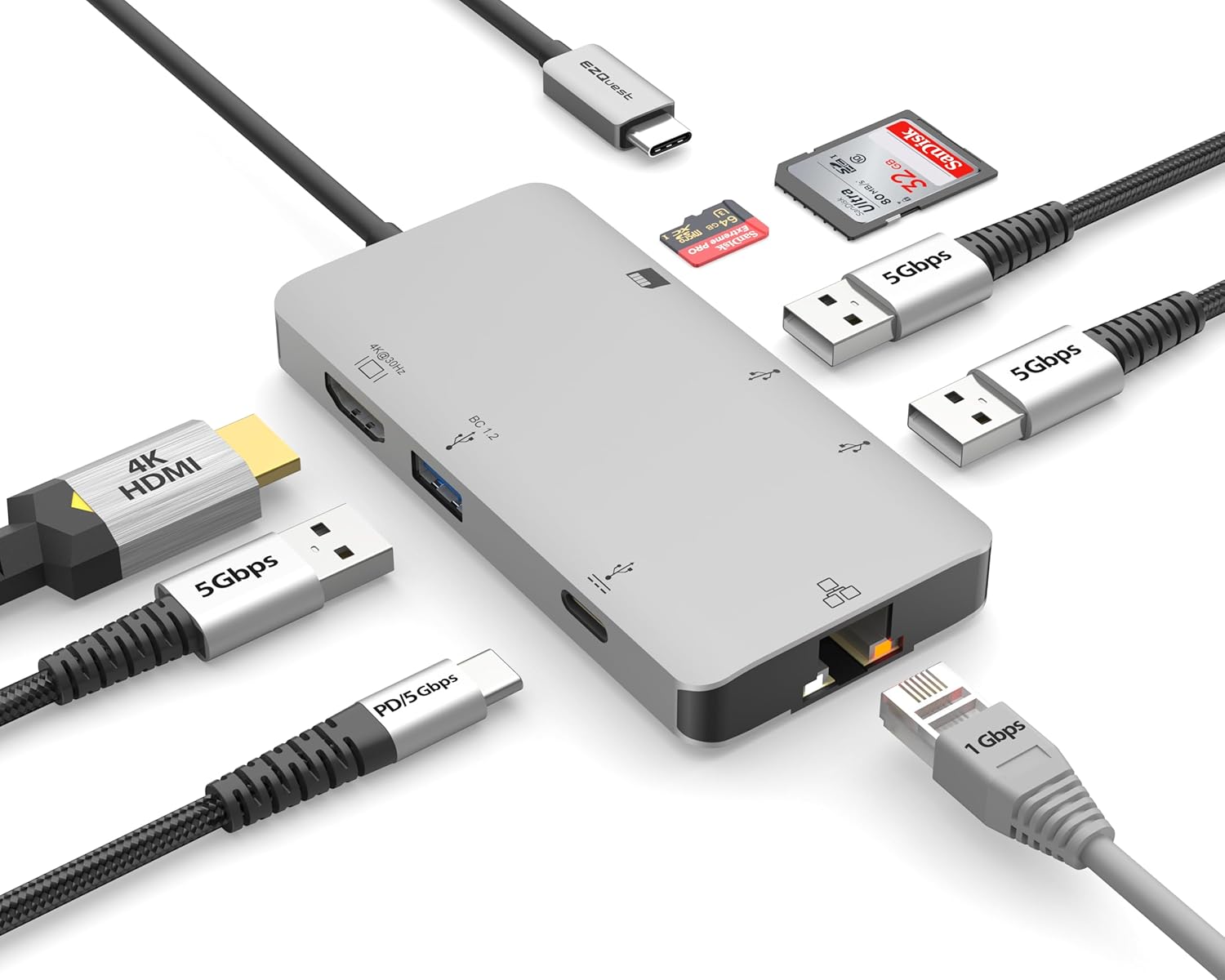
Image: The EZQuest USB C Hub Docking Station 8-in-1, showcasinњегов компактни дизајн и интегрисани УСБ-Ц кабл.

Image: A diagram illustrating the 8-in-1 expansion capabilities of the hub, including HDMI, USB-C PD, USB 3.0, Ethernet, and card readers.
Упутства за подешавање
- Повежите се са хост уређајем: Plug the integrated USB-C cable of the EZQuest hub into an available USB-C/Thunderbolt 3/4 port on your laptop, tablet, or smartphone.
- Напајање (опционо): For charging your host device, connect your USB-C power adapter to the USB-C Power Delivery port on the hub. The hub supports up to 100W input with 85W pass-through charging.
- HDMI дисплеј: Connect an HDMI cable from your monitor to the HDMI port on the hub for 4K 30Hz video output.
- Етхернет веза: For a stable wired network, connect an Ethernet cable to the Gigabit Ethernet port on the hub.
- USB периферни уређаји: Connect your USB-A devices (e.g., mouse, keyboard, external hard drive) to the three USB-A 3.0 ports.
- SD/Micro SD Cards: Insert your SD or Micro SD cards into the respective slots for data transfer.

Image: A user connecting the EZQuest USB C Hub to a laptop's USB-C port.

Image: Illustrates connecting a power adapter to the hub for pass-through charging of a laptop.
Упутство за употребу
Излаз екрана (ХДМИ)
The HDMI port supports 4K resolution at 30Hz. Connect an HDMI-enabled display to extend or mirror your desktop for enhanced productivity or multimedia viewing. Ensure your display and device support 4K 30Hz for optimal performance. Note that the USB-C ports on the hub are for data and power delivery, not for connecting a monitor.
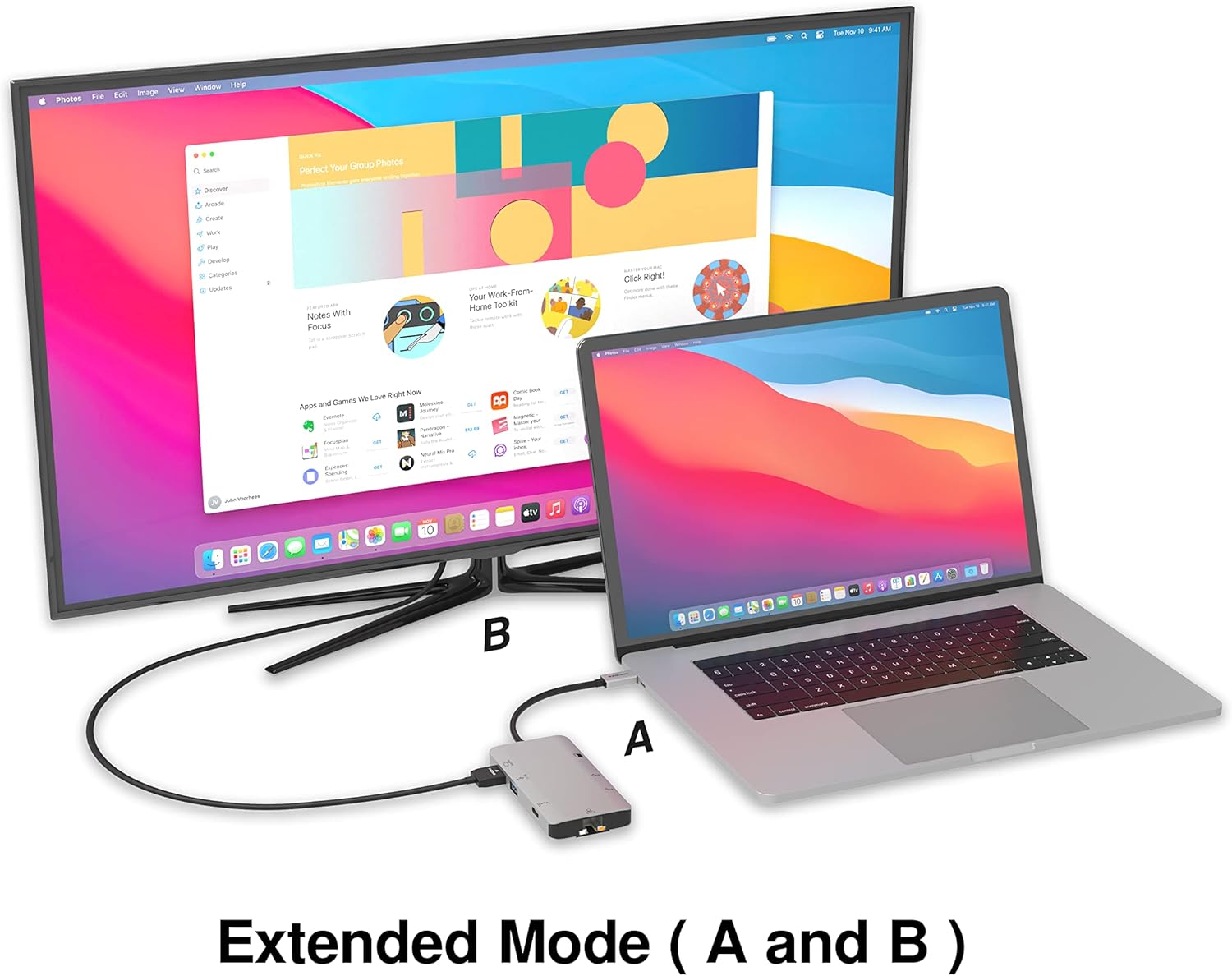
Image: A laptop connected to an external monitor via the hub, demonstrating extended display mode.
Data Transfer (USB-A & SD/Micro SD)
The three USB-A 3.0 ports offer data transfer speeds up to 5Gbps. The SD and Micro SD card slots allow for simultaneous read and write operations, facilitating quick file transfers from memory cards.

Image: Various devices like USB drives, SD cards, and an Ethernet cable connected to the EZQuest hub.
Network Connection (Gigabit Ethernet)
The Gigabit Ethernet port provides a stable and high-speed wired internet connection, ideal for large downloads, uploads, or streaming where Wi-Fi might be unreliable. An LED indicator confirms network activity.
Повер Дистрибутион
The USB-A ports distribute power efficiently. One USB-A port with BC1.2 outputs 5V/1.5A (7.5W), while the other two USB-A ports deliver 5V/0.9A (4.5W) each. The total shared power when all ports are in use is 10 watts.

Image: A diagram detailing the power output and data transfer speeds of the USB-A ports on the hub.
Карактеристике и портови
| Тип порта | Количина | Функционалност |
|---|---|---|
| ХДМИ | 1 | 4K @ 30Hz Video Output (Extended/Mirror Mode) |
| USB-C Power Delivery/Data | 1 | Up to 100W Power Input (85W Pass-Through), 5Gbps Data Transfer |
| УСБ-А 3.0 | 3 | 5Gbps Data Transfer (One port BC1.2 5V/1.5A, two ports 5V/0.9A) |
| Гигабит Етхернет | 1 | 10/100/1000 Mbps Wired Network Connection with LED Indicator |
| Читач СД картица | 1 | SDHC/SDXC Read/Write |
| Читач микро СД картица | 1 | Micro SDHC/SDXC Read/Write |
Компатибилност
This USB C Hub is compatible with a wide range of devices:
- Computers featuring USB-C, USB 4, Thunderbolt 4, or Thunderbolt 3 ports.
- USB-C smartphones and tablets equipped with OTG (On-The-Go) support.
Unsupported Device:
- The USB-A ports on this docking station do not support Apple SuperDrive. For connecting an Apple SuperDrive, an alternative adapter (e.g., EZQuest X40100 USB-C to USB-A Female Mini Adapter) directly to your Mac is recommended.
Решавање проблема
- Нема излаза на екран:
- Уверите се да USB-C порт вашег уређаја подржава видео излаз (DisplayPort алтернативни режим).
- Проверите све кабловске везе (USB-C од чворишта до уређаја, HDMI од чворишта до монитора).
- Verify your monitor input source is set correctly to HDMI.
- Try a different HDMI cable or monitor if available.
- Проблеми са наплатом:
- Уверите се да је ваш USB-C адаптер за напајање повезан са USB-C PD портом чворишта.
- Проверите да ли ваш адаптер за напајање пружа довољну снагуtage (up to 100W recommended for laptops).
- Check if the host device's USB-C port supports Power Delivery.
- Спори пренос података:
- Уверите се да користите уређаје и каблове компатибилне са USB 3.0 за оптималне брзине.
- The total shared power for USB-A ports is 10W; excessive power draw from multiple devices may affect performance.
- Ethernet Not Working:
- Check the Ethernet cable connection to both the hub and your router/modem.
- Verify network settings on your host device.
- Ensure the LED indicator on the Ethernet port is active.
- SD/Micro SD Card Not Recognized:
- Ensure the card is fully inserted into the correct slot.
- Try reinserting the card or using a different card.
- Check if the card is damaged or corrupted.
Спецификације
| Феатуре | Детаљ |
|---|---|
| Број модела | Кс40030 |
| Димензије производа | 0.81 к 1.63 к 0.2 инча |
| Тежина артикла | 1.6 унци |
| Хардверски интерфејс | УСБ тип Ц |
| ХДМИ излаз | 4К @ 30Хз |
| УСБ-Ц ПД улаз | До 100В |
| УСБ-Ц ПД излаз | До 85В |
| USB-A 3.0 Data Speed | 5Гбпс |
| Етхернет Спеед | 1 Gigabit (10/100/1000 Mbps) |
| Подршка за читач картица | SDHC, SDXC, Micro SDHC, Micro SDXC |
| Материјал | Anodized Aluminum Housing |
Одржавање
- Чишћење: Користите меку, суву крпу за чишћење главчине. Избегавајте течна средства за чишћење или аеросоле.
- Складиштење: Чвориште чувајте на хладном и сувом месту, даље од директне сунчеве светлости и екстремних температура.
- Руковање: Avoid dropping the device or subjecting it to strong impacts. Do not attempt to disassemble the hub.
Гаранција и подршка
The EZQuest USB C Hub Docking Station 8-in-1 comes with a Једногодишња гаранција без бриге. This warranty covers manufacturing defects and ensures peace of mind regarding your investment.
For technical support, warranty claims, or any product-related inquiries, please visit the official EZQuest website or contact their customer service team through the contact information provided with your product packaging.