
Увод
These instructions provide detailed guidance for the safe and effective use of your AfterShokz Titanium Open Ear Wireless Bone Conduction Headphones, model AS600CR. This manual covers setup, operation, maintenance, and troubleshooting to ensure optimal performance and longevity of your device.
Производ је завршенview
Кључне карактеристике
- Дизајн отвореног уха: Patented bone conduction technology delivers audio through the cheekbone, keeping you connected and aware of your surroundings.
- Безбедно и удобно приањање: An open-ear design enables bud-free listening and a partial titanium frame keeps the headphones in place through any activity.
- Мултифункционално дугме: Easy controls to play, pause, skip, activate voice assistant, and answer calls.
- Отпоран на зној: IP55 certified to repel sweat, dust, and moisture. Ideal for various activities, including rainy runs.
- 6-сатни век трајања батерије: Provides up to 6 hours of continuous music and calls on a single charge.
Садржај пакета
Your AfterShokz Titanium headphones package typically includes:
- AfterShokz Titanium Headphones (AS600CR)
- Мицро-УСБ кабл за пуњење
- Торбица за складиштење
- Earplugs (for optional use)
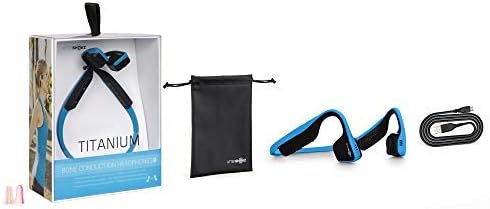
Image: Contents of the AfterShokz Titanium package, including the headphones, charging cable, storage pouch, and earplugs.
Сетуп
Пуњење слушалица
- Locate the Micro-USB charging port on your headphones.
- Connect the Micro-USB charging cable to the headphones and the other end to a USB power adapter or computer USB port.
- ЛЕД индикатор ће показивати стално црвено светло током пуњења.
- Once fully charged, the LED indicator will turn blue. A full charge takes approximately 1.5 hours.
Упаривање са Блуетоотх уређајем
- Уверите се да су слушалице искључене.
- Press and hold the power button (usually the volume+ button) for 5-7 seconds until the LED indicator flashes red and blue alternately. This indicates pairing mode.
- На свом уређају (паметном телефону, таблету, рачунару) омогућите Блутут и потражите доступне уређаје.
- Select "AfterShokz Titanium" from the list of found devices.
- Once successfully paired, the LED indicator will flash blue once, and a voice prompt will confirm "Connected."
Упутство за употребу
Ношење слушалица
Place the headphones with the transducers resting on your cheekbones, just in front of your ears. The band should rest comfortably behind your head.

Image: A person wearing AfterShokz Titanium headphones, demonstrating the open-ear design and comfortable fit during physical activity.
Функције дугмета
| Дугме | Акција | Функција |
|---|---|---|
| Multifunction Button (Large button on left transducer) | Сингле Пресс | Пуштање/паузирање музике, одговарање на позив |
| Доубле Пресс | Пређи на следећу нумеру | |
| Притисните и држите (2 секунде) | Activate voice assistant, Reject call | |
| Volume + / Power Button | Сингле Пресс | Повећајте јачину звука |
| Притисните и држите (2 секунде) | Укључивање/искључивање | |
| Јачина звука - Дугме | Сингле Пресс | Смањите јачину звука |
Одржавање
Чишћење
- Обришите слушалице меком, дamp тканина.
- Избегавајте употребу јаких хемикалија или абразивних материјала.
- Уверите се да је прикључак за пуњење сув пре пуњења.
Складиштење
- Store the headphones in the provided pouch when not in use to protect them from dust and damage.
- Avoid storing in extreme temperatures.
Решавање проблема
Но Повер
- Уверите се да су слушалице потпуно напуњене. Повежите их са извором напајања и проверите ЛЕД индикатор.
- Покушајте са другим каблом за пуњење или УСБ портом.
Није могуће упарити
- Ensure the headphones are in pairing mode (LED flashing red and blue).
- Искључите и укључите Блутут на свом уређају.
- Приближите слушалице свом уређају.
- Обришите претходне Bluetooth везе на уређају ако их имате превише.
Low Volume or Poor Sound Quality
- Подесите јачину звука и на слушалицама и на повезаном уређају.
- Уверите се да су претварачи правилно постављени на вашим јагодицама.
- If using earplugs, ensure they are inserted correctly.
- Проверите да ли има сметњи од других бежичних уређаја.
Спецификације
| Феатуре | Детаљ |
|---|---|
| Модел | АС600 |
| Повезивање | Блуетоотх |
| Трајање батерије | До 6 сати |
| Отпорност на воду | IP55 (Sweat and water-resistant) |
| Тежина | 40 грама |
| Материјал | Титанијум |
| Фреквенцијски опсег | 20 Hz - 20,000 Hz |
| Микрофон | Уграђени |
Гаранција и подршка
For warranty information and customer support, please refer to the official AfterShokz (now Shokz) webсајт или директно контактирајте њихову корисничку службу. Сачувајте доказ о куповини за потребе гаранције.
Note: AfterShokz has been rebranded to Shokz. Product support and warranty services are now provided under the Shokz brand.