
Увод
This manual provides comprehensive instructions for the installation, operation, and maintenance of your NB POWER TFT Display Electric Bike Controller and Display Set. This system includes a 48V-72V, 80A, 3000W Sabvoton V2 Controller, a TFT color display, an alarm lock, a twist throttle, brake levers, and a PAS sensor. Please read this manual thoroughly before installation and use to ensure proper function and safety.
Садржај пакета
Проверите да ли се у вашем пакету налазе све ставке наведене у наставку:
- 1x NB POWER TFT Color Display (48V-72V compatible)
- 1x Sabvoton V2 Controller (48V-72V, 3000W, 80A)
- 1x Alarm Lock
- 1x Twist Throttle
- 1x Pair of Brake Levers
- 1x PAS (Pedal Assist System) Sensor
- Necessary wiring and connectors

слика: The complete package contents, including the controller, TFT display, and various accessories, neatly packed in a box.
Подешавање и инсталација
Proper installation is crucial for the safe and efficient operation of your electric bike system. If you are unsure about any step, consult a qualified technician.
1. Controller Installation
Mount the Sabvoton V2 Controller securely to your electric bike frame. Ensure it is protected from direct water exposure and excessive vibration. Refer to the dimensions for proper fitment.
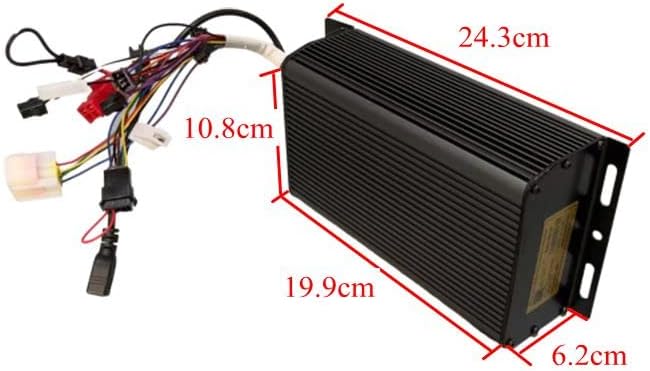
слика: The Sabvoton V2 Controller with its wiring harness, showing approximate dimensions for installation planning. The controller measures approximately 24.3cm in length, 10.8cm in width, and 6.2cm in height.
2. TFT Display Mounting
Attach the TFT color display to your handlebars in a position that is easily visible and accessible while riding. Secure it firmly to prevent movement.

слика: The TFT color display, illustrating its clear interface with speed, trip distance, wattage, and battery level indicators.
3. Ожичење
Connect the components to the controller according to the wiring diagram (not provided in this manual, refer to product packaging or manufacturer's website for detailed diagrams). Ensure all connections are secure and waterproof where necessary.
- Прикључак мотора: Connect the motor phase wires and Hall sensor wires to the corresponding ports on the controller.
- Повезивање батерије: Connect the battery positive and negative terminals to the controller's power input. Ensure correct polarity.
- ТФТ екран: Connect the display cable to the designated port on the controller.
- Окрени гас: Connect the throttle to its dedicated port.
- Полуге кочнице: Connect the brake levers to the controller. These typically provide a signal to cut motor power when brakes are applied.
- PAS Sensor: Install the PAS sensor on your pedal crank and connect its wire to the controller.
- Alarm Lock: Connect the alarm lock system.
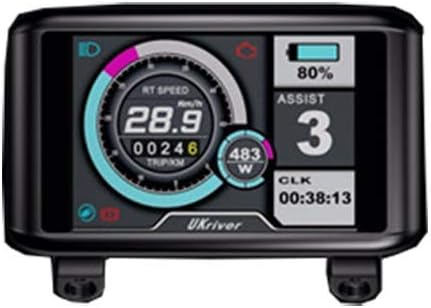
слика: Алтернатива view of a TFT display, showing various metrics and a different branding, indicating display compatibility.
слика: The twist throttle assembly, featuring an integrated key switch for power control and a separate matching grip.

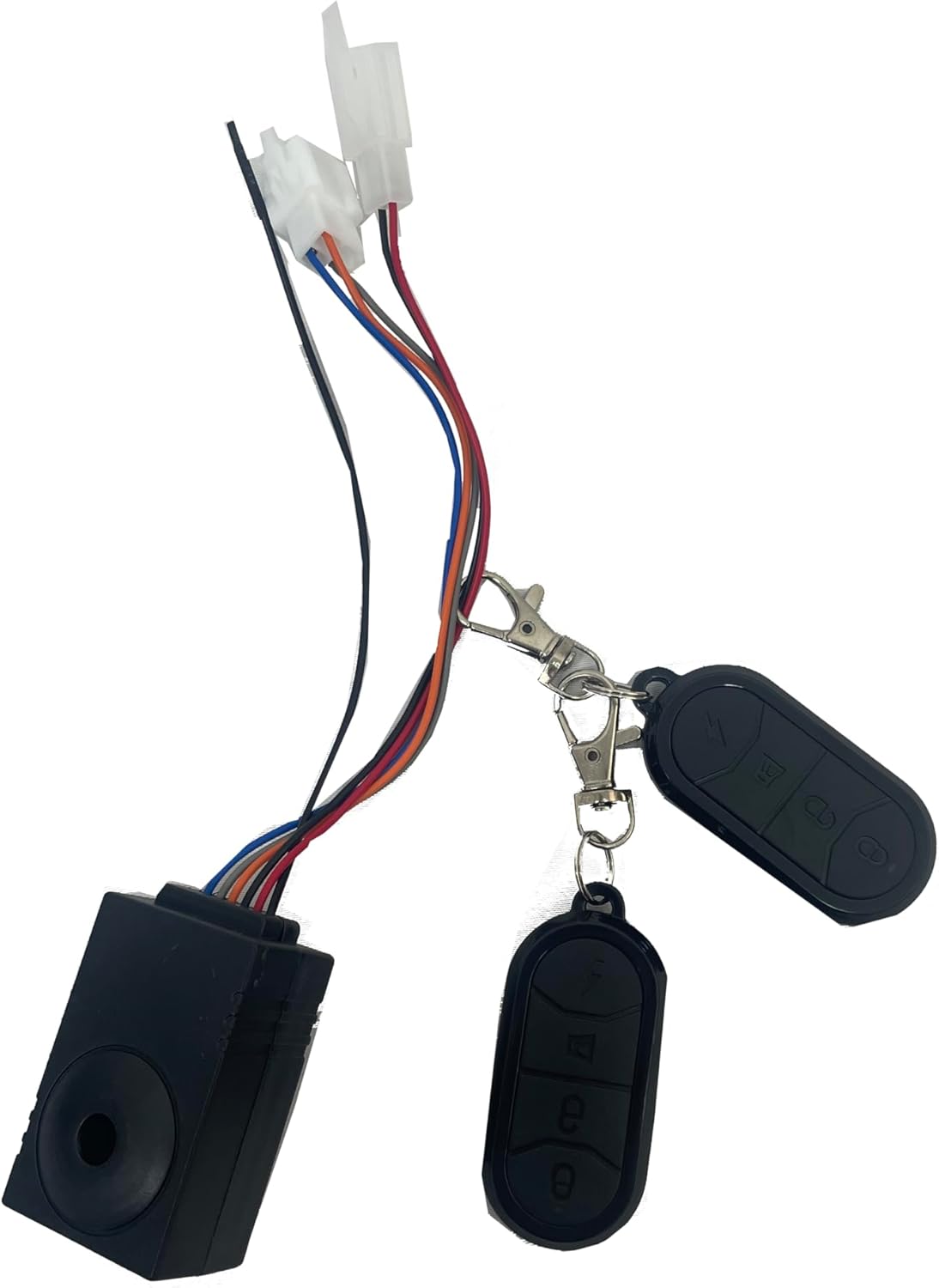
слика: The alarm lock system, including the main unit and two remote controls for arming and disarming.
Упутство за употребу
1. Укључивање/искључивање
Turn the key on the twist throttle to power on the system. The TFT display will illuminate. To power off, turn the key to the off position.
2. TFT Display Functions
The TFT display provides real-time information and allows for system adjustments:
- брзина: Приказује тренутну брзину вожње.
- Удаљеност: Shows trip distance and total odometer.
- Ватtage: Indicates real-time power consumption.
- Индикатор батерије: Приказује преостали ниво напуњености батерије.
- време: Тренутно време.
- Speed Levers (PAS Levels): Adjust pedal assist levels (typically 5 levels).
- Wheel Size Adjustment: Allows calibration for accurate speed and distance readings.
- Баттери Волtagе Подешавање: Configures the display for your specific battery voltagе (48В-72В).
Navigate through display settings using the buttons on the display unit. Refer to the specific display model's mini-manual for detailed button functions.
3. Управљање гасом
Gently twist the throttle grip to engage motor power. The amount of twist corresponds to the power output. Release the throttle to disengage power.
4. Pedal Assist System (PAS)
The PAS sensor detects pedaling motion and provides motor assistance based on the selected assist level on the TFT display. Higher assist levels provide more motor power with less pedaling effort.
5. Полуге кочнице
Activating the brake levers will cut power to the motor, ensuring safe stopping. Always use your brakes as needed.
6. Alarm Lock
Use the remote control to arm and disarm the alarm system. When armed, any movement or tampering with the bike will trigger an audible alarm.
Одржавање
Regular maintenance ensures the longevity and optimal performance of your electric bike system.
- Одржавати уредним одржавати чистим: Regularly wipe down the controller and display with a soft, damp тканина. Избегавајте употребу јаких хемикалија или абразивних материјала.
- Проверите везе: Periodically inspect all wiring connections for tightness and signs of wear or corrosion. Secure any loose connections.
- Заштита вода: While components are designed to be water-resistant, avoid submerging them or exposing them to heavy rain for extended periods.
- Одржавање батерије: Follow the manufacturer's instructions for your specific battery pack regarding charging, storage, and discharge cycles.
Решавање проблема
Ако наиђете на проблеме, погледајте следеће уобичајене проблеме и решења:
| Проблем | Могући узрок | Решење |
|---|---|---|
| Систем се не укључује. | Loose battery connection, dead battery, faulty key switch. | Check battery connections. Charge battery. Inspect key switch wiring. |
| Мотор не реагује на гас. | Loose throttle connection, faulty throttle, brake levers engaged, motor/controller fault. | Check throttle wiring. Ensure brake levers are not engaged. Consult a technician if problem persists. |
| Display shows incorrect speed/distance. | Неправилно подешавање величине точкова. | Adjust wheel size setting in the TFT display menu. |
| PAS not working. | Loose PAS sensor connection, faulty PAS sensor, incorrect PAS level setting. | Check PAS sensor wiring. Ensure PAS level is set above 0 on the display. |
Спецификације
| Феатуре | Детаљ |
|---|---|
| Бранд | NB POWER |
| Назив модела | TFT Display Sabvoton V2 Controller Set |
| Тип контролера | Sabvoton V2 Sine Wave System |
| Волtagе Компатибилност | 48В-72В |
| Цуррент Лимит | 80А |
| Мак Ватtage | 3000В |
| Дисплаи Типе | ТФТ екран у боји |
| Функције приказа | Speed, Distance, Wattage, Battery Indicator, Time, Wheel Size Adjust, Battery Voltage Adjust, 5 PAS Levels |
| Укључене компоненте | Controller, TFT Display, Alarm Lock, Twist Throttle, Brake Levers, PAS Sensor |
| ASIN | B07PF2S481 |
| УПЦ | 715444174148 |
Видео Демонстрација
Watch the official product video for a visual guide on the controller and display functionality.
видео: This video demonstrates the MQCON APP, testing the controller and display. It shows the display responding to throttle input and the motor wheel spinning, illustrating the system's operational response.
Гаранција и подршка
For warranty information or technical support, please contact NB POWER customer service through your purchase platform or the manufacturer's official webсајт. Сачувајте доказ о куповини за потребе гаранције.
Додатни планови заштите могу бити доступни за куповину:
- 2-Year Protection Plan (one-time payment)
- Комплетна заштита (месечна претплата)
Refer to the specific terms and conditions of these plans at the time of purchase.