Увод
The MUSKY DY28 is a versatile device combining a Bluetooth speaker, smart touch lamp, alarm clock, and MP3 player into a single unit. This manual provides instructions for its setup, operation, and maintenance to ensure optimal performance.
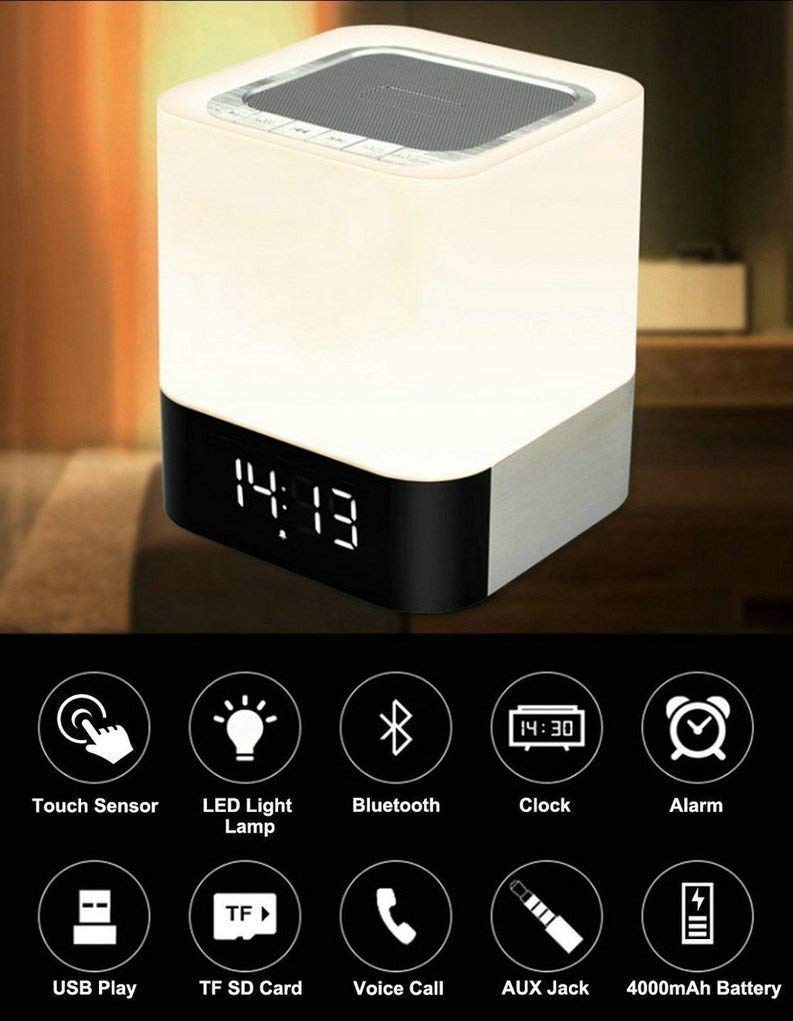
Image: The MUSKY DY28 device, showcasing its integrated clock display and touch-sensitive light panel.
Бок Цонтентс
- MUSKY DY28 Bluetooth Speaker
- Упутство за употребу
- Кабл за пуњење
Карактеристике производа
- Мултифункционални: Bluetooth speaker, smart touch lamp, alarm clock, and MP3 player.
- Блуетоотх КСНУМКС: Easy and stable connection with Bluetooth-enabled devices.
- Подесиво ЛЕД светло: Warm LED light with adjustable brightness (Max 20 Lumen) via touch sensor.
- Digital Clock & Alarm: Big digit 12/24H alarm clock with calendar, alarm, and sleep mode functions.
- Вишеструки режими репродукције: Supports MP3 playback via USB, micro TF/SD Card, and 3.5mm AUX input.
- Квалитет звука: 5W single acoustic driver with enhanced passive low-frequency radiator for clear sound and solid bass.
- Дуг век трајања батерије: Built-in 4000mAh battery provides up to 15 hours of lighting or 9 hours of music playback (depending on usage).
- Хандс-фрее позивање: Integrated microphone for answering calls.
Сетуп
1. Пуњење уређаја
Before first use, fully charge the speaker. Connect the provided USB charging cable to the charging port on the device and to a standard USB power adapter (not included) or a computer's USB port. The charging indicator will show the charging status.
2. Укључивање/искључивање
Locate the Power On/Off switch on the device. Slide the switch to the 'ON' position to power on the speaker. Slide it to 'OFF' to power off.
3. Блуетоотх упаривање
- Ensure the speaker is powered on and in Bluetooth mode (indicated by a flashing blue light or voice prompt).
- На свом мобилном уређају омогућите Блуетоотх и потражите доступне уређаје.
- Select 'MUSKY DY28' from the list of devices.
- Once paired, the speaker will indicate a successful connection (e.g., solid blue light or voice prompt).
4. Подешавање времена и аларма
Refer to the detailed control diagram for button locations. Use the 'Mode' button to cycle through functions until the clock setting is displayed. Use the 'Previous' and 'Next' buttons to adjust hours and minutes, and the 'Play/Pause' button to confirm. For alarm settings, follow a similar procedure, activating the alarm function and setting the desired time.

Слика: Детаљна view of the MUSKY DY28's control panel, highlighting buttons for power, charging, audio inputs, playback, volume, and the touch sensor.
Упутство за употребу
1. Репродукција музике
The DY28 supports multiple music sources:
- Блуетоотх режим: After successful pairing, play music from your connected device. Use the speaker's 'Play/Pause', 'Previous', and 'Next' buttons to control playback.
- УСБ улаз: Убаците УСБ флеш диск који садржи МП3 fileу USB порт. Звучник ће се аутоматски пребацити у USB режим и почети репродукцију.
- Micro TF/SD Card: Insert a micro TF/SD card with MP3 files into the Micro SD Slot. The speaker will automatically switch to TF/SD card mode and play music.
- АУКС улаз: Connect an external audio device using a 3.5mm AUX cable to the AUX port. The speaker will switch to AUX mode. Control playback from your external device.

Image: Visual guide demonstrating the three primary ways to play music on the DY28: via Bluetooth, Micro SD card, and USB drive.
2. Рад светла
The top panel of the speaker features a touch sensor for controlling the LED light. Tap the touch sensor to turn the light on/off and cycle through different brightness levels. The light offers a warm glow suitable for various environments.

Image: The MUSKY DY28 speaker illuminated, serving as a night light with its digital clock display visible in a low-light environment.
3. Alarm Clock Functions
Once the alarm is set, it will sound at the designated time. To snooze, tap the touch sensor. To turn off the alarm, press the 'Mode' button or power off the device. The sleep mode feature allows the lamp and speaker to automatically turn off after a set period.
4. Позивање без употребе руку
When a call comes in while connected via Bluetooth, the speaker will ring. Press the 'Play/Pause' button to answer the call. Press it again to end the call. The integrated microphone allows for hands-free conversation.
Спецификације
| Феатуре | Детаљ |
|---|---|
| Бранд | МУСКИ |
| Број модела | ДИ28 |
| Технологија повезивања | Помоћни, Блутут, УСБ |
| Врста бежичне технологије | Блуетоотх |
| Тип монтаже | Таблетоп Моунт |
| Спеакер Типе | Полица за књиге |
| Карактеристике производа | Light for emergency use |
| Тип контролера | Тоуцхпад |
| Контролни метод | Додирните |
| Боја | Бела |
| Капацитет батерије | 4000 мАх (уграђено) |
| Battery Life (Lighting) | До 15 сати |
| Трајање батерије (репродукција музике) | До 9 сати |
| Време пуњења | 2-4 сати |
| Блуетоотх домет | 33 стопа / 10 метара |
| Извор напајања | Баттери Поверед |
| Број аудио канала | 5 вати |
| Је водоотпоран | ТРУЕ |
| Тежина артикла | 700 грама |
| Компатибилни уређаји | МП3 плејер, паметни телефон, таблет |
Решавање проблема
- Нема напајања: Ensure the device is fully charged. Check the power switch is in the 'ON' position.
- Не могу да упарим Bluetooth: Make sure the speaker is in Bluetooth pairing mode. Ensure your device's Bluetooth is enabled and within range (10 meters). Try restarting both devices.
- Нема звука: Check the volume level on both the speaker and your connected device. Ensure the correct input mode (Bluetooth, USB, TF/SD, AUX) is selected.
- Светло не ради: Tap the touch sensor on the top of the speaker. Ensure the device has sufficient battery charge.
- Аларм се не оглашава: Verify the alarm time is set correctly and the alarm function is activated.
Одржавање
- Очистите уређај меком, сувом крпом. Не користите абразивна средства за чишћење или раствараче.
- Избегавајте излагање звучника екстремним температурама, директној сунчевој светлости или високој влажности.
- Чувајте уређај на хладном и сувом месту када се не користи дуже време.
- Не покушавајте сами да растављате или поправљате уређај, јер ће то поништити гаранцију.
Званични видео производа
Video: Official product video demonstrating the key features and functions of the MUSKY DY28 Bluetooth Speaker, Smart Touch Lamp, and Alarm Clock.
Гаранција и подршка
За информације о гаранцији и корисничку подршку, погледајте документацију која је достављена уз куповину или се директно обратите произвођачу. Сачувајте доказ о куповини за евентуалне рекламације у вези са гаранцијом.