
1. Увод
Хвала вам на куповиниasing the WamGra BY28 P Bluetooth Speaker Night Light Alarm Clock. This device combines a high-quality Bluetooth speaker, a versatile night light with touch control, a digital alarm clock, and an MP3 player, offering multiple functionalities in one compact unit. Please read this manual carefully to ensure proper use and optimal performance.

Слика 1.1: The WamGra BY28 P Bluetooth Speaker Night Light Alarm Clock, showcasing its main design and available color variations.
2. Садржај пакета
Молимо вас да проверите пакет за следеће ставке:
- WamGra BY28 P Bluetooth Speaker Night Light Alarm Clock x 1
- Упутство за употребу к 1
3. Производ је готовview
Familiarize yourself with the various parts and controls of your device.

Слика 3.1: Готовоview of the device's features, including the control panel, Bluetooth connectivity, hands-free call function, and various input ports.
Контролна табла (горе)
- Touch Mesh Net: Controls light modes and brightness.
- Дугме за напајање: Turns the device on/off, displays time when light is off.
- Дугме за режим: Switches between Bluetooth, MP3, AUX, and Clock modes.
- Дугме за појачавање јачине звука/следећу нумеру: Increases volume, skips to next track.
- Дугме за смањивање јачине звука/претходну нумеру: Decreases volume, skips to previous track.
- Дугме за репродукцију/паузирање/позивање: Пушта/паузира музику, одговара/завршава позиве.
Задњи портови
- Утор за микро СД картицу: За репродукцију МП3 files from a micro SD card.
- УСБ хост порт: За репродукцију МП3 fileс са УСБ флеш диска.
- AUX-IN порт: За повезивање екстерних аудио уређаја путем 3.5 мм аудио кабла.
- USB DC 5V Charging Port: За пуњење уређаја.
- ОН/ОФФ прекидач: Главни прекидач за напајање.
4. Почетно подешавање
4.1 Пуњење уређаја
- Пре прве употребе, потпуно напуните уређај.
- Connect the provided USB charging cable to the USB DC 5V charging port on the back of the speaker.
- Повежите други крај кабла са УСБ адаптером за напајање (није укључен) или УСБ портом рачунара.
- Индикаторска лампица пуњења ће се упалити. Потпуно пуњење траје отприлике 6 сат.
- Once fully charged, the indicator light will turn off or change color.
The built-in rechargeable battery provides approximately 8 hours of operation, depending on usage (volume, light brightness).
4.2 Укључивање/искључивање
- To power on, slide the ON/OFF switch on the back of the device to the 'ON' position. The display will light up.
- To power off, slide the ON/OFF switch to the 'OFF' position.
5. Радни режими
5.1 Режим Bluetooth звучника
The device functions as a Bluetooth 4.0 speaker, allowing wireless audio streaming from compatible devices up to 10 meters (32.81 feet).
- Уверите се да је уређај укључен.
- Притисните тастер Режим button until you hear a voice prompt indicating Bluetooth mode. The Bluetooth indicator will flash.
- На паметном телефону, таблету или другом уређају који подржава Bluetooth омогућите Bluetooth и потражите доступне уређаје.
- Select "BY28 P" from the list to pair. Once paired, you will hear a confirmation sound, and the Bluetooth indicator will stop flashing.
- You can now play audio from your connected device.
Хандс-фрее позивање
- When a call comes in during Bluetooth mode, press the Репродукуј / Паузирај / Позови дугме за одговор.
- Притисните тастер Репродукуј / Паузирај / Позови тастер поново за завршетак позива.
- Притисните и држите Репродукуј / Паузирај / Позови дугме за одбијање долазног позива.
5.2 Режим ноћног светла
The device features a touch-activated lamp with warm white and color-changing light options.
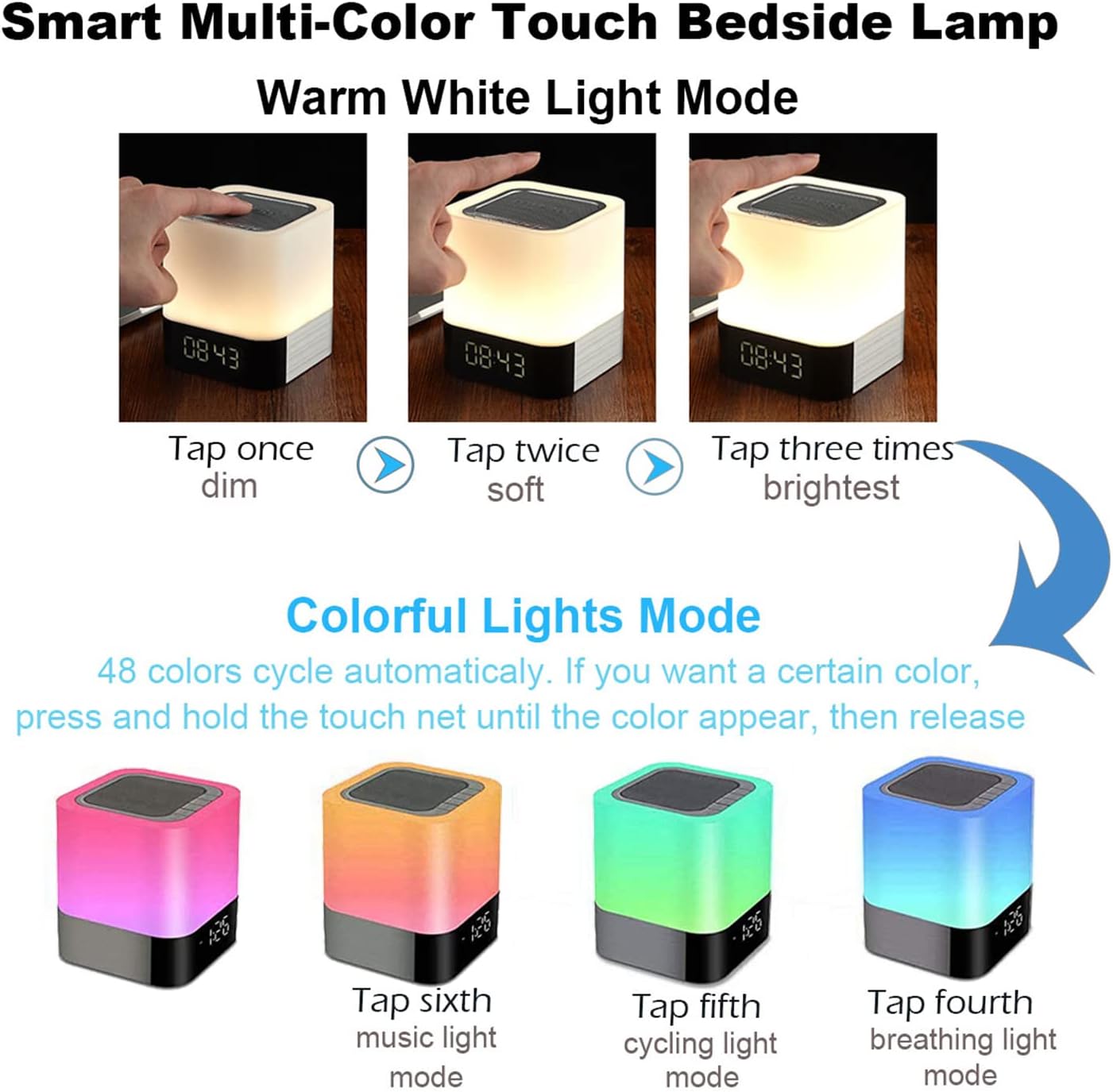
Слика 5.1: Visual guide for controlling the warm white and colorful light modes using the touch mesh net.
Режим топлог белог светла
- Tap the top mesh net once to turn on the dim warm white light.
- Tap a second time for soft warm white light.
- Tap a third time for the brightest warm white light.
- Tap a fourth time to turn off the warm white light.
Colorful Lights Mode (48 Colors)
- From any warm white light setting, press and hold the top mesh net until the light switches to the colorful mode.
- The colors will cycle automatically.
- To select a specific color, press and hold the touch net again when your desired color appears, then release. The light will stay on that color.
- To switch back to automatic color cycling, tap the mesh net.
- To turn off the colorful light, tap the mesh net until the light turns off.
5.3 Режим будилника
The device features a digital alarm clock with snooze function and the ability to set custom alarm sounds.
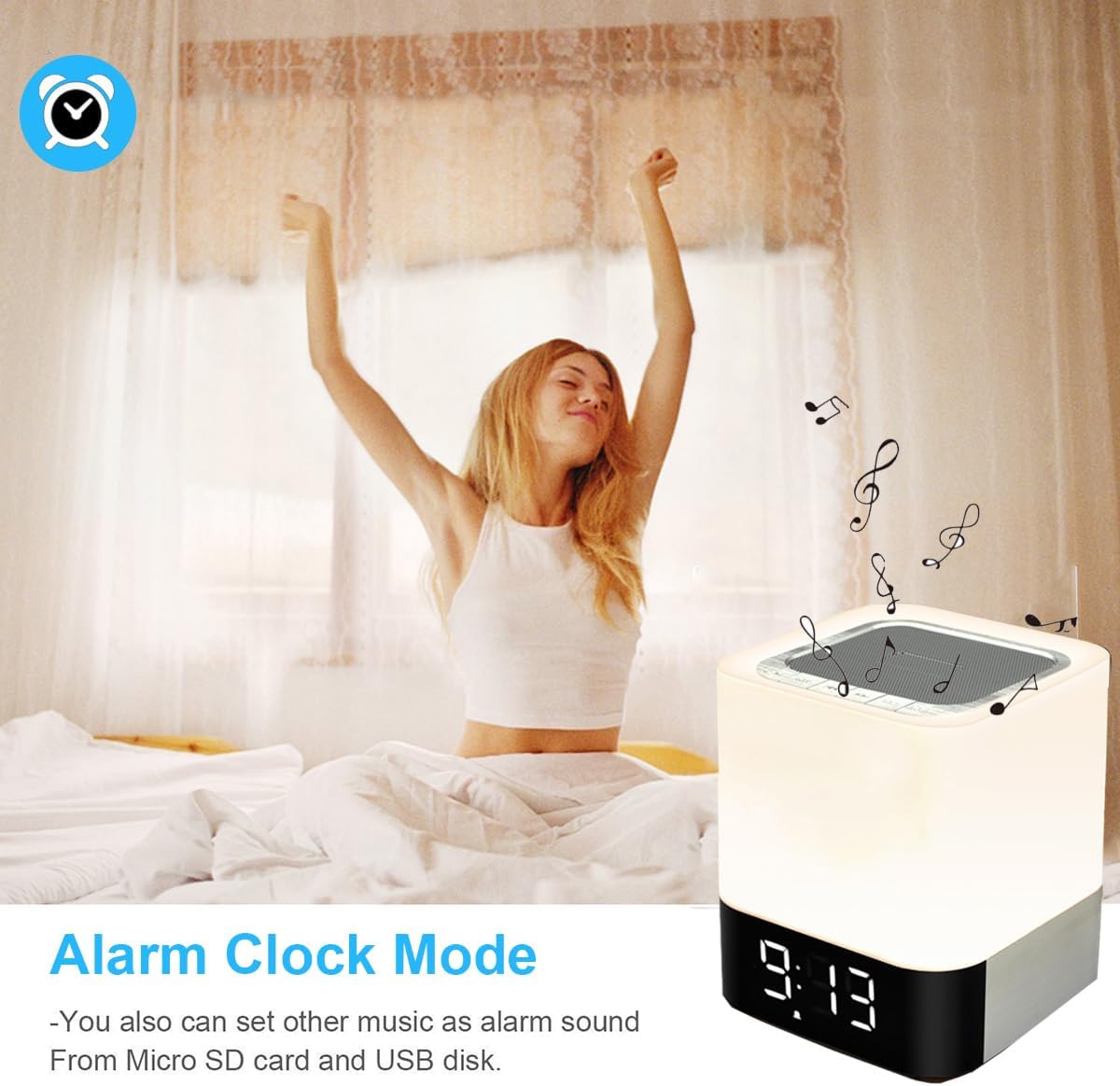
Слика 5.2: The alarm clock mode, highlighting the option to use custom MP3 songs as alarm sounds.
Подешавање времена
- Притисните тастер Режим button until the clock display is active.
- Притисните и држите Режим дугме док цифре сати не почну да трепћу.
- Користите Појачавање/следећа нумера и Смањивање јачине звука/претходна нумера дугмад за подешавање сата.
- Притисните тастер Режим button again to switch to minute adjustment. Adjust minutes using the volume buttons.
- Притисните тастер Режим button a third time to confirm the time setting.
Постављање аларма
- In clock display mode, press the Аларм Цлоцк button (usually indicated by an alarm icon, or a long press of the Mode button after time setting).
- The alarm hour digits will flash. Use the Појачавање/следећа нумера и Смањивање јачине звука/претходна нумера buttons to set the alarm hour.
- Притисните тастер Аларм Цлоцк button again to switch to minute adjustment. Adjust minutes using the volume buttons.
- Притисните тастер Аларм Цлоцк button a third time to confirm the alarm setting. The alarm icon will appear on the display.
Custom Alarm Sound (MP3)
- To use your favorite song as an alarm, save an MP3 file to a micro SD card or USB flash drive.
- Create a folder named "ALARM" on the root directory of your micro SD card or USB flash drive and place your desired MP3 file(s) inside.
- Insert the micro SD card or USB flash drive into the corresponding port on the device.
- The device will automatically use the MP3 file(s) in the "ALARM" folder as the alarm sound.
Функција одлагања
- When the alarm rings, tap the top mesh net once to activate the snooze function. The alarm will ring again after 5 minutes.
- To stop the alarm completely, quickly tap the top mesh net twice.
5.4 MP3 Player Mode
Play music directly from a micro SD card or USB flash drive.
- Insert a micro SD card or USB flash drive containing MP3 fileс у одговарајући порт.
- Притисните тастер Режим button until you hear a voice prompt indicating MP3 mode (or card/USB mode).
- The device will automatically start playing the MP3 files.
- Користите Појачавање/следећа нумера и Смањивање јачине звука/претходна нумера дугмад за навигацију по стазама.
- Користите Пусти/Паузирај дугме за паузирање или наставак репродукције.
5.5 AUX-IN режим
Повежите екстерне аудио уређаје помоћу 3.5 мм аудио кабла.
- Connect one end of a 3.5mm audio cable (not included) to the AUX-IN port on the back of the speaker.
- Повежите други крај са аудио излазом вашег екстерног уређаја (нпр. МП3 плејера, лаптопа).
- Притисните тастер Режим button until you hear a voice prompt indicating AUX mode.
- Пуштајте звук са екстерног уређаја. Јачина звука се може контролисати и преко звучника и преко екстерног уређаја.
6. Одржавање
- Очистите уређај меком, сувом крпом. Не користите абразивна средства за чишћење или раствараче.
- Keep the device away from water and excessive moisture. Although it has some water resistance, it is not fully waterproof.
- Избегавајте излагање уређаја екстремним температурама или директној сунчевој светлости.
- If not used for a long period, charge the battery at least once every three months to prolong its lifespan.
КСНУМКС. Решавање проблема
| Проблем | Могуће решење |
|---|---|
| Уређај се не укључује. | Ensure the ON/OFF switch is in the 'ON' position. Check battery level and charge the device if necessary. |
| Нема звука из звучника. | Check volume levels on both the speaker and the connected device. Ensure the correct mode (Bluetooth, MP3, AUX) is selected. For Bluetooth, ensure successful pairing. |
| Блуетоотх упаривање није успело. | Ensure the speaker is in Bluetooth mode and discoverable. Turn off and on Bluetooth on your device. Move the speaker closer to your device. |
| Light does not respond to touch. | Ensure the device is powered on. Try tapping the mesh net firmly. |
| Аларм се не оглашава. | Verify the alarm time is set correctly and the alarm function is activated (alarm icon visible). Ensure MP3 files for custom alarms are correctly placed in an "ALARM" folder on the root directory of the storage device. |
8. Спецификације
| Феатуре | Детаљ |
|---|---|
| Назив модела | BY28 P |
| Бранд | ВамГра |
| Димензије производа | 10 цм Д x 10 цм Ш x 11.2 цм В |
| Тежина артикла | 1.35 фунти (0.61 кг) |
| Спеакер Типе | Преносиви Блуетоотх звучник |
| Максимална излазна снага звучника | 5 Ваттс |
| Бежична комуникациона технологија | Блуетоотх 4.0 |
| Блуетоотх домет | 10 метара (32.81 стопа) |
| Технологија повезивања | Блуетоотх, помоћни (3.5 мм), УСБ |
| Контролни метод | Додирните |
| Извор напајања | Напаја се батеријама (1 литијум-јонска батерија је укључена) |
| Капацитет батерије | 4400 мАх |
| Време пуњења | Приближно 6 сати |
| Посебне карактеристике | Color Changing Light, Dimmable Light, Rechargeable, MP3 Player, Hands-Free Call |
9. Гаранција и подршка
This product comes with a limited warranty. Please refer to the warranty information provided at the time of purchase for details regarding coverage and duration.
For technical support, troubleshooting assistance, or warranty claims, please contact your retailer or the manufacturer directly. Contact information can typically be found on the product packaging or the brand's official webсајту.