
1. Увод
Thank you for choosing the HOTT CD511 Portable CD Player. This manual provides detailed instructions for the proper setup, operation, and maintenance of your device. Please read this manual thoroughly before use to ensure optimal performance and longevity of your CD player.
2. Производ је готовview
2.1 Кључне карактеристике
- CD/MP3 Compatibility: Supports CD, CD-R, CD-RW, and MP3 discs.
- Electronic Anti-Skip/Anti-Shock Protection (ESP/ASP): Ensures smooth playback even during movement.
- Опције напајања: Can be powered by batteries or via USB charging.
- Функција закључавања дугмета: Prevents accidental button presses during use.
- Вишеструки звучни ефекти: Includes BBS, Classic, Jazz, Pop, and Rock EQ modes.
- Various Play Modes: Offers play in order, repeat a track, repeat all, intro (first 10 seconds), and shuffle.
- Функција резимеа: Remembers the last played position even after power off.
2.2 Компоненте и контроле
Familiarize yourself with the various parts and controls of your HOTT CD511 CD player.
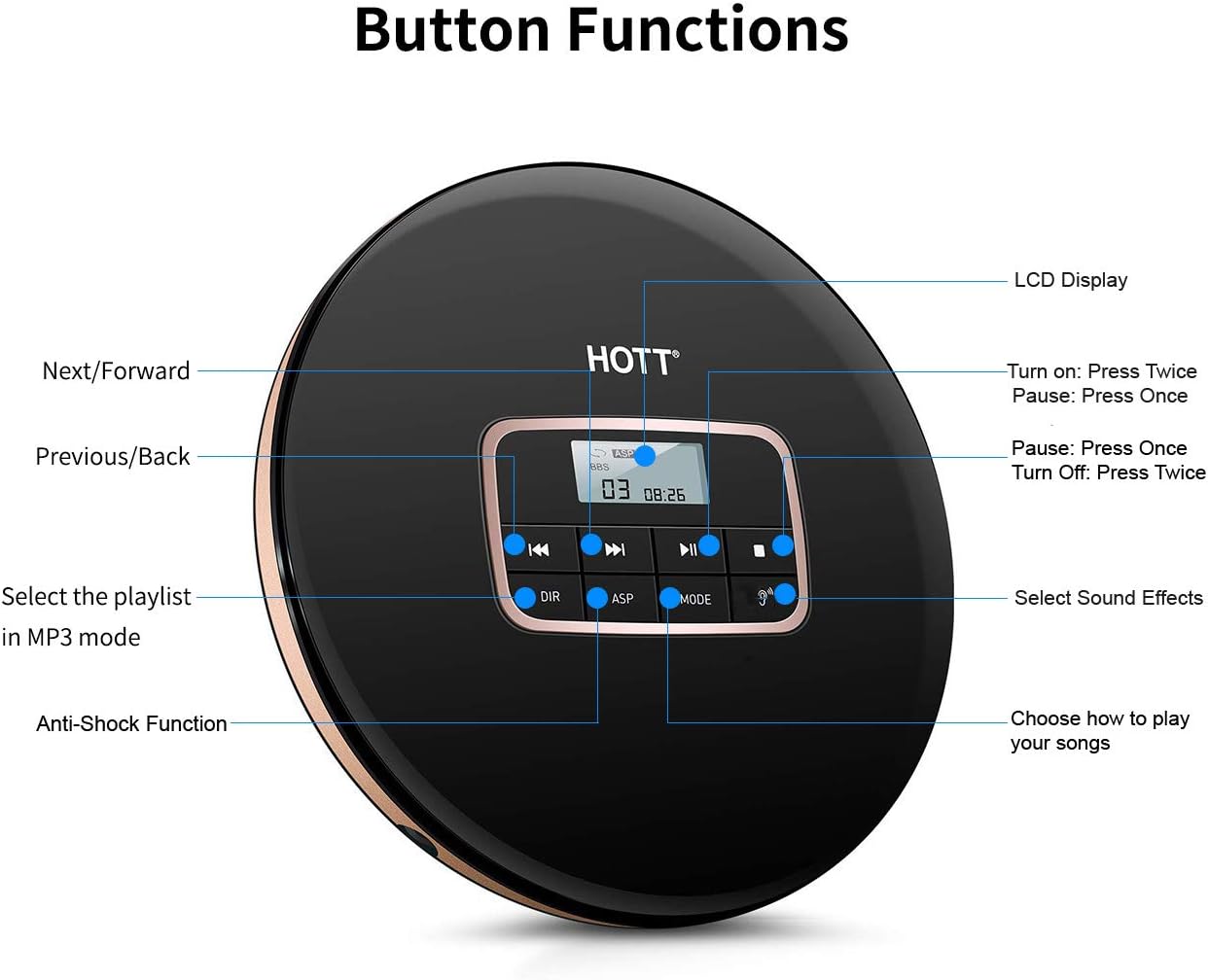
Слика 1: Врх view of the HOTT CD511 Portable CD Player, highlighting the LCD display and various control buttons for navigation, sound effects, and play modes.
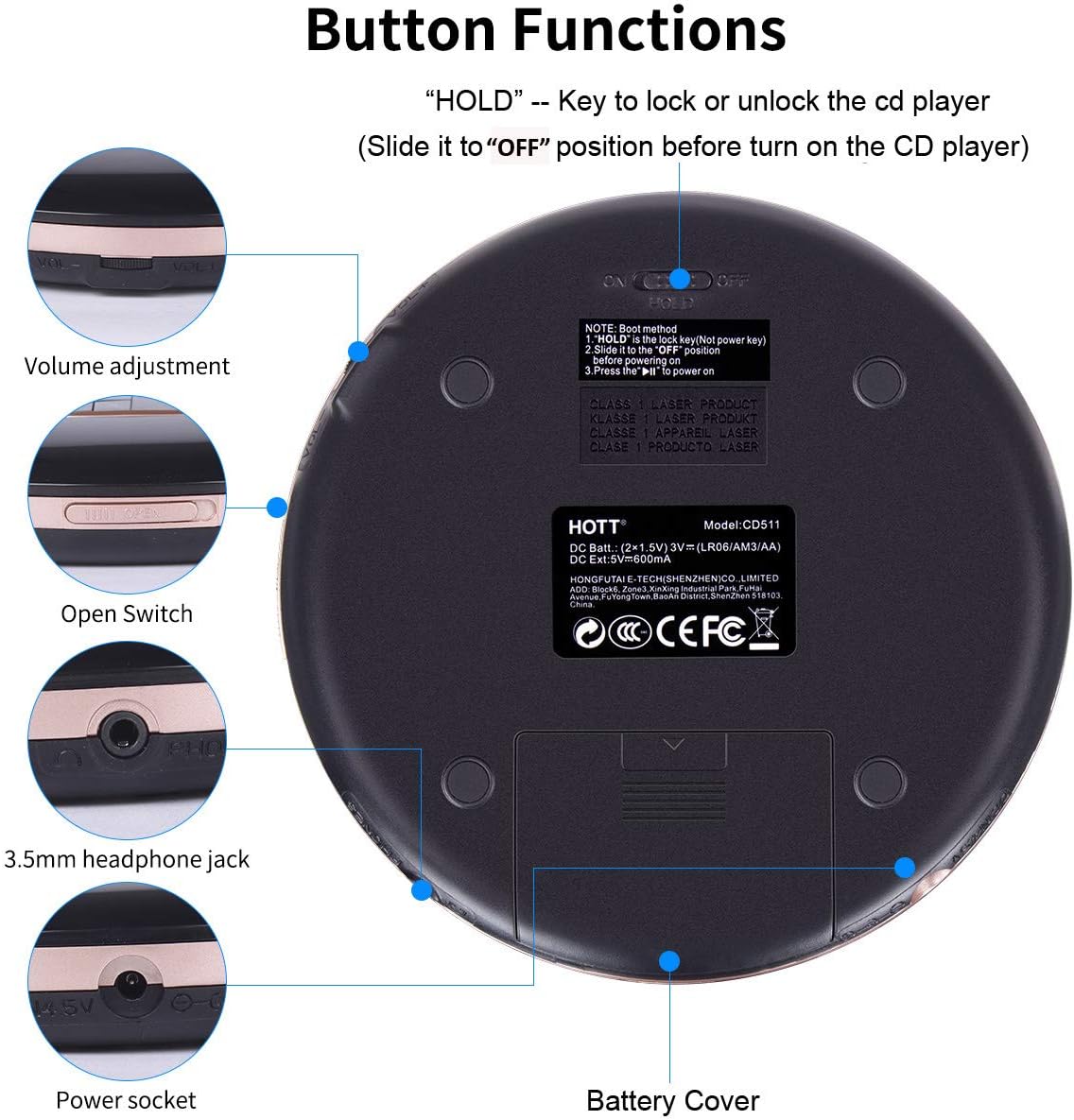
Слика 2: Доња и бочна страна view of the HOTT CD511 Portable CD Player, showing the HOLD switch, volume control, disc compartment open switch, headphone jack, power socket, and battery cover.
2.3 Компатибилност

Слика 3: The HOTT CD511 CD player supports various disc formats including standard CD, CD-R, CD-RW, and MP3 discs.
3. Подешавање
3.1 Напајање уређаја
The HOTT CD511 can be powered in two ways:
- батерије: Open the battery cover on the bottom of the player. Insert two (2) 1.5V AA batteries, ensuring correct polarity. Close the battery cover securely.
- УСБ Снага: Connect the provided USB cable to the power socket on the side of the player and to a USB power adapter (not included) or a computer's USB port.
Note: Ensure the "HOLD" switch is in the "OFF" position before turning on the CD player.
3.2 Убацивање CD-a
- Slide the "OPEN" switch to open the disc compartment lid.
- Carefully place the CD onto the center spindle with the label side facing up.
- Пажљиво притисните CD док не кликне на своје место.
- Close the disc compartment lid firmly until it latches.
3.3 Повезивање слушалица
Insert your 3.5mm headphones into the headphone jack located on the side of the player.
4. Упутство за употребу
4.1 Основна репродукција
- Укључено: Притисните тастер ПЛАИ/ПАУСЕ дугме двапут.
- Пусти/паузирај: Притисните тастер ПЛАИ/ПАУСЕ button once to play or pause.
- Зауставити: Притисните тастер СТОП дугме.
- Искључивање: Притисните тастер СТОП дугме двапут.
4.2 Навигација
- Следећа нумера: Притисните тастер НЕКСТ/ФОРВАРД дугме.
- Претходни запис: Притисните тастер PREVIOUS/BACK дугме.
- Премотавање унапред/уназад: Притисните и држите НЕКСТ/ФОРВАРД or PREVIOUS/BACK дугме током репродукције.
4.3 Контрола јачине звука
Подесите јачину звука помоћу ВОЛУМЕ +/- buttons located on the side of the player.
4.4 Play Modes and Sound Effects

Слика 4: The HOTT CD511 offers various play modes and sound effects for a customized listening experience.
- Дугме МОДЕ: Press to cycle through play modes: Single Repeat, All Repeat, Intro, Shuffle.
- ЕК тастер: Press to cycle through sound effects: BBS, Pop, Jazz, Rock, Classic.
- DIR Button (MP3 mode only): Selects the playlist or folder when playing MP3 discs.
4.5 Функција ХОЛД
Померите ХОЛД switch on the side of the player to the "ON" position to lock all buttons. This prevents accidental operation during transport. Slide it to "OFF" to unlock the buttons.
4.6 Anti-Skip/Anti-Shock Protection (ASP)
The ASP feature is automatically activated to prevent interruptions during playback caused by minor shocks or vibrations. The duration of anti-shock protection varies depending on the disc type (e.g., CD: 40 seconds, MP3 CD: 120 seconds).
4.7 Car Connectivity

Слика 5: The HOTT CD511 can be connected to a car's auxiliary input using a 3.5mm audio cable for playback through the car's sound system.
The CD player supports connection to car audio systems via a 3.5mm auxiliary cable. Connect one end of the cable to the player's headphone jack and the other end to your car's AUX input. This feature is compatible with most car models including Toyota, Honda, and Hyundai.
4.8 Сценарији коришћења

Слика 6: The HOTT CD511 is suitable for various activities such as relaxation, learning, prenatal education, and travel.
5. Одржавање
- Чишћење: Use a soft, dry cloth to clean the exterior of the player. For the lens, use a specialized CD lens cleaning kit. Do not use abrasive cleaners or solvents.
- Одржавање дискова: Држите ЦД-ове за ивице. Држите их чистим и без огреботина. Чувајте дискове у њиховим кутијама када их не користите.
- Замена батерије: Replace batteries when the low battery indicator appears on the LCD screen or when playback becomes inconsistent. Remove batteries if the player will not be used for an extended period.
- Складиштење: Store the player in a cool, dry place away from direct sunlight, high temperatures, and humidity.
КСНУМКС. Решавање проблема
| Проблем | Могући узрок | Решење |
|---|---|---|
| Плејер се не укључује. | Batteries are dead or incorrectly inserted. USB cable is not connected or faulty. HOLD switch is ON. | Replace batteries, check polarity. Ensure USB cable is securely connected. Turn HOLD switch OFF. |
| Диск се не репродукује. | Диск је прљав, изгребан или је неправилно уметнут. Формат диска није подржан. | Clean the disc, check for damage. Reinsert the disc correctly. Ensure disc is CD, CD-R, CD-RW, or MP3. |
| Sound skipping or interruption. | Disc is dirty or scratched. Player is subjected to excessive shock. | Clean the disc. Avoid strong vibrations. ASP function is active but has limits. |
| Нема звука из слушалица. | Headphones not connected properly. Volume is too low. Headphones are faulty. | Ensure headphones are fully plugged in. Increase volume. Test with different headphones. |
7. Спецификације
- Модел: ЦД511
- Димензије производа: 5.6 к 5.6 к 0.6 инча
- Тежина артикла: 15.5 унци
- Бренд: ХОТТ
- Боја: Црно
- Технологија повезивања: Помоћни, УСБ
- Посебна карактеристика: Портабле
- Број дискова: 1
- Произвођач: ХОТТ
- Прво доступно: 10. марта 2019. године
8. Званични видео производа
Видео 1: An official product video demonstrating the features and usage of the HOTT CD Player.
9. Гаранција и подршка
For warranty information or technical support, please refer to the contact details provided with your product packaging or visit the official HOTT webсајт. Сачувајте рачун као доказ о куповини за потребе гаранције.