
Veidoo T10
Veidoo 10-inch Android Tablet PC User Manual
Модел: Т10
1. Увод
This user manual provides detailed instructions for the safe and efficient operation of your Veidoo 10-inch Android Tablet PC. Please read this manual thoroughly before using the device and retain it for future reference. This tablet is designed for various uses, including communication, entertainment, and productivity.

This image shows the Veidoo 10-inch Android Tablet PC. The front of the tablet displays the home screen with the current time, date, and various application icons such as Camera, Gallery, Settings, and Music. The rear of the tablet, visible behind the front, is black with a subtle textured design and features the rear camera module.
2. Безбедносне информације
- Не излажите уређај екстремним температурама, директној сунчевој светлости или високој влажности.
- Избегавајте испуштање или излагање уређаја јаким ударима.
- Користите само пуњаче и додатну опрему које је одобрио произвођач.
- Не покушавајте сами да растављате или поправљате уређај. Обратите се квалификованом сервисеру.
- Држите уређај даље од деце и кућних љубимаца.
- Одложите уређај и његову батерију одговорно у складу са локалним прописима.
3. Производ је готовview
3.1 Физичке карактеристике
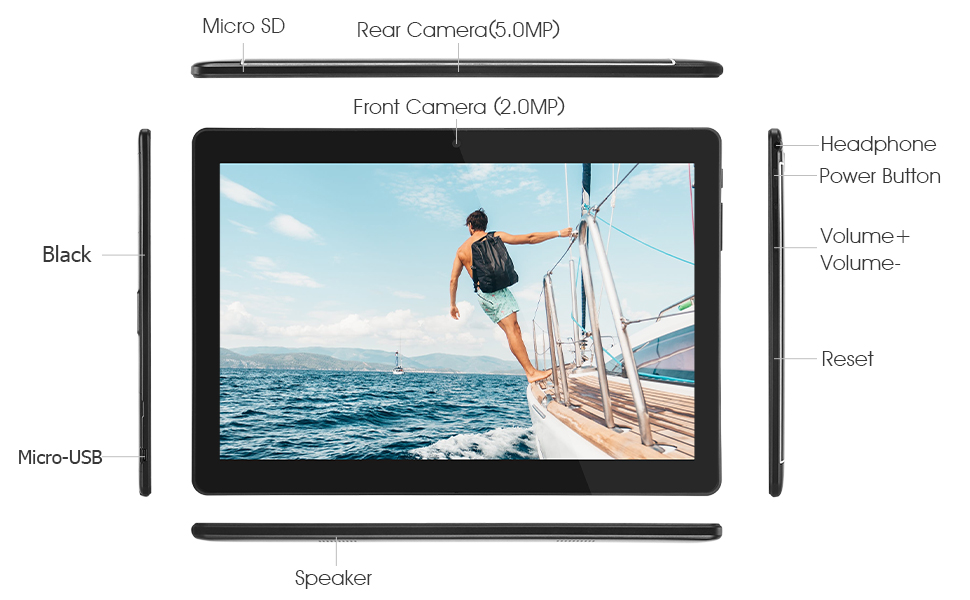
Familiarize yourself with the various ports and buttons on your Veidoo Tablet PC:

This diagram illustrates the various physical components and ports of the Veidoo 10-inch Android Tablet PC. It clearly labels the Micro SD card slot, the 5.0MP rear camera, the 2.0MP front camera, the headphone jack, the power button, the volume up and down buttons, the reset pinhole, the Micro-USB charging port, and the speaker.
- Мицро СД слот: За прошириви простор за складиштење.
- Задња камера (5.0MP): За снимање фотографија и видео записа.
- Предња камера (2.0MP): За видео позиве и селфије.
- Слушалице: Повежите слушалице од 3.5 мм.
- Дугме за напајање: Притисните и држите за укључивање/искључивање, кратко притисните за спавање/буђење.
- Дугмад за јачину звука: Подесите јачину звука.
- Ресетујте Пинхоле: Use a thin object to reset the device if unresponsive.
- Мицро-УСБ порт: За пуњење и пренос података.
- говорник: Аудио излаз.
3.2 Садржај пакета
Уверите се да су све ставке присутне у кутији вашег производа:

This image displays the items typically found inside the Veidoo 10-inch Android Tablet PC product box. It includes the tablet itself, a black protective case, a power adapter (wall charger), a USB charging and data cable, a service warranty card, and a leaflet containing frequently asked questions and support information.
- Veidoo 10-inch Android Tablet PC
- Повер Адаптер
- УСБ кабл
- Protective Case (optional, may vary by package)
- Кориснички приручник (овај документ)
- Сервисна гаранција
- FAQ Leaflet
4. Подешавање
4.1 Пуњење батерије
Before first use, fully charge the tablet. Connect the USB cable to the tablet's Micro-USB port and the other end to the power adapter. Plug the adapter into a wall outlet. The charging indicator will show the charging status. A full charge typically takes 3-4 hours.

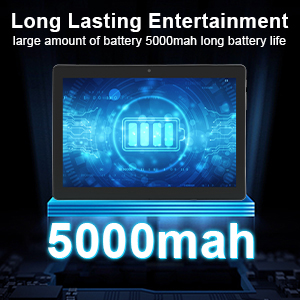
This image focuses on the Veidoo 10-inch Android Tablet PC's battery capacity, prominently displaying a battery icon and '5000mAh'. This signifies the tablet's 5000mAh battery, designed to provide extended usage time for entertainment and productivity.
4.2 Укључивање/искључивање
- За укључивање: Press and hold the Power button until the Veidoo logo appears on the screen.
- За искључивање: Притисните и држите дугме за напајање док се не појави мени. Изаберите „Искључи“ и потврдите.
- Спавање/Буђење: Кратко притисните дугме за напајање да бисте таблет пребацили у режим спавања или га пробудили.
4.3 Уметање SIM и Micro SD картица
The tablet supports dual SIM cards for 3G phone calls and a Micro SD card for expandable storage.
- Locate the SIM/SD card slot on the side of the tablet.
- Пажљиво отворите поклопац отвора.
- Insert the SIM card(s) and/or Micro SD card into the designated slots with the gold contacts facing down. Ensure they are correctly seated.
- Чврсто затворите поклопац отвора.
This image demonstrates the storage capabilities of the Veidoo 10-inch Android Tablet PC, showing multiple applications and content open. It highlights the device's 16GB internal storage (ROM) and its ability to expand storage up to 32GB via a Micro SD card, allowing for ampпростор за апликације, фотографије и видео записе.
4.4 Почетно подешавање
При првом укључивању, таблет ће вас водити кроз процес почетног подешавања:
- Изаберите жељени језик.
- Повежите се на Ви-Фи мрежу.
- Пријавите се помоћу свог Google налога или креирајте нови. Ово је неопходно за преузимање апликација из Google Play продавнице.
- Подесите закључавање екрана (ПИН, шаблон, лозинка).
- Review и прихватите услове и одредбе.
5. Управљање таблетом
5.1 Основна навигација
- Додирните: Изаберите ставку или отворите апликацију.
- Додирните и задржите: Access context menus or move icons.
- Превуците: Померајте се кроз екране или листе.
- Зумирање штипкањем прстију: Увећајте или умањите слике и web странице.
5.2 Connectivity (Wi-Fi & Bluetooth)
- Ви-Фи: Иди на Подешавања > Мрежа и интернет > Wi-FiУкључите Wi-Fi, изаберите мрежу и унесите лозинку.
- Блуетоотх: Иди на Подешавања > Повезани уређаји > БлутутУкључите Bluetooth, скенирајте уређаје и упарите се са жељеним додатком.
5.3 Making Phone Calls (3G)
With a valid SIM card inserted, you can make and receive 3G phone calls:

This image shows a group of four individuals participating in a video call using the Veidoo 10-inch Android Tablet PC. This illustrates the tablet's capability for video conferencing and its 3G phone call functionality, allowing users to connect with others remotely.
- Отворите Телефон апп.
- Dial the number using the keypad or select a contact.
- Додирните дугме за позив да започнете позив.
5.4 Коришћење камера
The tablet is equipped with a front and rear camera for photos and videos.
- Отворите Камера апп.
- Пребацујте се између предње и задње камере помоћу иконе камере.
- Додирните дугме затварача да бисте снимили фотографију или покренули/зауставили снимање видеа.
5.5 Управљање складиштем
Можеш view and manage your tablet's internal and external storage:
- Иди на Подешавања > Складиштење.
- Here you can see storage usage and free up space by deleting unnecessary files or uninstalling apps.
5.6 Installing and Uninstalling Apps
This image features the Veidoo 10-inch Android Tablet PC showcasing its Android 10 operating system with a multitude of application icons. This highlights that the device is GMS (Google Mobile Services) certified, ensuring access to Google Play Store and other Google services.
- Инсталирај: Отворите Гоогле Плаи продавница апликацију, потражите жељену апликацију и додирните Инсталирај.
- Деинсталирај: Иди на Подешавања > Апликације и обавештења > Погледајте све апликације. Select the app you wish to uninstall and tap Деинсталирај.
6. Одржавање
- Чишћење: Користите меку крпу која не оставља влакна за чишћење екрана и кућишта. Избегавајте абразивна средства за чишћење или раствараче.
- Ажурирања софтвера: Редовно проверавајте системска ажурирања у Подешавања > Систем > Ажурирање система како би се осигурале оптималне перформансе и безбедност.
- Одржавање батерије: To prolong battery life, avoid fully discharging the battery frequently. Store the tablet in a cool, dry place when not in use for extended periods.
- Резервна копија података: Regularly back up important data to a cloud service or external storage device to prevent data loss.
КСНУМКС. Решавање проблема
| Проблем | Могуће решење |
|---|---|
| Таблет се не укључује | Ensure the battery is charged. Connect the charger and wait a few minutes before attempting to power on. If unresponsive, try pressing the reset pinhole. |
| Екран не реагује | Restart the tablet by holding the Power button. If that doesn't work, use the reset pinhole. Ensure the screen is clean and dry. |
| Повезивање на Ви-Фи није могуће | Check if Wi-Fi is enabled in settings. Ensure the Wi-Fi password is correct. Restart your router and the tablet. |
| Апликације се руше или замрзавају | Close and reopen the app. Clear the app's cache in Подешавања> Апликације и обавештења. Update the app or uninstall and reinstall it. Ensure sufficient storage space. |
| Лош век трајања батерије | Reduce screen brightness. Close unused apps running in the background. Turn off Wi-Fi, Bluetooth, and GPS when not in use. Limit background data usage. |
8. Спецификације
Key technical specifications for the Veidoo 10-inch Android Tablet PC (Model T10):

This image provides a visual summary of the Veidoo Tablet PC's key specifications. It highlights features such as 1GB RAM, a 2MP front and 5MP rear camera setup, a 10.1-inch IPS HD display with 1280x800 resolution, 16GB of internal storage, Android 10 operating system, Wi-Fi connectivity, a Quad-Core CPU, and dual SIM card support.
| Феатуре | Детаљ |
|---|---|
| Назив модела | Touch (T10) |
| Величина екрана на стојећем екрану | 10.1 инча |
| Резолуција екрана | 800 к 1280 (ИПС) |
| РАМ | 1 GB (DDR3 SDRAM) |
| Величина чврстог диска / флеш меморије | 16 GB (expandable up to 32GB via Micro SD) |
| Вирелесс Типе | 802.11b, 802.11b/g (Wi-Fi), Bluetooth |
| Просечно трајање батерије | 6 Hours (5000mAh Lithium Polymer) |
| Хардверска платформа | Андроид |
| Оперативни систем | Android 6.0 Marshmallow (GMS Certified) |
| Тежина артикла | 2.86 фунти |
| Димензије производа | 9.49 к 6.69 к 0.37 инча |
| Позади Webцам Ресолутион | 5 МП |
| Фронт Webцам Ресолутион | 2 МП |
| Број процесора | 4 (Quad-Core) |
| Извор напајања | Напаја се батеријама, електричним каблом |
9. Гаранција и подршка
Your Veidoo Tablet PC comes with a service warranty. Please refer to the included Service Warranty Card for specific terms and conditions, including warranty period and coverage details.
For technical support, troubleshooting assistance, or warranty claims, please contact Veidoo customer service. Contact information can typically be found on the warranty card or the official Veidoo website. When contacting support, please have your model number (T10) and purchase information ready.
You can also visit the official Veidoo store on Amazon for more information and support resources: Veidoo Store
Ask a question about this manual
Ask about setup, troubleshooting, compatibility, parts, safety, or missing instructions. Manuals+ will review the question and use this page’s manual context to help answer it.