
1. Увод
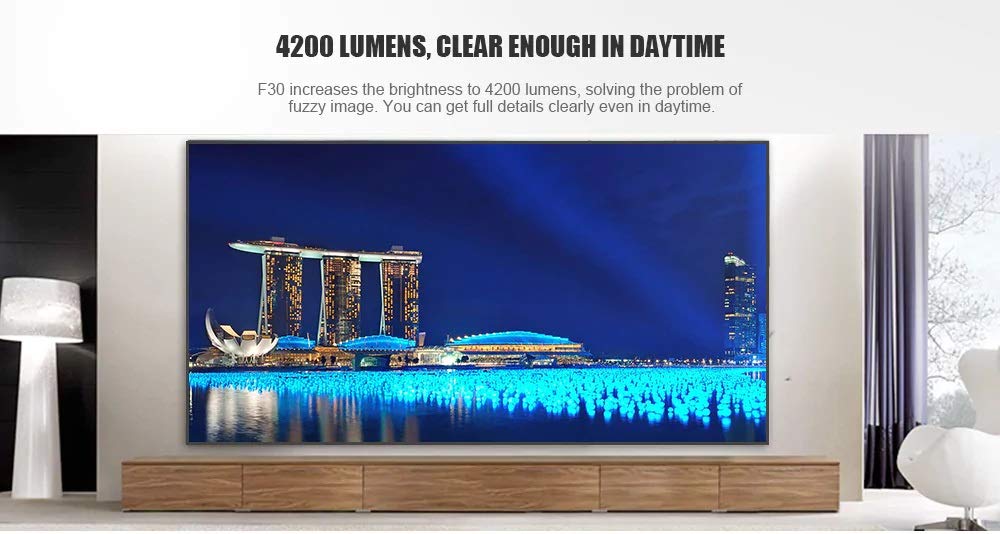
This manual provides essential instructions for the safe and efficient use of your Vivibright F30 Projector. Please read this manual thoroughly before operating the device and retain it for future reference. The Vivibright F30 is a Full HD 1080p LED projector designed for home theater, education, and business presentations, offering 4200 lumens brightness and multiple connectivity options.
2. Безбедносне информације
- Напајање: Користите само наведени адаптер за напајање. Уверите се да је јачина звукаtagе одговара захтевима пројектора.
- вентилација: Не блокирајте вентилационе отворе. Обезбедите довољно простора око пројектора за правилан проток ваздуха како бисте спречили прегревање.
- топлота: Пројектор лamp generates heat. Avoid touching the lens or vents immediately after use.
- Заштита очију: Не гледајте директно у сочиво пројектора када је укљученоamp is on. The bright light can cause eye strain or damage.
- Пласман: Поставите пројектор на стабилну, равну површину. Избегавајте постављање на директно сунчево светло, близу извора топлоте или у окружења са високом влажношћу или прашином.
- Чишћење: Искључите напајање пре чишћења. Користите меку, суву крпу. Не користите течна или аеросолна средства за чишћење.
- Сервисирање: Do not attempt to service the projector yourself. Refer all servicing to qualified personnel.
3. Садржај пакета
Проверите да ли су све ставке присутне у пакету:
- Vivibright F30 Projector
- Повер Цабле
- Ремоте Цонтрол
- Кориснички приручник (овај документ)
- HDMI Cable (may vary by region/package)
4. Производ је готовview
Упознајте се са компонентама и интерфејсима пројектора.
Слика 4.1: Фронт view of the Vivibright F30 Projector, showing the lens and ventilation.

Слика 4.2: Сиде view of the Vivibright F30 Projector, highlighting the various input ports.
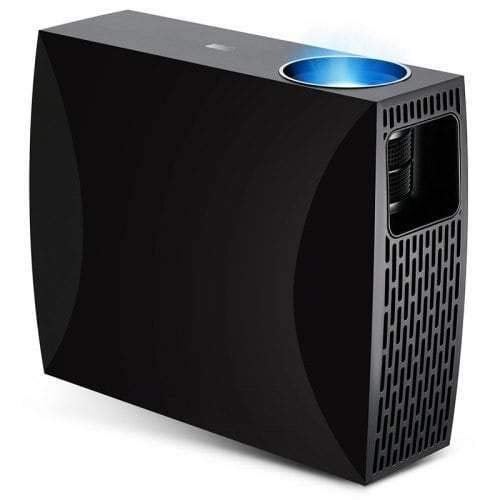
Слика 4.3: Top or rear view of the Vivibright F30 Projector, showing control buttons or additional vents.
4.1. Интерфејси
- ХДМИ портови: For connecting devices like laptops, gaming consoles, Blu-ray players, and media players.
- ВГА порт: For connecting older computers or other VGA-compatible devices.
- УСБ портови: For connecting USB storage devices to play media directly.
- Аудио излаз: За повезивање екстерних звучника или слушалица.
- Улазна снага: За повезивање кабла за напајање.
5. Подешавање
КСНУМКС. Постављање
Position the projector on a stable surface or mount it appropriately. Ensure the projector is perpendicular to the projection screen for optimal image geometry. The projection distance can range from 1.2 to 6.8 meters, depending on the desired screen size.
5.2. Прикључак за напајање
- Прикључите кабл за напајање на улазни порт за напајање пројектора.
- Укључите други крај кабла за напајање у уземљену електричну утичницу.
5.3. Повезивање улазних уређаја
Connect your desired source device (e.g., laptop, media player) to the projector using an appropriate cable (HDMI, VGA, USB). Ensure the cable is securely connected to both the projector and the source device.
5.4. Фокус и подешавање трапезоидног искривљења
- Фокус: Окрећите прстен за фокусирање на објективу пројектора док слика на екрану не постане оштра и јасна.
- Кеистоне: If the projected image is trapezoidal (wider at the top or bottom), use the keystone correction feature (manual or digital, depending on model) to adjust the image to a rectangular shape.
6. Упутство за употребу
6.1. Укључивање/искључивање
- Укључено: Press the power button on the projector or the remote control. The indicator light will change, and the lamp ће осветлити.
- Искључивање: Press the power button again. Confirm shutdown if prompted. Allow the projector to cool down before unplugging it.
6.2. Избор извора улаза
Press the "Source" button on the remote control or the projector's control panel to cycle through available input sources (HDMI1, HDMI2, VGA, USB). Select the input corresponding to your connected device.
6.3. Мену Навигатион
Use the arrow buttons on the remote control or projector to navigate through the on-screen display (OSD) menu. Press "OK" or "Enter" to select an option and "Exit" or "Menu" to go back or close the menu.
6.4. Picture and Audio Settings
Adjust picture settings such as brightness, contrast, color, and aspect ratio via the OSD menu to optimize image quality. Adjust volume levels for the built-in speaker or connected external audio devices.
7. Одржавање
7.1. Чишћење сочива
Gently wipe the projector lens with a soft, lint-free cloth specifically designed for optical surfaces. Do not use abrasive materials or harsh chemicals.
7.2. Чишћење кућишта пројектора
Use a soft, dry cloth to clean the exterior of the projector. For stubborn marks, a slightly damp cloth can be used, followed by a dry cloth. Ensure no liquid enters the ventilation openings.
7.3. Лamp Живот
The Vivibright F30 Projector utilizes an LED lamp with an estimated lifespan of up to 50,000 hours, requiring no regular replacement under normal usage conditions.
КСНУМКС. Решавање проблема
| Проблем | Могући узрок | Решење |
|---|---|---|
| Нема приказане слике |
|
|
| Слика је мутна |
|
|
| Слика је трапезоидног облика (ефекат кејстејнстона) |
|
|
| Нема звука |
|
|
| Пројектор се прегрева или гаси |
|
|
9. Спецификације
| Феатуре | Детаљ |
|---|---|
| Бранд | Вивибрајт |
| Модел | Ф30 |
| Нативе Ресолутион | 1920 к 1080 (Фулл ХД) |
| Подржана резолуција | До 4К |
| Осветљеност | 4200 Lumens (LED Luminous) |
| Однос контраста | 2200:1 |
| Дисплаи Тецхнологи | ЛЦД |
| Lamp Тип | ЛЕД |
| Lamp Живот | До 50,000 сати |
| Удаљеност пројекције | 1.2 до 6.8 метара |
| Ниво буке | 29 децибела |
| Повезивање | ХДМИ, ВГА, УСБ |
| Посебне карактеристике | Portable, Built-in Speaker |
| Тежина артикла | 3 кг |
| Тип монтаже | Таблетоп Моунт |
10. Гаранција и подршка
10.1. Информације о гаранцији
The Vivibright F30 Projector comes with a 1 година гаранције од датума куповине. Ова гаранција покрива производне недостатке и кварове при нормалној употреби. Молимо вас да сачувате доказ о куповини за потребе подношења захтева за гаранцију.
The warranty does not cover damage caused by misuse, accidents, unauthorized repairs, or normal wear and tear.
10.2. Корисничка подршка
For technical assistance, warranty claims, or further inquiries, please contact Vivibright customer support through their official website or the contact information provided with your purchase documentation. When contacting support, please have your product model (F30) and purchase details ready.