
1. Увод
Thank you for choosing the Tracer Mark USB Bluetooth Stereo 2.0 Speakers. These speakers are designed to provide high-quality audio for your computer, laptop, or gaming console. Featuring both Bluetooth wireless connectivity and a 3.5mm auxiliary input, they offer versatile audio playback options. The speakers are conveniently powered via a USB port, eliminating the need for an external power adapter.
2. Безбедносне информације
- Не излажите звучнике води или прекомерној влази.
- Избегавајте постављање звучника у близини извора топлоте или на директној сунчевој светлости.
- Do not attempt to disassemble or modify the speakers. This will void the warranty.
- Чувати ван домашаја деце.
- Use only the provided cables or compatible replacements.
3. Садржај пакета
Молимо вас да означите поље за следеће ставке:
- Tracer Mark USB Bluetooth Stereo 2.0 Speakers (2 units)
- Integrated USB Power Cable
- Integrated 3.5mm Audio Jack Cable
- Кориснички приручник (овај документ)
4. Производ је готовview
The Tracer Mark speakers feature a compact design with essential controls located on the front of the primary speaker unit.
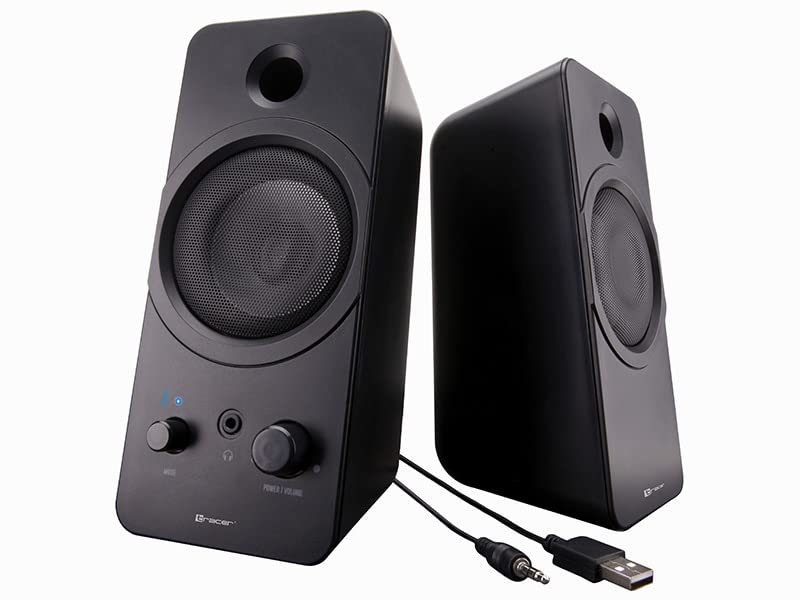
Слика: Фронт view of the Tracer Mark USB Bluetooth Stereo 2.0 Speakers. The left speaker shows a 'Mode' knob, a headphone jack, a 'Power | Volume' knob, and a blue LED indicator. Both speakers have a circular grille for the main driver and a port above it.
Контроле и индикатори:
- Power | Volume Knob: Turns the speakers on/off and adjusts the audio volume.
- Дугме за режим: Switches between Bluetooth and 3.5mm auxiliary input modes.
- Слушалице: За повезивање слушалица.
- Bluetooth Indicator LED: Displays the Bluetooth connection status.

Слика: Под углом view of the Tracer Mark USB Bluetooth Stereo 2.0 Speakers, showing their compact, rectangular design and the control panel on the front of the left speaker.
5. Подешавање
5.1 Прикључак за напајање
- Locate the integrated USB power cable extending from the primary speaker.
- Connect the USB plug to an available USB port on your computer, laptop, or a compatible USB wall adapter (5V/1A recommended).
- Уверите се да је извор напајања активан.
5.2 Audio Connection (Wired - 3.5mm Auxiliary)
- Locate the integrated 3.5mm audio jack cable extending from the primary speaker.
- Plug the 3.5mm audio jack into the headphone output or auxiliary audio output port of your computer, laptop, or other audio device.
- Turn the 'Mode' knob on the speaker to select the auxiliary input mode.
5.3 Audio Connection (Wireless - Bluetooth)
- Уверите се да су звучници укључени.
- Turn the 'Mode' knob to select Bluetooth mode. The Bluetooth indicator LED will start blinking, indicating it is in pairing mode.
- На аудио уређају (паметном телефону, таблету, рачунару) омогућите Bluetooth и потражите доступне уређаје.
- Select "Tracer Mark" from the list of found devices.
- Once paired, the Bluetooth indicator LED on the speaker will turn solid blue, indicating a successful connection.
6. Оперативни
6.1 Укључивање/искључивање и контрола јачине звука
- To power on the speakers, rotate the 'Power | Volume' knob clockwise until you hear a click and the indicator light illuminates.
- Наставите да ротирате у смеру казаљке на сату да бисте повећали јачину звука.
- To decrease the volume, rotate the knob counter-clockwise.
- To power off the speakers, rotate the 'Power | Volume' knob counter-clockwise until you hear a click and the indicator light turns off.
6.2 Избор режима
- Use the 'Mode' knob to switch between the 3.5mm auxiliary input and Bluetooth input.
- The Bluetooth indicator LED will show the current mode status.
6.3 Употреба слушалица
- Plug your headphones into the 3.5mm headphone jack on the front of the primary speaker.
- When headphones are connected, audio will automatically be routed to the headphones, muting the speakers.
- Unplug the headphones to resume audio playback through the speakers.
7. Одржавање
7.1 Чишћење
- Ensure the speakers are powered off and disconnected from the power source before cleaning.
- Use a soft, dry cloth to wipe the exterior surfaces of the speakers.
- Do not use liquid cleaners, aerosols, or abrasive materials, as these may damage the finish or internal components.
7.2 Складиштење
- Када се не користе дуже време, чувајте звучнике на хладном и сувом месту, даље од директне сунчеве светлости и екстремних температура.
- Keep the speakers free from dust.
КСНУМКС. Решавање проблема
If you encounter issues with your speakers, please refer to the following common problems and solutions:
| Проблем | Могући узрок | Решење |
|---|---|---|
| Нема звука из звучника. | Звучници нису укључени. Јачина звука је прениска. Изабран је погрешан режим уноса. Аудио кабл није правилно повезан. Device volume too low/muted. | Ensure 'Power | Volume' knob is turned on. Повећајте јачину звука помоћу дугмета. Select the correct mode (Bluetooth or AUX) with the 'Mode' knob. Check 3.5mm audio cable connection. Појачајте јачину звука на вашем аудио уређају. |
| Блутут се не повезује. | Звучници нису у режиму упаривања. Bluetooth disabled on device. Speakers too far from device. Интерференција. | Ensure 'Mode' knob is set to Bluetooth and LED is blinking. Омогућите Блуетоотх на свом уређају. Move speakers closer to your device (within 10 meters). Искључите друге Bluetooth уређаје у близини. |
| Изобличен звук. | Јачина звука је превелика. Лош квалитет извора звука. Лабава кабловска веза. | Reduce volume on speakers and/or audio device. Покушајте са другим извором звука. Проверите све кабловске везе. |
9. Спецификације
Detailed technical specifications for the Tracer Mark USB Bluetooth Stereo 2.0 Speakers:
| Број модела | ТРАГЛО46370 |
| Бранд | Трацер |
| Спеакер Типе | Преносиви Блуетоотх звучник |
| Режим аудио излаза | Stereo (2.0 Channels) |
| Максимална излазна снага | 12 Ваттс |
| Фреквенцијски одзив | 25 Hz - 22 kHz |
| Технологија повезивања | Bluetooth, 3.5mm Auxiliary |
| Бежична технологија | Блуетоотх |
| Извор напајања | Напајање преко USB-а (5V) |
| Контролни метод | Knob/Dial Control |
| Препоручена употреба | Computer, Laptop, Gaming Console |
| Компатибилни уређаји | Лични рачунар, лаптоп |
| Тежина | 958 грама |
| Тип монтаже | Таблетоп |
10. Гаранција и подршка
For warranty information and technical support, please refer to the documentation provided with your purchase or contact Tracer customer service directly. Keep your proof of purchase for warranty claims.