
Увод
This manual provides instructions for the safe and efficient operation of your RIDGID R84086B 18-Volt Cordless Mini Bluetooth Radio. This compact and versatile device offers portable audio entertainment and device charging, featuring AM/FM radio, Bluetooth connectivity, and an auxiliary input. It is powered by RIDGID 18-Volt batteries and can also function as a power bank for charging other devices.
Безбедносне информације
Always read and understand all safety warnings and instructions before operating this product. Failure to follow these instructions may result in electric shock, fire, and/or serious injury.
- Do not expose the radio to rain or wet conditions. Water entering the radio will increase the risk of electric shock.
- Use only with specified battery packs. Using any other battery packs may create a risk of injury and fire.
- Do not operate the radio in explosive atmospheres, such as in the presence of flammable liquids, gases, or dust.
- Keep the radio away from heat sources, direct sunlight, and extreme temperatures.
- Always ensure the battery is properly seated before use.
Производ је завршенview
Familiarize yourself with the components of your RIDGID R84086B radio.
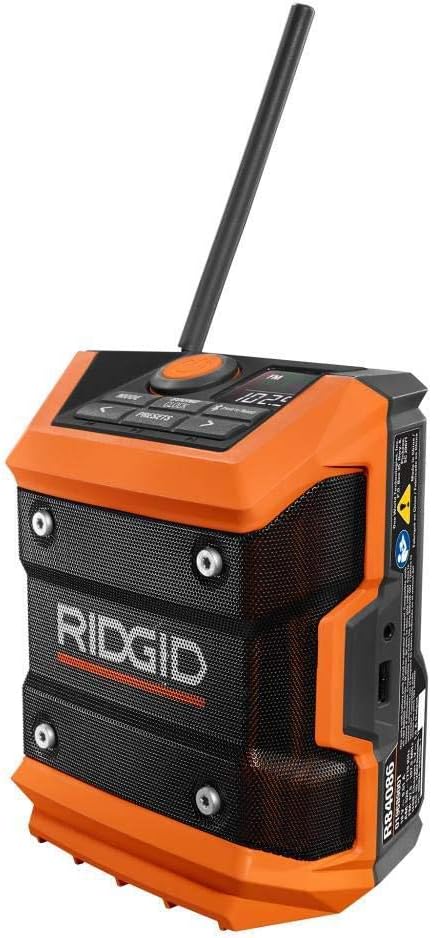
Слика 1: Предња страна view of the RIDGID R84086B radio, showing the control panel, speaker, and extended antenna.

Figure 2: The RIDGID R84086B radio in a workshop setting, demonstrating its portability and use with a smartphone.
Сетуп
Инсталација батерије
- Уверите се да је радио искључен.
- Align a charged RIDGID 18-Volt battery pack with the battery port on the radio.
- Уметните батерију у порт док не кликне чврсто на своје место.
Подешавање антене
For optimal radio reception, extend and adjust the antenna as needed. The antenna can be rotated and tilted to improve signal strength.
Упутство за употребу
Укључивање/искључивање
Press the orange power button located on the control panel to turn the radio on or off.
Избор режима
Притисните тастер МОДЕ button to cycle through available audio sources: FM Radio, AM Radio, Bluetooth, and Auxiliary (AUX) input.
Radio Tuning (AM/FM)
- Select FM or AM mode using the МОДЕ дугме.
- Use the left (<) и десно (>) arrow buttons to manually tune to a desired frequency.
- Да бисте сачували станицу као предефинисану, притисните и држите ПРЕСЕТС button, then use the arrow buttons to select a preset number and press ПРЕСЕТС поново да потврдим.
Блуетоотх упаривање
- Изаберите Bluetooth режим помоћу МОДЕ button. The Bluetooth icon on the display will flash, indicating it is in pairing mode.
- На свом мобилном уређају омогућите Блуетоотх и потражите доступне уређаје.
- Select "RIDGID Radio" from the list of devices to pair. Once paired, the Bluetooth icon will stop flashing and remain solid.
Аукилиари Инпут
To use the auxiliary input, connect an audio device (e.g., smartphone, MP3 player) to the 3.5mm AUX port on the side of the radio using a standard audio cable. Select AUX mode using the МОДЕ дугме.
Подешавање звука
Притисните тастер SOUND/CLOCK button to access sound settings. Use the arrow buttons to adjust bass and treble levels for your preferred audio experience.
Функционалност преносне батерије
The radio features a USB port that allows you to charge compatible devices. Connect your device to the USB port using an appropriate charging cable. The radio's battery will provide power to charge your device.
Video: Demonstration of the RIDGID R84086B radio's features, including battery installation, mode selection, radio tuning, auxiliary input, and power bank functionality.
Одржавање
Чишћење
Regularly clean the radio with a soft, damp крпа. Не користите јаке хемикалије или абразивна средства за чишћење. Уверите се да су сви отвори без прашине и остатака.
Баттери Царе
Store battery packs in a cool, dry place away from direct sunlight. Do not store battery packs in a discharged condition. Always charge batteries fully before extended storage.
Решавање проблема
Но Повер
- Уверите се да је батерија потпуно напуњена и правилно уметнута.
- Check for any obstructions in the battery port.
Слаб радио пријем
- Extend and adjust the antenna for better signal.
- Move the radio to a different location to avoid interference.
Проблеми са Блуетоотх везом
- Уверите се да је радио у режиму упаривања путем Bluetooth-а.
- Make sure your mobile device's Bluetooth is enabled and within range.
- Покушајте да раскинете упаривање и поново упарите уређај.
Спецификације
| Бранд | РИДГИД |
| Број модела | Р84086Б |
| Технологија повезивања | Блуетоотх |
| Извор напајања | Battery Powered (RIDGID 18-Volt) |
| Тежина артикла | 1.75 фунти |
| Компатибилни уређаји | Смартпхоне |
| Хардверски интерфејс | УСБ |
| УПЦ | 723548648427 |
Гаранција и подршка
Информације о гаранцији
This product comes with a 90-day limited warranty. Please refer to the warranty card included with your purchase for full terms and conditions.
Корисничка подршка
For technical assistance, troubleshooting, or warranty claims, please contact RIDGID customer support. Contact information can typically be found on the official RIDGID webсајту или на паковању вашег производа.