
1. Увод
The LAUNCH CR319 is a handheld On-Board Diagnostics II (OBD2) code reader designed to assist in diagnosing vehicle engine issues. It provides access to various diagnostic functions to help users identify and clear trouble codes, monitor vehicle performance data, and check emission readiness status. This manual provides detailed instructions for the proper use and maintenance of your CR319 device.
2. Производ је готовview
2.1 Кључне карактеристике
- Комплетне OBD2 функције: Подржава свих 10 OBD2 тест режима.
- DTC Lookup Library: Built-in database with over 3000 code definitions.
- Вишејезична подршка: Available in English, Portuguese, Russian, Italian, Spanish, French, and German.
- Плуг анд Плаи: No batteries or charger required; powered directly from the vehicle's OBD2 port.
- Компактан дизајн: Једноставан за руковање и складиштење.
2.2 Компоненте уређаја
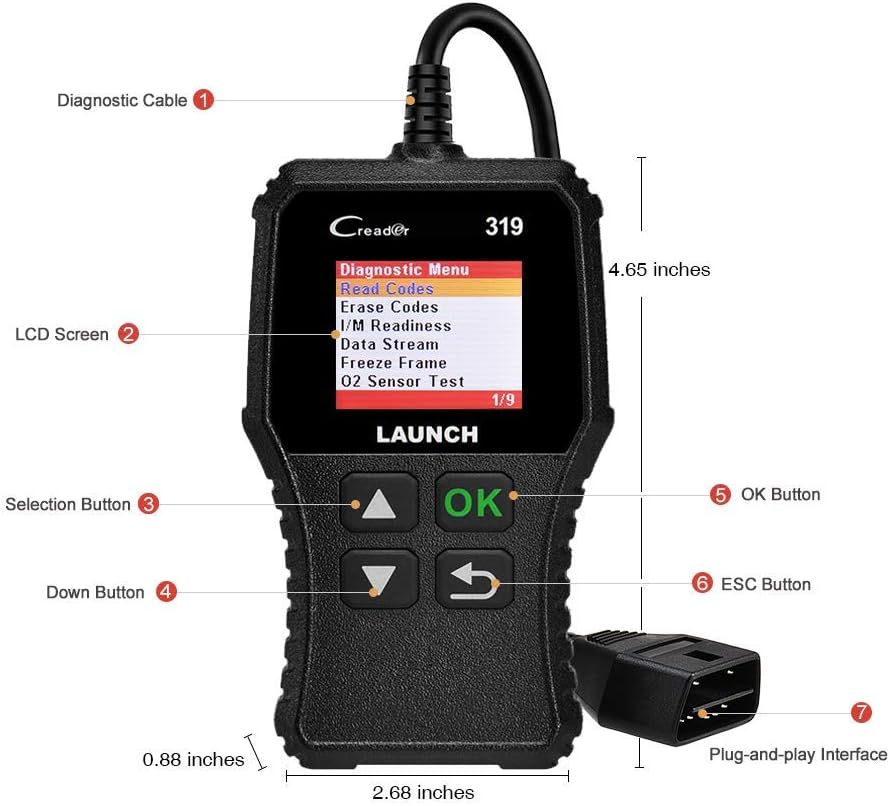
The image above illustrates the main components of the LAUNCH CR319 OBD2 Scanner. Key parts include the Diagnostic Cable (1) for connecting to the vehicle, the LCD Screen (2) for displaying information, Selection Buttons (3) for navigation, the Down Button (4), the OK Button (5) for confirmation, the ESC Button (6) to return to the previous screen, and the Plug-and-Play Interface (7) which is the OBD2 connector.
3. Подешавање
- Пронађите OBD2 порт: The OBD2 port is typically located under the dashboard on the driver's side of the vehicle. Refer to your vehicle's owner's manual if you cannot locate it.
- Повежите скенер: Plug the CR319's diagnostic cable connector firmly into the vehicle's OBD2 port. The device will power on automatically.
- Покрените возило: Turn the vehicle's ignition to the 'ON' position (engine off) or start the engine, depending on the diagnostic function you intend to perform.
4. Упутство за употребу
After connecting the CR319 to your vehicle, the main menu will appear. Use the Up/Down selection buttons to navigate through the options and the OK button to confirm a selection. The ESC button returns to the previous screen.
4.1 Читање кодова
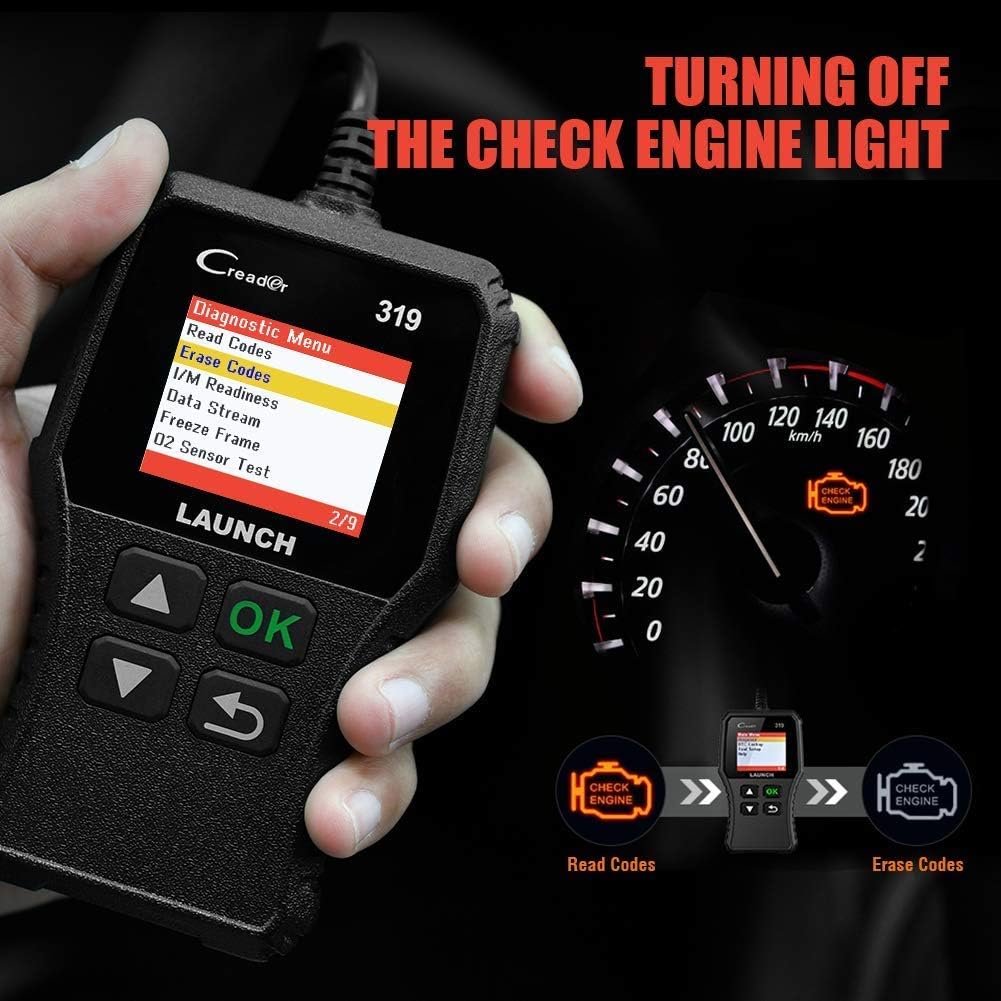
Ова функција преузима дијагностичке кодове грешака (DTC) из рачунара возила. Ови кодови указују на специфичне проблеме које је открио систем за самодијагностику возила.
- Из главног менија изаберите 'Diagnose'.
- Изаберите „Читај кодове“.
- The scanner will display any stored, pending, or permanent codes along with their descriptions.
4.2 Очистите кодове
This function erases DTCs from the vehicle's computer and turns off the Check Engine Light (MIL). Ensure any underlying issues are resolved before clearing codes, as they may reappear.
- Из главног менија изаберите 'Diagnose'.
- Изаберите 'Erase Codes'.
- Confirm the action when prompted. The Check Engine Light should turn off.
4.3 Спремност за И / М
This function checks the status of the vehicle's emission-related monitoring systems to determine if they are ready for an emissions test.
- Из главног менија изаберите 'Diagnose'.
- Изаберите 'I/M Readiness'.
- The screen will display the status of various monitors (e.g., Misfire Monitor, Fuel System Monitor). 'OK' or 'Complete' indicates the monitor has run and passed; 'INC' or 'Incomplete' means the monitor has not yet run or completed its diagnostic cycle.
4.4 Data Stream (Live Data)

This function displays real-time operational data from the vehicle's engine control unit (ECU). This data can include engine RPM, vehicle speed, oxygen sensor readings, coolant temperature, and more.
- Из главног менија изаберите 'Diagnose'.
- Изаберите „Ток података“.
- Use the Up/Down buttons to scroll through the various data parameters.
4.5 Замрзни оквир
When an emission-related fault occurs, the vehicle's computer records a snapshot of operating conditions at the time of the fault. This data is called Freeze Frame data.
- Из главног менија изаберите 'Diagnose'.
- Изаберите 'Freeze Frame'.
- Review the recorded parameters to understand the conditions under which the fault occurred.
4.6 ДТЦ тражење

This feature allows you to manually enter a Diagnostic Trouble Code and view its definition from the scanner's internal database.
- Из главног менија изаберите 'DTC Lookup'.
- Use the navigation buttons to input the desired DTC.
- Притисните 'OK' да view the code definition.
4.7 Other OBD2 Functions
The CR319 also supports the following OBD2 functions, accessible through the 'Diagnose' menu:
- Тест О2 сензора: Retrieves oxygen sensor monitor test results for the most recently completed tests.
- Тест EVAP система (режим 8): Initiates a test of the Evaporative Emission Control System.
- Тест уграђеног монитора (режим 6): Преузима резултате испитивања за компоненте и системе погонског склопа повезане са емисијом које се не прате континуирано.
- Подаци о возилу: Displays the vehicle identification number (VIN), calibration ID (CALID), and calibration verification number (CVN).
5. Компатибилност

The LAUNCH CR319 OBD2 Scanner is compatible with most American, European, and Asian vehicles manufactured from 1996 and newer that are OBDII-compliant. It supports all standard OBDII protocols, including KWP2000, ISO9141, J1850 VPW, J1850 PWM, and CAN (Controller Area Network).
5.1 Supported Vehicles
- 12V Gasoline cars.
- Vehicles compliant with OBDII standards (1996 US-based, 2000 EU-based, and newer Asian cars).
5.2 Not Supported Vehicles
- Diesel cars.
- 24V Heavy duty vehicles.
- Hybrid vehicles.
- Electric vehicles.
6. Спецификације
| Феатуре | Спецификација |
|---|---|
| Модел | ЦР319 |
| Дисплаи | ЛЦД у боји |
| Оператинг Волtage | 9-18V (via OBD2 port) |
| Подржани протоколи | KWP2000, ISO9141, J1850 VPW, J1850 PWM, CAN |
| Димензије (Д к Ш к В) | 1.5 к 6 к 10.8 инча |
| Тежина | 7.4 унци |
| Радна температура | 0°Ц до 50°Ц (32°Ф до 122°Ф) |
| Температура складиштења | -20°Ц до 70°Ц (-4°Ф до 158°Ф) |
| Подржани језици | English, Portuguese, Russian, Italian, Spanish, French, German |
КСНУМКС. Решавање проблема
7.1 Уређај се не укључује
- Ensure the diagnostic cable is securely connected to the vehicle's OBD2 port.
- Проверите да ли је контакт брава возила у положају „УКЉУЧЕНО“ или да ли мотор ради.
- Check the vehicle's fuse for the OBD2 port (consult your vehicle's owner's manual).
7.2 Грешка у комуникацији са возилом
- Confirm the vehicle is OBDII-compliant (generally 1996 and newer for gasoline vehicles).
- Ensure the diagnostic cable is properly connected.
- Turn off the ignition, wait 10 seconds, then turn it back to 'ON' and try again.
- If possible, test the scanner on another compatible vehicle to rule out a device malfunction.
7.3 Codes Cannot Be Cleared
- Уверите се да је паљење возила у положају „УКЉУЧЕНО“ (мотор искључен).
- If the underlying fault that triggered the code is still present, the code may not clear or will reappear immediately. Address the vehicle's issue first.
8. Одржавање
- Чишћење: Користите меку, суву крпу за чишћење уређаја. Избегавајте абразивна средства за чишћење или раствараче.
- Складиштење: Чувајте скенер на чистом, сувом месту, даље од екстремних температура и директне сунчеве светлости.
- Нега каблова: Do not pull the cable forcefully or bend it sharply. Inspect the cable for damage before each use.
9. Гаранција и подршка
For warranty information, technical support, or service inquiries, please contact LAUNCH customer support. Refer to the product packaging or the official LAUNCH webсајт за најновије контакт информације.