
Увод
Thank you for choosing the Noval N-40-TN Rechargeable 40 Kg Scale. This manual provides essential information for the safe and efficient operation, maintenance, and troubleshooting of your new scale. Please read this manual thoroughly before using the device and keep it for future reference.
Безбедносна упутства
- Не преоптерећујте вагу преко њеног максималног капацитета од 40 кг.
- Place the scale on a stable, flat, and level surface to ensure accurate readings.
- Избегавајте излагање ваге екстремним температурама, директној сунчевој светлости или високој влажности.
- Држите вагу даље од јаких електромагнетних поља.
- Не потапајте вагу у воду или друге течности.
- Користите само назначени адаптер за напајање за пуњење.
- Чувати ван домашаја деце.
Садржај пакета
Молимо вас да проверите пакет за следеће ставке:
- Noval N-40-TN Rechargeable 40 Kg Scale Unit
- Посуда за мерење од нерђајућег челика
- Адаптер за напајање/кабл за пуњење
- Кориснички приручник (овај документ)
Производ је завршенview
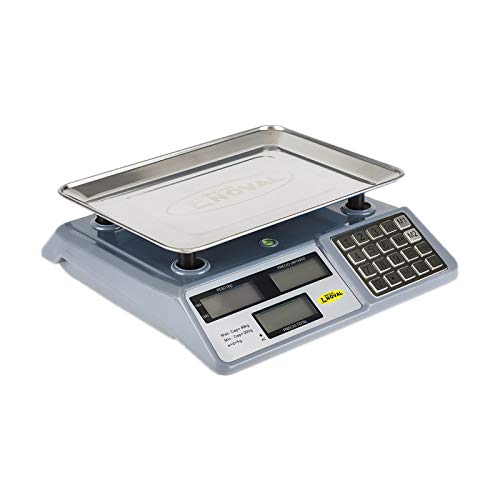
Слика 1: Фронт view of the Noval N-40-TN scale, showing the main unit with the stainless steel weighing pan attached. The display panel and keypad are visible on the right side.
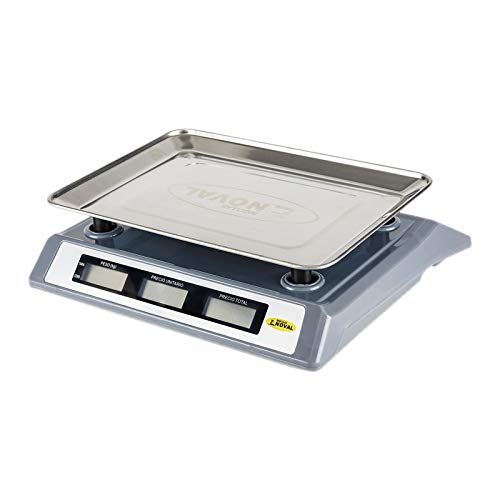
Слика 2: Сиде view of the Noval N-40-TN scale, highlighting its compact design and the elevated weighing pan for easy placement of items.
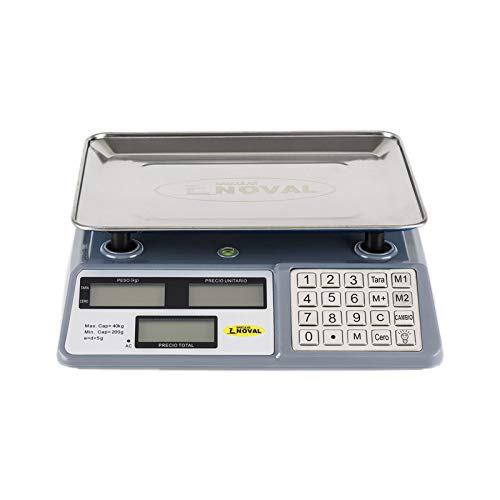
Слика 3: Одозго надоле view of the Noval N-40-TN scale, clearly showing the three display windows (Weight, Unit Price, Total Price) and the full numeric keypad with function buttons like Tare, Zero, M1, M2, M, C, and Cambio.
Компоненте:
- Weighing Pan: Stainless steel platform for placing items to be weighed.
- Дисплеј: Features three LCD screens for displaying Weight (PESO), Unit Price (P.UNITARIO), and Total Price (PRECIO TOTAL).
- Тастатура: Numeric keys (0-9) and function keys for various operations.
- Улазна снага: Port for connecting the AC power adapter for charging and continuous operation.
Сетуп
- Распакивање: Пажљиво извадите све компоненте из амбалаже. Сачувајте амбалажу за будуће складиштење или транспорт.
- Pan Installation: Place the stainless steel weighing pan securely onto the scale's support posts. Ensure it sits flat and stable.
- Прво пуњење: Before first use, connect the power adapter to the scale's power input port and plug it into a suitable electrical outlet. Allow the scale to charge for at least 8-10 hours. The 'AC' indicator on the display will illuminate when connected to power.
- Пласман: Position the scale on a firm, level, and vibration-free surface. Avoid placing it near air vents, fans, or direct sunlight, which can affect accuracy.
Упутство за употребу
Укључивање/искључивање:
- Да бисте укључили вагу, притисните дугме [УКЉУЧЕНО/ИСКЉУЧЕНО] button (location may vary, typically on the front or side).
- Да бисте искључили вагу, притисните и држите [УКЉУЧЕНО/ИСКЉУЧЕНО] дугме док се екран не искључи.
Основно мерење тежине:
- Ensure the scale displays '0.000' in the Weight (PESO) window. If not, press the [Cero] дугме за нулирање скале.
- Пажљиво поставите предмет који треба мерити на средину мерне површине.
- Read the weight displayed in the 'PESO' window.
Функција таре:
The Tare function allows you to subtract the weight of a container, so only the net weight of the contents is measured.
- Place the empty container on the weighing pan. The scale will display its weight.
- Притисните тастер [Tara] button. The 'PESO' display will return to '0.000'.
- Add the items to be weighed into the container. The scale will now display only the weight of the items.
- Да бисте обрисали тару, извадите посуду и притисните [Tara] поново или искључите и укључите вагу.
Unit Price and Total Price Calculation:
- Place the item on the weighing pan. The weight will be displayed in the 'PESO' window.
- Using the numeric keypad, enter the unit price (e.g., price per kilogram) into the scale. The entered value will appear in the 'P.UNITARIO' (Unit Price) window.
- The 'PRECIO TOTAL' (Total Price) window will automatically calculate and display the total cost based on the weight and unit price.
Memory Functions (M1, M2, M):
These buttons allow you to store and recall frequently used unit prices.
- To Store a Unit Price: Enter the desired unit price using the numeric keypad. Press and hold [М1], [М2], или [М] until a confirmation beep or display change occurs.
- To Recall a Unit Price: Једноставно притисните [М1], [М2], или [М]. The stored unit price will appear in the 'P.UNITARIO' window.
Clear (C) Button:
Притисните тастер [Ц] button to clear any entered unit price or incorrect input from the display.
Change (Cambio) Button:
This function is typically used in retail settings to calculate change. After a total price is displayed, enter the amount paid by the customer, then press [Cambio]. The display will show the change due.
Одржавање
- Чишћење: Wipe the scale surface and weighing pan with a soft, damp cloth. Do not use abrasive cleaners, solvents, or immerse the unit in water. Ensure the scale is dry before storage or next use.
- Одржавање батерије: To prolong battery life, avoid completely draining the battery frequently. Recharge the scale when the low battery indicator appears. If storing for an extended period, charge the battery every 3 months to prevent deep discharge.
- Складиштење: Чувајте вагу на хладном и сувом месту, даље од директне сунчеве светлости и екстремних температура.
- калибрација: This scale is factory calibrated. If you suspect accuracy issues, consult a qualified technician for recalibration. Do not attempt to calibrate it yourself unless you have proper equipment and training.
Решавање проблема
| Проблем | Могући узрок | Решење |
|---|---|---|
| Вага се не укључује. | Слаба батерија или нема прикључка на напајање. | Connect the power adapter and charge the battery. Ensure the power outlet is working. |
| Нетачна очитавања. | Scale not on a level surface, pan not seated correctly, or external interference. | Place on a stable, level surface. Re-seat the weighing pan. Avoid vibrations or drafts. Press [Cero] пре вагања. |
| Display shows "Lo" or similar. | Ниска батерија. | Recharge the scale's battery. |
| Display shows "Err" or overload message. | Вага је преоптерећена. | Remove the item immediately. Do not exceed the maximum capacity of 40 kg. |
Спецификације
- Модел: N-40-TN
- Бренд: ОБИ
- Максимални капацитет: 40 Kilograms (40 kg)
- Минимални капацитет: 200 грама (0.2 кг)
- Division (e): 5 грама (0.005 кг)
- Извор напајања: Rechargeable Battery & AC Power
- Јединице мере: Килограми (кг)
Гаранција и подршка
This product is manufactured by OBI. For specific warranty terms and conditions, please refer to the warranty card included with your purchase or contact your retailer. Please note that spare parts availability in the EU is guaranteed for 1 year from the date of purchase.
For technical support, service, or inquiries, please contact your local distributor or the point of purchase. Keep your purchase receipt as proof of purchase for warranty claims.
For general inquiries, you may visit the OBI official website or contact their customer service department (contact details not provided in this manual).