
1. Увод
This manual provides comprehensive instructions for the setup, operation, maintenance, and troubleshooting of your Canyon CNS-SW71SS Smartwatch. Please read this manual carefully before using your device to ensure proper function and longevity.
The Canyon CNS-SW71SS Smartwatch is designed to help you monitor your fitness activities and stay connected. It features a 1.22-inch color screen, multi-sport modes, heart rate monitoring, sleep tracking, and notification alerts. Its IP68 water resistance makes it suitable for various environments.
2. Производ је готовview
2.1 Кључне карактеристике
- 1.22-inch color touch screen display.
- Multi-sport mode for tracking various activities.
- Daily activity monitoring: calories, steps, heart rate, and sleep.
- Notifications for incoming calls, SMS, emails, calendar events, and social media.
- Music control and remote camera function.
- Smart alarm and weather data display.
- До 7 дана трајања батерије.
- IP68 water resistance (submersible up to 1 meter for 30 minutes).
- Bluetooth 4.0 повезивање.
- Compatible with iOS and Android operating systems.
- Comes with two interchangeable wristbands: metal and TPU.
2.2 Компоненте
The Canyon CNS-SW71SS Smartwatch consists of the main watch unit, interchangeable wristbands, and a charging cable.

Слика 1: Предња страна view of the Canyon CNS-SW71SS Smartwatch, showing the display with steps, distance, calories, and heart rate data.

Слика 2: Под углом view of the Canyon CNS-SW71SS Smartwatch, featuring a silver metal mesh strap and a round display.
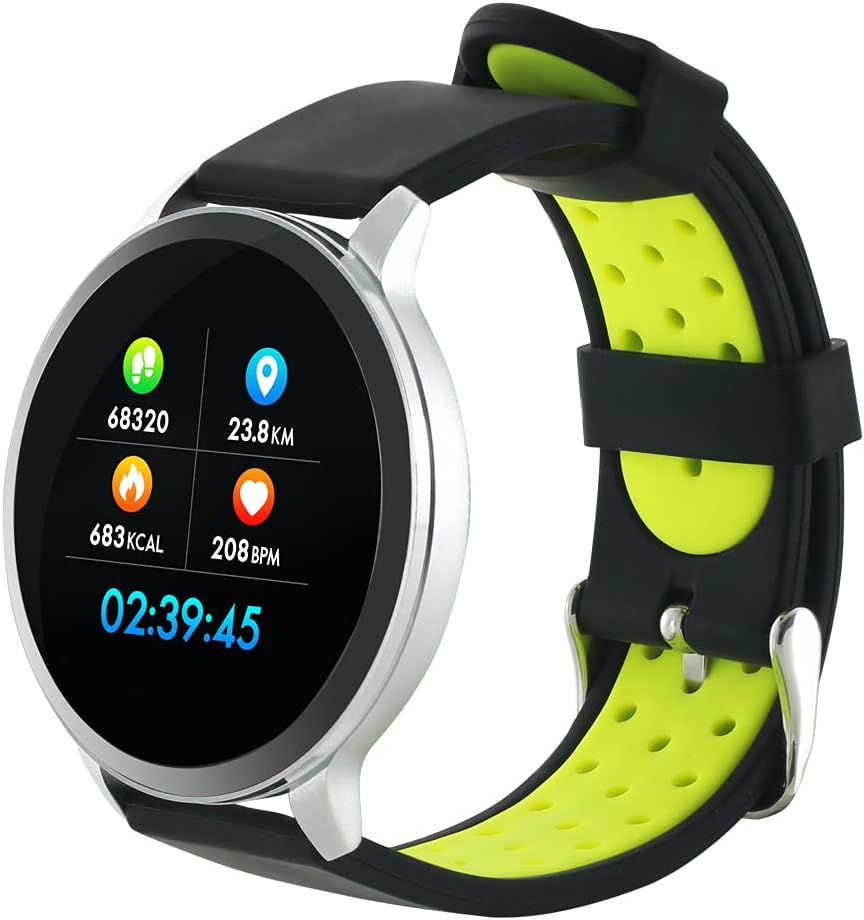
Figure 3: The Canyon CNS-SW71SS Smartwatch shown with an alternative black and lime green TPU strap, highlighting its interchangeable design.

Слика 4: Задња страна view of the Canyon CNS-SW71SS Smartwatch, displaying the optical heart rate sensor and magnetic charging contacts.

Figure 5: The retail packaging for the Canyon CNS-SW71SS Smartwatch, illustrating key features and the included two straps.
3. Подешавање
3.1 Пуњење паметног сата
- Повежите кабл за пуњење са УСБ адаптером за напајање (није укључен) или УСБ портом рачунара.
- Align the magnetic charging pins of the cable with the charging contacts on the back of the smartwatch. The watch will vibrate and display a charging icon.
- Allow approximately 2-3 hours for a full charge. A full charge provides up to 7 days of usage.
3.2 Installing the Canyon Fit Application
- Scan the QR code provided in the packaging or search for "Canyon Fit" in your smartphone's app store (Google Play Store for Android, Apple App Store for iOS).
- Преузмите и инсталирајте апликацију.
- Open the Canyon Fit app and follow the on-screen instructions to create an account and set up your profile.
3.3 Упаривање са вашим паметним телефоном
- Уверите се да је ваш паметни сат напуњен и укључен.
- Омогућите Блуетоотх на свом паметном телефону.
- Open the Canyon Fit application.
- Navigate to the device pairing section within the app (usually found under 'Device' or 'Profile').
- Select your smartwatch (e.g., "CNS-SW71SS") from the list of available devices.
- Confirm the pairing request on both your smartphone and smartwatch if prompted.
3.4 Attaching/Changing Wristbands
The smartwatch comes with two wristbands (metal and TPU) that can be interchanged. To attach or change a wristband, locate the quick-release pins on the underside of the strap. Slide the pin to detach the current strap and then align and slide the pin of the new strap into the corresponding holes on the watch body until it clicks into place.
4. Упутство за употребу
4.1 Основна навигација
- Екран на додир: Swipe left/right to navigate through different functions and menus. Swipe up/down to view обавештења или брза подешавања.
- Бочно дугме: Press the side button to return to the main watch face or to wake up the screen. A long press may access power options or specific features depending on the context.
4.2 Праћење кондиције
- Мулти-Спорт Моде: Access the 'Workout' or 'Sport' menu on your watch. Select your desired activity (e.g., running, cycling, walking) to start tracking. The watch will record duration, distance, calories burned, and heart rate.
- Дневна Активност: The watch automatically tracks your steps, distance, and calories burned throughout the day. View these statistics on the watch face or in the Canyon Fit app.
- Мониторинг срчане фреквенције: The watch continuously monitors your heart rate. You can also manually initiate a heart rate measurement from the heart rate interface.
- Праћење спавања: Wear the smartwatch to bed, and it will automatically track your sleep patterns, including deep sleep, light sleep, and wake times. View detailed sleep analysis in the Canyon Fit app.
4.3 Обавештења
Once paired with your smartphone and with notification permissions granted in the Canyon Fit app, your smartwatch will display alerts for:
- Долазни позиви
- СМС поруке
- Емаилс
- Календарски догађаји
- Social Media Apps (e.g., WhatsApp, Facebook, InstagРАМ)
Превуците прстом нагоре на бројчанику сата да бисте view recent notifications. You can dismiss notifications from the watch.
4.4 додатних функција
- Контрола музике: While music is playing on your phone, you can use the watch to play/pause, skip tracks, and adjust volume.
- Даљинска камера: Open the camera function in the Canyon Fit app. Use your smartwatch as a remote shutter button to take photos on your phone.
- Паметни аларм: Set alarms through the Canyon Fit app. The watch will vibrate to wake you up gently.
- Подаци о времену: Once connected to your phone, the watch will display current weather conditions and forecasts for your location.
5. Одржавање
5.1 Чишћење
- Обришите екран и кућиште сата меком крпомamp тканина.
- For the metal strap, use a soft brush to gently clean any debris. For the TPU strap, wash with mild soap and water.
- Уверите се да су контакти за пуњење чисти и суви пре пуњења.
- Избегавајте употребу јаких хемикалија или абразивних материјала за чишћење.
5.2 Отпорност на воду (IP68)
The Canyon CNS-SW71SS Smartwatch is IP68 rated, meaning it is resistant to dust and can be immersed in water up to 1 meter deep for a maximum of 30 minutes. While it can withstand splashes, rain, and brief immersion, it is not recommended for hot showers, saunas, or diving, as steam and high water pressure can compromise the seals.
- Do not press any buttons while the watch is submerged.
- Добро осушите сат након излагања води.
5.3 Одржавање батерије
- Избегавајте често потпуно пражњење батерије.
- Редовно пуните уређај, чак и ако га не користите, како бисте одржали здравље батерије.
- Чувајте сат на хладном и сувом месту када га не користите дуже време.
КСНУМКС. Решавање проблема
- Сат се не укључује: Уверите се да је сат потпуно напуњен. Повежите га са пуњачем најмање 30 минута.
- Не може се упарити са паметним телефоном:
- Уверите се да је Блуетоотх омогућен на вашем телефону.
- Ensure the Canyon Fit app has necessary permissions.
- Рестартујте и телефон и паметни сат.
- Покушајте да раскинете упаривање и поново упарите уређај путем апликације.
- Обавештења се не приказују:
- Check notification settings in the Canyon Fit app and your phone's system settings.
- Уверите се да је сат повезан путем Блутут-а.
- Inaccurate heart rate/activity data:
- Уверите се да сат чврсто приања на зглоб, не превише стегнут или превише лабав.
- Очистите сензор на задњој страни сата.
- Environmental factors or certain movements can affect accuracy.
- Екран не реагује: Try restarting the smartwatch by holding down the side button. If unresponsive, allow the battery to fully drain and then recharge.
7. Спецификације
| Назив модела | CNS-SW71SS |
| Бранд | КАЊОН |
| Величина екрана | 1.22 инча |
| Компатибилност оперативног система | Андроид, иОС |
| Технологија повезивања | Блуетоотх 4.0 |
| Оцена водоотпорности | ИП68 |
| Посебне карактеристике | Wireless Charging (implied by product data), Multi-Sport Mode, Heart Rate Monitor, Sleep Tracker, Notifications |
| Компатибилни уређаји | Смартпхоне |
| Батерија | Пуњиве (1 укључене) |
| Опције боја | Black, Lime Green, Silver |
8. Гаранција и подршка
For warranty information and technical support, please refer to the documentation included with your purchase or visit the official Canyon website. You can also contact Canyon customer service for assistance with product issues or inquiries.
Подршка на мрежи: https://canyon.eu/support/ (Прampлинк, молимо вас да проверите званичну страницу за подршку)